Block 1 - Gmail Trigger
- Type / Role
- n8n-nodes-base.gmailTrigger - gmailTrigger
- Config choices
- Version 1.2


 Early Deal
This workflow is provided as-is. Please review and test before using in production.
Problem This Solves Managing credit card expenses can be tricky, especially when you want to stay transparent and keep your spouse in the loop. Most banks don't offer real time notification shar...
n8n-nodes-base.gmailtrigger, n8n-nodes-base.code, n8n-nodes-base.filter, n8n-nodes-base.telegram, n8n-nodes-base.splitinbatches, n8n-nodes-base.googlesheets
This workflow is cataloged by N8N Workflows and links back to its original n8n.io source page by Krishna Kumar Eswaran.
Original n8n.io source🧠 Problem This Solves Managing credit card expenses can be tricky, especially when you want to stay transparent and keep your spouse in the loop. Most banks don't offer real-time notification sharing with family members, and manually updating expenses takes time and effort. This n8n workflow automates the entire process: tracking your HDFC credit card usage, logging it in Google Sheets, and sending an instant Telegram notification to your spouse.
👥 Who This Template Is For Couples who want shared visibility of credit card spending
Individuals looking for automated personal finance tracking
Anyone using HDFC Credit Card with email alerts enabled
n8n users who want to integrate Gmail, Google Sheets, and Telegram
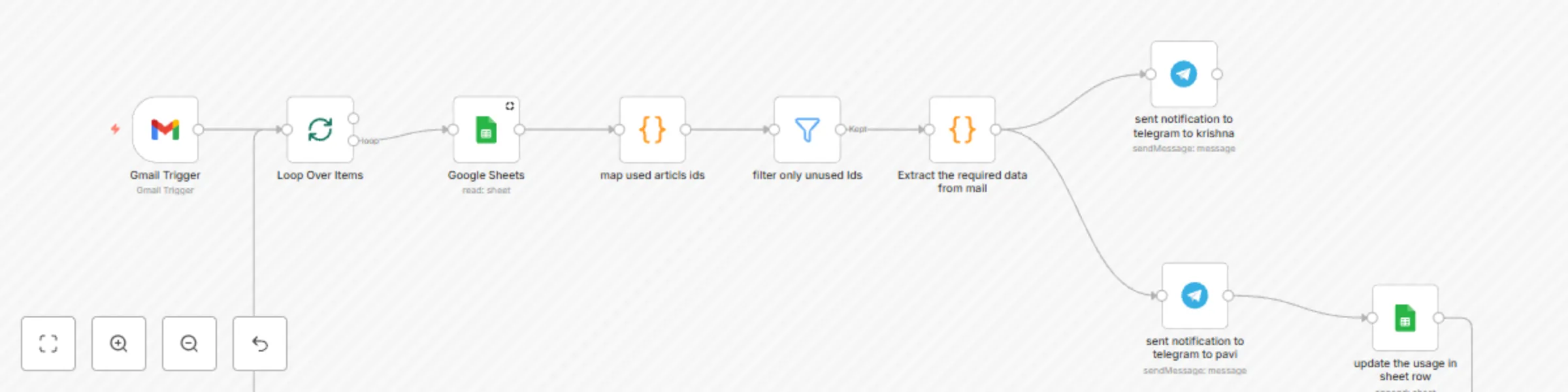
⚙️ Workflow Breakdown Here’s how the automation works:
Gmail Trigger – Monitors your Gmail inbox for credit card transaction alerts from HDFC Bank.
Email Parser – Extracts transaction details like amount, merchant name, date, and card type.
Google Sheets Node – Logs the parsed transaction data into a structured Google Sheet for record-keeping.
Telegram Node – Sends a message to your wife’s Telegram account with transaction details for instant notification.
Step-by-Step Setup Instructions
A Gmail account connected to n8n
A Google Sheet created with columns like Date, Amount, Merchant, Card, etc.
A Telegram Bot and your wife’s Telegram Chat ID
Filter emails with subject line containing keywords like Credit Card Transaction Alert.
Extract Email Content Use the HTML Extract or Regex node to parse out transaction amount, merchant name, date, and card number from the email body.
Log to Google Sheets Connect your Google Sheets account in n8n
Use the Append Row node to add each transaction as a new row in your finance sheet.
Format a message like: "💳 HDFC Transaction Alert: ₹5,000 at Amazon on 17 May via XXXX1234"
Send it via the Telegram node
🛠️ Customization Tips 💡 Add Spending Limits: Add a condition node to alert only if the transaction exceeds a certain amount.
🧾 Category Mapping: Use additional logic to classify expenses (e.g., Shopping, Dining) based on keywords.
📊 Weekly Summary: Create another workflow that sends a weekly Telegram summary using data from Google Sheets.
🔐 Security Tip: Mask part of the card number before sending the Telegram message for added security.
This catalog entry is organized from the workflow JSON. The node-level section below shows the executable blocks available for review before importing the template.
| Workflow | Track HDFC credit card transactions with Google Sheets and Telegram notifications |
|---|---|
| Complexity | intermediate |
| Nodes | 9 |
| Categories | Personal Productivity |
| Author | Krishna Kumar Eswaran |
| Published | 17 May 2025 |
Use the JSON export at /data/workflows/4128/4128.json as the source template for this automation.
Open n8n, import the downloaded JSON, and review each node before activating the workflow.
Replace placeholder credentials, API keys, webhook URLs, account IDs, and environment-specific values with your own settings.
Run the workflow manually or in a staging workspace, inspect node output, and confirm downstream systems receive the expected data.
Enable the workflow only after testing, then monitor executions, errors, and rate limits during the first production runs.
Review imported nodes carefully before activation. This catalog entry is intended to help you inspect the workflow structure, understand required services, and find related templates faster.
Node names, credentials, schedules, webhook paths, and external service limits may need adjustment for your workspace.
Problem This Solves Managing credit card expenses can be tricky, especially when you want to stay transparent and keep your spouse in the loop. Most banks don't offer real time notification shar...
Review the workflow JSON, configure any required credentials in n8n, and test the automation in a safe workspace before using it in production.
Yes. Use the block-by-block analysis and the downloadable JSON to inspect each node, then adjust credentials, prompts, schedules, filters, or destinations for your Personal Productivity use case.