Track certification requirement changes with ScrapeGraphAI, GitHub and email

Workflow preview

Workflow preview
100%
Track certification requirement changes with ScrapeGraphAI, GitHub and email preview
Open on n8n.io

Important notice

This workflow is provided as-is. Please review and test before using in production.

1. Workflow Overview

Job Posting Aggregator with Email and GitHub ️ COMMUNITY TEMPLATE DISCLAIMER: This is a community contributed template that uses ScrapeGraphAI (a community node). Please ensure you have the Scrape...

Best for

  • Market Research automation workflows
  • AI Summarization automation workflows
  • advanced n8n builders looking for reusable templates

Tools used

n8n-nodes-base.stickynote, n8n-nodes-base.manualtrigger, n8n-nodes-base.code, n8n-nodes-base.splitinbatches, n8n-nodes-scrapegraphai.scrapegraphai, n8n-nodes-base.github, n8n-nodes-base.merge, n8n-nodes-base.if

Source and attribution

This workflow is cataloged by N8N Workflows and links back to its original n8n.io source page by vinci-king-01.

Original n8n.io source

1.1 Workflow description

Title
Track certification requirement changes with ScrapeGraphAI, GitHub and email
Workflow name
Track certification requirement changes with ScrapeGraphAI, GitHub and email

Job Posting Aggregator with Email and GitHub

⚠️ COMMUNITY TEMPLATE DISCLAIMER: This is a community-contributed template that uses ScrapeGraphAI (a community node). Please ensure you have the ScrapeGraphAI community node installed in your n8n instance before using this template.

This workflow automatically aggregates certification-related job-posting requirements from multiple industry sources, compares them against last year’s data stored in GitHub, and emails a concise change log to subscribed professionals. It streamlines annual requirement checks and renewal reminders, ensuring users never miss an update.

Pre-conditions/Requirements

Prerequisites

  • n8n instance (self-hosted or n8n cloud)
  • ScrapeGraphAI community node installed
  • Git installed (for optional local testing of the repo)
  • Working SMTP server or other Email credential supported by n8n

Required Credentials

  • ScrapeGraphAI API Key – Enables web scraping of certification pages
  • GitHub Personal Access Token – Allows the workflow to read/write files in the repo
  • Email / SMTP Credentials – Sends the summary email to end-users

Specific Setup Requirements

Resource Purpose Example
GitHub Repository Stores certification_requirements.json versioned annually https://github.com/<you>/cert-requirements.git
Watch List File List of page URLs & selectors to scrape Saved in the repo under /config/watchList.json
Email List Semicolon-separated list of recipients [email protected];[email protected]

How it works

This workflow automatically aggregates certification-related job-posting requirements from multiple industry sources, compares them against last year’s data stored in GitHub, and emails a concise change log to subscribed professionals. It streamlines annual requirement checks and renewal reminders, ensuring users never miss an update.

Key Steps:

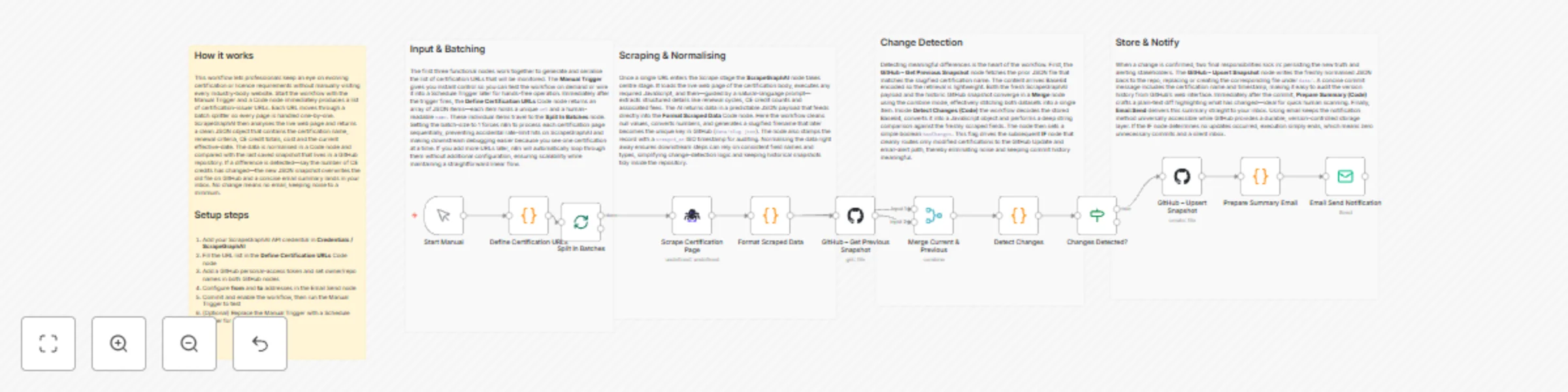
  • Manual Trigger: Starts the workflow on demand or via scheduled cron.
  • Load Watch List (Code Node): Reads the list of certification URLs and CSS selectors.
  • Split In Batches: Iterates through each URL to avoid rate limits.
  • ScrapeGraphAI: Scrapes requirement details from each page.
  • Merge (Wait): Reassembles individual scrape results into a single JSON array.
  • GitHub (Read File): Retrieves last year’s certification_requirements.json.
  • IF (Change Detector): Compares current vs. previous JSON and decides whether changes exist.
  • Email Send: Composes and sends a formatted summary of changes.
  • GitHub (Upsert File): Commits the new JSON file back to the repo for future comparisons.

Set up steps

Setup Time: 15-25 minutes

  1. Install Community Node: From n8n UI → Settings → Community Nodes → search and install “ScrapeGraphAI”.
  2. Create/Clone GitHub Repo: Add an empty certification_requirements.json ( {} ) and a config/watchList.json with an array of objects like:
    [
      {
        "url": "https://cert-body.org/requirements",
        "selector": "#requirements"
      }
    ]
    
  3. Generate GitHub PAT: Scope repo, store in n8n Credentials as “GitHub API”.
  4. Add ScrapeGraphAI Credential: Paste your API key into n8n Credentials.
  5. Configure Email Credentials: E.g., SMTP with username/password or OAuth2.
  6. Open Workflow: Import the template JSON into n8n.
  7. Update Environment Variables (in the Code node or via n8n variables):
    • GITHUB_REPO (e.g., user/cert-requirements)
    • EMAIL_RECIPIENTS
  8. Test Run: Trigger manually. Verify email content and GitHub commit.
  9. Schedule: Add a Cron node (optional) for yearly or quarterly automatic runs.

Node Descriptions

Core Workflow Nodes:

  • Manual Trigger – Initiates the workflow manually or via external schedule.
  • Code (Load Watch List) – Reads and parses watchList.json from GitHub or static input.
  • SplitInBatches – Controls request concurrency to avoid scraping bans.
  • ScrapeGraphAI – Extracts requirement text using provided CSS selectors or XPath.
  • Merge (Combine) – Waits for all batches and merges them into one dataset.
  • GitHub (Read/Write File) – Handles version-controlled storage of JSON data.
  • IF (Change Detector) – Compares hashes/JSON diff to detect updates.
  • EmailSend – Sends change log, including renewal reminders and diff summary.
  • Sticky Note – Provides in-workflow documentation for future editors.

Data Flow:

  1. Manual TriggerCode (Load Watch List)SplitInBatches
  2. SplitInBatchesScrapeGraphAIMerge
  3. MergeGitHub (Read File)IF (Change Detector)
  4. IF (True)Email SendGitHub (Upsert File)

Customization Examples

Adjusting Scraper Configuration

// Inside the Watch List JSON object
{
  "url": "https://new-association.com/cert-update",
  "selector": ".content article:nth-of-type(1) ul"
}

Custom Email Template

// In Email Send node → HTML Content
<div>
  <h2>📋 Certification Updates – {{ $json.date }}</h2>
  <p>The following certifications have new requirements:</p>
  <ul>
    {{ $json.diffHtml }}
  </ul>
  <p>For full details visit our GitHub repo.</p>
</div>

Data Output Format

The workflow outputs structured JSON data:

{
  "timestamp": "2024-09-01T12:00:00Z",
  "source": "watchList.json",
  "current": {
    "AWS-SAA": "Version 3.0, requires renewed proctored exam",
    "PMP": "60 PDUs every 3 years"
  },
  "previous": {
    "AWS-SAA": "Version 2.0",
    "PMP": "60 PDUs every 3 years"
  },
  "changes": {
    "AWS-SAA": "Updated to Version 3.0; exam format changed."
  }
}

Troubleshooting

Common Issues

  1. ScrapeGraphAI returns empty data – Check CSS/XPath selectors and ensure page is publicly accessible.
  2. GitHub authentication fails – Verify PAT scope includes repo and that the credential is linked in both GitHub nodes.

Performance Tips

  • Limit SplitInBatches size to 3-5 URLs when sources are heavy to avoid timeouts.
  • Enable n8n execution mode “Queue” for long-running scrapes.

Pro Tips:

  • Store selector samples in comments next to each watch list entry for future maintenance.
  • Use a Cron node set to “0 0 1 1 *” for an annual run exactly on Jan 1st.
  • Add a Telegram node after Email Send for instant mobile notifications.

1.2 Logical Blocks

This catalog entry is organized from the workflow JSON. The node-level section below shows the executable blocks available for review before importing the template.

2. Block-by-Block Analysis

Block 1 - Workflow Overview

Type / Role
n8n-nodes-base.stickyNote - stickyNote
Config choices
Version 1

Block 2 - Section – Input & Batching

Type / Role
n8n-nodes-base.stickyNote - stickyNote
Config choices
Version 1

Block 3 - Section – Scraping & Normalising

Type / Role
n8n-nodes-base.stickyNote - stickyNote
Config choices
Version 1

Block 4 - Section – Change Detection

Type / Role
n8n-nodes-base.stickyNote - stickyNote
Config choices
Version 1

Block 5 - Section – Store & Notify

Type / Role
n8n-nodes-base.stickyNote - stickyNote
Config choices
Version 1

Block 6 - Start Manual

Type / Role
n8n-nodes-base.manualTrigger - manualTrigger
Config choices
Version 1

Block 7 - Define Certification URLs

Type / Role
n8n-nodes-base.code - code
Config choices
Version 2

Block 8 - Split In Batches

Type / Role
n8n-nodes-base.splitInBatches - splitInBatches
Config choices
Version 3

Block 9 - Scrape Certification Page

Type / Role
n8n-nodes-scrapegraphai.scrapegraphAi - scrapegraphAi
Config choices
Version 1

Block 10 - Format Scraped Data

Type / Role
n8n-nodes-base.code - code
Config choices
Version 2

Block 11 - GitHub – Get Previous Snapshot

Type / Role
n8n-nodes-base.github - github
Config choices
Version 1

Block 12 - Merge Current & Previous

Type / Role
n8n-nodes-base.merge - merge
Config choices
Version 2

Block 13 - Detect Changes

Type / Role
n8n-nodes-base.code - code
Config choices
Version 2

Block 14 - Changes Detected?

Type / Role
n8n-nodes-base.if - if
Config choices
Version 2

Block 15 - GitHub – Upsert Snapshot

Type / Role
n8n-nodes-base.github - github
Config choices
Version 1

Block 16 - Prepare Summary Email

Type / Role
n8n-nodes-base.code - code
Config choices
Version 2

Block 17 - Email Send Notification

Type / Role
n8n-nodes-base.emailSend - emailSend
Config choices
Version 2.1

3. Summary Table

Workflow Track certification requirement changes with ScrapeGraphAI, GitHub and email
Complexity advanced
Nodes 17
Categories Market Research, AI Summarization
Author vinci-king-01
Published 15 Dec 2025

4. Reproducing the Workflow from Scratch

  1. 1. Download the workflow JSON

    Use the JSON export at /data/workflows/11835/11835.json as the source template for this automation.

  2. 2. Import the template into n8n

    Open n8n, import the downloaded JSON, and review each node before activating the workflow.

  3. 3. Configure credentials and variables

    Replace placeholder credentials, API keys, webhook URLs, account IDs, and environment-specific values with your own settings.

  4. 4. Test with sample data

    Run the workflow manually or in a staging workspace, inspect node output, and confirm downstream systems receive the expected data.

  5. 5. Activate and monitor

    Enable the workflow only after testing, then monitor executions, errors, and rate limits during the first production runs.

5. General Notes & Resources

Review imported nodes carefully before activation. This catalog entry is intended to help you inspect the workflow structure, understand required services, and find related templates faster.

Node names, credentials, schedules, webhook paths, and external service limits may need adjustment for your workspace.

Frequently asked questions

What does Track certification requirement changes with ScrapeGraphAI, GitHub and email do?

Job Posting Aggregator with Email and GitHub ️ COMMUNITY TEMPLATE DISCLAIMER: This is a community contributed template that uses ScrapeGraphAI (a community node). Please ensure you have the Scrape...

What do I need before importing this workflow?

Review the workflow JSON, configure any required credentials in n8n, and test the automation in a safe workspace before using it in production.

Can I customize this workflow?

Yes. Use the block-by-block analysis and the downloadable JSON to inspect each node, then adjust credentials, prompts, schedules, filters, or destinations for your Market Research, AI Summarization use case.