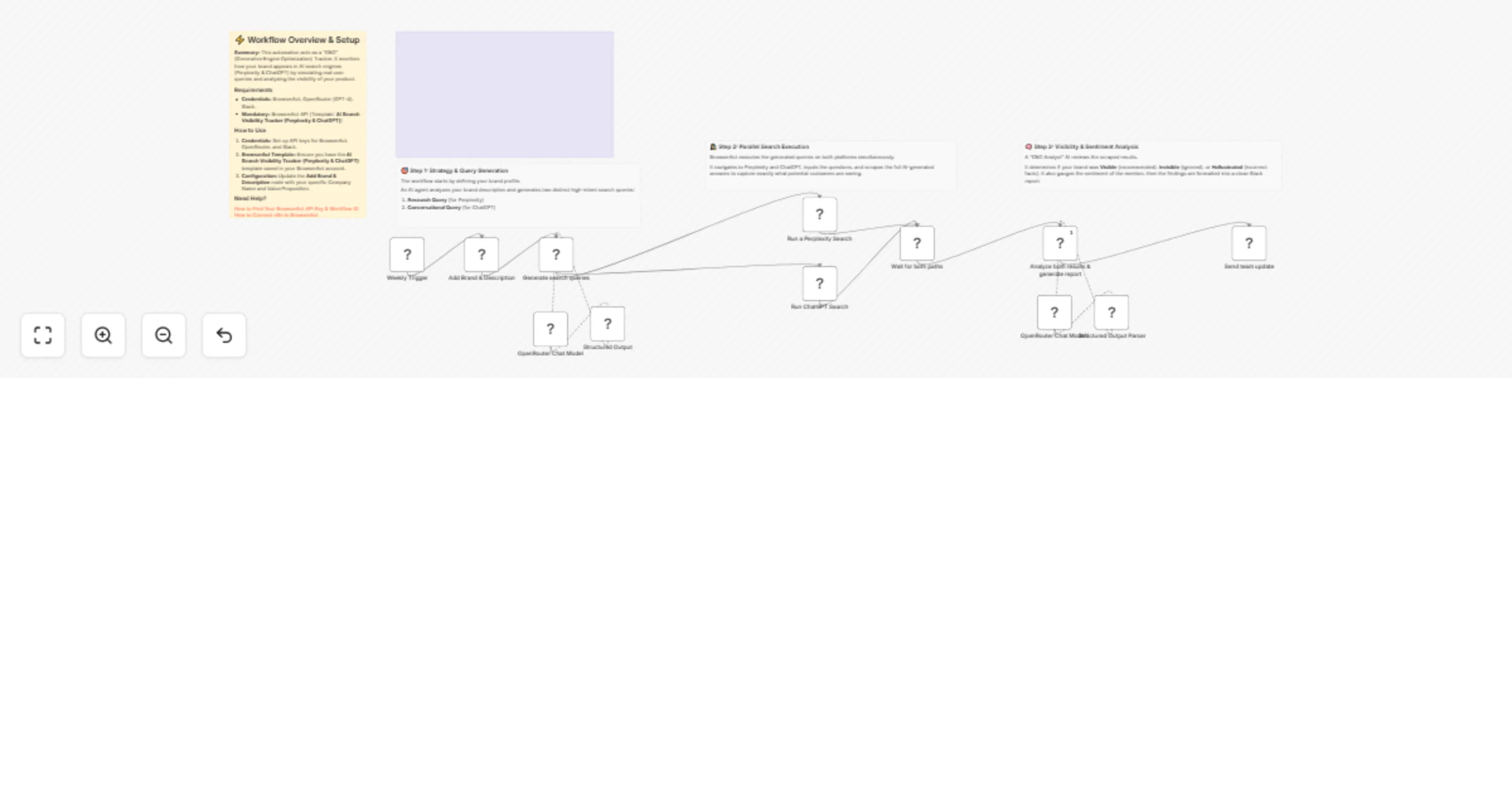
Track brand visibility on Perplexity and ChatGPT with BrowserAct and OpenRouter

Workflow preview

Workflow preview
100%
Track brand visibility on Perplexity and ChatGPT with BrowserAct and OpenRouter preview
Open on n8n.io

1. Workflow Overview

Track brand visibility on Perplexity and ChatGPT with BrowserAct & OpenRouter Introduction This workflow acts as a "Generative Engine Optimization" (GEO) tracker. It automatically monitors how your...

Best for

  • Market Research automation workflows
  • AI Summarization automation workflows
  • advanced n8n builders looking for reusable templates

Tools used

@n8n/n8n-nodes-langchain.lmchatopenrouter, n8n-nodes-browseract.browseract, n8n-nodes-base.scheduletrigger, n8n-nodes-base.set, n8n-nodes-base.merge, @n8n/n8n-nodes-langchain.agent, @n8n/n8n-nodes-langchain.outputparserstructured, n8n-nodes-base.slack

Source and attribution

This workflow is cataloged by N8N Workflows and links back to its original n8n.io source page by Madame AI Team | Kai.

Original n8n.io source

1.1 Workflow description

Title
Track brand visibility on Perplexity and ChatGPT with BrowserAct and OpenRouter
Workflow name
Track brand visibility on Perplexity and ChatGPT with BrowserAct and OpenRouter

Track brand visibility on Perplexity and ChatGPT with BrowserAct & OpenRouter

Introduction

This workflow acts as a "Generative Engine Optimization" (GEO) tracker. It automatically monitors how your brand is being recommended on AI-powered search engines by simulating real user queries on Perplexity and ChatGPT, analyzing the responses for visibility and sentiment, and reporting the findings to Slack.

Target Audience

Brand managers, SEO specialists, and marketing teams who need to monitor their "share of voice" in AI search results.

How it works

  1. Scheduling: A Weekly Trigger initiates the workflow to ensure regular monitoring of your brand's presence.
  2. Context Setup: A Set node defines the target Brand name and a brief Description of the value proposition.
  3. Query Generation: An AI Agent (using OpenRouter/GPT-4o) reads the brand details and generates two distinct search queries:
  • Research Query: Targeted at Perplexity (e.g., "Top rated tools for X in 2025").
  • Conversational Query: Targeted at ChatGPT (e.g., "I need advice on X, what do you recommend?").
  1. Parallel Execution: The workflow splits into two parallel paths to maximize efficiency.
  2. Data Extraction: Two separate BrowserAct nodes execute the generated queries on Perplexity and ChatGPT respectively. They scrape the full text of the AI's response.
  3. Synchronization: A Merge node waits for both scraping tasks to complete before proceeding.
  4. Analysis: A second AI Agent acts as a "GEO Analyst." It compares the scraped answers against your Brand Name to determine if the brand was "Visible" (recommended), "Invisible" (ignored), or "Hallucinated." It also grades the sentiment.
  5. Reporting: A Slack node posts a formatted report detailing the visibility status on both platforms.

How to set up

  1. Configure Credentials: Connect your BrowserAct, OpenRouter, and Slack accounts in n8n.
  2. Prepare BrowserAct: Ensure the AI Search Visibility Tracker (Perplexity & ChatGPT) template is saved in your BrowserAct account.
  3. Define Brand: Open the Add Brand & Description node. Update the Brand field with your company name and the Description field with your core offering.
  4. Select Slack Channel: Open the Send team update node and select the channel where reports should be posted.

Requirements

  • BrowserAct Account: Required for scraping the AI platforms. Template: AI Search Visibility Tracker (Perplexity & ChatGPT).
  • OpenRouter Account: Required for generating queries and analyzing the sentiment of the results.
  • Slack Account: Required for receiving the final visibility report.

How to customize the workflow

  1. Add More Engines: Clone the BrowserAct node to add checks for Google Gemini or Claude, then connect them to the Merge node.
  2. Track Competitors: Modify the Add Brand & Description node to input a competitor's name instead of your own to see how AI recommends them.
  3. Store History: Add a Google Sheets node before the Slack step to log the "Sentiment Score" and "Visibility Status" over time for trend analysis.

Need Help?


Workflow Guidance and Showcase Video

1.2 Logical Blocks

This catalog entry is organized from the workflow JSON. The node-level section below shows the executable blocks available for review before importing the template.

2. Block-by-Block Analysis

Block 1 - OpenRouter Chat Model

Type / Role
@n8n/n8n-nodes-langchain.lmChatOpenRouter - lmChatOpenRouter
Config choices
Version 1

Block 2 - Run a Perplexity Search

Type / Role
n8n-nodes-browseract.browserAct - browserAct
Config choices
Version 1

Block 3 - Run ChatGPT Search

Type / Role
n8n-nodes-browseract.browserAct - browserAct
Config choices
Version 1

Block 4 - OpenRouter Chat Model1

Type / Role
@n8n/n8n-nodes-langchain.lmChatOpenRouter - lmChatOpenRouter
Config choices
Version 1

Block 5 - Weekly Trigger

Type / Role
n8n-nodes-base.scheduleTrigger - scheduleTrigger
Config choices
Version 1.3

Block 6 - Add Brand & Description

Type / Role
n8n-nodes-base.set - set
Config choices
Version 3.4

Block 7 - Wait for both paths

Type / Role
n8n-nodes-base.merge - merge
Config choices
Version 3.2

Block 8 - Analyze both results & generate report

Type / Role
@n8n/n8n-nodes-langchain.agent - agent
Config choices
Version 3

Block 9 - Structured Output

Type / Role
@n8n/n8n-nodes-langchain.outputParserStructured - outputParserStructured
Config choices
Version 1.3

Block 10 - Structured Output Parser

Type / Role
@n8n/n8n-nodes-langchain.outputParserStructured - outputParserStructured
Config choices
Version 1.3

Block 11 - Send team update

Type / Role
n8n-nodes-base.slack - slack
Config choices
Version 2.4

Block 12 - Generate search queries

Type / Role
@n8n/n8n-nodes-langchain.agent - agent
Config choices
Version 3

Block 13 - Documentation

Type / Role
n8n-nodes-base.stickyNote - stickyNote
Config choices
Version 1

Block 14 - Step 1 Explanation

Type / Role
n8n-nodes-base.stickyNote - stickyNote
Config choices
Version 1

Block 15 - Step 2 Explanation

Type / Role
n8n-nodes-base.stickyNote - stickyNote
Config choices
Version 1

Block 16 - Step 3 Explanation

Type / Role
n8n-nodes-base.stickyNote - stickyNote
Config choices
Version 1

Block 17 - Sticky Note

Type / Role
n8n-nodes-base.stickyNote - stickyNote
Config choices
Version 1

3. Summary Table

Workflow Track brand visibility on Perplexity and ChatGPT with BrowserAct and OpenRouter
Complexity advanced
Nodes 17
Categories Market Research, AI Summarization
Author Madame AI Team | Kai
Published 13 Feb 2026

4. Reproducing the Workflow from Scratch

  1. 1. Download the workflow JSON

    Use the JSON export at /data/workflows/13378/13378.json as the source template for this automation.

  2. 2. Import the template into n8n

    Open n8n, import the downloaded JSON, and review each node before activating the workflow.

  3. 3. Configure credentials and variables

    Replace placeholder credentials, API keys, webhook URLs, account IDs, and environment-specific values with your own settings.

  4. 4. Test with sample data

    Run the workflow manually or in a staging workspace, inspect node output, and confirm downstream systems receive the expected data.

  5. 5. Activate and monitor

    Enable the workflow only after testing, then monitor executions, errors, and rate limits during the first production runs.

5. General Notes & Resources

Review imported nodes carefully before activation. This catalog entry is intended to help you inspect the workflow structure, understand required services, and find related templates faster.

Node names, credentials, schedules, webhook paths, and external service limits may need adjustment for your workspace.

Frequently asked questions

What does Track brand visibility on Perplexity and ChatGPT with BrowserAct and OpenRouter do?

Track brand visibility on Perplexity and ChatGPT with BrowserAct & OpenRouter Introduction This workflow acts as a "Generative Engine Optimization" (GEO) tracker. It automatically monitors how your...

What do I need before importing this workflow?

Review the workflow JSON, configure any required credentials in n8n, and test the automation in a safe workspace before using it in production.

Can I customize this workflow?

Yes. Use the block-by-block analysis and the downloadable JSON to inspect each node, then adjust credentials, prompts, schedules, filters, or destinations for your Market Research, AI Summarization use case.