TikTok post scraper via keywords | Bright Data + Sheets integration

Workflow preview

Workflow preview
100%
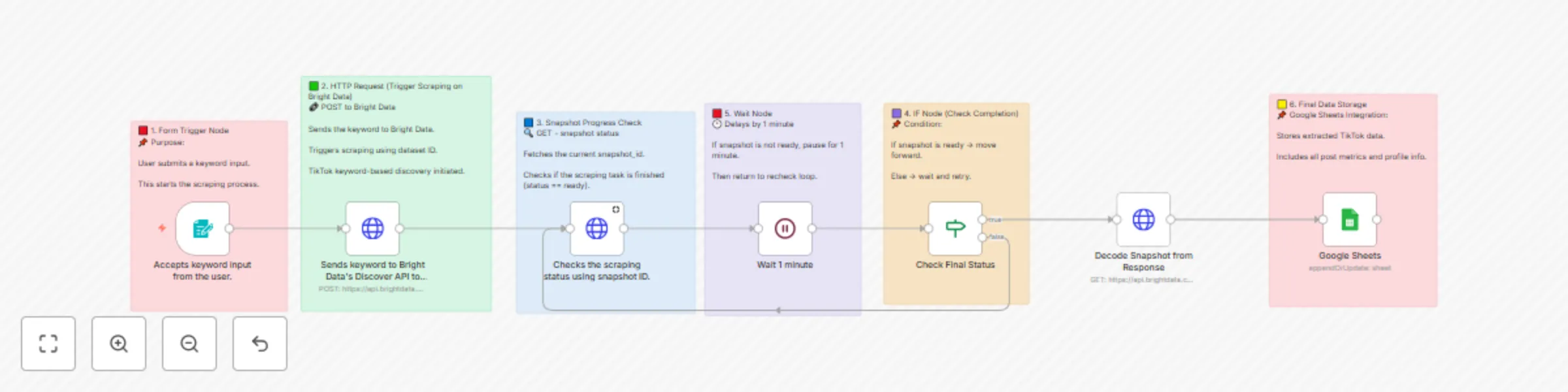
TikTok post scraper via keywords | Bright Data + Sheets integration preview
Open on n8n.io

Important notice

This workflow is provided as-is. Please review and test before using in production.

1. Workflow Overview

TikTok Post Scraper via Keywords Bright Data + Sheets Integration Workflow Description Automatically scrapes TikTok posts based on keyword search using Bright Data API and stores comprehens...

Best for

  • Market Research automation workflows
  • intermediate n8n builders looking for reusable templates

Tools used

n8n-nodes-base.googlesheets, n8n-nodes-base.httprequest, n8n-nodes-base.wait, n8n-nodes-base.formtrigger, n8n-nodes-base.stickynote, n8n-nodes-base.if

Source and attribution

This workflow is cataloged by N8N Workflows and links back to its original n8n.io source page by Shiv Gupta.

Original n8n.io source

1.1 Workflow description

Title
TikTok post scraper via keywords | Bright Data + Sheets integration
Workflow name
TikTok post scraper via keywords | Bright Data + Sheets integration

🎵 TikTok Post Scraper via Keywords | Bright Data + Sheets Integration

📝 Workflow Description

Automatically scrapes TikTok posts based on keyword search using Bright Data API and stores comprehensive data in Google Sheets for analysis and monitoring.


🔄 How It Works

This workflow operates through a simple, automated process:

  • Keyword Input: User submits search keywords through a web form
  • Data Scraping: Bright Data API searches TikTok for posts matching the keywords
  • Processing Loop: Monitors scraping progress and waits for completion
  • Data Storage: Automatically saves all extracted data to Google Sheets
  • Result Delivery: Provides comprehensive post data including metrics, user info, and media URLs

⏱️ Setup Information

Estimated Setup Time: 10-15 minutes

This includes importing the workflow, configuring credentials, and testing the integration. Most of the process is automated once properly configured.


✨ Key Features

📝 Keyword-Based Search

Search TikTok posts using specific keywords

📊 Comprehensive Data Extraction

Captures post metrics, user profiles, and media URLs

📋 Google Sheets Integration

Automatically organizes data in spreadsheets

🔄 Automated Processing

Handles scraping progress monitoring

🛡️ Reliable Scraping

Uses Bright Data's professional infrastructure

⚡ Real-time Updates

Live status monitoring and data processing


📊 Data Extracted

Field Description Example
url TikTok post URL https://www.tiktok.com/@user/video/123456
post_id Unique post identifier 7234567890123456789
description Post caption/description Check out this amazing content! #viral
digg_count Number of likes 15400
share_count Number of shares 892
comment_count Number of comments 1250
play_count Number of views 125000
profile_username Creator's username @creativity_master
profile_followers Creator's follower count 50000
hashtags Post hashtags #viral #trending #fyp
create_time Post creation timestamp 2025-01-15T10:30:00Z
video_url Direct video URL https://video.tiktok.com/tos/...

🚀 Setup Instructions

Step 1: Prerequisites

  • n8n instance (self-hosted or cloud)
  • Bright Data account with TikTok scraping dataset access
  • Google account with Sheets access
  • Basic understanding of n8n workflows

Step 2: Import Workflow

  1. Copy the provided JSON workflow code
  2. In n8n: Go to Workflows → + Add workflow → Import from JSON
  3. Paste the JSON code and click Import
  4. The workflow will appear in your n8n interface

Step 3: Configure Bright Data

  1. In n8n: Navigate to Credentials → + Add credential → Bright Data API
  2. Enter your Bright Data API credentials
  3. Test the connection to ensure it's working
  4. Update the workflow nodes with your dataset ID: gd_lu702nij2f790tmv9h
  5. Replace BRIGHT_DATA_API_KEY with your actual API key

Step 4: Configure Google Sheets

  1. Create a new Google Sheet or use an existing one
  2. Copy the Sheet ID from the URL
  3. In n8n: Credentials → + Add credential → Google Sheets OAuth2 API
  4. Complete OAuth setup and test connection
  5. Update the Google Sheets node with your Sheet ID
  6. Ensure the sheet has a tab named "Tiktok by keyword"

Step 5: Test the Workflow

  1. Activate the workflow using the toggle switch
  2. Access the form trigger URL to submit a test keyword
  3. Monitor the workflow execution in n8n
  4. Verify data appears in your Google Sheet
  5. Check that all fields are populated correctly

⚙️ Configuration Details

Bright Data API Settings

  • Dataset ID: gd_lu702nij2f790tmv9h
  • Discovery Type: discover_new
  • Search Method: keyword
  • Results per Input: 2 posts per keyword
  • Include Errors: true

Workflow Parameters

  • Wait Time: 1 minute between status checks
  • Status Check: Monitors until scraping is complete
  • Data Format: JSON response from Bright Data
  • Error Handling: Automatic retry on incomplete scraping

📋 Usage Guide

Running the Workflow

  1. Access the form trigger URL provided by n8n
  2. Enter your desired keyword (e.g., "viral dance", "cooking tips")
  3. Submit the form to start the scraping process
  4. Wait for the workflow to complete (typically 2-5 minutes)
  5. Check your Google Sheet for the extracted data

Best Practices

  • Use specific, relevant keywords for better results
  • Monitor your Bright Data usage to stay within limits
  • Regularly backup your Google Sheets data
  • Test with simple keywords before complex searches
  • Review extracted data for accuracy and completeness

🔧 Troubleshooting

Common Issues

🚨 Scraping Not Starting
  • Verify Bright Data API credentials are correct
  • Check dataset ID matches your account
  • Ensure sufficient credits in Bright Data account
🚨 No Data in Google Sheets
  • Confirm Google Sheets credentials are authenticated
  • Verify sheet ID is correct
  • Check that the "Tiktok by keyword" tab exists
🚨 Workflow Timeout
  • Increase wait time if scraping takes longer
  • Check Bright Data dashboard for scraping status
  • Verify keyword produces available results

📈 Use Cases

Content Research

Research trending content and hashtags in your niche to inform your content strategy.

Competitor Analysis

Monitor competitor posts and engagement metrics to understand market trends.

Influencer Discovery

Find influencers and creators in specific topics or industries.

Market Intelligence

Gather data on trending topics, hashtags, and user engagement patterns.


🔒 Security Notes

  • Keep your Bright Data API credentials secure
  • Use appropriate Google Sheets sharing permissions
  • Monitor API usage to prevent unexpected charges
  • Regularly rotate API keys for better security
  • Comply with TikTok's terms of service and data usage policies

🎉 Ready to Use!

Your TikTok scraper is now configured and ready to extract valuable data. Start with simple keywords and gradually expand your research as you become familiar with the workflow.

Need Help? Visit the n8n community forum or check the Bright Data documentation for additional support and advanced configuration options.


For any questions or support, please contact: Email or fill out this form

1.2 Logical Blocks

This catalog entry is organized from the workflow JSON. The node-level section below shows the executable blocks available for review before importing the template.

2. Block-by-Block Analysis

Block 1 - Google Sheets

Type / Role
n8n-nodes-base.googleSheets - googleSheets
Config choices
Version 4.6

Block 2 - Decode Snapshot from Response

Type / Role
n8n-nodes-base.httpRequest - httpRequest
Config choices
Version 4.2

Block 3 - Wait 1 minute

Type / Role
n8n-nodes-base.wait - wait
Config choices
Version 1.1

Block 4 - Accepts keyword input from the user.

Type / Role
n8n-nodes-base.formTrigger - formTrigger
Config choices
Version 2.2

Block 5 - Sends keyword to Bright Data's Discover API to start scraping.

Type / Role
n8n-nodes-base.httpRequest - httpRequest
Config choices
Version 4.2

Block 6 - Checks the scraping status using snapshot ID.

Type / Role
n8n-nodes-base.httpRequest - httpRequest
Config choices
Version 4.2

Block 7 - Sticky Note

Type / Role
n8n-nodes-base.stickyNote - stickyNote
Config choices
Version 1

Block 8 - Sticky Note1

Type / Role
n8n-nodes-base.stickyNote - stickyNote
Config choices
Version 1

Block 9 - Sticky Note2

Type / Role
n8n-nodes-base.stickyNote - stickyNote
Config choices
Version 1

Block 10 - Sticky Note3

Type / Role
n8n-nodes-base.stickyNote - stickyNote
Config choices
Version 1

Block 11 - Check Final Status

Type / Role
n8n-nodes-base.if - if
Config choices
Version 2.2

Block 12 - Sticky Note4

Type / Role
n8n-nodes-base.stickyNote - stickyNote
Config choices
Version 1

Block 13 - Sticky Note6

Type / Role
n8n-nodes-base.stickyNote - stickyNote
Config choices
Version 1

3. Summary Table

Workflow TikTok post scraper via keywords | Bright Data + Sheets integration
Complexity intermediate
Nodes 13
Categories Market Research
Author Shiv Gupta
Published 23 Jun 2025

4. Reproducing the Workflow from Scratch

  1. 1. Download the workflow JSON

    Use the JSON export at /data/workflows/5153/5153.json as the source template for this automation.

  2. 2. Import the template into n8n

    Open n8n, import the downloaded JSON, and review each node before activating the workflow.

  3. 3. Configure credentials and variables

    Replace placeholder credentials, API keys, webhook URLs, account IDs, and environment-specific values with your own settings.

  4. 4. Test with sample data

    Run the workflow manually or in a staging workspace, inspect node output, and confirm downstream systems receive the expected data.

  5. 5. Activate and monitor

    Enable the workflow only after testing, then monitor executions, errors, and rate limits during the first production runs.

5. General Notes & Resources

Review imported nodes carefully before activation. This catalog entry is intended to help you inspect the workflow structure, understand required services, and find related templates faster.

Node names, credentials, schedules, webhook paths, and external service limits may need adjustment for your workspace.

Frequently asked questions

What does TikTok post scraper via keywords | Bright Data + Sheets integration do?

TikTok Post Scraper via Keywords Bright Data + Sheets Integration Workflow Description Automatically scrapes TikTok posts based on keyword search using Bright Data API and stores comprehens...

What do I need before importing this workflow?

Review the workflow JSON, configure any required credentials in n8n, and test the automation in a safe workspace before using it in production.

Can I customize this workflow?

Yes. Use the block-by-block analysis and the downloadable JSON to inspect each node, then adjust credentials, prompts, schedules, filters, or destinations for your Market Research use case.