Block 1 - OpenAI Chat Model
- Type / Role
- @n8n/n8n-nodes-langchain.lmChatOpenAi - lmChatOpenAi
- Config choices
- Version 1.2


 Early Deal
This workflow is provided as-is. Please review and test before using in production.
Who's it for This workflow is perfect for marketers, social media managers, recruiters, sales teams, and researchers who need to collect and organize public profile data from TikTok and LinkedIn. W...
@n8n/n8n-nodes-langchain.lmchatopenai, n8n-nodes-base.httprequesttool, n8n-nodes-base.googlesheetstool, n8n-nodes-base.telegramtrigger, n8n-nodes-base.if, n8n-nodes-base.telegram, @n8n/n8n-nodes-langchain.openai, n8n-nodes-base.set
This workflow is cataloged by N8N Workflows and links back to its original n8n.io source page by Yang.
Original n8n.io sourceThis workflow is perfect for marketers, social media managers, recruiters, sales teams, and researchers who need to collect and organize public profile data from TikTok and LinkedIn. Whether you're building influencer databases, enriching CRM data, conducting competitor research, or gathering prospect information, this workflow automates the entire data extraction and storage process.
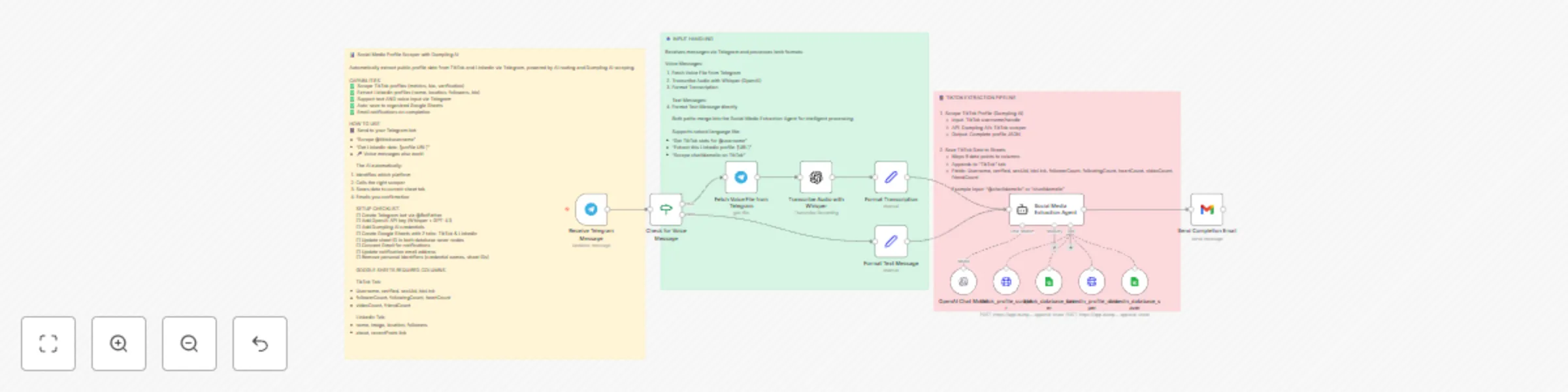
This AI-powered Telegram bot automatically scrapes public profile data from TikTok and LinkedIn, then saves it directly to Google Sheets. Simply send a TikTok username or LinkedIn profile URL via text or voice message, and the workflow handles everything:
For TikTok profiles:
For LinkedIn profiles:
All data is automatically organized into separate Google Sheets tabs for easy reference and analysis. You receive an email notification when extraction is complete.
The workflow uses an AI Agent as an intelligent router that determines which platform to scrape based on your input. Here's the flow:
The AI agent ensures proper tool pairing - it always scrapes first, then saves, preventing partial data or errors.
Accounts & Credentials Needed:
Google Sheets Structure: Create a spreadsheet with two tabs:
TikTok Tab - Columns:
LinkedIn Tab - Columns:
Step 1: Create Telegram Bot
/newbot command and follow promptsStep 2: Configure Credentials
Step 3: Set Up Google Sheets
Step 4: Update Workflow
Step 5: Test the Workflow
Add More Social Platforms: Create new scraper/saver tool pairs for Instagram, Twitter/X, or YouTube by:
Enhance Voice Input:
Advanced Data Enrichment:
Notification Improvements:
Batch Processing:
This catalog entry is organized from the workflow JSON. The node-level section below shows the executable blocks available for review before importing the template.
| Workflow | Telegram bot: extract & store TikTok and LinkedIn data to Google Sheets with Dumpling AI |
|---|---|
| Complexity | advanced |
| Nodes | 16 |
| Categories | Market Research, AI Chatbot |
| Author | Yang |
| Published | 05 Dec 2025 |
Use the JSON export at /data/workflows/11546/11546.json as the source template for this automation.
Open n8n, import the downloaded JSON, and review each node before activating the workflow.
Replace placeholder credentials, API keys, webhook URLs, account IDs, and environment-specific values with your own settings.
Run the workflow manually or in a staging workspace, inspect node output, and confirm downstream systems receive the expected data.
Enable the workflow only after testing, then monitor executions, errors, and rate limits during the first production runs.
Review imported nodes carefully before activation. This catalog entry is intended to help you inspect the workflow structure, understand required services, and find related templates faster.
Node names, credentials, schedules, webhook paths, and external service limits may need adjustment for your workspace.
Who's it for This workflow is perfect for marketers, social media managers, recruiters, sales teams, and researchers who need to collect and organize public profile data from TikTok and LinkedIn. W...
Review the workflow JSON, configure any required credentials in n8n, and test the automation in a safe workspace before using it in production.
Yes. Use the block-by-block analysis and the downloadable JSON to inspect each node, then adjust credentials, prompts, schedules, filters, or destinations for your Market Research, AI Chatbot use case.