Tax deadline management & compliance alerts with GPT-4, Google Sheets & Slack
Workflow preview


 Early Deal
DISCOUNT 20%

Important notice
This workflow is provided as-is. Please review and test before using in production.
Overview
AI-Driven Tax Compliance & Deadline Management System
Description
Automate tax deadline monitoring with AI-powered insights. This workflow checks your tax calendar daily at 8 AM, uses GPT-4 to analyze upcoming deadlines across multiple jurisdictions, detects overdue and critical items, and sends intelligent alerts via email and Slack only when immediate action is required. Perfect for finance teams and accounting firms who need proactive compliance management without manual tracking. 🏛️🤖📊
Good to Know
- AI-Powered: GPT-4 provides risk assessment and strategic recommendations
- Multi-Jurisdiction: Handles Federal, State, and Local tax requirements automatically
- Smart Alerts: Only notifies executives when deadlines are overdue or critical (≤3 days)
- Priority Classification: Categorizes deadlines as Overdue, Critical, High, or Medium priority
- Dual Notifications: Critical alerts to leadership + daily summaries to team channel
- Complete Audit Trail: Logs all checks and deadlines to Google Sheets for compliance records
How It Works
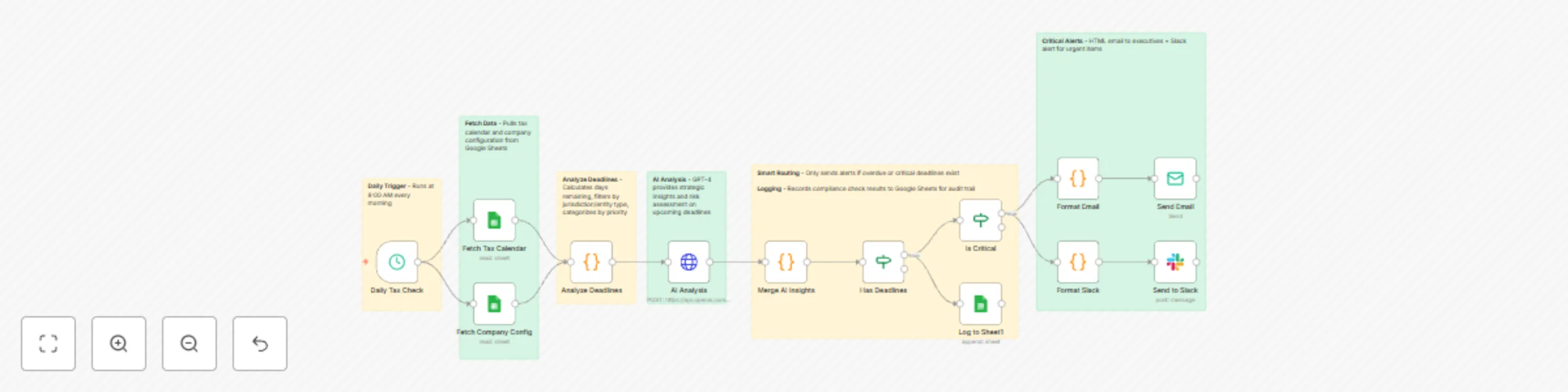
- Daily Trigger - Runs at 8:00 AM every morning
- Fetch Data - Pulls tax calendar and company configuration from Google Sheets
- Analyze Deadlines - Calculates days remaining, filters by jurisdiction/entity type, categorizes by priority
- AI Analysis - GPT-4 provides strategic insights and risk assessment on upcoming deadlines
- Smart Routing - Only sends alerts if overdue or critical deadlines exist
- Critical Alerts - HTML email to executives + Slack alert for urgent items
- Team Updates - Slack summary to finance channel with all upcoming deadlines
- Logging - Records compliance check results to Google Sheets for audit trail
Requirements
Google Sheets Structure
Sheet 1: TaxCalendar
DeadlineID | DeadlineName | DeadlineDate | Jurisdiction | Category | AssignedTo | IsActive
FED-Q1     | Form 1120 Q1 | 2025-04-15   | Federal      | Income   | John Doe   | TRUE
Sheet 2: CompanyConfig (single row)
Jurisdictions          | EntityType  | FiscalYearEnd
Federal, California    | Corporation | 12-31
Sheet 3: ComplianceLog (auto-populated)
Date       | AlertLevel | TotalUpcoming | CriticalCount | OverdueCount
2025-01-15 | HIGH       | 12            | 3             | 1
Credentials Needed
- Google Sheets - Service Account OAuth2
- OpenAI - API Key (GPT-4 access required)
- SMTP - Email account for sending alerts
- Slack - Bot Token with
chat:writepermission
Setup Steps
- Import workflow JSON into n8n
- Add all 4 credentials
- Replace these placeholders:
YOUR_TAX_CALENDAR_ID- Tax calendar sheet IDYOUR_CONFIG_ID- Company config sheet IDYOUR_LOG_ID- Compliance log sheet IDC12345678- Slack channel ID[email protected]- Sender email[email protected]- Recipient email
- Share all sheets with Google service account email
- Invite Slack bot to channels
- Test workflow manually
- Activate the trigger
Customizing This Workflow
Change Alert Thresholds: Edit "Analyze Deadlines" node:
- Critical: Change
<= 3to<= 5for 5-day warning - High: Change
<= 7to<= 14for 2-week notice - Medium: Change
<= 30to<= 60for 2-month lookout
Adjust Schedule: Edit "Daily Tax Check" trigger:
- Change hour/minute for different run time
- Add multiple trigger times for tax season (8 AM, 2 PM, 6 PM)
Add More Recipients: Edit "Send Email" node:
- To:
[email protected], [email protected] - CC:
[email protected] - BCC:
[email protected]
Customize Email Design: Edit "Format Email" node to change colors, add logo, or modify layout
Add SMS Alerts: Insert Twilio node after "Is Critical" for emergency notifications
Integrate Task Management: Add HTTP Request node to create tasks in Asana/Jira for critical deadlines
Troubleshooting
| Issue | Solution |
|---|---|
| No deadlines found | Check date format (YYYY-MM-DD) and IsActive = TRUE |
| AI analysis failed | Verify OpenAI API key and account credits |
| Email not sending | Test SMTP credentials and check if critical condition met |
| Slack not posting | Invite bot to channel and verify channel ID format |
| Permission denied | Share Google Sheets with service account email |
📞 Professional Services
Need help with implementation or customization?
Our team offers:
- 🎯 Custom workflow development
- 🏢 Enterprise deployment support
- 🎓 Team training sessions
- 🔧 Ongoing maintenance
- 📊 Custom reporting & dashboards
- 🔗 Additional API integrations
Discover more workflows – Get in touch with us