Block 1 - Daily Tax Check
- Type / Role
- n8n-nodes-base.scheduleTrigger - scheduleTrigger
- Config choices
- Version 1.2


 Early Deal
This workflow is provided as-is. Please review and test before using in production.
AI Driven Tax Compliance & Deadline Management System Description Automate tax deadline monitoring with AI powered insights. This workflow checks your tax calendar daily at 8 AM, uses GPT 4 to anal...
n8n-nodes-base.scheduletrigger, n8n-nodes-base.googlesheets, n8n-nodes-base.code, n8n-nodes-base.httprequest, n8n-nodes-base.if, n8n-nodes-base.emailsend, n8n-nodes-base.slack, n8n-nodes-base.stickynote
This workflow is cataloged by N8N Workflows and links back to its original n8n.io source page by Oneclick AI Squad.
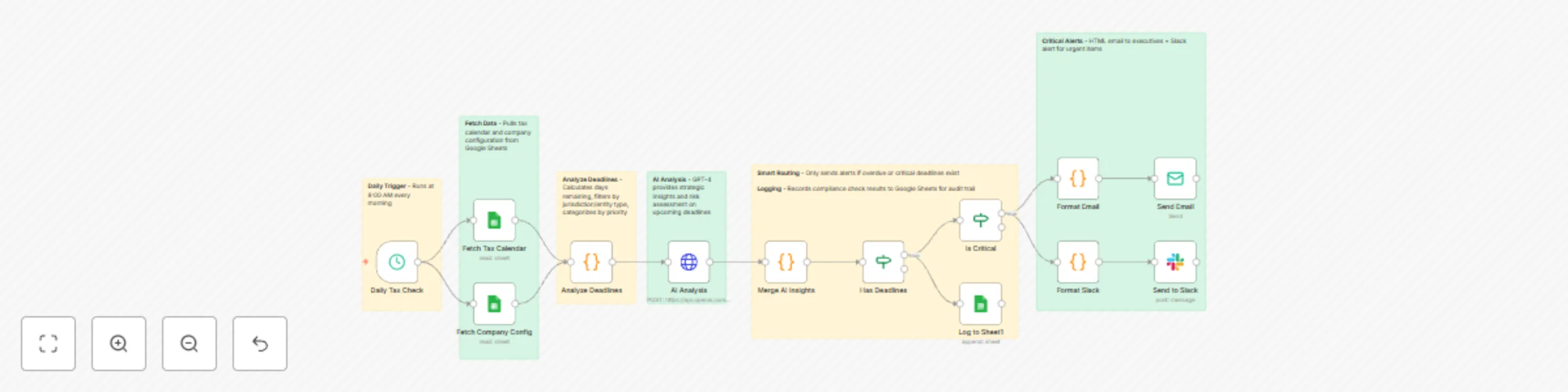
Original n8n.io sourceAutomate tax deadline monitoring with AI-powered insights. This workflow checks your tax calendar daily at 8 AM, uses GPT-4 to analyze upcoming deadlines across multiple jurisdictions, detects overdue and critical items, and sends intelligent alerts via email and Slack only when immediate action is required. Perfect for finance teams and accounting firms who need proactive compliance management without manual tracking. 🏛️🤖📊
Sheet 1: TaxCalendar
DeadlineID | DeadlineName | DeadlineDate | Jurisdiction | Category | AssignedTo | IsActive
FED-Q1     | Form 1120 Q1 | 2025-04-15   | Federal      | Income   | John Doe   | TRUE
Sheet 2: CompanyConfig (single row)
Jurisdictions          | EntityType  | FiscalYearEnd
Federal, California    | Corporation | 12-31
Sheet 3: ComplianceLog (auto-populated)
Date       | AlertLevel | TotalUpcoming | CriticalCount | OverdueCount
2025-01-15 | HIGH       | 12            | 3             | 1
chat:write permissionYOUR_TAX_CALENDAR_ID - Tax calendar sheet IDYOUR_CONFIG_ID - Company config sheet ID YOUR_LOG_ID - Compliance log sheet IDC12345678 - Slack channel ID[email protected] - Sender email[email protected] - Recipient emailChange Alert Thresholds: Edit "Analyze Deadlines" node:
<= 3 to <= 5 for 5-day warning<= 7 to <= 14 for 2-week notice<= 30 to <= 60 for 2-month lookoutAdjust Schedule: Edit "Daily Tax Check" trigger:
Add More Recipients: Edit "Send Email" node:
[email protected], [email protected][email protected][email protected]Customize Email Design: Edit "Format Email" node to change colors, add logo, or modify layout
Add SMS Alerts: Insert Twilio node after "Is Critical" for emergency notifications
Integrate Task Management: Add HTTP Request node to create tasks in Asana/Jira for critical deadlines
| Issue | Solution |
|---|---|
| No deadlines found | Check date format (YYYY-MM-DD) and IsActive = TRUE |
| AI analysis failed | Verify OpenAI API key and account credits |
| Email not sending | Test SMTP credentials and check if critical condition met |
| Slack not posting | Invite bot to channel and verify channel ID format |
| Permission denied | Share Google Sheets with service account email |
Need help with implementation or customization?
Our team offers:
Discover more workflows – Get in touch with us
This catalog entry is organized from the workflow JSON. The node-level section below shows the executable blocks available for review before importing the template.
| Workflow | Tax deadline management & compliance alerts with GPT-4, Google Sheets & Slack |
|---|---|
| Complexity | advanced |
| Nodes | 19 |
| Categories | Document Extraction, AI Summarization |
| Author | Oneclick AI Squad |
| Published | 24 Oct 2025 |
Use the JSON export at /data/workflows/10108/10108.json as the source template for this automation.
Open n8n, import the downloaded JSON, and review each node before activating the workflow.
Replace placeholder credentials, API keys, webhook URLs, account IDs, and environment-specific values with your own settings.
Run the workflow manually or in a staging workspace, inspect node output, and confirm downstream systems receive the expected data.
Enable the workflow only after testing, then monitor executions, errors, and rate limits during the first production runs.
Review imported nodes carefully before activation. This catalog entry is intended to help you inspect the workflow structure, understand required services, and find related templates faster.
Node names, credentials, schedules, webhook paths, and external service limits may need adjustment for your workspace.
AI Driven Tax Compliance & Deadline Management System Description Automate tax deadline monitoring with AI powered insights. This workflow checks your tax calendar daily at 8 AM, uses GPT 4 to anal...
Review the workflow JSON, configure any required credentials in n8n, and test the automation in a safe workspace before using it in production.
Yes. Use the block-by-block analysis and the downloadable JSON to inspect each node, then adjust credentials, prompts, schedules, filters, or destinations for your Document Extraction, AI Summarization use case.