Block 1 - Update a member
- Type / Role
- n8n-nodes-base.mailchimp - mailchimp
- Config choices
- Version 1


 Early Deal
This workflow is provided as-is. Please review and test before using in production.
Description Use this workflow to automatically sync Zoom webinar registrants into Mailchimp, filter out internal contacts, and send double opt in confirmation emails. Ideal for keeping your newslet...
n8n-nodes-base.mailchimp, n8n-nodes-base.httprequest, n8n-nodes-base.code, n8n-nodes-base.filter, n8n-nodes-base.if, n8n-nodes-base.stickynote, n8n-nodes-base.set, n8n-nodes-base.manualtrigger
This workflow is cataloged by N8N Workflows and links back to its original n8n.io source page by Easy8.ai.
Original n8n.io sourceUse this workflow to automatically sync Zoom webinar registrants into Mailchimp, filter out internal contacts, and send double opt-in confirmation emails. Ideal for keeping your newsletter audiences clean, accurate, and enriched with new leads—without manual export/import steps.
This workflow connects Zoom Webinars with Mailchimp via API to automate the onboarding of webinar attendees into your marketing audience.
It retrieves registrant data from Zoom (based on Webinar ID and Occurrence ID), extracts attendee emails, filters out internal domains, checks whether the contact already exists in Mailchimp, and then creates or updates each record.
New contacts receive a double opt-in confirmation email, and all newly added leads are tagged for segmentation inside Mailchimp.
Perfect for marketing teams running webinars who need to transfer participants into Mailchimp quickly and reliably.
This automation streamlines attendee follow-up, ensures compliance with double opt-in requirements.
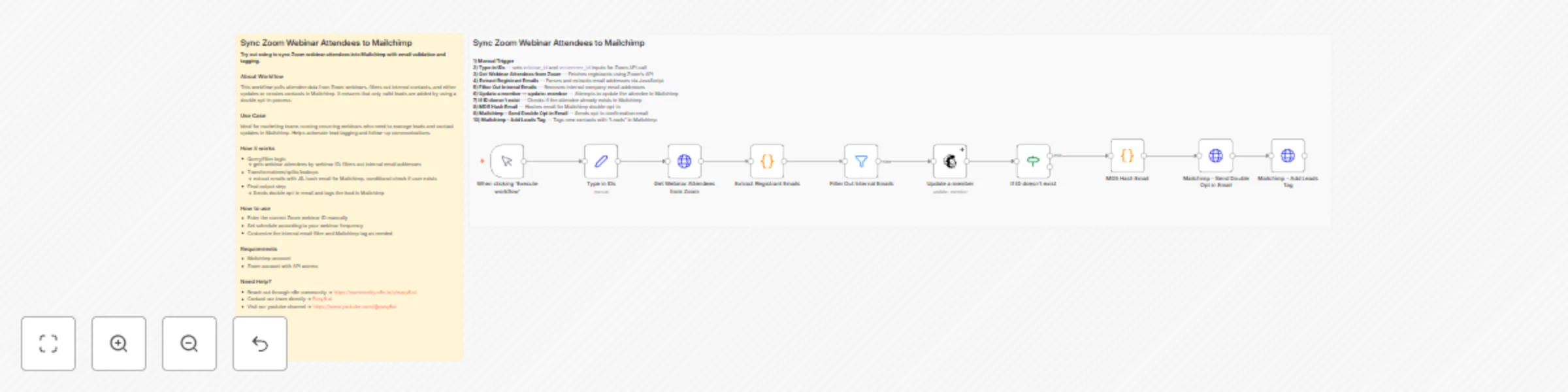
Manual Trigger – Execute workflow
The workflow starts manually. You can optionally replace the manual trigger with a Schedule Trigger if you want to automate recurring webinars.
Manual Input – Set Webinar ID and Occurrence ID
The workflow includes a Set node that requires you to enter:
webinar_idoccurence_idZoom API – Get Webinar Attendees
Retrieves registrants for the selected webinar occurrence using the Zoom API.
Code Node – Extract Registrant Emails
Processes the Zoom API response and extracts the email addresses of all registrants.
Filter Node – Filter Out Internal Emails
Removes internal/company email addresses by checking that they do not contain your domain.
(This is fully configurable.)
Mailchimp – Update a Member
Attempts to update the contact in Mailchimp based on their email address.
This determines whether the contact already exists.
IF Node – If ID Doesn’t Exist
Checks if Mailchimp returned an id during the update attempt.
If Mailchimp did not return an ID, the contact is treated as new and continues through the creation + confirmation path.
Code Node – MD5 Hash Email
Hashes the email using MD5. Mailchimp uses this hash as the unique identifier for list members.
Mailchimp – Send Double Opt-In Email
Creates the contact with “pending” status and sends a double opt-in email.
Mailchimp – Add Leads Tag
Tags the contact with "Leads" immediately as part of the creation process.
Import the workflow into your n8n instance
Configure credentials:
Enter webinar details:
webinar_id and occurence_id in the Type in IDs nodeAdjust internal email filtering:
@yourcompanydomain.com)Configure Mailchimp nodes:
LIST_ID_HERE with your Mailchimp Audience/List ID Test the workflow:
This catalog entry is organized from the workflow JSON. The node-level section below shows the executable blocks available for review before importing the template.
| Workflow | Sync Zoom webinar attendees to Mailchimp with double opt-in and email filtering |
|---|---|
| Complexity | intermediate |
| Nodes | 12 |
| Categories | Social Media |
| Author | Easy8.ai |
| Published | 08 Dec 2025 |
Use the JSON export at /data/workflows/11593/11593.json as the source template for this automation.
Open n8n, import the downloaded JSON, and review each node before activating the workflow.
Replace placeholder credentials, API keys, webhook URLs, account IDs, and environment-specific values with your own settings.
Run the workflow manually or in a staging workspace, inspect node output, and confirm downstream systems receive the expected data.
Enable the workflow only after testing, then monitor executions, errors, and rate limits during the first production runs.
Review imported nodes carefully before activation. This catalog entry is intended to help you inspect the workflow structure, understand required services, and find related templates faster.
Node names, credentials, schedules, webhook paths, and external service limits may need adjustment for your workspace.
Description Use this workflow to automatically sync Zoom webinar registrants into Mailchimp, filter out internal contacts, and send double opt in confirmation emails. Ideal for keeping your newslet...
Review the workflow JSON, configure any required credentials in n8n, and test the automation in a safe workspace before using it in production.
Yes. Use the block-by-block analysis and the downloadable JSON to inspect each node, then adjust credentials, prompts, schedules, filters, or destinations for your Social Media use case.