Sync events from Excel to Google Calendar with GPT-4o-Mini smart summaries
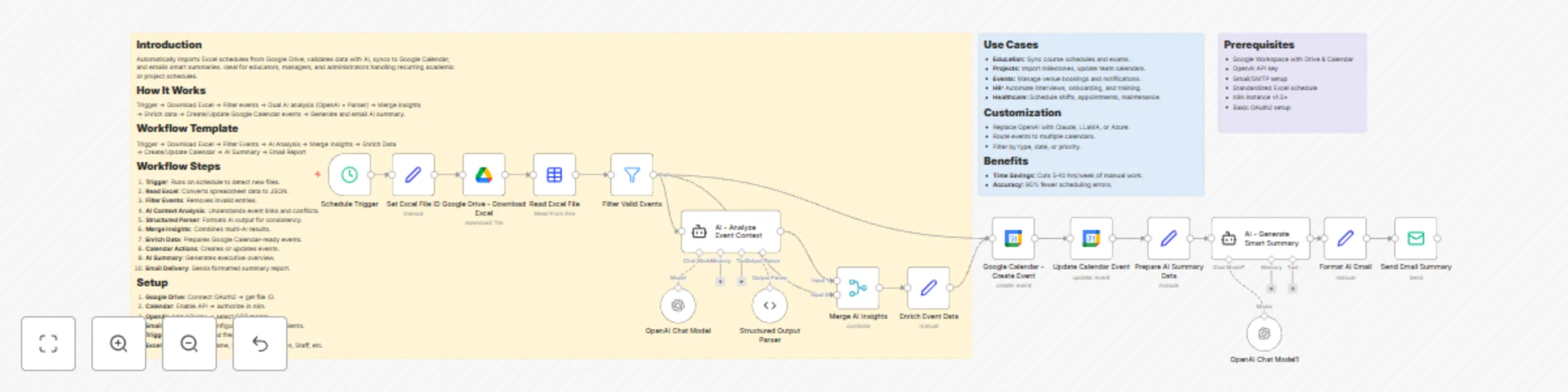
Workflow preview

$20/month : Unlimited workflows
2500 executions/month

THE #1 IN WEB SCRAPING
Scrape any website without limits
HOSTINGER  Early Deal
DISCOUNT 20% Try free
Early DealDISCOUNT 20%
Self-hosted n8n
Unlimited workflows - from $4.99/mo

#1 hub for scraping, AI & automation
6000+ actors - $5 credits/mo
Important notice
This workflow is provided as-is. Please review and test before using in production.
Overview
Introduction
Automatically imports Excel schedules from Google Drive, validates data with AI, syncs to Google Calendar, and emails smart summaries. Ideal for educators, managers, and administrators handling recurring academic or project schedules.
How It Works
Trigger → Download Excel → Filter events → Dual AI analysis (OpenAI + Parser) → Merge insights → Enrich data → Create/Update Google Calendar events → Generate and email AI summary.
Workflow Template
Trigger → Download Excel → Filter Events → AI Analysis → Merge Insights → Enrich Data → Create/Update Calendar → AI Summary → Email Report
Workflow Steps
- Trigger: Runs on schedule to detect new files.
- Read Excel: Converts spreadsheet data to JSON.
- Filter Events: Removes invalid entries.
- AI Context Analysis: Understands event links and conflicts.
- Structured Parser: Formats AI output for consistency.
- Merge Insights: Combines multi-AI results.
- Enrich Data: Prepares Google Calendar-ready events.
- Calendar Actions: Creates or updates events.
- AI Summary: Generates executive overview.
- Email Delivery: Sends formatted summary report.
Setup
- Google Drive: Connect OAuth2 → get file ID.
- Calendar: Enable API → authorize in n8n.
- OpenAI: Add API key → select GPT model.
- Email (Gmail/SMTP): Configure sender and recipients.
- Trigger: Set timezone and frequency.
- Excel Format: Include Name, Date, Time, Location, Staff, etc.