Block 1 - When clicking ‘Test workflow’
- Type / Role
- n8n-nodes-base.manualTrigger - manualTrigger
- Config choices
- Version 1


 Early Deal
This workflow is provided as-is. Please review and test before using in production.
n8n Template: Store Chat Data in Supabase PostgreSQL for WhatsApp/Slack Integration This n8n template captures chat data (like user ID, name, or address) and saves it to a Supabase PostgreSQL datab...
n8n-nodes-base.manualtrigger, n8n-nodes-base.set, @n8n/n8n-nodes-langchain.lmchatgooglegemini, @n8n/n8n-nodes-langchain.memorypostgreschat, n8n-nodes-base.supabase, @n8n/n8n-nodes-langchain.agent
This workflow is cataloged by N8N Workflows and links back to its original n8n.io source page by JPres.
Original n8n.io sourceThis n8n template captures chat data (like user ID, name, or address) and saves it to a Supabase PostgreSQL database. It’s built for testing now but designed to work with WhatsApp, Slack, or similar platforms later, where chat inputs aren’t predefined. Guide with images can be found on: https://github.com/JimPresting/Supabase-n8n-Self-Hosted-Integration/
To let your n8n instance talk to Supabase, add a firewall rule in your VPC network settings (e.g., Google Cloud, AWS, etc.).
Go to VPC Network settings.
Add a new firewall rule:
allow-postgres-outbound0.0.0.0/0 (allows all; restrict to Supabase IPs for security)IPv4 ranges and add the n8n VM’s IP range, orNone if any VM can connectTCP5432 (default PostgreSQL port)Save the rule.
Log into your Supabase Dashboard.
Go to your project, click the Connect button in the header.
Copy the PostgreSQL connection string:
postgresql://postgres.fheraruzdahjd:[YOUR-PASSWORD]@aws-0-eu-central-1.pooler.supabase.com:6543/postgres
[YOUR-PASSWORD] with your Supabase account password (no brackets) and replace the string before that with your actual unique identifier.6543 or 5432)—use what’s in the string.This workflow takes chat data, maps it to variables, and stores it in Supabase. It’s built to handle messy chat inputs from platforms like WhatsApp or Slack in production.
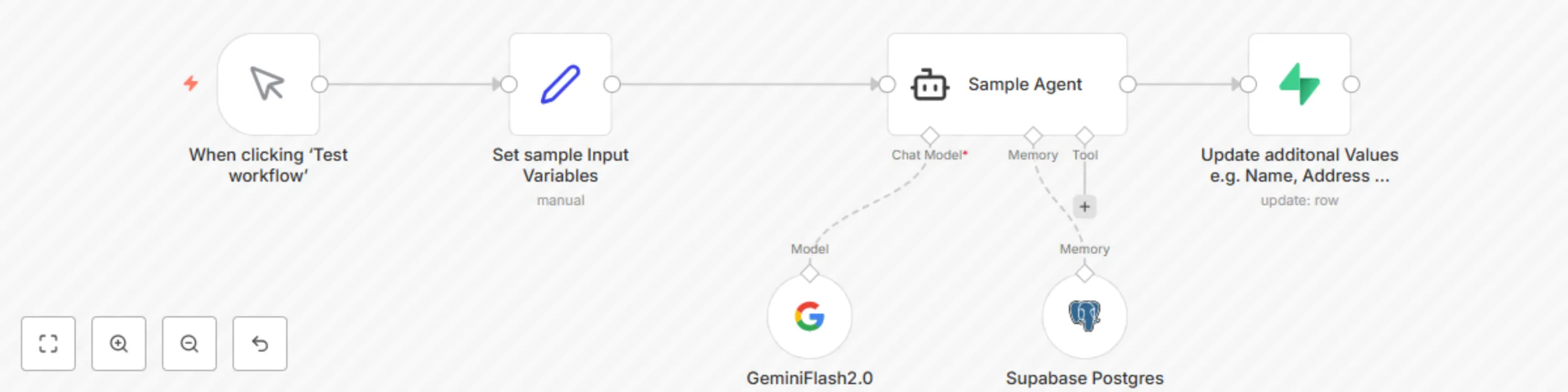
Trigger Node: "When clicking 'Test workflow'" (manual trigger).
Set Node: "Set sample input variables (manual)".
id, name, address to mimic chat data.id will be something unique like a phone number, account ID, or account number.Sample Agent Node: Uses a model (e.g., GeminiFlash2.0 but doesn't matter).
Supabase PostgreSQL Node: "Supabase PostgreSQL Database".
id, name, address) to a table.id (like a phone number or account ID) is the key. Extra fields like name or address let us keep all user info in one place for later use (e.g., analytics or replies).Output Node: "Update additional values e.g., name, address".
id, name) to our database fields.id as a key (phone number, account ID, etc.) with extra fields like name makes this workflow flexible for many use cases, like user profiles or support logs.In the n8n workflow, set up the Supabase PostgreSQL node:
aws-0-eu-central-1.pooler.supabase.com (from the connection string)6543 (or what’s in the connection string)postgrespostgres.fhspudlibstmpgwqmumo (from the connection string)Set the node to Insert or Update:
id to a unique column in your Supabase table (e.g., phone number, account ID).name, address to their columns.Test the workflow to confirm data saves correctly.
0.0.0.0/0. Find Supabase’s IP ranges in their docs and use those.This catalog entry is organized from the workflow JSON. The node-level section below shows the executable blocks available for review before importing the template.
| Workflow | Store chat data in Supabase PostgreSQL for WhatsApp/Slack chatbot |
|---|---|
| Complexity | intermediate |
| Nodes | 6 |
| Categories | Support Chatbot, AI Chatbot |
| Author | JPres |
| Published | 05 May 2025 |
Use the JSON export at /data/workflows/3867/3867.json as the source template for this automation.
Open n8n, import the downloaded JSON, and review each node before activating the workflow.
Replace placeholder credentials, API keys, webhook URLs, account IDs, and environment-specific values with your own settings.
Run the workflow manually or in a staging workspace, inspect node output, and confirm downstream systems receive the expected data.
Enable the workflow only after testing, then monitor executions, errors, and rate limits during the first production runs.
Review imported nodes carefully before activation. This catalog entry is intended to help you inspect the workflow structure, understand required services, and find related templates faster.
Node names, credentials, schedules, webhook paths, and external service limits may need adjustment for your workspace.
n8n Template: Store Chat Data in Supabase PostgreSQL for WhatsApp/Slack Integration This n8n template captures chat data (like user ID, name, or address) and saves it to a Supabase PostgreSQL datab...
Review the workflow JSON, configure any required credentials in n8n, and test the automation in a safe workspace before using it in production.
Yes. Use the block-by-block analysis and the downloadable JSON to inspect each node, then adjust credentials, prompts, schedules, filters, or destinations for your Support Chatbot, AI Chatbot use case.