Standardize daily construction reports with OpenAI, Gmail and Google Sheets

Workflow preview

Workflow preview
100%
Standardize daily construction reports with OpenAI, Gmail and Google Sheets preview
Open on n8n.io

1. Workflow Overview

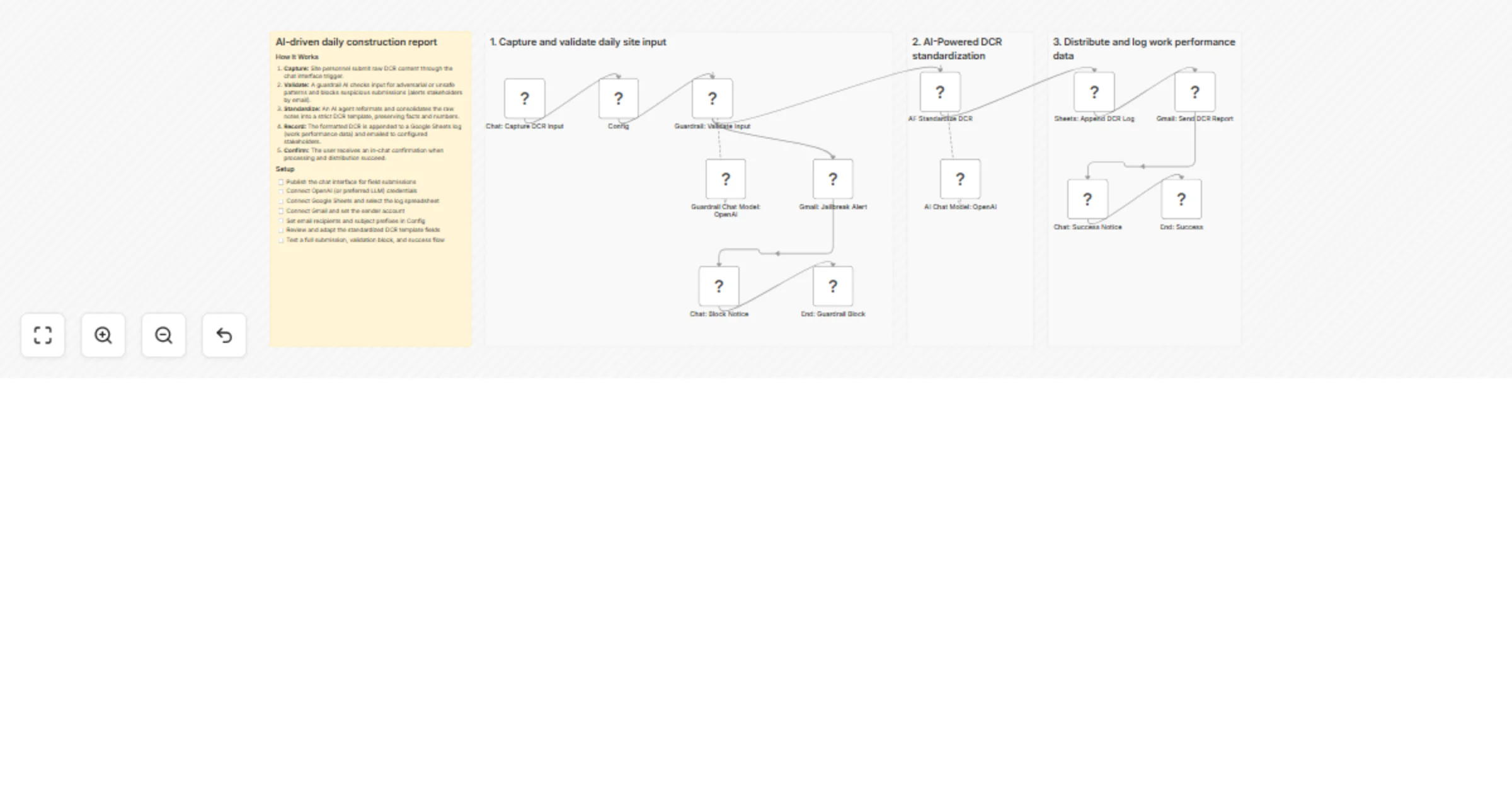
AI Driven daily construction report (DCR) standardization What This Workflow Does Standardize Daily Construction Reports (DCR) with AI by capturing raw site inputs via chat and automatically genera...

Best for

  • Project Management automation workflows
  • AI Chatbot automation workflows
  • advanced n8n builders looking for reusable templates

Tools used

n8n-nodes-base.stickynote, @n8n/n8n-nodes-langchain.chattrigger, @n8n/n8n-nodes-langchain.guardrails, n8n-nodes-base.gmail, @n8n/n8n-nodes-langchain.chat, @n8n/n8n-nodes-langchain.agent, @n8n/n8n-nodes-langchain.lmchatopenai, n8n-nodes-base.googlesheets

Source and attribution

This workflow is cataloged by N8N Workflows and links back to its original n8n.io source page by Alysson Neves.

Original n8n.io source

1.1 Workflow description

Title
Standardize daily construction reports with OpenAI, Gmail and Google Sheets
Workflow name
Standardize daily construction reports with OpenAI, Gmail and Google Sheets

AI-Driven daily construction report (DCR) standardization

What This Workflow Does

Standardize Daily Construction Reports (DCR) with AI by capturing raw site inputs via chat and automatically generating structured Work Performance Data.

This workflow enables you to:

  • Capture field reports through a Chat Interface
  • Validate inputs using AI Guardrails (anti-jailbreak protection)
  • Standardize DCR content with OpenAI
  • Distribute structured technical reports via Gmail
  • Log Work Performance Data into Google Sheets
  • Ensure traceability and governance-ready documentation

How to Use This Template

Use this template to automate Daily Construction Report standardization and logging by combining:

  • Chat Trigger → Collect raw field inputs in real time
  • OpenAI Guardrails → Validate and block unsafe or adversarial submissions
  • OpenAI (GPT model) → Transform raw notes into structured DCR format
  • Google Sheets → Store structured Work Performance Data
  • Gmail → Notify stakeholders and distribute reports

Action-Oriented Overview

You can:

  • Capture raw DCR notes directly from site personnel via chat
  • Validate input integrity using AI guardrails with jailbreak detection
  • Automatically block and alert stakeholders in case of suspicious input
  • Standardize informal notes into a structured DCR template including:
  • Project identification
  • Field team
  • Activities performed
  • Working hours
  • Weather conditions
  • Occurrences and issues
  • Materials and equipment
  • Physical progress
  • Responsible person
  • Log the structured DCR into Google Sheets as Work Performance Data
  • Send the standardized report automatically via Gmail
  • Provide immediate confirmation back to the field user

What You Achieve

With this workflow, you can:

  • Do AI-powered DCR standardization with OpenAI
  • Do secure field data collection with AI guardrails
  • Do automated Work Performance Data logging with Google Sheets
  • Do real-time stakeholder communication with Gmail
  • Do governance-ready execution documentation aligned with PMBOK®

Ideal For

  • Construction site managers
  • Field engineers
  • Project control teams
  • PMO environments
  • Organizations aligned with PMI / PMBOK® execution practices
  • Companies implementing digital transformation in site reporting

This template operationalizes Manage Project Execution by transforming raw field notes into structured, standardized Work Performance Data (WPD).


Categories

  • AI
  • Project Management

Alignment with PMI – PMBOK® 8

Focus Area: Executing Process: Manage Project Execution Artifact Generated: Work Performance Data (WPD)

1.2 Logical Blocks

This catalog entry is organized from the workflow JSON. The node-level section below shows the executable blocks available for review before importing the template.

2. Block-by-Block Analysis

Block 1 - Sticky Note

Type / Role
n8n-nodes-base.stickyNote - stickyNote
Config choices
Version 1

Block 2 - Sticky Note2

Type / Role
n8n-nodes-base.stickyNote - stickyNote
Config choices
Version 1

Block 3 - Sticky Note3

Type / Role
n8n-nodes-base.stickyNote - stickyNote
Config choices
Version 1

Block 4 - Sticky Note4

Type / Role
n8n-nodes-base.stickyNote - stickyNote
Config choices
Version 1

Block 5 - Chat: Capture DCR Input

Type / Role
@n8n/n8n-nodes-langchain.chatTrigger - chatTrigger
Config choices
Version 1.4

Block 6 - Guardrail: Validate Input

Type / Role
@n8n/n8n-nodes-langchain.guardrails - guardrails
Config choices
Version 2

Block 7 - Gmail: Jailbreak Alert

Type / Role
n8n-nodes-base.gmail - gmail
Config choices
Version 2.2

Block 8 - Chat: Block Notice

Type / Role
@n8n/n8n-nodes-langchain.chat - chat
Config choices
Version 1

Block 9 - AI: Standardize DCR

Type / Role
@n8n/n8n-nodes-langchain.agent - agent
Config choices
Version 3

Block 10 - Guardrail Chat Model: OpenAI

Type / Role
@n8n/n8n-nodes-langchain.lmChatOpenAi - lmChatOpenAi
Config choices
Version 1.3

Block 11 - AI Chat Model: OpenAI

Type / Role
@n8n/n8n-nodes-langchain.lmChatOpenAi - lmChatOpenAi
Config choices
Version 1.3

Block 12 - Sheets: Append DCR Log

Type / Role
n8n-nodes-base.googleSheets - googleSheets
Config choices
Version 4.7

Block 13 - Gmail: Send DCR Report

Type / Role
n8n-nodes-base.gmail - gmail
Config choices
Version 2.2

Block 14 - Chat: Success Notice

Type / Role
@n8n/n8n-nodes-langchain.chat - chat
Config choices
Version 1

Block 15 - End: Guardrail Block

Type / Role
n8n-nodes-base.noOp - noOp
Config choices
Version 1

Block 16 - End: Success

Type / Role
n8n-nodes-base.noOp - noOp
Config choices
Version 1

Block 17 - Config

Type / Role
n8n-nodes-base.set - set
Config choices
Version 3.4

3. Summary Table

Workflow Standardize daily construction reports with OpenAI, Gmail and Google Sheets
Complexity advanced
Nodes 17
Categories Project Management, AI Chatbot
Author Alysson Neves
Published 18 Dec 2025

4. Reproducing the Workflow from Scratch

  1. 1. Download the workflow JSON

    Use the JSON export at /data/workflows/11907/11907.json as the source template for this automation.

  2. 2. Import the template into n8n

    Open n8n, import the downloaded JSON, and review each node before activating the workflow.

  3. 3. Configure credentials and variables

    Replace placeholder credentials, API keys, webhook URLs, account IDs, and environment-specific values with your own settings.

  4. 4. Test with sample data

    Run the workflow manually or in a staging workspace, inspect node output, and confirm downstream systems receive the expected data.

  5. 5. Activate and monitor

    Enable the workflow only after testing, then monitor executions, errors, and rate limits during the first production runs.

5. General Notes & Resources

Review imported nodes carefully before activation. This catalog entry is intended to help you inspect the workflow structure, understand required services, and find related templates faster.

Node names, credentials, schedules, webhook paths, and external service limits may need adjustment for your workspace.

Frequently asked questions

What does Standardize daily construction reports with OpenAI, Gmail and Google Sheets do?

AI Driven daily construction report (DCR) standardization What This Workflow Does Standardize Daily Construction Reports (DCR) with AI by capturing raw site inputs via chat and automatically genera...

What do I need before importing this workflow?

Review the workflow JSON, configure any required credentials in n8n, and test the automation in a safe workspace before using it in production.

Can I customize this workflow?

Yes. Use the block-by-block analysis and the downloadable JSON to inspect each node, then adjust credentials, prompts, schedules, filters, or destinations for your Project Management, AI Chatbot use case.