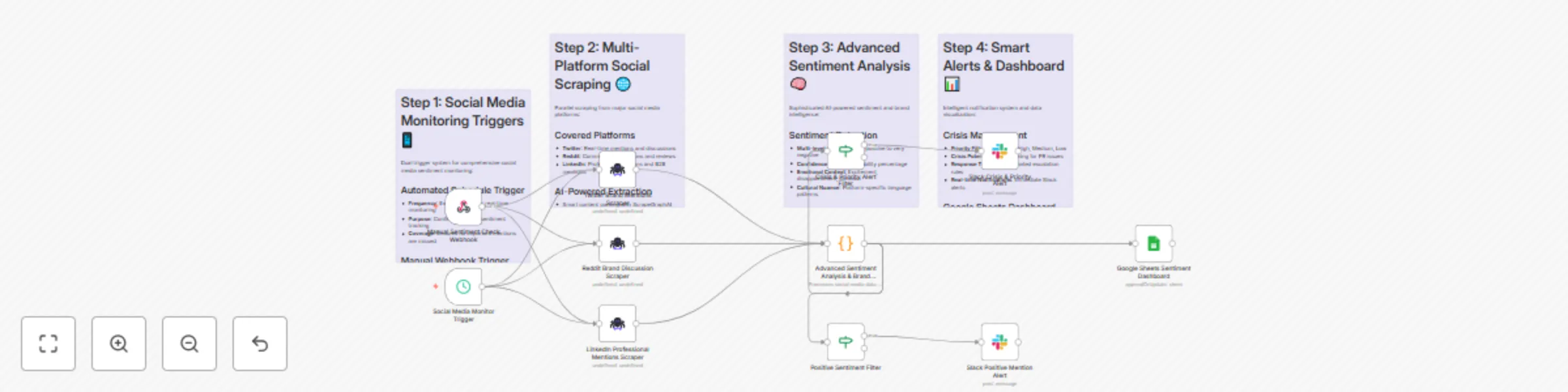
Social media sentiment analysis dashboard with custom AI for Twitter, Reddit & LinkedIn

Workflow preview

Workflow preview
100%
Social media sentiment analysis dashboard with custom AI for Twitter, Reddit & LinkedIn preview
Open on n8n.io

Important notice

This workflow is provided as-is. Please review and test before using in production.

1. Workflow Overview

Social Media Sentiment Analysis Dashboard with AI and Real time Monitoring Target Audience Social media managers and community managers Marketing teams monitoring brand reputation PR professiona...

Best for

  • Market Research automation workflows
  • AI Summarization automation workflows
  • advanced n8n builders looking for reusable templates

Tools used

n8n-nodes-base.scheduletrigger, n8n-nodes-base.webhook, n8n-nodes-scrapegraphai.scrapegraphai, n8n-nodes-base.code, n8n-nodes-base.googlesheets, n8n-nodes-base.if, n8n-nodes-base.slack, n8n-nodes-base.stickynote

Source and attribution

This workflow is cataloged by N8N Workflows and links back to its original n8n.io source page by vinci-king-01.

Original n8n.io source

1.1 Workflow description

Title
Social media sentiment analysis dashboard with custom AI for Twitter, Reddit & LinkedIn
Workflow name
Social media sentiment analysis dashboard with custom AI for Twitter, Reddit & LinkedIn

Social Media Sentiment Analysis Dashboard with AI and Real-time Monitoring

🎯 Target Audience

  • Social media managers and community managers
  • Marketing teams monitoring brand reputation
  • PR professionals tracking public sentiment
  • Customer service teams identifying trending issues
  • Business analysts measuring social media ROI
  • Brand managers protecting brand reputation
  • Product managers gathering user feedback

🚀 Problem Statement

Manual social media monitoring is overwhelming and often misses critical sentiment shifts or trending topics. This template solves the challenge of automatically collecting, analyzing, and visualizing social media sentiment data across multiple platforms to provide actionable insights for brand management and customer engagement.

🔧 How it Works

This workflow automatically monitors social media platforms using AI-powered sentiment analysis, processes mentions and conversations, and provides real-time insights through a comprehensive dashboard.

Key Components

  1. Scheduled Trigger - Runs the workflow at specified intervals to maintain real-time monitoring
  2. AI-Powered Sentiment Analysis - Uses advanced NLP to analyze sentiment, emotions, and topics
  3. Multi-Platform Integration - Monitors Twitter, Reddit, and other social platforms
  4. Real-time Alerting - Sends notifications for critical sentiment changes or viral content
  5. Dashboard Integration - Stores all data in Google Sheets for comprehensive analysis and reporting

📊 Google Sheets Column Specifications

The template creates the following columns in your Google Sheets:

Column Data Type Description Example
timestamp DateTime When the mention was recorded "2024-01-15T10:30:00Z"
platform String Social media platform "Twitter"
username String User who posted the content "@john_doe"
content String Full text of the post/comment "Love the new product features!"
sentiment_score Number Sentiment score (-1 to 1) 0.85
sentiment_label String Sentiment classification "Positive"
emotion String Primary emotion detected "Joy"
topics Array Key topics identified ["product", "features"]
engagement Number Likes, shares, comments 1250
reach_estimate Number Estimated reach 50000
influence_score Number User influence metric 0.75
alert_priority String Alert priority level "High"

🛠️ Setup Instructions

Estimated setup time: 20-25 minutes

Prerequisites

  • n8n instance with community nodes enabled
  • ScrapeGraphAI API account and credentials
  • Google Sheets account with API access
  • Slack workspace for notifications (optional)
  • Social media API access (Twitter, Reddit, etc.)

Step-by-Step Configuration

1. Install Community Nodes
# Install required community nodes
npm install n8n-nodes-scrapegraphai
npm install n8n-nodes-slack
2. Configure ScrapeGraphAI Credentials
  • Navigate to Credentials in your n8n instance
  • Add new ScrapeGraphAI API credentials
  • Enter your API key from ScrapeGraphAI dashboard
  • Test the connection to ensure it's working
3. Set up Google Sheets Connection
  • Add Google Sheets OAuth2 credentials
  • Grant necessary permissions for spreadsheet access
  • Create a new spreadsheet for sentiment analysis data
  • Configure the sheet name (default: "Sentiment Analysis")
4. Configure Social Media Monitoring
  • Update the websiteUrl parameters in ScrapeGraphAI nodes
  • Add URLs for social media platforms you want to monitor
  • Customize the user prompt to extract specific sentiment data
  • Set up keywords, hashtags, and brand mentions to track
5. Set up Notification Channels
  • Configure Slack webhook or API credentials
  • Set up email service credentials for alerts
  • Define sentiment thresholds for different alert levels
  • Test notification delivery
6. Configure Schedule Trigger
  • Set monitoring frequency (every 15 minutes, hourly, etc.)
  • Choose appropriate time zones for your business hours
  • Consider social media platform rate limits
7. Test and Validate
  • Run the workflow manually to verify all connections
  • Check Google Sheets for proper data formatting
  • Test sentiment analysis with sample content

🔄 Workflow Customization Options

Modify Monitoring Targets

  • Add or remove social media platforms
  • Change keywords, hashtags, or brand mentions
  • Adjust monitoring frequency based on platform activity

Extend Sentiment Analysis

  • Add more sophisticated emotion detection
  • Implement topic clustering and trend analysis
  • Include influencer identification and scoring

Customize Alert System

  • Set different thresholds for different sentiment levels
  • Create tiered alert systems (info, warning, critical)
  • Add sentiment trend analysis and predictions

Output Customization

  • Add data visualization and reporting features
  • Implement sentiment trend charts and graphs
  • Create executive dashboards with key metrics
  • Add competitor sentiment comparison

📈 Use Cases

  • Brand Reputation Management: Monitor and respond to brand mentions
  • Crisis Management: Detect and respond to negative sentiment quickly
  • Customer Feedback Analysis: Understand customer satisfaction and pain points
  • Product Launch Monitoring: Track sentiment around new product releases
  • Competitor Analysis: Monitor competitor sentiment and engagement
  • Influencer Identification: Find and engage with influential users

🚨 Important Notes

  • Respect social media platforms' terms of service and rate limits
  • Implement appropriate delays between requests to avoid rate limiting
  • Regularly review and update your monitoring keywords and parameters
  • Monitor API usage to manage costs effectively
  • Keep your credentials secure and rotate them regularly
  • Consider privacy implications and data protection regulations

🔧 Troubleshooting

Common Issues:

  • ScrapeGraphAI connection errors: Verify API key and account status
  • Google Sheets permission errors: Check OAuth2 scope and permissions
  • Sentiment analysis errors: Review the Code node's JavaScript logic
  • Rate limiting: Adjust monitoring frequency and implement delays
  • Alert delivery failures: Check notification service credentials

Support Resources:

  • ScrapeGraphAI documentation and API reference
  • n8n community forums for workflow assistance
  • Google Sheets API documentation for advanced configurations
  • Social media platform API documentation
  • Sentiment analysis best practices and guidelines

1.2 Logical Blocks

This catalog entry is organized from the workflow JSON. The node-level section below shows the executable blocks available for review before importing the template.

2. Block-by-Block Analysis

Block 1 - Social Media Monitor Trigger

Type / Role
n8n-nodes-base.scheduleTrigger - scheduleTrigger
Config choices
Version 1.2

Block 2 - Manual Sentiment Check Webhook

Type / Role
n8n-nodes-base.webhook - webhook
Config choices
Version 1.1

Block 3 - Twitter Brand Mentions Scraper

Type / Role
n8n-nodes-scrapegraphai.scrapegraphAi - scrapegraphAi
Config choices
Version 1

Block 4 - Reddit Brand Discussion Scraper

Type / Role
n8n-nodes-scrapegraphai.scrapegraphAi - scrapegraphAi
Config choices
Version 1

Block 5 - LinkedIn Professional Mentions Scraper

Type / Role
n8n-nodes-scrapegraphai.scrapegraphAi - scrapegraphAi
Config choices
Version 1

Block 6 - Advanced Sentiment Analysis & Brand Intelligence

Type / Role
n8n-nodes-base.code - code
Config choices
Version 2

Block 7 - Google Sheets Sentiment Dashboard

Type / Role
n8n-nodes-base.googleSheets - googleSheets
Config choices
Version 4.4

Block 8 - Crisis & Priority Alert Filter

Type / Role
n8n-nodes-base.if - if
Config choices
Version 2

Block 9 - Slack Crisis & Priority Alert

Type / Role
n8n-nodes-base.slack - slack
Config choices
Version 2.2

Block 10 - Positive Sentiment Filter

Type / Role
n8n-nodes-base.if - if
Config choices
Version 2

Block 11 - Slack Positive Mention Alert

Type / Role
n8n-nodes-base.slack - slack
Config choices
Version 2.2

Block 12 - Sticky Note - Triggers

Type / Role
n8n-nodes-base.stickyNote - stickyNote
Config choices
Version 1

Block 13 - Sticky Note - Social Scraping

Type / Role
n8n-nodes-base.stickyNote - stickyNote
Config choices
Version 1

Block 14 - Sticky Note - Sentiment Analysis

Type / Role
n8n-nodes-base.stickyNote - stickyNote
Config choices
Version 1

Block 15 - Sticky Note - Dashboard & Alerts

Type / Role
n8n-nodes-base.stickyNote - stickyNote
Config choices
Version 1

3. Summary Table

Workflow Social media sentiment analysis dashboard with custom AI for Twitter, Reddit & LinkedIn
Complexity advanced
Nodes 15
Categories Market Research, AI Summarization
Author vinci-king-01
Published 25 Jul 2025

4. Reproducing the Workflow from Scratch

  1. 1. Download the workflow JSON

    Use the JSON export at /data/workflows/6430/6430.json as the source template for this automation.

  2. 2. Import the template into n8n

    Open n8n, import the downloaded JSON, and review each node before activating the workflow.

  3. 3. Configure credentials and variables

    Replace placeholder credentials, API keys, webhook URLs, account IDs, and environment-specific values with your own settings.

  4. 4. Test with sample data

    Run the workflow manually or in a staging workspace, inspect node output, and confirm downstream systems receive the expected data.

  5. 5. Activate and monitor

    Enable the workflow only after testing, then monitor executions, errors, and rate limits during the first production runs.

5. General Notes & Resources

Review imported nodes carefully before activation. This catalog entry is intended to help you inspect the workflow structure, understand required services, and find related templates faster.

Node names, credentials, schedules, webhook paths, and external service limits may need adjustment for your workspace.

Frequently asked questions

What does Social media sentiment analysis dashboard with custom AI for Twitter, Reddit & LinkedIn do?

Social Media Sentiment Analysis Dashboard with AI and Real time Monitoring Target Audience Social media managers and community managers Marketing teams monitoring brand reputation PR professiona...

What do I need before importing this workflow?

Review the workflow JSON, configure any required credentials in n8n, and test the automation in a safe workspace before using it in production.

Can I customize this workflow?

Yes. Use the block-by-block analysis and the downloadable JSON to inspect each node, then adjust credentials, prompts, schedules, filters, or destinations for your Market Research, AI Summarization use case.