Block 1 - HTTP Request5
- Type / Role
- n8n-nodes-base.httpRequest - httpRequest
- Config choices
- Version 4.2


 Early Deal
This workflow is provided as-is. Please review and test before using in production.
Workflow 1: Domain and Email Health This part of the workflow is triggered every 5 hours by the Schedule Trigger1 node. Its purpose is to pull health metrics for both email domains and individua...
n8n-nodes-base.httprequest, n8n-nodes-base.googlesheets, n8n-nodes-base.splitout, n8n-nodes-base.scheduletrigger, n8n-nodes-base.stickynote
This workflow is cataloged by N8N Workflows and links back to its original n8n.io source page by Rahi Uppal.
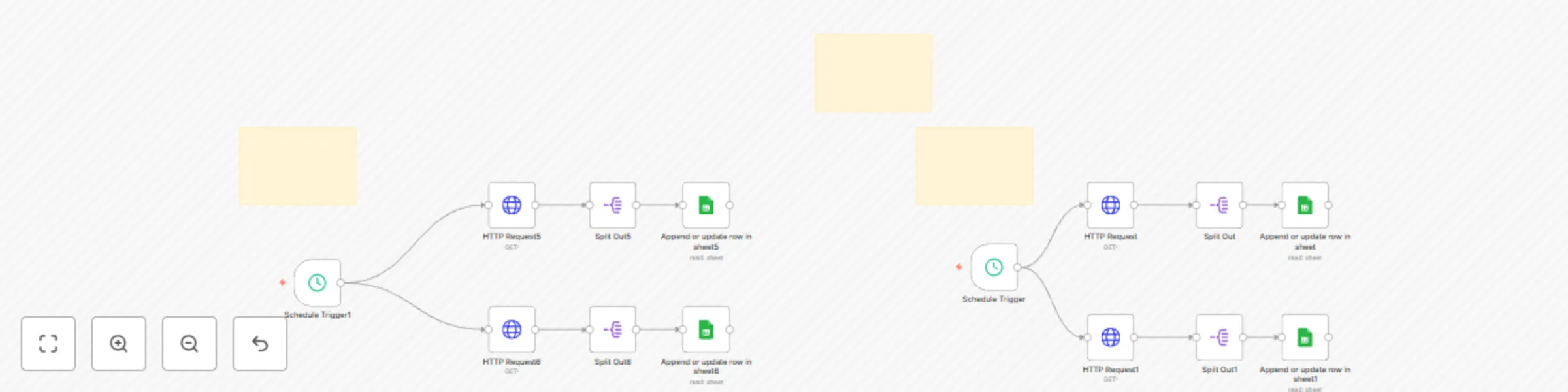
Original n8n.io sourceWorkflow 1: Domain and Email Health 🩺 This part of the workflow is triggered every 5 hours by the Schedule Trigger1 node. Its purpose is to pull health metrics for both email domains and individual email addresses.
How it Works: ++Schedule Trigger:++ The Schedule Trigger1 node initiates the workflow every 5 hours.
++API Requests:++ Two separate HTTP Request nodes, HTTP Request5 and HTTP Request6, make API calls to Smartlead.
++HTTP Request5 calls++ the endpoint for domain-wise health metrics.
++HTTP Request6 calls++ the endpoint for email-wise health metrics.
Both requests use the same api_key and a date range from 2025-07-04 to the current day.
++Data Splitting:++ The Split Out5 and Split Out6 nodes take the JSON response from the API calls and split the data into individual items. This is necessary so each row of data can be processed and added to Google Sheets separately.
++Google Sheets Integration:++ Finally, the Append or update row in sheet5 and Append or update row in sheet6 nodes update two different Google Sheets:
++Append or update row in sheet5 adds++ or updates rows in the DomainHealth sheet, matching on the domain column.
++Append or update row in sheet6 adds++ or updates rows in the EmailHealth sheet, matching on the from_email column.
Workflow 2: Global and Campaign-Specific Analytics 📊 This second part of the workflow is triggered every 2 hours by the Schedule Trigger node. Its goal is to get a day-by-day overview of email engagement and campaign-specific performance.
How it Works: Schedule Trigger: The Schedule Trigger node starts this workflow every 2 hours.
++API Requests:++ Two HTTP Request nodes, HTTP Request and HTTP Request1, call different Smartlead API endpoints.
++HTTP Request++ retrieves day-wise overall stats for email engagement.
++HTTP Request1 ++retrieves overall stats for each campaign.
++Data Splitting:++ The Split Out and Split Out1 nodes separate the JSON responses into individual data items for processing.
++Google Sheets Integration:++ The Append or update row in sheet and Append or update row in sheet1 nodes then write the data to Google Sheets.
++Append or update row in sheet++ updates the Sheet1 sheet with day-wise metrics, using the date as a matching column.
++Append or update row in sheet1++ updates the CampaignWise sheet with campaign performance metrics, using the campaign id to match rows.
This catalog entry is organized from the workflow JSON. The node-level section below shows the executable blocks available for review before importing the template.
| Workflow | Smartlead email campaign analytics dashboard with Google Sheets integration |
|---|---|
| Complexity | advanced |
| Nodes | 17 |
| Categories | Social Media, Multimodal AI |
| Author | Rahi Uppal |
| Published | 10 Aug 2025 |
Use the JSON export at /data/workflows/7210/7210.json as the source template for this automation.
Open n8n, import the downloaded JSON, and review each node before activating the workflow.
Replace placeholder credentials, API keys, webhook URLs, account IDs, and environment-specific values with your own settings.
Run the workflow manually or in a staging workspace, inspect node output, and confirm downstream systems receive the expected data.
Enable the workflow only after testing, then monitor executions, errors, and rate limits during the first production runs.
Review imported nodes carefully before activation. This catalog entry is intended to help you inspect the workflow structure, understand required services, and find related templates faster.
Node names, credentials, schedules, webhook paths, and external service limits may need adjustment for your workspace.
Workflow 1: Domain and Email Health This part of the workflow is triggered every 5 hours by the Schedule Trigger1 node. Its purpose is to pull health metrics for both email domains and individua...
Review the workflow JSON, configure any required credentials in n8n, and test the automation in a safe workspace before using it in production.
Yes. Use the block-by-block analysis and the downloadable JSON to inspect each node, then adjust credentials, prompts, schedules, filters, or destinations for your Social Media, Multimodal AI use case.