Smart travel package finder: Search flights & hotels with Skyscanner-Booking.com
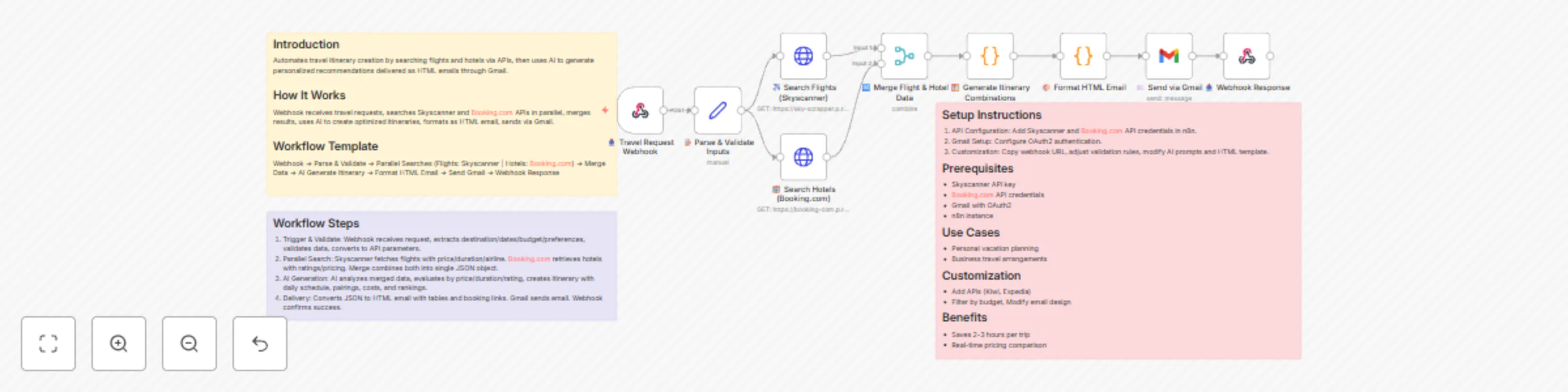
Workflow preview

$20/month : Unlimited workflows
2500 executions/month

THE #1 IN WEB SCRAPING
Scrape any website without limits
HOSTINGER  Early Deal
DISCOUNT 20% Try free
Early DealDISCOUNT 20%
Self-hosted n8n
Unlimited workflows - from $4.99/mo

#1 hub for scraping, AI & automation
6000+ actors - $5 credits/mo
Important notice
This workflow is provided as-is. Please review and test before using in production.
Overview
Introduction
Automates travel itinerary creation by searching flights and hotels via APIs, then uses AI to generate personalized recommendations delivered as HTML emails through Gmail.
How It Works
Webhook receives travel requests, searches Skyscanner and Booking.com APIs in parallel, merges results, uses AI to create optimized itineraries, formats as HTML email, sends via Gmail.
Workflow Template
Webhook → Parse & Validate → Parallel Searches (Flights: Skyscanner | Hotels: Booking.com) → Merge Data → AI Generate Itinerary → Format HTML Email → Send Gmail → Webhook Response
Workflow Steps
- Trigger & Validate: Webhook receives request, extracts destination/dates/budget/preferences, validates data, converts to API parameters.
- Parallel Search: Skyscanner fetches flights with price/duration/airline. Booking.com retrieves hotels with ratings/pricing. Merge combines both into single JSON object.
- AI Generation: AI analyzes merged data, evaluates by price/duration/rating, creates itinerary with daily schedule, pairings, costs, and rankings.
- Delivery: Converts JSON to HTML email with tables and booking links. Gmail sends email. Webhook confirms success.
Setup Instructions
- API Configuration: Add Skyscanner and Booking.com API credentials in n8n.
- Gmail Setup: Configure OAuth2 authentication.
- Customization: Copy webhook URL, adjust validation rules, modify AI prompts and HTML template.
Prerequisites
- Skyscanner API key
- Booking.com API credentials
- Gmail with OAuth2
- n8n instance
Use Cases
- Personal vacation planning
- Business travel arrangements
Customization
- Add APIs (Kiwi, Expedia)
- Filter by budget, Modify email design
Benefits
- Saves 2-3 hours per trip
- Real-time pricing comparison