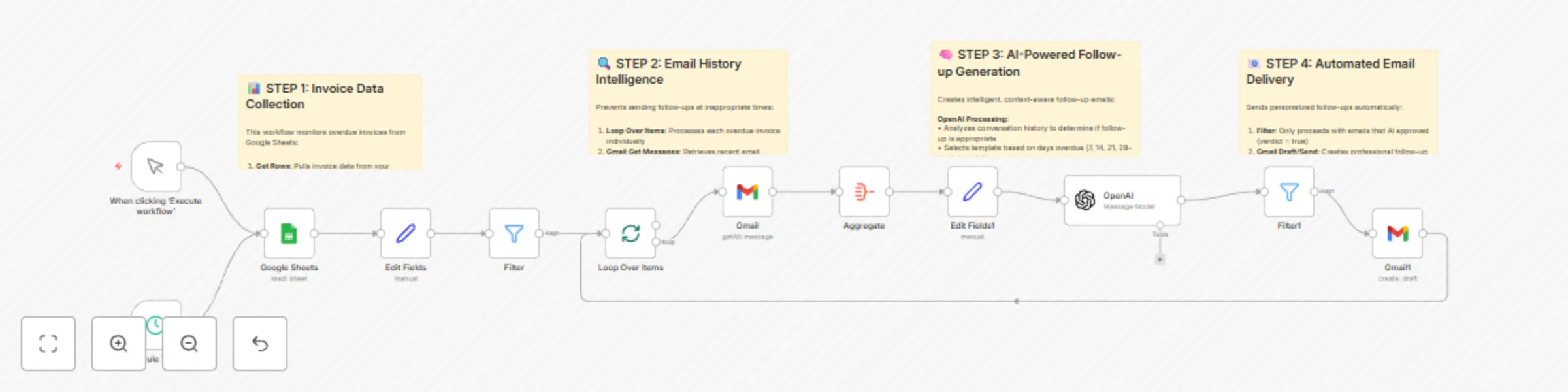
Smart invoice collection system with GPT-4.1, Gmail & Google Sheets

Workflow preview

Workflow preview
100%
Smart invoice collection system with GPT-4.1, Gmail & Google Sheets preview
Open on n8n.io

Important notice

This workflow is provided as-is. Please review and test before using in production.

1. Workflow Overview

Smart Invoice Collection System with OpenAI, Gmail & Google Sheets Categories: Financial Automation, AI Business Tools, Cash Flow Management This workflow creates an intelligent invoice collection ...

Best for

  • Invoice Processing automation workflows
  • Multimodal AI automation workflows
  • advanced n8n builders looking for reusable templates

Tools used

n8n-nodes-base.stickynote, n8n-nodes-base.manualtrigger, n8n-nodes-base.googlesheets, n8n-nodes-base.set, n8n-nodes-base.filter, n8n-nodes-base.splitinbatches, n8n-nodes-base.gmail, n8n-nodes-base.aggregate

Source and attribution

This workflow is cataloged by N8N Workflows and links back to its original n8n.io source page by Nick Saraev.

Original n8n.io source

1.1 Workflow description

Title
Smart invoice collection system with GPT-4.1, Gmail & Google Sheets
Workflow name
Smart invoice collection system with GPT-4.1, Gmail & Google Sheets

Smart Invoice Collection System with OpenAI, Gmail & Google Sheets

Categories: Financial Automation, AI Business Tools, Cash Flow Management

This workflow creates an intelligent invoice collection system that automatically follows up on overdue invoices using AI-powered personalization. The system monitors your invoice database, analyzes email history to prevent inappropriate follow-ups, and sends increasingly urgent but professional reminders at precise intervals. Built to solve one of the biggest cash flow killers for small businesses, this automation can easily generate an additional $10-15K per year in recovered payments.

Benefits

  • Automated Cash Flow Recovery - Generate $10-15K annually in previously forgotten invoice payments
  • Intelligent Timing - AI analyzes email history to prevent sending follow-ups at inappropriate times
  • Escalating Urgency - Four template levels from gentle reminders to firm collection notices
  • Professional Communication - Maintains business relationships while ensuring payment
  • Zero Manual Work - Complete automation from overdue detection to email delivery
  • High-Value Service - Easily sold to clients for $1,500-3,000 per implementation

How It Works

Invoice Monitoring System:

  • Connects to Google Sheets containing your invoice database with sent dates and client information
  • Automatically calculates days overdue using date difference calculations
  • Filters invoices to process only those at specific intervals (7, 14, 21, 28 days overdue)
  • Runs on schedule (daily recommended) to catch invoices as they become overdue

Email History Intelligence:

  • Retrieves recent email conversations with each client using Gmail integration
  • Analyzes communication patterns to identify recent discussions about invoices
  • Prevents sending follow-ups within 72 hours of relevant email conversations
  • Aggregates email threads with timestamps for comprehensive context analysis

AI-Powered Follow-up Generation:

  • Uses OpenAI to analyze conversation history and determine follow-up appropriateness
  • Selects appropriate template based on days overdue and escalation schedule
  • Generates personalized emails that reference specific client names and invoice details
  • Adapts tone from friendly reminders to more urgent payment requests over time

Professional Email Delivery:

  • Creates properly formatted emails with personalized subject lines and content
  • Maintains professional tone while applying appropriate urgency levels
  • Includes clear next steps and payment instructions for clients
  • Optionally creates drafts for review or sends automatically based on your preference

Smart Template Escalation:

  • 7 Days: Gentle reminder with helpful tone ("Hope you're well, just checking on that invoice")
  • 14 Days: Professional follow-up with assistance offer ("Here to help if anything's unclear")
  • 21 Days: More direct approach with specific timeline expectations
  • 28 Days: Firm but professional final notice before escalation

Required Google Sheets Setup

Create a Google Sheet with these exact column headers:

Invoice Tracking Sheet:

  • Client Name - Full name of client/company for personalization
  • Email - Client's email address for follow-up communications
  • Date Sent - Date invoice was originally sent (format: YYYY-MM-DD)
  • Invoice ID - Unique identifier for tracking and reference
  • Amount - Invoice amount (optional, for internal tracking)
  • Status - Payment status (Pending, Paid, Overdue - optional)

Setup Instructions:

  1. Create Google Sheet with exact column headers listed above
  2. Populate with your outstanding invoice data
  3. Connect Google Sheets OAuth credentials in n8n
  4. Update the Google Sheets document ID in the "Google Sheets" node
  5. Configure Gmail OAuth for email access and sending
  6. Set schedule trigger for daily execution (recommended 9 AM business hours)

Template Customization: The system includes 4 pre-written templates that you can customize:

  • Modify sender name and signature in the AI prompt
  • Adjust urgency levels and escalation timing
  • Customize company-specific language and policies
  • Add payment links or specific instructions

Business Use Cases

  • Service-Based Businesses - Agencies, consultants, and freelancers with NET30/60 payment terms
  • B2B Companies - Businesses with recurring invoice cycles and multiple clients
  • Accounting Firms - Offer automated collections as a premium service to clients
  • Small Business Owners - Eliminate manual follow-up work while improving cash flow
  • Automation Agencies - High-value service offering with clear ROI demonstration
  • Professional Services - Lawyers, architects, and consultants with project-based billing

Revenue Potential

This system transforms invoice collection economics:

  • $10-15K annual recovery for average small business with forgotten invoices
  • $1,500-3,000 implementation fee when sold as a service to clients
  • 40-60% reduction in accounts receivable aging
  • Zero ongoing labor costs - replaces hours of manual follow-up work
  • Improved client relationships - consistent, professional communication
  • Scalable business offering - one-time setup serves clients indefinitely

Difficulty Level: Intermediate
Estimated Build Time: 1-2 hours
Monthly Operating Cost: ~$15 (OpenAI + Google Workspace APIs)

Watch My Complete Build Process

Want to see exactly how I built this invoice collection system from scratch? I walk through the entire development process live, including the AI prompting strategies, email history analysis, and the exact business logic that generates thousands in recovered payments.

🎥 Watch My Live Build: "THIS Smart Invoice System Will Make You an Additional $750/Month"

This comprehensive tutorial shows the real development process - including advanced filtering logic, AI prompt engineering, and the proven templates that maintain professional relationships while ensuring payment.

Set Up Steps

Google Sheets Integration:

  • Create invoice tracking spreadsheet with required column structure
  • Set up Google Sheets OAuth credentials and permissions
  • Configure document ID and sheet name in the workflow
  • Test data retrieval with sample invoice entries

Gmail Configuration:

  • Set up Gmail OAuth for both reading and sending emails
  • Configure email search parameters for conversation history
  • Test email retrieval and draft creation functionality
  • Set appropriate sender name and signature

AI Follow-up Engine:

  • Configure OpenAI API credentials with appropriate rate limits
  • Customize the 4 escalation templates for your business tone
  • Test AI decision-making with sample conversation histories
  • Optimize prompts for your specific industry and client types

Schedule and Automation:

  • Set up daily schedule trigger (recommended 9 AM business hours)
  • Configure error handling for API failures and network issues
  • Test complete workflow with small batch of overdue invoices
  • Monitor initial runs and optimize timing/templates based on results

Quality Control:

  • Start with draft mode to review AI-generated emails before sending
  • Monitor client responses and adjust templates for better results
  • Track payment recovery rates to demonstrate system effectiveness
  • Scale to full automation once confident in output quality

Advanced Optimizations

Enhance the system with additional capabilities:

  • Multi-Currency Support - Handle international invoices with proper formatting
  • Payment Link Integration - Include Stripe/PayPal links for immediate payment
  • CRM Integration - Sync with Salesforce, HubSpot, or other business systems
  • Escalation Rules - Automatically transfer to collections after final notice
  • Performance Analytics - Track recovery rates and optimize messaging
  • Multi-Language Templates - Support international clients with localized messaging

Important Considerations

  • Email Frequency - Built-in 72-hour delays prevent overwhelming clients with follow-ups
  • Professional Tone - Templates maintain business relationships while ensuring payment
  • Legal Compliance - Follow local collection laws and regulations for your jurisdiction
  • Client Communication - System preserves conversation history for context and disputes
  • Privacy Protection - All email analysis happens securely within your n8n instance

Why This System Works

The key to successful automated invoice collection lies in intelligent timing and personalization:

  • Context awareness prevents follow-ups during ongoing payment discussions
  • Graduated escalation maintains professionalism while applying appropriate pressure
  • Personalized messaging makes automated emails feel human-written
  • Consistent execution ensures no invoices fall through the cracks
  • Relationship preservation maintains client trust while securing payments

Check Out My Channel

For more revenue-generating automation systems and proven business-building strategies, explore my YouTube channel where I share the exact systems used to scale automation agencies to $72K+ monthly revenue.

1.2 Logical Blocks

This catalog entry is organized from the workflow JSON. The node-level section below shows the executable blocks available for review before importing the template.

2. Block-by-Block Analysis

Block 1 - Unnamed node

Type / Role
n8n-nodes-base.stickyNote - stickyNote
Config choices
Version 1

Block 2 - Unnamed node

Type / Role
n8n-nodes-base.stickyNote - stickyNote
Config choices
Version 1

Block 3 - Unnamed node

Type / Role
n8n-nodes-base.stickyNote - stickyNote
Config choices
Version 1

Block 4 - Unnamed node

Type / Role
n8n-nodes-base.stickyNote - stickyNote
Config choices
Version 1

Block 5 - When clicking ‘Execute workflow’

Type / Role
n8n-nodes-base.manualTrigger - manualTrigger
Config choices
Version 1

Block 6 - Google Sheets

Type / Role
n8n-nodes-base.googleSheets - googleSheets
Config choices
Version 4.6

Block 7 - Edit Fields

Type / Role
n8n-nodes-base.set - set
Config choices
Version 3.4

Block 8 - Filter

Type / Role
n8n-nodes-base.filter - filter
Config choices
Version 2.2

Block 9 - Loop Over Items

Type / Role
n8n-nodes-base.splitInBatches - splitInBatches
Config choices
Version 3

Block 10 - Gmail

Type / Role
n8n-nodes-base.gmail - gmail
Config choices
Version 2.1

Block 11 - Aggregate

Type / Role
n8n-nodes-base.aggregate - aggregate
Config choices
Version 1

Block 12 - OpenAI

Type / Role
@n8n/n8n-nodes-langchain.openAi - openAi
Config choices
Version 1.8

Block 13 - Edit Fields1

Type / Role
n8n-nodes-base.set - set
Config choices
Version 3.4

Block 14 - Filter1

Type / Role
n8n-nodes-base.filter - filter
Config choices
Version 2.2

Block 15 - Gmail1

Type / Role
n8n-nodes-base.gmail - gmail
Config choices
Version 2.1

Block 16 - Schedule Trigger

Type / Role
n8n-nodes-base.scheduleTrigger - scheduleTrigger
Config choices
Version 1.2

3. Summary Table

Workflow Smart invoice collection system with GPT-4.1, Gmail & Google Sheets
Complexity advanced
Nodes 16
Categories Invoice Processing, Multimodal AI
Author Nick Saraev
Published 26 Jun 2025

4. Reproducing the Workflow from Scratch

  1. 1. Download the workflow JSON

    Use the JSON export at /data/workflows/5391/5391.json as the source template for this automation.

  2. 2. Import the template into n8n

    Open n8n, import the downloaded JSON, and review each node before activating the workflow.

  3. 3. Configure credentials and variables

    Replace placeholder credentials, API keys, webhook URLs, account IDs, and environment-specific values with your own settings.

  4. 4. Test with sample data

    Run the workflow manually or in a staging workspace, inspect node output, and confirm downstream systems receive the expected data.

  5. 5. Activate and monitor

    Enable the workflow only after testing, then monitor executions, errors, and rate limits during the first production runs.

5. General Notes & Resources

Review imported nodes carefully before activation. This catalog entry is intended to help you inspect the workflow structure, understand required services, and find related templates faster.

Node names, credentials, schedules, webhook paths, and external service limits may need adjustment for your workspace.

Frequently asked questions

What does Smart invoice collection system with GPT-4.1, Gmail & Google Sheets do?

Smart Invoice Collection System with OpenAI, Gmail & Google Sheets Categories: Financial Automation, AI Business Tools, Cash Flow Management This workflow creates an intelligent invoice collection ...

What do I need before importing this workflow?

Review the workflow JSON, configure any required credentials in n8n, and test the automation in a safe workspace before using it in production.

Can I customize this workflow?

Yes. Use the block-by-block analysis and the downloadable JSON to inspect each node, then adjust credentials, prompts, schedules, filters, or destinations for your Invoice Processing, Multimodal AI use case.