SERP competitor research with Scrape.do API & Google Sheets

Workflow preview

Workflow preview
100%
SERP competitor research with Scrape.do API & Google Sheets preview
Open on n8n.io

Important notice

This workflow is provided as-is. Please review and test before using in production.

1. Workflow Overview

Extract Competitor SERP Rankings from Google Search to Sheets with Scrape.do This template requires a self hosted n8n instance to run. A complete n8n automation that extrac...

Best for

  • Market Research automation workflows
  • intermediate n8n builders looking for reusable templates

Tools used

n8n-nodes-base.manualtrigger, n8n-nodes-base.googlesheets, n8n-nodes-base.code, n8n-nodes-base.httprequest, n8n-nodes-base.stickynote

Source and attribution

This workflow is cataloged by N8N Workflows and links back to its original n8n.io source page by Onur.

Original n8n.io source

1.1 Workflow description

Title
SERP competitor research with Scrape.do API & Google Sheets
Workflow name
SERP competitor research with Scrape.do API & Google Sheets

🔍 Extract Competitor SERP Rankings from Google Search to Sheets with Scrape.do

This template requires a self-hosted n8n instance to run.

A complete n8n automation that extracts competitor data from Google search results for specific keywords and target countries using Scrape.do SERP API, and saves structured results into Google Sheets for SEO, competitive analysis, and market research.


📋 Overview

This workflow provides a lightweight competitor analysis solution that identifies ranking websites for chosen keywords across different countries. Ideal for SEO specialists, content strategists, and digital marketers who need structured SERP insights without manual effort.

Who is this for?

  • SEO professionals tracking keyword competitors
  • Digital marketers conducting market analysis
  • Content strategists planning based on SERP insights
  • Business analysts researching competitor positioning
  • Agencies automating SEO reporting

What problem does this workflow solve?

  • Eliminates manual SERP scraping
  • Processes multiple keywords across countries
  • Extracts structured data (position, title, URL, description)
  • Automates saving results into Google Sheets
  • Ensures repeatable & consistent methodology

⚙️ What this workflow does

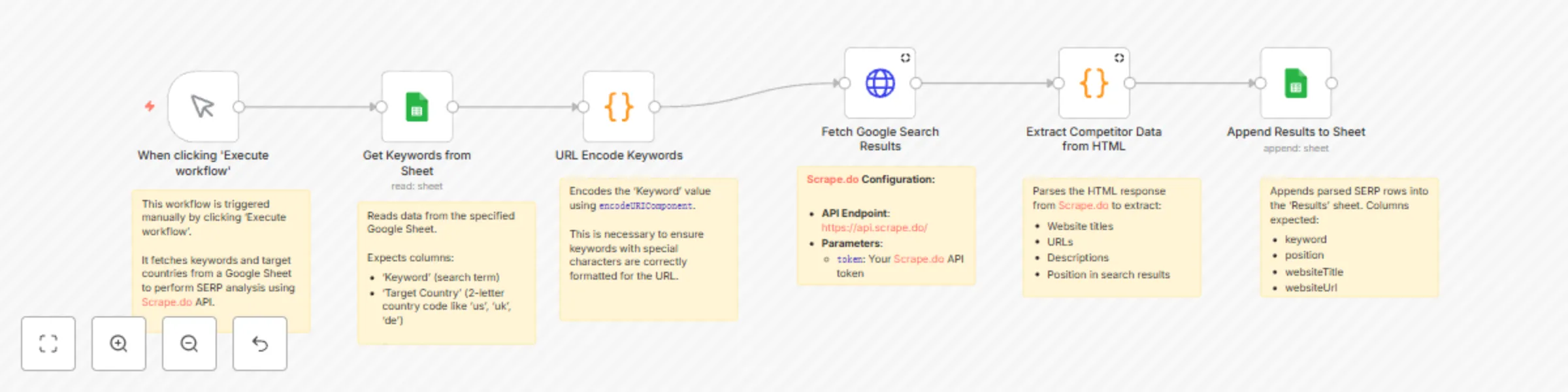
  1. Manual Trigger → Starts the workflow manually
  2. Get Keywords from Sheet → Reads keywords + target countries from a Google Sheet
  3. URL Encode Keywords → Converts keywords into URL-safe format
  4. Process Keywords in Batches → Handles multiple keywords sequentially to avoid rate limits
  5. Fetch Google Search Results → Calls Scrape.do SERP API to retrieve raw HTML of Google SERPs
  6. Extract Competitor Data from HTML → Parses HTML into structured competitor data (top 10 results)
  7. Append Results to Sheet → Writes structured SERP results into a Google Sheet

📊 Output Data Points

Field Description Example
Keyword Original search term digital marketing services
Target Country 2-letter ISO code of target region US
position Ranking position in search results 1
websiteTitle Page title from SERP result Digital Marketing Software & Tools
websiteUrl Extracted website URL https://www.hubspot.com/marketing
websiteDescription Snippet/description from search results Grow your business with HubSpot’s tools…

⚙️ Setup

Prerequisites

  • n8n instance (self-hosted)
  • Google account with Sheets access
  • Scrape.do account with SERP API token

Google Sheet Structure

This workflow uses one Google Sheet with two tabs:

Input Tab: "Keywords"

Column Type Description Example
Keyword Text Search query digital marketing
Target Country Text 2-letter ISO code US

Output Tab: "Results"

Column Type Description Example
Keyword Text Original search term digital marketing
position Number SERP ranking 1
websiteTitle Text Title of the page Digital Marketing Software & Tools
websiteUrl URL Website/page URL https://www.hubspot.com/marketing
websiteDescription Text Snippet text Grow your business with HubSpot’s tools

🛠 Step-by-Step Setup

  1. Import Workflow: Copy the JSON → n8n → Workflows → + Add → Import from JSON
  2. Configure Scrape.do API:
    • Endpoint: https://api.scrape.do/
    • Parameter: token=YOUR_SCRAPEDO_TOKEN
    • Add render=true for full HTML rendering
  3. Configure Google Sheets:
    • Create a sheet with two tabs: Keywords (input), Results (output)
    • Set up Google Sheets OAuth2 credentials in n8n
    • Replace placeholders: YOUR_GOOGLE_SHEET_ID and YOUR_GOOGLE_SHEETS_CREDENTIAL_ID
  4. Run & Test:
    • Add test data in Keywords tab
    • Execute workflow → Check results in Results tab

🧰 How to Customize

  • Add more fields: Extend HTML parsing logic in the “Extract Competitor Data” node to capture extra data (e.g., domain, sitelinks).
  • Filtering: Exclude domains or results with custom rules.
  • Batch Size: Adjust “Process Keywords in Batches” for speed vs. rate-limits.
  • Rate Limiting: Insert a Wait node (e.g., 10–30 seconds) if API rate limits apply.
  • Multi-Sheet Output: Save per-country or per-keyword results into separate tabs.

📊 Use Cases

  • SEO Competitor Analysis: Identify top-ranking sites for target keywords
  • Market Research: See how SERPs differ by region
  • Content Strategy: Analyze titles & descriptions of competitor pages
  • Agency Reporting: Automate competitor SERP snapshots for clients

📈 Performance & Limits

  • Single Keyword: ~10–20 seconds (depends on Scrape.do response)
  • Batch of 10: 3–5 minutes typical
  • Large Sets (50+): 20–40 minutes depending on API credits & batching
  • API Calls: 1 Scrape.do request per keyword
  • Reliability: 95%+ extraction success, 98%+ data accuracy

🧩 Troubleshooting

  • API error → Check YOUR_SCRAPEDO_TOKEN and API credits
  • No keywords loaded → Verify Google Sheet ID & tab name = Keywords
  • Permission denied → Re-authenticate Google Sheets OAuth2 in n8n
  • Empty results → Check parsing logic and verify search term validity
  • Workflow stops early → Ensure batching loop (SplitInBatches) is properly connected

🤝 Support & Community


🎯 Final Notes

This workflow provides a repeatable foundation for extracting competitor SERP rankings with Scrape.do and saving them to Google Sheets.
You can extend it with filtering, richer parsing, or integration with reporting dashboards to create a fully automated SEO intelligence pipeline.

1.2 Logical Blocks

This catalog entry is organized from the workflow JSON. The node-level section below shows the executable blocks available for review before importing the template.

2. Block-by-Block Analysis

Block 1 - When clicking 'Execute workflow'

Type / Role
n8n-nodes-base.manualTrigger - manualTrigger
Config choices
Version 1

Block 2 - Get Keywords from Sheet

Type / Role
n8n-nodes-base.googleSheets - googleSheets
Config choices
Version 4.6

Block 3 - URL Encode Keywords

Type / Role
n8n-nodes-base.code - code
Config choices
Version 2

Block 4 - Fetch Google Search Results

Type / Role
n8n-nodes-base.httpRequest - httpRequest
Config choices
Version 4.2

Block 5 - Extract Competitor Data from HTML

Type / Role
n8n-nodes-base.code - code
Config choices
Version 2

Block 6 - Append Results to Sheet

Type / Role
n8n-nodes-base.googleSheets - googleSheets
Config choices
Version 4.6

Block 7 - Workflow Start

Type / Role
n8n-nodes-base.stickyNote - stickyNote
Config choices
Version 1

Block 8 - Read Keywords

Type / Role
n8n-nodes-base.stickyNote - stickyNote
Config choices
Version 1

Block 9 - Encode Keywords

Type / Role
n8n-nodes-base.stickyNote - stickyNote
Config choices
Version 1

Block 10 - Fetch SERP Data with Scrape.do

Type / Role
n8n-nodes-base.stickyNote - stickyNote
Config choices
Version 1

Block 11 - Extract Competitor Data

Type / Role
n8n-nodes-base.stickyNote - stickyNote
Config choices
Version 1

Block 12 - Append to Results sheet

Type / Role
n8n-nodes-base.stickyNote - stickyNote
Config choices
Version 1

3. Summary Table

Workflow SERP competitor research with Scrape.do API & Google Sheets
Complexity intermediate
Nodes 12
Categories Market Research
Author Onur
Published 25 Sept 2025

4. Reproducing the Workflow from Scratch

  1. 1. Download the workflow JSON

    Use the JSON export at /data/workflows/8917/8917.json as the source template for this automation.

  2. 2. Import the template into n8n

    Open n8n, import the downloaded JSON, and review each node before activating the workflow.

  3. 3. Configure credentials and variables

    Replace placeholder credentials, API keys, webhook URLs, account IDs, and environment-specific values with your own settings.

  4. 4. Test with sample data

    Run the workflow manually or in a staging workspace, inspect node output, and confirm downstream systems receive the expected data.

  5. 5. Activate and monitor

    Enable the workflow only after testing, then monitor executions, errors, and rate limits during the first production runs.

5. General Notes & Resources

Review imported nodes carefully before activation. This catalog entry is intended to help you inspect the workflow structure, understand required services, and find related templates faster.

Node names, credentials, schedules, webhook paths, and external service limits may need adjustment for your workspace.

Frequently asked questions

What does SERP competitor research with Scrape.do API & Google Sheets do?

Extract Competitor SERP Rankings from Google Search to Sheets with Scrape.do This template requires a self hosted n8n instance to run. A complete n8n automation that extrac...

What do I need before importing this workflow?

Review the workflow JSON, configure any required credentials in n8n, and test the automation in a safe workspace before using it in production.

Can I customize this workflow?

Yes. Use the block-by-block analysis and the downloadable JSON to inspect each node, then adjust credentials, prompts, schedules, filters, or destinations for your Market Research use case.