Send weekly GA4 WoW email reports with Gemini AI executive summary

Workflow preview

Workflow preview
100%
Send weekly GA4 WoW email reports with Gemini AI executive summary preview
Open on n8n.io

1. Workflow Overview

Weekly Google Analytics 4 Report Full WoW Tracking & Auto Generated with Gemini AI Stop manually building weekly analytics reports. This workflow automatically fetches your GA4 data every Monday mo...

Best for

  • Market Research automation workflows
  • AI Summarization automation workflows
  • advanced n8n builders looking for reusable templates

Tools used

n8n-nodes-base.googleanalytics, n8n-nodes-base.scheduletrigger, n8n-nodes-base.merge, @n8n/n8n-nodes-langchain.googlegemini, n8n-nodes-base.code, n8n-nodes-base.emailsend, n8n-nodes-base.stickynote

Source and attribution

This workflow is cataloged by N8N Workflows and links back to its original n8n.io source page by AppStoneLab Technologies LLP.

Original n8n.io source

1.1 Workflow description

Title
Send weekly GA4 WoW email reports with Gemini AI executive summary
Workflow name
Send weekly GA4 WoW email reports with Gemini AI executive summary

Weekly Google Analytics 4 Report - Full WoW Tracking & Auto-Generated with Gemini AI

Stop manually building weekly analytics reports. This workflow automatically fetches your GA4 data every Monday morning, generates an AI-written executive summary using Gemini, builds a premium formatted HTML email with deep Week-over-Week (WoW) comparisons for every metric, and delivers it straight to your stakeholders' inboxes — fully hands-free.

👤 Who is this for?

  • Marketing teams and agency owners who report GA4 metrics weekly to clients
  • Product managers and founders who want a Monday morning performance digest
  • Freelancers managing analytics for multiple clients who want to automate reporting
  • Anyone who spends 30–60 minutes every week manually pulling GA4 numbers and calculating WoW changes

🚩 What problem does this solve?

Manual GA4 reporting is repetitive, error-prone, and time-consuming. This template eliminates that entirely — every Monday at 8:00 AM in your configured timezone, a fully formatted report lands in your inbox. With the new dual-node architecture, it automatically calculates accurate WoW trends for your overall metrics, specific pages, traffic sources, and more, all contextualized by a Gemini-generated executive summary.

⚙️ What this workflow does

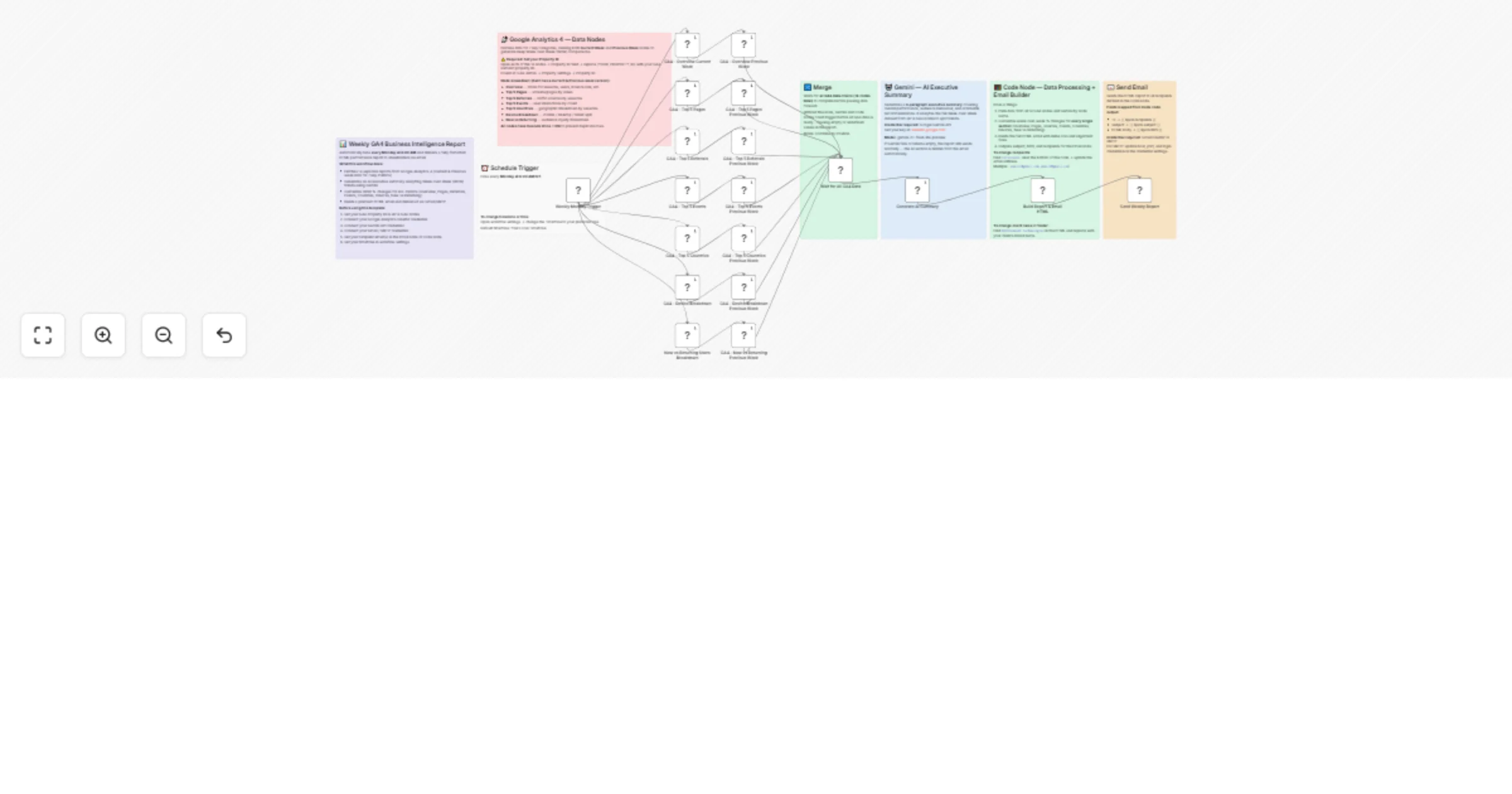
  1. ⏰ Triggers every Monday at 8:00 AM via the Schedule Trigger node
  2. 📡 Fetches 14 GA4 reports in parallel - pulling both Current Week and Previous Week data simultaneously for speed:
  • Overview metrics
  • Top 5 Screens / Pages by views
  • Top 5 Traffic Sources / Referrals
  • Top 5 Events by count
  • Top 5 Countries by sessions
  • Device breakdown (mobile / desktop / tablet)
  • New vs Returning users
  1. 🔀 Merges all 14 responses and passes the complete historical dataset forward
  2. 🤖 Gemini writes a 3-5 bullet point summary analyzing the full WoW dataset to highlight performance trends, audience behaviour, and actionable recommendations
  3. 🧮 Code node processes all data - aligns current vs. previous week data, calculates WoW % changes for every single category, handles new/dropped entries, and builds the full inline-CSS HTML email
  4. 📧 Sends the report via standard SMTP / Email node to your configured recipients

📧 What the email report includes

  • Header - dark luxury card with 4 KPI tiles (Users, Sessions, Bounce Rate, Avg Duration) and WoW arrows
  • AI Executive Summary - 3-5 bullet point Gemini-generated insight (hidden automatically if Gemini fails)
  • Overview Table - all 5 core metrics with This Week / Last Week / WoW % change pill badges
  • Audience - New vs Returning users with visual progress bars and WoW changes
  • Top Screens - ranked by views, including previous week values and WoW trend pills. (not set) and (empty) rows are preserved for transparency
  • Traffic Sources - top referral channels with WoW changes; direct traffic auto-labelled as Direct / App Open
  • Top Events - tracks interaction trends with WoW changes; system events (first_open, os_update, etc.) are filtered out automatically
  • Geography - top 5 countries by sessions with WoW comparisons
  • Devices - mobile / desktop / tablet with visual progress bars and WoW trend pills

🛠️ Setup Instructions

Step 1 - Google Analytics 4 Credential

  1. Go to n8n Credentials → Add new → search Google Analytics OAuth2
  2. Sign in with the Google account that has access to your GA4 property
  3. Assign this credential to all 14 GA4 nodes

Step 2 - Set your GA4 Property ID

  1. Open each of the 14 GA4 nodes
  2. In the Property ID field, replace {YOUR_PROPERTY_ID} with your GA4 numeric property ID
  3. Find your Property ID at: GA4 Admin → Property Settings → Property ID (looks like 123456789)

Step 3 - Gemini API Credential

  1. Get your free API key at aistudio.google.com
  2. Go to n8n Credentials → Add new → search Google Gemini
  3. Paste your API key and assign it to the Generate AI Summary node

Step 4 - Email / SMTP Credential

  1. Go to n8n Credentials → Add new → search SMTP (or swap the node for Gmail OAuth2 if preferred)
  2. Enter your email host, port, and login credentials
  3. Assign to the Send Weekly Report node

Step 5 - Set Recipients

  1. Open the Send Weekly Report node (or the Code node depending on your mapping preference)
  2. Update the To Email field with your recipient address(es): '[email protected], [email protected]'
  3. Alternatively, update the recipients: line at the bottom of the Build Report & Email HTML Code node.

Step 6 - Set Timezone

  1. Open the Weekly Monday Trigger node
  2. Update the workflow settings to match your local timezone so the 8:00 AM trigger fires correctly.

🔧 How to Customise

  • Change the schedule → Open the trigger node, adjust the day and time to any cadence you need (daily, bi-weekly, monthly)
  • Change the client brand in the footer → Search for AppStoneLab Technologies in the Code node and replace it with your client or company name
  • Filter or change events → In the Code node, find the EXCLUDE_EVENTS array and add/remove event names to control which events appear in the report
  • Change the AI summary language or tone → Edit the prompt inside the Generate AI Summary Gemini node to match your client's preferred reporting style

📦 Requirements

Service Purpose Free Tier Available
Google Analytics 4 Source of all report data ✅ Yes
Google Gemini API AI executive summary generation ✅ Yes (via AI Studio)
SMTP / Email Email delivery ✅ Yes

⚠️ Notes

  • Mobile app properties - If your GA4 property tracks a mobile app, the workflow uses unifiedScreenName instead of pagePath, which works correctly for both web and app properties
  • WoW calculations - Bounce rate change is intentionally inverted (a decrease is shown as positive/green). If a metric like a specific page or country is new this week, the workflow dynamically tags it as "New" instead of breaking the calculation.
  • Gemini failure handling - If the Gemini node fails for any reason, the AI summary section is automatically hidden and the rest of the report sends normally
  • Execute Once - All 14 GA4 nodes have Execute Once enabled to prevent duplicate rows from the merge operation

1.2 Logical Blocks

This catalog entry is organized from the workflow JSON. The node-level section below shows the executable blocks available for review before importing the template.

2. Block-by-Block Analysis

Block 1 - GA4 - Overview Current Week

Type / Role
n8n-nodes-base.googleAnalytics - googleAnalytics
Config choices
Version 2

Block 2 - GA4 - Overview Previous Week

Type / Role
n8n-nodes-base.googleAnalytics - googleAnalytics
Config choices
Version 2

Block 3 - GA4 - Top 5 Pages

Type / Role
n8n-nodes-base.googleAnalytics - googleAnalytics
Config choices
Version 2

Block 4 - GA4 - Top 5 Referrals

Type / Role
n8n-nodes-base.googleAnalytics - googleAnalytics
Config choices
Version 2

Block 5 - GA4 - Top 5 Events

Type / Role
n8n-nodes-base.googleAnalytics - googleAnalytics
Config choices
Version 2

Block 6 - GA4 - Top 5 Countries

Type / Role
n8n-nodes-base.googleAnalytics - googleAnalytics
Config choices
Version 2

Block 7 - GA4 - Device Breakdown

Type / Role
n8n-nodes-base.googleAnalytics - googleAnalytics
Config choices
Version 2

Block 8 - New vs Returning Users Breakdown

Type / Role
n8n-nodes-base.googleAnalytics - googleAnalytics
Config choices
Version 2

Block 9 - Weekly Monday Trigger

Type / Role
n8n-nodes-base.scheduleTrigger - scheduleTrigger
Config choices
Version 1.3

Block 10 - Wait for All GA4 Data

Type / Role
n8n-nodes-base.merge - merge
Config choices
Version 3.2

Block 11 - Generate AI Summary

Type / Role
@n8n/n8n-nodes-langchain.googleGemini - googleGemini
Config choices
Version 1.1

Block 12 - Build Report & Email HTML

Type / Role
n8n-nodes-base.code - code
Config choices
Version 2

Block 13 - Send Weekly Report

Type / Role
n8n-nodes-base.emailSend - emailSend
Config choices
Version 2.1

Block 14 - GA4 - Top 5 Pages Previous Week

Type / Role
n8n-nodes-base.googleAnalytics - googleAnalytics
Config choices
Version 2

Block 15 - GA4 - Top 5 Referrals Previous Week

Type / Role
n8n-nodes-base.googleAnalytics - googleAnalytics
Config choices
Version 2

Block 16 - GA4 - Top 5 Events Previous Week

Type / Role
n8n-nodes-base.googleAnalytics - googleAnalytics
Config choices
Version 2

Block 17 - GA4 - Top 5 Countries Previous Week

Type / Role
n8n-nodes-base.googleAnalytics - googleAnalytics
Config choices
Version 2

Block 18 - GA4 - Device Breakdown Previous Week

Type / Role
n8n-nodes-base.googleAnalytics - googleAnalytics
Config choices
Version 2

Block 19 - GA4 - New vs Returning Previous Week

Type / Role
n8n-nodes-base.googleAnalytics - googleAnalytics
Config choices
Version 2

Block 20 - Sticky Note

Type / Role
n8n-nodes-base.stickyNote - stickyNote
Config choices
Version 1

Block 21 - Sticky Note2

Type / Role
n8n-nodes-base.stickyNote - stickyNote
Config choices
Version 1

Block 22 - Sticky Note1

Type / Role
n8n-nodes-base.stickyNote - stickyNote
Config choices
Version 1

Block 23 - Sticky Note3

Type / Role
n8n-nodes-base.stickyNote - stickyNote
Config choices
Version 1

Block 24 - Sticky Note4

Type / Role
n8n-nodes-base.stickyNote - stickyNote
Config choices
Version 1

Showing the first 24 of 26 workflow blocks. Download the JSON for the full node graph.

3. Summary Table

Workflow Send weekly GA4 WoW email reports with Gemini AI executive summary
Complexity advanced
Nodes 26
Categories Market Research, AI Summarization
Author AppStoneLab Technologies LLP
Published 11 Mar 2026

4. Reproducing the Workflow from Scratch

  1. 1. Download the workflow JSON

    Use the JSON export at /data/workflows/13993/13993.json as the source template for this automation.

  2. 2. Import the template into n8n

    Open n8n, import the downloaded JSON, and review each node before activating the workflow.

  3. 3. Configure credentials and variables

    Replace placeholder credentials, API keys, webhook URLs, account IDs, and environment-specific values with your own settings.

  4. 4. Test with sample data

    Run the workflow manually or in a staging workspace, inspect node output, and confirm downstream systems receive the expected data.

  5. 5. Activate and monitor

    Enable the workflow only after testing, then monitor executions, errors, and rate limits during the first production runs.

5. General Notes & Resources

Review imported nodes carefully before activation. This catalog entry is intended to help you inspect the workflow structure, understand required services, and find related templates faster.

Node names, credentials, schedules, webhook paths, and external service limits may need adjustment for your workspace.

Frequently asked questions

What does Send weekly GA4 WoW email reports with Gemini AI executive summary do?

Weekly Google Analytics 4 Report Full WoW Tracking & Auto Generated with Gemini AI Stop manually building weekly analytics reports. This workflow automatically fetches your GA4 data every Monday mo...

What do I need before importing this workflow?

Review the workflow JSON, configure any required credentials in n8n, and test the automation in a safe workspace before using it in production.

Can I customize this workflow?

Yes. Use the block-by-block analysis and the downloadable JSON to inspect each node, then adjust credentials, prompts, schedules, filters, or destinations for your Market Research, AI Summarization use case.