Send subscription renewal reminders via Telegram with Supabase

Workflow preview

Workflow preview
100%
Send subscription renewal reminders via Telegram with Supabase preview
Open on n8n.io

1. Workflow Overview

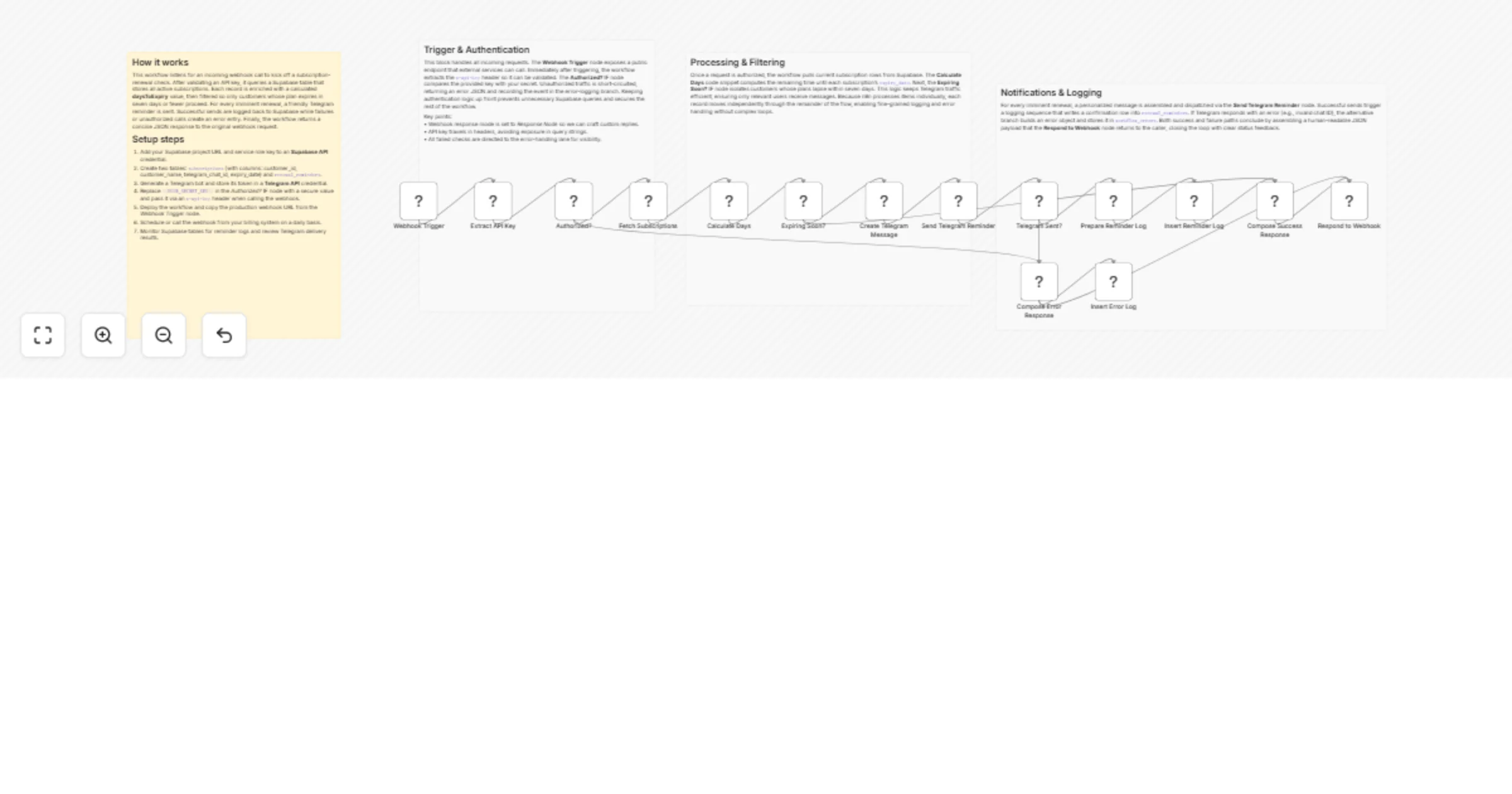
Subscription Renewal Reminder – Telegram & Supabase This workflow tracks upcoming subscription expiry dates stored in Supabase and automatically sends personalized renewal reminder messages to each...

Best for

  • Invoice Processing automation workflows
  • advanced n8n builders looking for reusable templates

Tools used

n8n-nodes-base.webhook, n8n-nodes-base.set, n8n-nodes-base.if, n8n-nodes-base.supabase, n8n-nodes-base.code, n8n-nodes-base.telegram, n8n-nodes-base.respondtowebhook, n8n-nodes-base.stickynote

Source and attribution

This workflow is cataloged by N8N Workflows and links back to its original n8n.io source page by vinci-king-01.

Original n8n.io source

1.1 Workflow description

Title
Send subscription renewal reminders via Telegram with Supabase
Workflow name
Send subscription renewal reminders via Telegram with Supabase

Subscription Renewal Reminder – Telegram & Supabase

This workflow tracks upcoming subscription expiry dates stored in Supabase and automatically sends personalized renewal-reminder messages to each customer via Telegram. It is designed to be triggered by an HTTP Webhook (manually or on a schedule) and ensures that customers are notified a configurable number of days before their subscription lapses.

> Community Template Disclaimer > This is a community-contributed n8n workflow template. It is provided “as-is” without official support from n8n GmbH. Always test thoroughly before using in production.

Pre-conditions/Requirements

Prerequisites

  • n8n instance (self-hosted or n8n.cloud)
  • Supabase project with a subscriptions table (id, customer_name, expiration_date, telegram_chat_id, notified)
  • A Telegram Bot created via @BotFather
  • Outbound HTTPS access from n8n to api.telegram.org and your Supabase project REST endpoint

Required Credentials

  • Supabase Service Role Key – Full access for reading/writing the subscriptions table
  • Telegram Bot Token – To send messages from your bot
  • n8n Webhook URL – Auto-generated when you activate the workflow

(ScrapeGraphAI API Key is not required for this non-scraping workflow.)

Specific Setup Requirements

Environment Variable Example Value Purpose
SUPABASE_URL https://xyzcompany.supabase.co Base URL for Supabase REST API
SUPABASE_KEY eyJhbGciOiJI... Service Role Key
TELEGRAM_TOKEN 609012345:AA... Bot token obtained from BotFather
REMINDER_DAYS 3 Days before expiry to notify

How it works

This workflow tracks upcoming subscription expiry dates stored in Supabase and automatically sends personalized renewal-reminder messages to each customer via Telegram. It is triggered by an HTTP Webhook (manually or via external scheduler) and ensures that customers are notified a configurable number of days before their subscription lapses.

Key Steps:

  • Receive Trigger (Webhook): External call fires the workflow or an internal Cron node can be added.
  • Set Static Parameters: The Set node calculates “today + REMINDER_DAYS”.
  • Query Supabase: Fetch all subscriptions expiring on or before the calculated date and not yet notified.
  • Branch Logic (If node): Check if any subscriptions were returned.
  • Loop & Dispatch (Code + Telegram nodes): Iterate over each customer row, compose a message, and send via Telegram.
  • Flag as Notified (Supabase Update): Update each processed row to prevent duplicate reminders.
  • Respond to Webhook: Return a concise JSON summary for logging or downstream integrations.

Set up steps

Setup Time: 15–20 minutes

  1. Create Telegram Bot a. Open Telegram and talk to @BotFather/newbot b. Copy the given bot token; paste it into n8n Telegram credentials.

  2. Prepare Supabase a. Create a table named subscriptions with columns: id (uuid), customer_name (text), expiration_date (date), telegram_chat_id (text), notified (bool, default false) b. Obtain the Service Role Key from Project Settings → API.

  3. Import the Workflow a. In n8n, click Templates → Import and select “Subscription Renewal Reminder – Telegram & Supabase”. b. Replace placeholder credentials in the Supabase and Telegram nodes.

  4. Define Environment Variables (Optional but recommended) Add SUPABASE_URL, SUPABASE_KEY, TELEGRAM_TOKEN, and REMINDER_DAYS in Settings → Environment Variables for easy maintenance.

  5. Activate the Workflow Copy the production webhook URL and (optionally) set up a cron job or n8n Cron node to hit it daily.

Node Descriptions

Core Workflow Nodes:

  • Webhook – Entry point; triggers the workflow via HTTP request.
  • Set (Calculate Target Date) – Defines targetDate = today + REMINDER_DAYS.
  • Supabase (Select) – Retrieves expiring subscriptions that haven’t been notified.
  • If (Rows > 0?) – Determines whether to continue or exit early.
  • Code (For-Each Loop) – Iterates through each returned row to send messages and update status.
  • Telegram – Sends a personalized renewal reminder to the customer’s chat.
  • Supabase (Update) – Flags the subscription row as notified = true.
  • Respond to Webhook – Returns a JSON summary with counts of sent messages.
  • Sticky Notes – Inline documentation for maintainers (non-executable).

Data Flow:

  1. WebhookSetSupabase (Select)IfCodeTelegramSupabase (Update)Respond to Webhook

Customization Examples

Send Slack Notifications Instead of Telegram

// Replace Telegram node with Slack node
const message = `Hi ${item.customer_name}, your subscription expires on ${item.expiration_date}.`;
return [{ text: message, channel: item.slack_channel_id }];

Notify 7 Days & 1 Day Before Expiry

// In Set node
items[0].json.reminderOffsets = [7, 1]; // days
return items;

Data Output Format

The workflow outputs structured JSON data:

{
 "totalSubscriptionsChecked": 42,
 "remindersSent": 13,
 "timestamp": "2024-05-27T09:15:22.000Z"
}

Troubleshooting

Common Issues

  1. No messages sent – Check the If node; ensure REMINDER_DAYS is set correctly and the Supabase query returns rows.
  2. Telegram error 403 – The user hasn’t started a chat with your bot. Ask the customer to click “Start” in Telegram.

Performance Tips

  • Batch database updates instead of row-by-row when dealing with thousands of records.
  • Cache Supabase responses if you expect multiple workflows to query the same data within seconds.

Pro Tips:

  • Use the Cron node inside n8n instead of external schedulers for a fully self-contained setup.
  • Add an Email node after the Telegram node for multi-channel reminders.
  • Store template messages in Supabase so non-developers can update wording without editing the workflow.

1.2 Logical Blocks

This catalog entry is organized from the workflow JSON. The node-level section below shows the executable blocks available for review before importing the template.

2. Block-by-Block Analysis

Block 1 - Webhook Trigger

Type / Role
n8n-nodes-base.webhook - webhook
Config choices
Version 1.1

Block 2 - Extract API Key

Type / Role
n8n-nodes-base.set - set
Config choices
Version 3.4

Block 3 - Authorized?

Type / Role
n8n-nodes-base.if - if
Config choices
Version 2

Block 4 - Fetch Subscriptions

Type / Role
n8n-nodes-base.supabase - supabase
Config choices
Version 1

Block 5 - Calculate Days

Type / Role
n8n-nodes-base.code - code
Config choices
Version 2

Block 6 - Expiring Soon?

Type / Role
n8n-nodes-base.if - if
Config choices
Version 2

Block 7 - Create Telegram Message

Type / Role
n8n-nodes-base.set - set
Config choices
Version 3.4

Block 8 - Send Telegram Reminder

Type / Role
n8n-nodes-base.telegram - telegram
Config choices
Version 1.2

Block 9 - Telegram Sent?

Type / Role
n8n-nodes-base.if - if
Config choices
Version 2

Block 10 - Prepare Reminder Log

Type / Role
n8n-nodes-base.set - set
Config choices
Version 3.4

Block 11 - Insert Reminder Log

Type / Role
n8n-nodes-base.supabase - supabase
Config choices
Version 1

Block 12 - Compose Success Response

Type / Role
n8n-nodes-base.set - set
Config choices
Version 3.4

Block 13 - Respond to Webhook

Type / Role
n8n-nodes-base.respondToWebhook - respondToWebhook
Config choices
Version 1

Block 14 - Compose Error Response

Type / Role
n8n-nodes-base.set - set
Config choices
Version 3.4

Block 15 - Insert Error Log

Type / Role
n8n-nodes-base.supabase - supabase
Config choices
Version 1

Block 16 - 🔔 Subscription Renewal Reminder – Overview

Type / Role
n8n-nodes-base.stickyNote - stickyNote
Config choices
Version 1

Block 17 - 🛡️ Trigger & Auth (Info)

Type / Role
n8n-nodes-base.stickyNote - stickyNote
Config choices
Version 1

Block 18 - 📊 Processing (Info)

Type / Role
n8n-nodes-base.stickyNote - stickyNote
Config choices
Version 1

Block 19 - 📨 Notification & Logging (Info)

Type / Role
n8n-nodes-base.stickyNote - stickyNote
Config choices
Version 1

3. Summary Table

Workflow Send subscription renewal reminders via Telegram with Supabase
Complexity advanced
Nodes 19
Categories Invoice Processing
Author vinci-king-01
Published 03 Feb 2026

4. Reproducing the Workflow from Scratch

  1. 1. Download the workflow JSON

    Use the JSON export at /data/workflows/13193/13193.json as the source template for this automation.

  2. 2. Import the template into n8n

    Open n8n, import the downloaded JSON, and review each node before activating the workflow.

  3. 3. Configure credentials and variables

    Replace placeholder credentials, API keys, webhook URLs, account IDs, and environment-specific values with your own settings.

  4. 4. Test with sample data

    Run the workflow manually or in a staging workspace, inspect node output, and confirm downstream systems receive the expected data.

  5. 5. Activate and monitor

    Enable the workflow only after testing, then monitor executions, errors, and rate limits during the first production runs.

5. General Notes & Resources

Review imported nodes carefully before activation. This catalog entry is intended to help you inspect the workflow structure, understand required services, and find related templates faster.

Node names, credentials, schedules, webhook paths, and external service limits may need adjustment for your workspace.

Frequently asked questions

What does Send subscription renewal reminders via Telegram with Supabase do?

Subscription Renewal Reminder – Telegram & Supabase This workflow tracks upcoming subscription expiry dates stored in Supabase and automatically sends personalized renewal reminder messages to each...

What do I need before importing this workflow?

Review the workflow JSON, configure any required credentials in n8n, and test the automation in a safe workspace before using it in production.

Can I customize this workflow?

Yes. Use the block-by-block analysis and the downloadable JSON to inspect each node, then adjust credentials, prompts, schedules, filters, or destinations for your Invoice Processing use case.