Block 1 - Sticky Note
- Type / Role
- n8n-nodes-base.stickyNote - stickyNote
- Config choices
- Version 1


 Early Deal
This workflow is provided as-is. Please review and test before using in production.
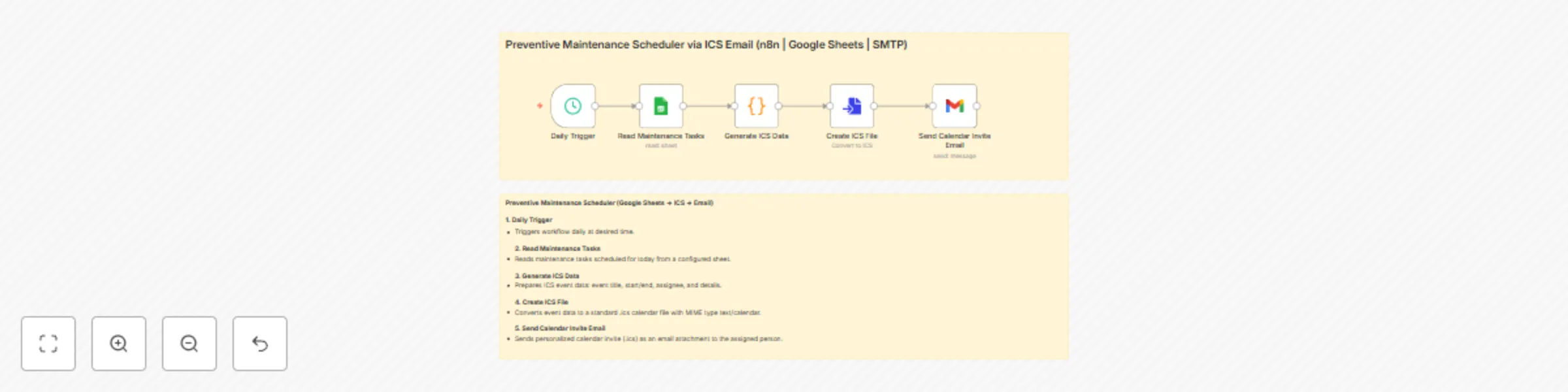
Preventive Maintenance Scheduler via ICS Email (n8n Google Sheets Gmail) This workflow automatically reads your daily preventive maintenance schedule from Google Sheets and sends each assign...
n8n-nodes-base.stickynote, n8n-nodes-base.scheduletrigger, n8n-nodes-base.googlesheets, n8n-nodes-base.code, n8n-nodes-base.converttofile, n8n-nodes-base.gmail
This workflow is cataloged by N8N Workflows and links back to its original n8n.io source page by WeblineIndia.
Original n8n.io sourceThis workflow automatically reads your daily preventive maintenance schedule from Google Sheets and sends each assigned team member a personalized calendar invite (.ICS) as an email attachment. No more manual reminders or copying events — your operations and field teams will always be on schedule with clear, actionable reminders!
.ics calendar invite file with correct timings and description..ics file attached — ready to add to Outlook, Gmail or mobile calendar.date, asset, task, location, email| Tool | Purpose |
|---|---|
| n8n Instance | Run and schedule the automation |
| Google Sheets | Source of maintenance schedule/tasks |
| Gmail (or SMTP) | Email platform to send calendar files |
| Customization | How |
|---|---|
| Change calendar invite/event wording | Edit title or description in the "Create ICS File" node |
| Adjust event start/end times | Modify time logic in "Generate ICS Data" node |
| Change daily send time | Tweak time in "Daily Trigger" node |
| Use a different email provider (SMTP) | Swap Gmail node for SMTP node; link correct credentials |
| Add extra notifications (SMS/Slack) | Add appropriate node after or before Send Email node |
| Add-on | Description |
|---|---|
| Recurring Tasks | Automate repeated tasks via your sheet/setup |
| Email Logging | Log sent invites in another sheet/db |
| WhatsApp/SMS Alerts | Add Twilio or WhatsApp for instant alerts |
| Manager Summary | Send daily reports or dashboards to leads |
| Pre-alerts | Add reminder emails 1hr / 1 day before event |
| Issue | Possible Cause | Solution |
|---|---|---|
| No email received | Gmail/SMTP misconfigured | Check node credentials, token or SMTP settings |
| Calendar file comes as .txt | Wrong file type/extension/MIME | Ensure "Create ICS File" outputs .ics and text/calendar |
| No invites sent for today | No matching rows in Google Sheet | Check date/value format; add sample data for today |
| Google Sheets returns error | Wrong Sheet ID/tab, access issue | Confirm correct Google Sheet is linked and shared |
| Event time/zone is incorrect | Code node’s time logic not matching | Adjust start/end time settings in the code node |
Want guided setup, advanced reporting, Outlook synchronization or a full preventive maintenance dashboard?
👉 Contact WeblineIndia — Your n8n Automation partner for smart preventive maintenance and calendar-driven ops!
This catalog entry is organized from the workflow JSON. The node-level section below shows the executable blocks available for review before importing the template.
| Workflow | Send preventive maintenance schedules with Google Sheets and Gmail ICS invites |
|---|---|
| Complexity | intermediate |
| Nodes | 7 |
| Categories | Project Management, Multimodal AI |
| Author | WeblineIndia |
| Published | 21 Aug 2025 |
Use the JSON export at /data/workflows/7700/7700.json as the source template for this automation.
Open n8n, import the downloaded JSON, and review each node before activating the workflow.
Replace placeholder credentials, API keys, webhook URLs, account IDs, and environment-specific values with your own settings.
Run the workflow manually or in a staging workspace, inspect node output, and confirm downstream systems receive the expected data.
Enable the workflow only after testing, then monitor executions, errors, and rate limits during the first production runs.
Review imported nodes carefully before activation. This catalog entry is intended to help you inspect the workflow structure, understand required services, and find related templates faster.
Node names, credentials, schedules, webhook paths, and external service limits may need adjustment for your workspace.
Preventive Maintenance Scheduler via ICS Email (n8n Google Sheets Gmail) This workflow automatically reads your daily preventive maintenance schedule from Google Sheets and sends each assign...
Review the workflow JSON, configure any required credentials in n8n, and test the automation in a safe workspace before using it in production.
Yes. Use the block-by-block analysis and the downloadable JSON to inspect each node, then adjust credentials, prompts, schedules, filters, or destinations for your Project Management, Multimodal AI use case.