Block 1 - Sticky Note - Main
- Type / Role
- n8n-nodes-base.stickyNote - stickyNote
- Config choices
- Version 1


 Early Deal
This workflow is provided as-is. Please review and test before using in production.
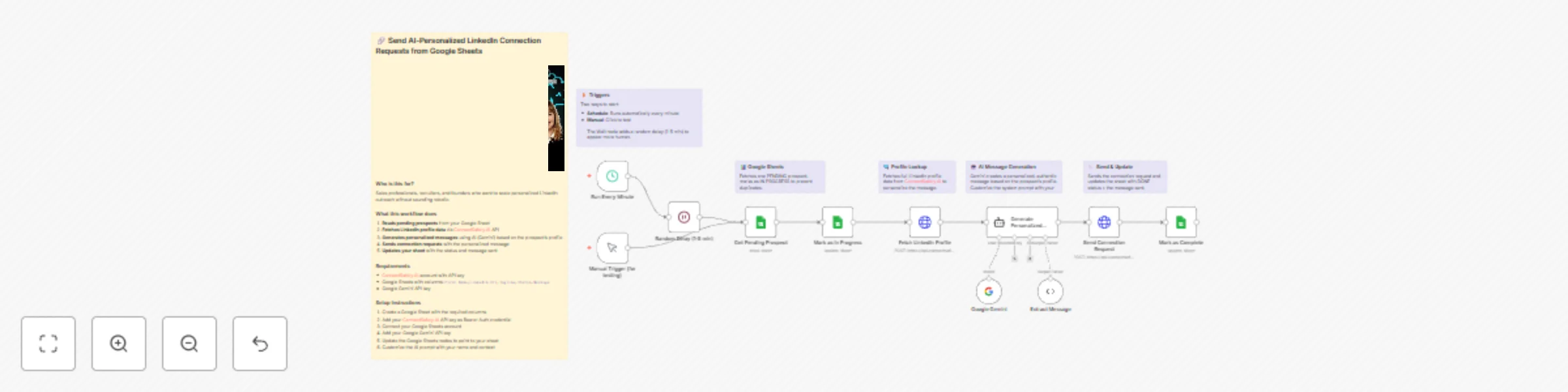
Send AI personalized LinkedIn connection requests from Google Sheets using ConnectSafely.AI API Who's it for This workflow is built for sales professionals, recruiters, founders, and growth markete...
n8n-nodes-base.stickynote, n8n-nodes-base.manualtrigger, n8n-nodes-base.scheduletrigger, n8n-nodes-base.wait, n8n-nodes-base.googlesheets, n8n-nodes-base.httprequest, @n8n/n8n-nodes-langchain.agent, @n8n/n8n-nodes-langchain.lmchatgooglegemini
This workflow is cataloged by N8N Workflows and links back to its original n8n.io source page by ConnectSafely.
Original n8n.io sourceThis workflow is built for sales professionals, recruiters, founders, and growth marketers who want to scale their LinkedIn outreach without sacrificing personalization. Perfect for anyone tired of sending generic connection requests that get ignored, or manually crafting individual messages for hundreds of prospects.
If you're running ABM campaigns, building a sales pipeline, recruiting talent, or expanding your professional network, this automation handles the heavy lifting while keeping your outreach authentic and human.
The workflow automates personalized LinkedIn connection requests by combining Google Sheets prospect tracking with AI-powered message generation through ConnectSafely.ai's API.
The process flow:
Random delays between requests mimic human behavior and maintain LinkedIn compliance.
Watch the complete step-by-step implementation guide:
Structure your Google Sheet with the following columns:
| Column Name | Description | Required |
|---|---|---|
First Name |
Contact's first name | Optional |
LinkedIn Url |
LinkedIn profile URL or username | Yes |
Tagline |
Contact's headline/title | Optional |
Status |
Processing status (PENDING/IN PROGRESS/DONE) | Yes |
Message |
Stores the AI-generated message sent | Yes |
Sample Data Format:
First Name: John
LinkedIn Url: https://www.linkedin.com/in/johndoe
Tagline: VP of Sales at TechCorp
Status: PENDING
Message: (left empty - will be filled by workflow)
Pro Tip: Use LinkedIn Sales Navigator export or a prospecting tool to populate your sheet with qualified leads.
This credential is used by both the "Fetch LinkedIn Profile" and "Send Connection Request" HTTP nodes.
StatusPENDINGrow_numberIN PROGRESSrow_numberDONE{{ $('Generate Personalized Message').item.json.message }}The Generate Personalized Message node contains the system prompt that controls how messages are written. Customize it for your personal brand:
MY CONTEXT:
[CUSTOMIZE THIS: Add your name, role, and what you're looking for in connections]
With your actual information, for example:
MY CONTEXT:
I'm Sarah, founder of a B2B SaaS startup. I'm interested in connecting with other founders, VCs, and sales leaders to exchange ideas and explore potential partnerships.
"- [YOUR NAME]" to your actual nameStatus: PENDINGDONE with the message storedEdit the system prompt in the Generate Personalized Message node to adjust:
{{ Math.floor(Math.random() * 4) + 1 }} to change the rangeIssue: AI generating messages over 300 characters
Issue: "Profile not found" errors from ConnectSafely.ai
https://www.linkedin.com/in/)Issue: Generic-sounding AI messages
Issue: Duplicate connection requests sent
row_number column exists in your sheetIssue: Google Sheets not updating
row_number column exists and the matching column is correctly configuredIssue: Bearer Auth errors
Stay updated with the latest automation tips, LinkedIn strategies, and platform updates:
Looking to build sophisticated LinkedIn automation workflows tailored to your business needs?
Contact our team for custom automation development, strategy consulting, and enterprise solutions.
We specialize in:
This catalog entry is organized from the workflow JSON. The node-level section below shows the executable blocks available for review before importing the template.
| Workflow | Send AI-personalized LinkedIn connection requests from Google Sheets with Gemini |
|---|---|
| Complexity | advanced |
| Nodes | 17 |
| Categories | Lead Nurturing, Multimodal AI |
| Author | ConnectSafely |
| Published | 02 Dec 2025 |
Use the JSON export at /data/workflows/11420/11420.json as the source template for this automation.
Open n8n, import the downloaded JSON, and review each node before activating the workflow.
Replace placeholder credentials, API keys, webhook URLs, account IDs, and environment-specific values with your own settings.
Run the workflow manually or in a staging workspace, inspect node output, and confirm downstream systems receive the expected data.
Enable the workflow only after testing, then monitor executions, errors, and rate limits during the first production runs.
Review imported nodes carefully before activation. This catalog entry is intended to help you inspect the workflow structure, understand required services, and find related templates faster.
Node names, credentials, schedules, webhook paths, and external service limits may need adjustment for your workspace.
Send AI personalized LinkedIn connection requests from Google Sheets using ConnectSafely.AI API Who's it for This workflow is built for sales professionals, recruiters, founders, and growth markete...
Review the workflow JSON, configure any required credentials in n8n, and test the automation in a safe workspace before using it in production.
Yes. Use the block-by-block analysis and the downloadable JSON to inspect each node, then adjust credentials, prompts, schedules, filters, or destinations for your Lead Nurturing, Multimodal AI use case.