Send AI-generated stale lead nudges from Notion CRM to Telegram with OpenAI

Workflow preview

Workflow preview
100%
Send AI-generated stale lead nudges from Notion CRM to Telegram with OpenAI preview
Open on n8n.io

1. Workflow Overview

Meet your new automated Sales Manager. This workflow acts as a relentless but helpful AI Sales Coach that lives inside your n8n. It wakes up every morning, scans your Notion CRM for deals that have...

Best for

  • Lead Nurturing automation workflows
  • AI Chatbot automation workflows
  • intermediate n8n builders looking for reusable templates

Tools used

n8n-nodes-base.scheduletrigger, n8n-nodes-base.manualtrigger, n8n-nodes-base.set, n8n-nodes-base.notion, n8n-nodes-base.code, n8n-nodes-base.splitinbatches, @n8n/n8n-nodes-langchain.openai, n8n-nodes-base.telegram

Source and attribution

This workflow is cataloged by N8N Workflows and links back to its original n8n.io source page by Vadim Mubi.

Original n8n.io source

1.1 Workflow description

Title
Send AI-generated stale lead nudges from Notion CRM to Telegram with OpenAI
Workflow name
Send AI-generated stale lead nudges from Notion CRM to Telegram with OpenAI

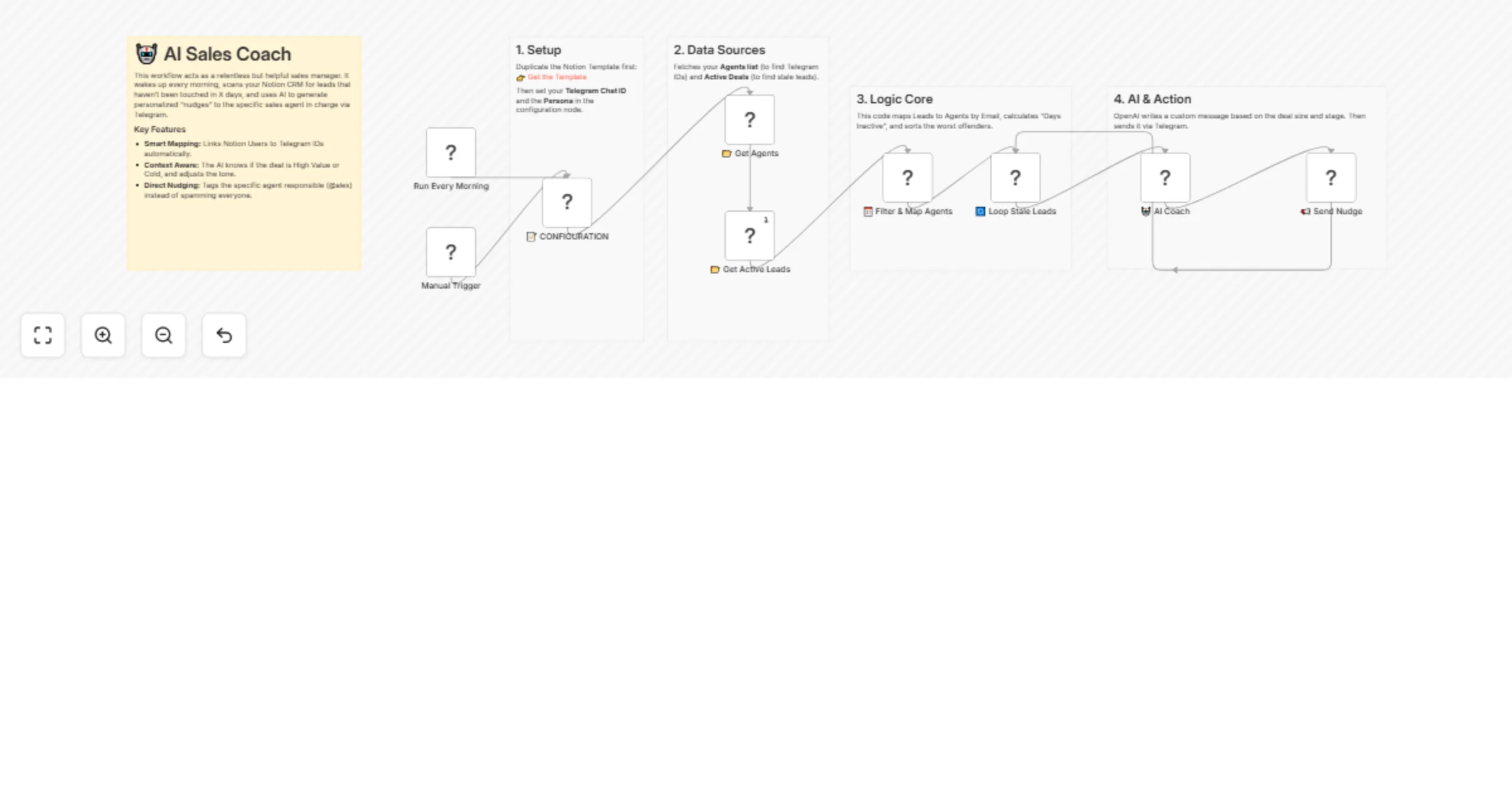
Meet your new automated Sales Manager. This workflow acts as a relentless but helpful AI Sales Coach that lives inside your n8n.

It wakes up every morning, scans your Notion CRM for deals that have been neglected, and uses OpenAI to send personalized, context-aware "nudges" directly to the specific sales agent responsible via Telegram.

đź’ˇ Why use this?

  • Stop Generic Spam: Unlike dumb bots that blast the whole channel, this workflow maps Notion Users to Telegram Handles to tag the exact person responsible (e.g., "@alex, wake up!").
  • Context-Aware AI: The AI reads the deal details. It gets "greedy" for high-value deals and "sarcastic" for long silences.
  • Zero Management: It runs on autopilot, ensuring no lead slips through the cracks.

⚙️ How it works

  1. Data Sync: Fetches your "Agents" database (Notion User ↔ Telegram ID) and "Active Deals".
  2. Logic Core: Calculates exactly how many days a lead has been untouched.
  3. Smart Routing: Matches the Assigned Manager in Notion to their Telegram ID.
  4. AI Generation: Generates a punchy message based on the deal's value and stage.
  5. Delivery: Sends the notification to Telegram with a direct link to the Notion deal.

đź›  Setup Steps

  1. Get the Notion System This workflow requires a specific database structure to map Agents and Deals. 👉 Click here to duplicate the Notion Template

  2. Connect Databases

  • In the "Get Agents" node, select your duplicated Agents Configuration database.
  • In the "Get Active Leads" node, select your duplicated Active Deals database.
  1. Configure Settings Open the 📝 CONFIGURATION node to set:
  • DAYS_INACTIVE_LIMIT: How many days of silence before alerting? (default: 7).
  • COACH_PERSONA: Customize the AI's personality (e.g., "Tough Boss" or "Friendly Helper").
  • TELEGRAM_CHAT_ID: A fallback chat for unassigned leads.
  1. Connect Accounts Add your credentials for Notion, OpenAI, and Telegram.

1.2 Logical Blocks

This catalog entry is organized from the workflow JSON. The node-level section below shows the executable blocks available for review before importing the template.

2. Block-by-Block Analysis

Block 1 - Run Every Morning

Type / Role
n8n-nodes-base.scheduleTrigger - scheduleTrigger
Config choices
Version 1.2

Block 2 - Manual Trigger

Type / Role
n8n-nodes-base.manualTrigger - manualTrigger
Config choices
Version 1

Block 3 - 📝 CONFIGURATION

Type / Role
n8n-nodes-base.set - set
Config choices
Version 2

Block 4 - đź“‚ Get Agents

Type / Role
n8n-nodes-base.notion - notion
Config choices
Version 2.2

Block 5 - đź“‚ Get Active Leads

Type / Role
n8n-nodes-base.notion - notion
Config choices
Version 2.2

Block 6 - 🗓️ Filter & Map Agents

Type / Role
n8n-nodes-base.code - code
Config choices
Version 2

Block 7 - 🔄 Loop Stale Leads

Type / Role
n8n-nodes-base.splitInBatches - splitInBatches
Config choices
Version 3

Block 8 - 🤖 AI Coach

Type / Role
@n8n/n8n-nodes-langchain.openAi - openAi
Config choices
Version 1

Block 9 - 📢 Send Nudge

Type / Role
n8n-nodes-base.telegram - telegram
Config choices
Version 1.2

Block 10 - Sticky Note 1

Type / Role
n8n-nodes-base.stickyNote - stickyNote
Config choices
Version 1

Block 11 - Sticky Note 2

Type / Role
n8n-nodes-base.stickyNote - stickyNote
Config choices
Version 1

Block 12 - Sticky Note 3

Type / Role
n8n-nodes-base.stickyNote - stickyNote
Config choices
Version 1

Block 13 - Sticky Note 4

Type / Role
n8n-nodes-base.stickyNote - stickyNote
Config choices
Version 1

Block 14 - Main Sticky

Type / Role
n8n-nodes-base.stickyNote - stickyNote
Config choices
Version 1

3. Summary Table

Workflow Send AI-generated stale lead nudges from Notion CRM to Telegram with OpenAI
Complexity intermediate
Nodes 14
Categories Lead Nurturing, AI Chatbot
Author Vadim Mubi
Published 20 Jan 2026

4. Reproducing the Workflow from Scratch

  1. 1. Download the workflow JSON

    Use the JSON export at /data/workflows/12841/12841.json as the source template for this automation.

  2. 2. Import the template into n8n

    Open n8n, import the downloaded JSON, and review each node before activating the workflow.

  3. 3. Configure credentials and variables

    Replace placeholder credentials, API keys, webhook URLs, account IDs, and environment-specific values with your own settings.

  4. 4. Test with sample data

    Run the workflow manually or in a staging workspace, inspect node output, and confirm downstream systems receive the expected data.

  5. 5. Activate and monitor

    Enable the workflow only after testing, then monitor executions, errors, and rate limits during the first production runs.

5. General Notes & Resources

Review imported nodes carefully before activation. This catalog entry is intended to help you inspect the workflow structure, understand required services, and find related templates faster.

Node names, credentials, schedules, webhook paths, and external service limits may need adjustment for your workspace.

Frequently asked questions

What does Send AI-generated stale lead nudges from Notion CRM to Telegram with OpenAI do?

Meet your new automated Sales Manager. This workflow acts as a relentless but helpful AI Sales Coach that lives inside your n8n. It wakes up every morning, scans your Notion CRM for deals that have...

What do I need before importing this workflow?

Review the workflow JSON, configure any required credentials in n8n, and test the automation in a safe workspace before using it in production.

Can I customize this workflow?

Yes. Use the block-by-block analysis and the downloadable JSON to inspect each node, then adjust credentials, prompts, schedules, filters, or destinations for your Lead Nurturing, AI Chatbot use case.