Block 1 - When clicking ‘Test workflow’
- Type / Role
- n8n-nodes-base.manualTrigger - manualTrigger
- Config choices
- Version 1
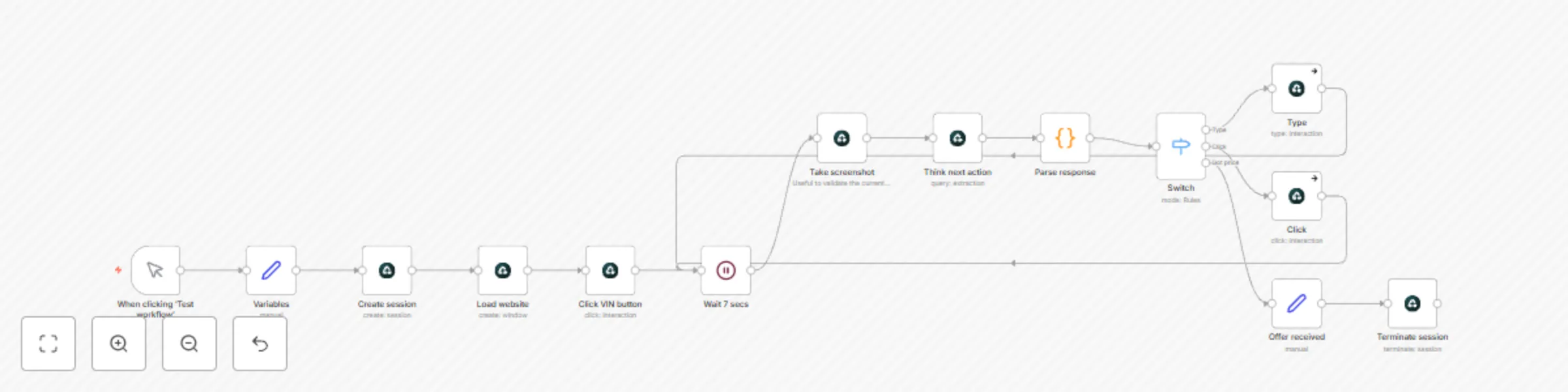


 Early Deal
This workflow is provided as-is. Please review and test before using in production.
How to Sell Your Used Car Easily with Airtop Selling a used car traditionally involves tedious manual steps: listing your vehicle online, filling repetitive forms, answering buyer inquiries, and co...
n8n-nodes-base.manualtrigger, n8n-nodes-base.set, n8n-nodes-base.wait, n8n-nodes-base.code, n8n-nodes-base.switch, n8n-nodes-base.airtop
This workflow is cataloged by N8N Workflows and links back to its original n8n.io source page by Airtop.
Original n8n.io sourceSelling a used car traditionally involves tedious manual steps: listing your vehicle online, filling repetitive forms, answering buyer inquiries, and comparing multiple offers—often leading to lost time, inaccuracies, and missed opportunities. Dealers' platforms and marketplace websites can introduce additional friction, occasionally requiring manual interactions and delivering inconsistent offers.
The Sell a Used Car Agent powered by Airtop and n8n eliminates this friction by automating the selling process. Simply input your car's details once, and the automation quickly navigates through popular used car marketplaces like Carvana, CarMax, and others, efficiently fetching competitive buying offers. Leveraging Airtop’s powerful real-browser automation capabilities, this setup interacts smoothly with the forms and queries specific to each sales platform, eliminating error-prone manual entries and tedious repetition.
This Airtop automation employs sophisticated data extraction features, including structured JSON output, ensuring accurate, formatted data ready for immediate review.
Say goodbye to cumbersome listing processes, and hello to streamlined, effortless car selling.
When started, Airtop opens automated, real browser sessions to intelligently fill out required car details on leading resale marketplaces (e.g., Carvana and CarMax). It captures instantly generated vehicle offers, structures them into clean JSON output, and returns organized buying proposals. All of this is accomplished without manual intervention.
> VIN: 1FTRF17253NB81140 Mileage: 221081 Zip code: 01952 Condition: Perfect, no interior or exterior damages, all tires are inflated, have 2 keys, working battery, has an attached catalytic converter, Airbags not deployed, No flood or fire damage. Ownership: full clean title with no debt answer yes to all other questions
Happy Automating!
This catalog entry is organized from the workflow JSON. The node-level section below shows the executable blocks available for review before importing the template.
| Workflow | Sell a used car with an AI agent in Airtop |
|---|---|
| Complexity | intermediate |
| Nodes | 14 |
| Categories | Market Research |
| Author | Airtop |
| Published | 08 Apr 2025 |
Use the JSON export at /data/workflows/3483/3483.json as the source template for this automation.
Open n8n, import the downloaded JSON, and review each node before activating the workflow.
Replace placeholder credentials, API keys, webhook URLs, account IDs, and environment-specific values with your own settings.
Run the workflow manually or in a staging workspace, inspect node output, and confirm downstream systems receive the expected data.
Enable the workflow only after testing, then monitor executions, errors, and rate limits during the first production runs.
Review imported nodes carefully before activation. This catalog entry is intended to help you inspect the workflow structure, understand required services, and find related templates faster.
Node names, credentials, schedules, webhook paths, and external service limits may need adjustment for your workspace.
How to Sell Your Used Car Easily with Airtop Selling a used car traditionally involves tedious manual steps: listing your vehicle online, filling repetitive forms, answering buyer inquiries, and co...
Review the workflow JSON, configure any required credentials in n8n, and test the automation in a safe workspace before using it in production.
Yes. Use the block-by-block analysis and the downloadable JSON to inspect each node, then adjust credentials, prompts, schedules, filters, or destinations for your Market Research use case.