Block 1 - Fetch Snapshot Results
- Type / Role
- n8n-nodes-base.httpRequest - httpRequest
- Config choices
- Version 4.2


 Early Deal
This workflow is provided as-is. Please review and test before using in production.
Yelp Business Finder: Scraping Local Businesses by Keyword, Category & Location Using Bright Data and Google Sheets Description: Automate local business data collection from Yelp using AI powere...
n8n-nodes-base.httprequest, n8n-nodes-base.formtrigger, n8n-nodes-base.if, n8n-nodes-base.wait, n8n-nodes-base.googlesheets, @n8n/n8n-nodes-langchain.agent, @n8n/n8n-nodes-langchain.lmchatgooglegemini, n8n-nodes-base.code
This workflow is cataloged by N8N Workflows and links back to its original n8n.io source page by Bright Data.
Original n8n.io sourceDescription: Automate local business data collection from Yelp using AI-powered input validation, Bright Data scraping, and automatic Google Sheets integration. Perfect for market research, lead generation, and competitive analysis.
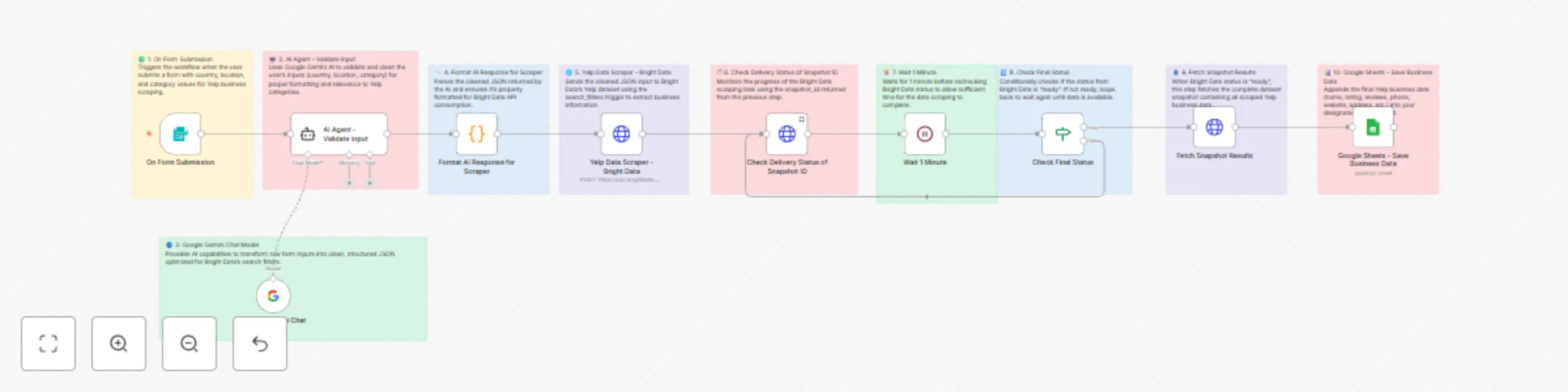
Form Submission: Users submit a simple form with country, location, and business category parameters.
AI Validation: Google Gemini AI validates and cleans input data, ensuring proper formatting and Yelp category alignment.
Data Scraping: Bright Data's Yelp dataset API scrapes business information based on the cleaned parameters.
Status Monitoring: The workflow monitors scraping progress and waits for data completion.
Data Export: Final business data is automatically appended to your Google Sheets for easy analysis.
⏱️ Estimated Setup Time: 10-15 minutes
✅ Active n8n instance (cloud or self-hosted) ✅ Google account with Sheets access ✅ Bright Data account with Yelp scraping dataset ✅ Google Gemini API access
Import Workflow:
Configure Google Sheets:
Setup Bright Data:
BRIGHT_DATA_API_KEY with your actual API keyConfigure Google Gemini:
Test & Activate:
📍 Business Name
Official business name from Yelp
⭐ Overall Rating
Average customer rating (1-5 stars)
📝 Reviews Count
Total number of customer reviews
🏷️ Categories
Business categories and tags
🌐 Website URL
Official business website
📞 Phone Number
Contact phone number
📍 Address
Full business address
🔗 Yelp URL
Direct link to Yelp listing
🔍 Market Research
Analyze local business landscapes and competition
📈 Lead Generation
Build prospect lists for B2B outreach
🏪 Location Analysis
Research business density by area and category
📊 Competitive Intelligence
Monitor competitor ratings and customer feedback
⚠️ Important Notes:
Common Issues:
🚀 Ready to start scraping Yelp business data efficiently!
This catalog entry is organized from the workflow JSON. The node-level section below shows the executable blocks available for review before importing the template.
| Workflow | Scrape Yelp business data with Gemini AI, Bright Data & Google Sheets |
|---|---|
| Complexity | advanced |
| Nodes | 20 |
| Categories | Lead Generation, AI Summarization |
| Author | Bright Data |
| Published | 10 Jun 2025 |
Use the JSON export at /data/workflows/4844/4844.json as the source template for this automation.
Open n8n, import the downloaded JSON, and review each node before activating the workflow.
Replace placeholder credentials, API keys, webhook URLs, account IDs, and environment-specific values with your own settings.
Run the workflow manually or in a staging workspace, inspect node output, and confirm downstream systems receive the expected data.
Enable the workflow only after testing, then monitor executions, errors, and rate limits during the first production runs.
Review imported nodes carefully before activation. This catalog entry is intended to help you inspect the workflow structure, understand required services, and find related templates faster.
Node names, credentials, schedules, webhook paths, and external service limits may need adjustment for your workspace.
Yelp Business Finder: Scraping Local Businesses by Keyword, Category & Location Using Bright Data and Google Sheets Description: Automate local business data collection from Yelp using AI powere...
Review the workflow JSON, configure any required credentials in n8n, and test the automation in a safe workspace before using it in production.
Yes. Use the block-by-block analysis and the downloadable JSON to inspect each node, then adjust credentials, prompts, schedules, filters, or destinations for your Lead Generation, AI Summarization use case.