Block 1 - 📥 User Input Trigger
- Type / Role
- n8n-nodes-base.formTrigger - formTrigger
- Config choices
- Version 2.2


 Early Deal
This workflow is provided as-is. Please review and test before using in production.
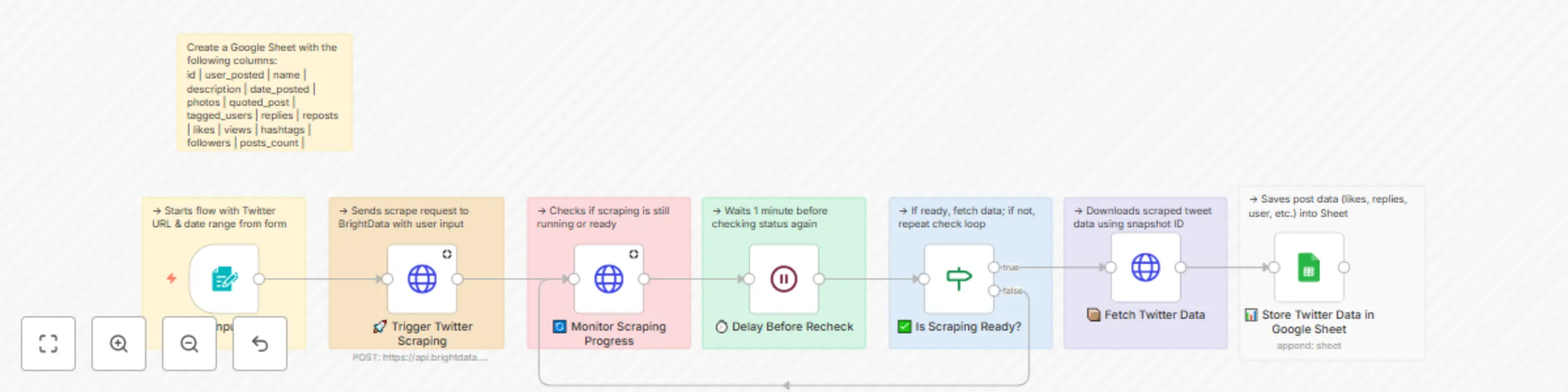
Twitter Profile Scraper via Bright Data API with Google Sheets Output A comprehensive n8n automation that scrapes Twitter profile data using Bright Data's Twitter dataset and stores comprehensiv...
n8n-nodes-base.formtrigger, n8n-nodes-base.stickynote, n8n-nodes-base.httprequest, n8n-nodes-base.wait, n8n-nodes-base.if, n8n-nodes-base.googlesheets
This workflow is cataloged by N8N Workflows and links back to its original n8n.io source page by Incrementors.
Original n8n.io sourceA comprehensive n8n automation that scrapes Twitter profile data using Bright Data's Twitter dataset and stores comprehensive tweet analytics, user metrics, and engagement data directly into Google Sheets.
This workflow provides an automated Twitter data collection solution that extracts profile information and tweet data from specified Twitter accounts within custom date ranges. Perfect for social media analytics, competitor research, brand monitoring, and content strategy analysis.
🔗 Form-Based Input: Easy-to-use form for Twitter URL and date range selection
🐦 Twitter Integration: Uses Bright Data's Twitter dataset for accurate data extraction
📊 Comprehensive Data: Captures tweets, engagement metrics, and profile information
📈 Google Sheets Storage: Automatically stores all data in organized spreadsheet format
🔄 Progress Monitoring: Real-time status tracking with automatic retry mechanisms
⚡ Fast & Reliable: Professional scraping with built-in error handling
📅 Date Range Control: Flexible time period selection for targeted data collection
🎯 Customizable Fields: Advanced data field selection and mapping
| Field | Description | Example |
|---|---|---|
| user_posted | Username who posted the tweet | @elonmusk |
| name | Display name of the user | Elon Musk |
| description | Tweet content/text | "Exciting updates coming soon..." |
| date_posted | When the tweet was posted | 2025-01-15T10:30:00Z |
| likes | Number of likes on the tweet | 1,234 |
| reposts | Number of retweets | 567 |
| replies | Number of replies | 89 |
| views | Total view count | 12,345 |
| followers | User's follower count | 50M |
| following | Users they follow | 123 |
| is_verified | Verification status | true/false |
| hashtags | Hashtags used in tweet | #AI #Technology |
| photos | Image URLs in tweet | image1.jpg, image2.jpg |
| videos | Video content URLs | video1.mp4 |
| user_id | Unique user identifier | 12345678 |
| timestamp | Data extraction timestamp | 2025-01-15T11:00:00Z |
gd_lwxkxvnf1cynvib9co)https://docs.google.com/spreadsheets/d/SHEET_ID_HERE/editBRIGHT_DATA_API_KEY with your actual API tokenYOUR_GOOGLE_SHEET_ID with your Sheet IDYour Google Sheet will show:
Edit the custom_output_fields array in the "🚀 Trigger Twitter Scraping" node to add or remove data points:
"custom_output_fields": [
  "id", "user_posted", "name", "description",
  "date_posted", "likes", "reposts", "replies",
  "views", "hashtags", "followers", "is_verified"
]
Modify the column mapping in the "📊 Store Twitter Data in Google Sheet" node to match your preferred sheet layout and add custom formulas or calculations.
To process multiple Twitter profiles:
"Bright Data connection failed"
"No data extracted"
"Google Sheets permission denied"
"Workflow timeout"
"Progress monitoring stuck"
Goal: Track engagement metrics and content performance
Goal: Monitor competitor social media activity
Goal: Track brand mentions and sentiment analysis
Goal: Analyze successful content patterns
Goal: Collect social media data for market analysis
To monitor multiple Twitter accounts efficiently:
Enhance the workflow with analytical capabilities:
Connect the workflow to your existing systems:
☐ n8n instance running (self-hosted or cloud)
☐ Bright Data account with Twitter dataset access
☐ Google account with Sheets access
☐ Valid Twitter profile URLs ready for scraping
☐ 10-15 minutes available for setup
☐ Import Workflow - Copy JSON and import to n8n
☐ Configure Bright Data - Set up API credentials and test
☐ Create Google Sheet - New sheet with proper column structure
☐ Set up Google Sheets credentials - OAuth setup and test
☐ Update workflow settings - Replace API keys and sheet IDs
☐ Test with sample data - Add 1 Twitter URL and small date range
☐ Verify data flow - Check data appears in Google Sheet correctly
☐ Activate workflow - Enable form trigger for production use
Your workflow URL: Access form trigger when workflow is active
🎯 Happy Twitter Scraping! This workflow provides a solid foundation for automated Twitter data collection. Customize it to fit your specific social media analytics and research needs.
For any questions or support, please contact:
[email protected]
or fill out this form: https://www.incrementors.com/contact-us/
This catalog entry is organized from the workflow JSON. The node-level section below shows the executable blocks available for review before importing the template.
| Workflow | Scrape Twitter profiles with Bright Data API and export to Google Sheets |
|---|---|
| Complexity | advanced |
| Nodes | 15 |
| Categories | Market Research |
| Author | Incrementors |
| Published | 25 Jul 2025 |
Use the JSON export at /data/workflows/6405/6405.json as the source template for this automation.
Open n8n, import the downloaded JSON, and review each node before activating the workflow.
Replace placeholder credentials, API keys, webhook URLs, account IDs, and environment-specific values with your own settings.
Run the workflow manually or in a staging workspace, inspect node output, and confirm downstream systems receive the expected data.
Enable the workflow only after testing, then monitor executions, errors, and rate limits during the first production runs.
Review imported nodes carefully before activation. This catalog entry is intended to help you inspect the workflow structure, understand required services, and find related templates faster.
Node names, credentials, schedules, webhook paths, and external service limits may need adjustment for your workspace.
Twitter Profile Scraper via Bright Data API with Google Sheets Output A comprehensive n8n automation that scrapes Twitter profile data using Bright Data's Twitter dataset and stores comprehensiv...
Review the workflow JSON, configure any required credentials in n8n, and test the automation in a safe workspace before using it in production.
Yes. Use the block-by-block analysis and the downloadable JSON to inspect each node, then adjust credentials, prompts, schedules, filters, or destinations for your Market Research use case.