Block 1 - Google Sheets
- Type / Role
- n8n-nodes-base.googleSheets - googleSheets
- Config choices
- Version 4.6


 Early Deal
This workflow is provided as-is. Please review and test before using in production.
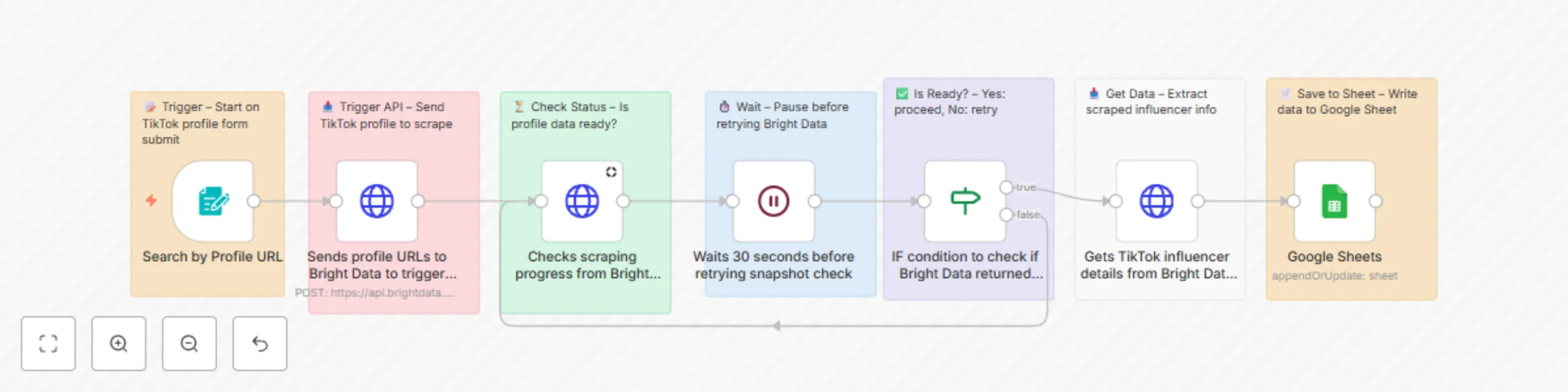
TikTok Influencer Scraper (URL Input) via Bright Data + n8n & Sheets A comprehensive n8n automation that scrapes TikTok influencer profiles using Bright Data's TikTok dataset and automatically s...
n8n-nodes-base.googlesheets, n8n-nodes-base.formtrigger, n8n-nodes-base.stickynote, n8n-nodes-base.httprequest, n8n-nodes-base.wait, n8n-nodes-base.if
This workflow is cataloged by N8N Workflows and links back to its original n8n.io source page by ankitkansaldev.
Original n8n.io sourceA comprehensive n8n automation that scrapes TikTok influencer profiles using Bright Data's TikTok dataset and automatically saves detailed profile information to Google Sheets.
This workflow provides an automated TikTok influencer data collection solution that scrapes comprehensive profile information and saves it to Google Sheets. Perfect for influencer marketing research, competitor analysis, social media monitoring, and marketing campaign planning.
📝 Form-Based Input: Simple web form to submit TikTok profile URLs 🤖 Bright Data Integration: Uses Bright Data's TikTok dataset for reliable scraping ⏳ Status Monitoring: Intelligent polling system to check scraping progress 🔄 Retry Logic: Automatic retry mechanism with 30-second intervals 📊 Data Extraction: Comprehensive profile data including engagement metrics 📈 Google Sheets Storage: Automatic data storage and organization ⚡ Error Handling: Built-in error handling and status reporting 🎯 Custom Fields: Configurable output fields for specific data needs
| Field | Description | Example |
|---|---|---|
| Account ID | Unique TikTok account identifier | @username123 |
| Nickname | Display name on profile | "John Doe" |
| Biography | Profile bio/description | "Content creator & influencer" |
| Followers | Number of followers | 1,250,000 |
| Following | Number of accounts following | 500 |
| Likes | Total likes across all videos | 50,000,000 |
| Videos Count | Total number of videos posted | 1,200 |
| Profile URL | Direct link to TikTok profile | https://www.tiktok.com/@username |
| Profile Picture | Profile image URL | https://p16-sign-sg.tiktokcdn.com/... |
| Profile Picture HD | High-definition profile image | https://p16-sign-sg.tiktokcdn.com/... |
| Is Verified | Verification status | true/false |
| Bio Link | External link in bio | https://linktr.ee/username |
| Like Engagement Rate | Engagement rate based on likes | 5.2% |
| Comment Engagement Rate | Engagement rate based on comments | 2.1% |
| Top Videos | List of top performing videos | [video_objects] |
| Region | Geographic region | "US" |
| Is Under Age 18 | Age status indicator | true/false |
Set up Bright Data credentials:
Configure dataset:
gd_l1villgoiiidt09ci)Create a Google Sheet:
https://docs.google.com/spreadsheets/d/SHEET_ID_HERE/editSet up Google Sheets credentials:
Prepare your data sheet with columns:
Update API credentials:
BRIGHT_DATA_API_KEY with your actual API keyUpdate Google Sheets nodes:
1OeqtCFm4Wek9DI5YFOWQXTpQJS-SJxC10iAPKEKkmiYConfigure form settings:
Add test profiles:
https://www.tiktok.com/@username)Test the workflow:
https://www.tiktok.com/@usernameThe workflow follows this sequence:
Your Google Sheet will show:
Edit the JSON body in "Sends profile URLs to Bright Data" node to include additional fields:
"custom_output_fields": [
  "account_id",
  "nickname",
  "biography",
  "followers",
  "following",
  "likes",
  "videos_count",
  "language",
  "creation_time",
  "last_post_time",
  "avg_video_duration",
  "hashtags_used",
  "music_used"
]
Customize the scraping parameters:
To process multiple profiles simultaneously:
Enhance the form with additional inputs:
"Bright Data connection failed"
"Profile not found or private"
"Google Sheets permission denied"
"Scraping timeout"
"Invalid dataset ID"
"Form submission failed"
Goal: Identify and analyze potential influencers for campaigns
Goal: Monitor competitors' TikTok presence and performance
Goal: Track brand mentions and user-generated content
Goal: Gather social media intelligence for business decisions
To optimize for large-scale scraping:
Enhance data quality with validation:
Connect the workflow to your existing systems:
For real-time updates:
☐ n8n instance running (self-hosted or cloud)
☐ Google account with Sheets access
☐ Bright Data account with TikTok dataset access
☐ Valid TikTok profile URLs for testing
☐ 15 minutes for setup
☐ Import Workflow - Copy JSON and import to n8n
☐ Configure Bright Data - Set up API credentials and test
☐ Create Google Sheet - New sheet with proper column structure
☐ Set up Google Sheets credentials - OAuth setup and test
☐ Update workflow settings - Replace sheet ID and API keys
☐ Test with sample profiles - Submit 1-2 URLs and verify results
☐ Activate workflow - Enable form trigger for production use
Your form URL: https://your-n8n-instance.com/form/[webhook-id]
This workflow provides a solid foundation for automated TikTok influencer data collection. Customize it to fit your specific needs and use cases for influencer marketing, competitive analysis, and social media research.
This catalog entry is organized from the workflow JSON. The node-level section below shows the executable blocks available for review before importing the template.
| Workflow | Scrape TikTok influencer profiles with Bright Data API to Google Sheets |
|---|---|
| Complexity | intermediate |
| Nodes | 14 |
| Categories | Market Research |
| Author | ankitkansaldev |
| Published | 28 Jun 2025 |
Use the JSON export at /data/workflows/5434/5434.json as the source template for this automation.
Open n8n, import the downloaded JSON, and review each node before activating the workflow.
Replace placeholder credentials, API keys, webhook URLs, account IDs, and environment-specific values with your own settings.
Run the workflow manually or in a staging workspace, inspect node output, and confirm downstream systems receive the expected data.
Enable the workflow only after testing, then monitor executions, errors, and rate limits during the first production runs.
Review imported nodes carefully before activation. This catalog entry is intended to help you inspect the workflow structure, understand required services, and find related templates faster.
Node names, credentials, schedules, webhook paths, and external service limits may need adjustment for your workspace.
TikTok Influencer Scraper (URL Input) via Bright Data + n8n & Sheets A comprehensive n8n automation that scrapes TikTok influencer profiles using Bright Data's TikTok dataset and automatically s...
Review the workflow JSON, configure any required credentials in n8n, and test the automation in a safe workspace before using it in production.
Yes. Use the block-by-block analysis and the downloadable JSON to inspect each node, then adjust credentials, prompts, schedules, filters, or destinations for your Market Research use case.