A

ankitkansaldev

2
Workflows

Workflows by ankitkansaldev
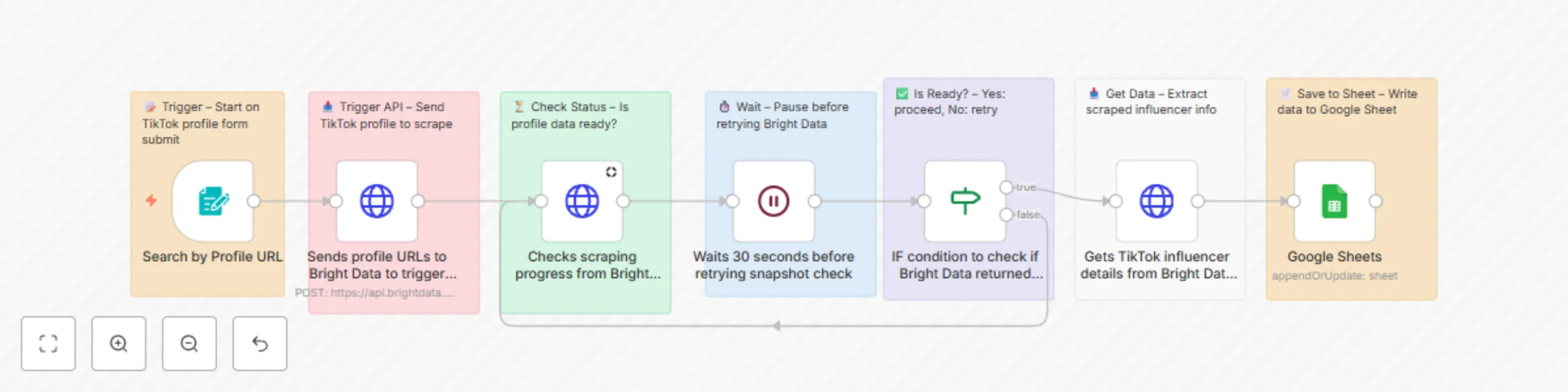
Workflow preview: Scrape TikTok influencer profiles with Bright Data API to Google Sheets
Free intermediate

Scrape TikTok influencer profiles with Bright Data API to Google Sheets

# 🎬 TikTok Influencer Scraper (URL Input) via Bright Data + n8n & Sheets A comprehensive n8n automation that scrapes TikTok influencer profiles using Bright Data's TikTok dataset and automatically saves detailed profile information to Google Sheets. ## 📋 Overview This workflow provides an automated TikTok influencer data collection solution that scrapes comprehensive profile information and saves it to Google Sheets. Perfect for influencer marketing research, competitor analysis, social media monitoring, and marketing campaign planning. ## ✨ Key Features 📝 **Form-Based Input**: Simple web form to submit TikTok profile URLs 🤖 **Bright Data Integration**: Uses Bright Data's TikTok dataset for reliable scraping ⏳ **Status Monitoring**: Intelligent polling system to check scraping progress 🔄 **Retry Logic**: Automatic retry mechanism with 30-second intervals 📊 **Data Extraction**: Comprehensive profile data including engagement metrics 📈 **Google Sheets Storage**: Automatic data storage and organization ⚡ **Error Handling**: Built-in error handling and status reporting 🎯 **Custom Fields**: Configurable output fields for specific data needs ## 🎯 What This Workflow Does ### Input - **Profile URLs**: TikTok profile URLs submitted through web form - **Custom Fields**: Configurable data fields for extraction - **Country Settings**: Geo-targeting for accurate data collection ### Processing 1. **Form Submission**: User submits TikTok profile URL through web form 2. **API Trigger**: Sends profile data to Bright Data for scraping 3. **Status Polling**: Continuously checks scraping progress 4. **Wait & Retry**: Implements 30-second delays between status checks 5. **Data Retrieval**: Fetches complete profile data when ready 6. **Sheet Update**: Saves extracted data to Google Sheets 7. **Status Reporting**: Provides completion status and messages ### Output Data Points | Field | Description | Example | |-------|-------------|---------| | Account ID | Unique TikTok account identifier | @username123 | | Nickname | Display name on profile | "John Doe" | | Biography | Profile bio/description | "Content creator & influencer" | | Followers | Number of followers | 1,250,000 | | Following | Number of accounts following | 500 | | Likes | Total likes across all videos | 50,000,000 | | Videos Count | Total number of videos posted | 1,200 | | Profile URL | Direct link to TikTok profile | https://www.tiktok.com/@username | | Profile Picture | Profile image URL | https://p16-sign-sg.tiktokcdn.com/... | | Profile Picture HD | High-definition profile image | https://p16-sign-sg.tiktokcdn.com/... | | Is Verified | Verification status | true/false | | Bio Link | External link in bio | https://linktr.ee/username | | Like Engagement Rate | Engagement rate based on likes | 5.2% | | Comment Engagement Rate | Engagement rate based on comments | 2.1% | | Top Videos | List of top performing videos | [video_objects] | | Region | Geographic region | "US" | | Is Under Age 18 | Age status indicator | true/false | ## 🚀 Setup Instructions ### Prerequisites - n8n instance (self-hosted or cloud) - Google account with Sheets access - Bright Data account with TikTok dataset access - Valid TikTok profile URLs for testing - 10-15 minutes for setup ### Step 1: Import the Workflow 1. Copy the JSON workflow code from the provided file 2. In n8n: **Workflows** → **+ Add workflow** → **Import from JSON** 3. Paste JSON and click **Import** ### Step 2: Configure Bright Data 1. **Set up Bright Data credentials:** - In n8n: **Credentials** → **+ Add credential** → **HTTP Request Generic Credential** - Name: "Bright Data API" - Authentication: Bearer Token - Token: Your Bright Data API key - Test the connection 2. **Configure dataset:** - Ensure you have access to TikTok dataset (`gd_l1villgoiiidt09ci`) - Verify dataset permissions in Bright Data dashboard - Check dataset limits and pricing ### Step 3: Configure Google Sheets Integration 1. **Create a Google Sheet:** - Go to Google Sheets - Create a new spreadsheet named "TikTok Influencer Data" - Create a sheet tab named "TikTok profile by url" - Copy the Sheet ID from URL: `https://docs.google.com/spreadsheets/d/SHEET_ID_HERE/edit` 2. **Set up Google Sheets credentials:** - In n8n: **Credentials** → **+ Add credential** → **Google Sheets OAuth2 API** - Complete OAuth setup and test connection 3. **Prepare your data sheet with columns:** - Column A: Account ID - Column B: Nickname - Column C: Biography - Column D: Followers - Column E: Following - Column F: Likes - Column G: Videos Count - Column H: Profile URL - Column I: Is Verified - Column J: Bio Link - Column K: Like Engagement Rate - Column L: Comment Engagement Rate - Column M: Region - Column N: Status - Column O: Message ### Step 4: Update Workflow Settings 1. **Update API credentials:** - Open "Sends profile URLs to Bright Data to trigger scraping" node - Replace `BRIGHT_DATA_API_KEY` with your actual API key - Update dataset ID if different 2. **Update Google Sheets nodes:** - Open "Google Sheets" node - Replace document ID: `1OeqtCFm4Wek9DI5YFOWQXTpQJS-SJxC10iAPKEKkmiY` - Select your Google Sheets credential - Choose the correct sheet/tab name 3. **Configure form settings:** - Open "Search by Profile URL" node - Customize form title and field labels as needed - Note the webhook URL for form access ### Step 5: Test & Activate 1. **Add test profiles:** - Access the form using the webhook URL - Submit 1-2 TikTok profile URLs for testing - Use full URLs (e.g., `https://www.tiktok.com/@username`) 2. **Test the workflow:** - Submit a test profile through the form - Monitor execution in n8n - Verify data appears in Google Sheet - Check for any error messages ## 📖 Usage Guide ### Submitting TikTok Profiles 1. Navigate to your form URL (found in Form Trigger node) 2. Enter TikTok profile URL in the format: `https://www.tiktok.com/@username` 3. Click Submit to start the scraping process 4. Wait for processing (typically 1-3 minutes) ### Understanding the Process The workflow follows this sequence: 1. **Form Submission** → Profile URL captured 2. **API Trigger** → Scraping job submitted to Bright Data 3. **Status Polling** → Checks every 30 seconds if data is ready 4. **Data Retrieval** → Fetches complete profile information 5. **Sheet Update** → Saves data to Google Sheets ### Monitoring Progress - Check n8n execution logs for real-time status - Bright Data dashboard shows scraping progress - Google Sheets will populate when data is ready - Status column shows "ready" when complete ### Reading the Results Your Google Sheet will show: - Complete TikTok profile information - Engagement metrics and statistics - Profile verification status - Bio links and external connections - Timestamp of data collection ## 🔧 Customization Options ### Adding More Data Points Edit the JSON body in "Sends profile URLs to Bright Data" node to include additional fields: ```json "custom_output_fields": [ "account_id", "nickname", "biography", "followers", "following", "likes", "videos_count", "language", "creation_time", "last_post_time", "avg_video_duration", "hashtags_used", "music_used" ] ``` ### Modifying Input Parameters Customize the scraping parameters: - **Country targeting**: Change "country" field in input - **Search limits**: Adjust "limit_per_input" value - **Discovery method**: Modify "discover_by" parameter - **Error handling**: Toggle "include_errors" setting ### Batch Processing Multiple Profiles To process multiple profiles simultaneously: 1. Modify the input array in the API call 2. Add multiple profile URLs in single request 3. Implement loop logic for processing results 4. Add rate limiting between requests ### Custom Form Fields Enhance the form with additional inputs: 1. Open "Search by Profile URL" node 2. Add form fields for: - Country selection - Number of videos to analyze - Specific date ranges - Custom tags or categories ## 🚨 Troubleshooting ### Common Issues & Solutions 1. **"Bright Data connection failed"** - **Cause**: Invalid API credentials or dataset access - **Solution**: Verify API key in Bright Data dashboard, check dataset permissions 2. **"Profile not found or private"** - **Cause**: Invalid TikTok URL or private profile - **Solution**: Verify profile URL format, ensure profile is public 3. **"Google Sheets permission denied"** - **Cause**: Incorrect credentials or sheet permissions - **Solution**: Re-authenticate Google Sheets, check sheet sharing settings 4. **"Scraping timeout"** - **Cause**: Profile data taking too long to process - **Solution**: Increase wait time or implement longer polling intervals 5. **"Invalid dataset ID"** - **Cause**: Incorrect or expired dataset configuration - **Solution**: Check Bright Data dashboard for correct dataset ID 6. **"Form submission failed"** - **Cause**: Webhook configuration issues - **Solution**: Verify webhook URL and form trigger settings ### Advanced Troubleshooting - **Check execution logs** in n8n for detailed error messages - **Test individual nodes** by running them separately - **Verify data formats** ensure URLs are properly formatted - **Monitor API limits** check Bright Data usage quotas - **Add error handling** implement try-catch logic for robust operation ## 📊 Use Cases & Examples ### 1. Influencer Marketing Research **Goal**: Identify and analyze potential influencers for campaigns - Research influencers in specific niches - Analyze engagement rates and audience size - Compare multiple influencers for campaign selection - Track influencer growth over time ### 2. Competitive Analysis **Goal**: Monitor competitors' TikTok presence and performance - Track competitor follower growth - Analyze content strategies and engagement - Monitor posting frequency and timing - Identify trending content themes ### 3. Social Media Monitoring **Goal**: Track brand mentions and user-generated content - Monitor branded hashtag usage - Track brand advocates and micro-influencers - Analyze sentiment and engagement patterns - Identify trending topics in your industry ### 4. Market Research Pipeline **Goal**: Gather social media intelligence for business decisions - Analyze target audience behavior - Study content preferences and trends - Generate reports for stakeholders - Support marketing strategy development ## ⚙ Advanced Configuration ### Rate Limiting and Performance To optimize for large-scale scraping: 1. Adjust wait times between status checks 2. Implement exponential backoff for retries 3. Add batch processing for multiple profiles 4. Monitor API usage to avoid limits ### Data Validation and Cleaning Enhance data quality with validation: 1. Add data type validation for numeric fields 2. Implement URL format checking 3. Clean and standardize text fields 4. Add data completeness checks ### Integration with Business Tools Connect the workflow to your existing systems: - **CRM Integration**: Update customer records with influencer data - **Slack Notifications**: Send alerts when new data is available - **Database Storage**: Store data in PostgreSQL/MySQL for analysis - **BI Tools**: Connect to Tableau/Power BI for visualization ### Webhook Integration For real-time updates: 1. Add webhook triggers for immediate profile checks 2. Integrate with external systems via webhooks 3. Create API endpoints for programmatic access 4. Implement authentication for secure access ## 📈 Performance & Limits ### Expected Performance - **Single Profile**: 30-60 seconds average processing time - **Concurrent Requests**: 5-10 simultaneous (depends on Bright Data plan) - **Data Accuracy**: 95%+ for public TikTok profiles - **Success Rate**: 90%+ for accessible profiles - **Daily Capacity**: 100-1000 profiles (depends on rate limits) ### Resource Usage - **Memory**: ~50MB per execution - **Storage**: Minimal (data stored in Google Sheets) - **API Calls**: 3-5 Bright Data calls per profile (including status checks) - **Bandwidth**: ~1-2MB per profile scraped - **Execution Time**: 1-2 minutes per profile ### Scaling Considerations - **Rate Limiting**: Add delays for high-volume scraping - **Error Handling**: Implement retry logic for failed requests - **Data Validation**: Add checks for malformed profile data - **Monitoring**: Track success/failure rates over time - **Cost Optimization**: Monitor API usage to control costs ## 🤝 Support & Community ### Getting Help - **n8n Community Forum**: community.n8n.io - **Documentation**: docs.n8n.io - **Bright Data Support**: Contact through your dashboard - **GitHub Issues**: Report bugs and feature requests ### Contributing - Share improvements with the community - Report issues and suggest enhancements - Create variations for specific use cases - Document best practices and lessons learned ## 📋 Quick Setup Checklist ### Before You Start ☐ n8n instance running (self-hosted or cloud) ☐ Google account with Sheets access ☐ Bright Data account with TikTok dataset access ☐ Valid TikTok profile URLs for testing ☐ 15 minutes for setup ### Setup Steps ☐ **Import Workflow** - Copy JSON and import to n8n ☐ **Configure Bright Data** - Set up API credentials and test ☐ **Create Google Sheet** - New sheet with proper column structure ☐ **Set up Google Sheets credentials** - OAuth setup and test ☐ **Update workflow settings** - Replace sheet ID and API keys ☐ **Test with sample profiles** - Submit 1-2 URLs and verify results ☐ **Activate workflow** - Enable form trigger for production use ### Ready to Use! 🎉 Your form URL: `https://your-n8n-instance.com/form/[webhook-id]` ## 🎯 Happy TikTok Scraping! This workflow provides a solid foundation for automated TikTok influencer data collection. Customize it to fit your specific needs and use cases for influencer marketing, competitive analysis, and social media research.

a
ankitkansaldev
Market Research
28 Jun 2025
4052
0

Workflow preview: Scrape Reuters news & send AI summaries with Brightdata, Claude 4 & Telegram
Free advanced

Scrape Reuters news & send AI summaries with Brightdata, Claude 4 & Telegram

# 📰 Comprehensive Reuters News Intelligence System With Brightdata & Telegram Alerts A powerful n8n automation workflow that scrapes the latest Reuters news articles using Bright Data's web scraping capabilities and delivers intelligent news summaries directly to your Telegram chat. ## 📋 Overview This workflow provides an automated news intelligence solution that monitors Reuters for breaking news, analyzes content using Claude AI, and delivers personalized news alerts. Perfect for journalists, researchers, traders, and anyone who needs real-time access to Reuters content with AI-powered insights. ## ✨ Key Features 🎯 **Form-Based Input**: Easy web form to specify keywords and news type preferences 🤖 **AI-Powered Processing**: Uses Claude 4 Sonnet for intelligent content analysis 🌐 **Professional Scraping**: Leverages Bright Data's Reuters dataset for reliable data extraction 📱 **Telegram Integration**: Instant notifications delivered to your preferred chat ⏰ **Smart Waiting**: Built-in delays to ensure data processing completion 🔄 **Status Monitoring**: Automatic scraping status checks with retry logic 📊 **Data Formatting**: Clean, structured output with essential article fields 🚀 **Scalable Design**: Handles multiple articles with batch processing ## 🎯 What This Workflow Does ### Input - **Keywords**: Search terms for Reuters articles (e.g., "Election", "Gas shocks", "Technology") - **News Type**: Sorting preference (newest, oldest, relevance) - **Form Submission**: Web-based interface for easy interaction ### Processing 1. **Form Trigger**: Captures user input via web form interface 2. **AI Agent Orchestration**: Claude processes requirements and coordinates actions 3. **Bright Data Request**: Initiates Reuters scraping with specified keywords 4. **Status Monitoring**: Checks scraping progress with smart retry logic 5. **Data Retrieval**: Fetches completed article data when ready 6. **Content Processing**: Extracts and formats essential article information 7. **Telegram Delivery**: Sends structured news updates to specified chat ### Output Data Points | Field | Description | Example | |-------|-------------|---------| | **article_title** | The main headline of the article | "Global Energy Markets Face Uncertainty" | | **headline** | Reuters display headline | "Oil Prices Surge Amid Supply Concerns" | | **description** | Article summary/meta description | "Energy markets react to geopolitical tensions..." | | **content** | Full article body text | "LONDON (Reuters) - Oil prices jumped 3%..." | | **article_url** | Direct link to Reuters article | "https://reuters.com/business/energy/..." | ## 🚀 Setup Instructions ### Prerequisites - n8n instance (self-hosted or cloud) - Bright Data account with Reuters dataset access - Telegram bot and channel setup - Claude API access (Anthropic) - 15-20 minutes for complete setup ### Step 1: Import the Workflow 1. Copy the JSON workflow code from the provided file 2. In n8n: **Workflows** → **+ Add workflow** → **Import from JSON** 3. Paste JSON content and click **Import** 4. Save the workflow with a descriptive name ### Step 2: Configure Bright Data Integration 1. **Set up Bright Data credentials:** - In n8n: **Credentials** → **+ Add credential** → **HTTP Header Auth** - Name: "Bright Data API" - Add header: `Authorization: Bearer YOUR_BRIGHT_DATA_API_KEY` - Test the connection 2. **Configure Reuters dataset:** - Ensure access to dataset ID: `gd_lyptx9h74wtlvpnfu` - Verify Reuters scraping permissions in Bright Data dashboard - Check monthly quota and usage limits ### Step 3: Configure Anthropic Claude Integration 1. **Set up Anthropic credentials:** - In n8n: **Credentials** → **+ Add credential** → **Anthropic API** - Enter your Anthropic API key - Test the connection 2. **Update model settings:** - Open "Anthropic Chat Model" node - Verify model is set to: `claude-sonnet-4-20250514` - Adjust temperature and other parameters if needed ### Step 4: Configure Telegram Notifications 1. **Create Telegram Bot:** - Message @BotFather on Telegram - Use `/newbot` command and follow instructions - Save the bot token provided 2. **Get Chat ID:** - Add your bot to desired channel/group - Send a test message - Visit: `https://api.telegram.org/bot{BOT_TOKEN}/getUpdates` - Find your chat ID in the response 3. **Set up Telegram credentials:** - In n8n: **Credentials** → **+ Add credential** → **Telegram API** - Enter bot token from BotFather - Test the connection 4. **Update Telegram node:** - Open "Telegram" node - Replace `DEMO_CHAT_ID` with your actual chat ID - Customize message format if needed ### Step 5: Configure Web Form 1. **Set up form trigger:** - Open "On form submission" node - Note the webhook URL provided - Customize form title and fields if needed 2. **Test form functionality:** - Access the webhook URL in your browser - Fill out test form with sample keywords - Verify form submission triggers workflow ### Step 6: Update Node Configurations 1. **Update HTTP Request nodes:** - Replace `BRIGHT_DATA_API_KEY` with actual credentials reference - Verify dataset ID matches your Bright Data setup - Check request parameters and headers 2. **Configure Data Formatting:** - Open "Data Formatting" node - Review JavaScript code for field extraction - Modify output fields if additional data needed ### Step 7: Test & Activate 1. **Run initial test:** - Submit form with test keywords (e.g., "Technology") - Monitor workflow execution in n8n - Check for Telegram message delivery 2. **Verify data flow:** - Confirm Bright Data snapshot creation - Check status monitoring functionality - Validate final data formatting 3. **Activate workflow:** - Toggle workflow to "Active" status - Monitor for any execution errors - Set up error notifications if needed ## 📖 Usage Guide ### Submitting News Requests 1. **Access the form:** - Navigate to your webhook URL - Form title: "Reuters News Intelligence" 2. **Fill required fields:** - **Keywords**: Enter search terms (e.g., "Climate Change", "Tech Earnings") - **News Type**: Select sorting preference: - `newest`: Most recent articles first - `oldest`: Historical articles first - `relevance`: Best matching articles 3. **Submit and wait:** - Click submit to trigger workflow - Expect 1-3 minutes for processing - Check Telegram for article delivery ### Understanding the Process The workflow follows this sequence: 1. **Form submission** triggers Claude AI agent 2. **Claude coordinates** all scraping and processing steps 3. **Bright Data scrapes** Reuters with your keywords 4. **System waits** for scraping completion (60 seconds) 5. **Status check** confirms data readiness 6. **Article data** is retrieved and formatted 7. **Telegram message** delivers final results ### Reading Telegram Results Each article includes: - **Clickable URL** to full Reuters article - **Headline** for quick scanning - **Description** with article summary - **Content preview** with key details ## 🔧 Customization Options ### Modifying Search Parameters Edit the "HTTP Request" node to adjust: ```json { "keyword": "Your search terms", "sort": "newest|oldest|relevance", "limit_per_input": "2-10 articles" } ``` ### Customizing Telegram Messages Update the "Telegram" node message format: ``` 🗞️ *{{ $json.heading }}* 📖 {{ $json.description }} 🔗 [Read Full Article]({{ $json.article_url }}) 📅 Retrieved: {{ $now.format('YYYY-MM-DD HH:mm') }} ``` ### Adding Email Notifications 1. Add "Email" node after "Data Formatting" 2. Configure SMTP credentials 3. Create HTML email template with article data 4. Connect to same input as Telegram node ### Enhancing AI Processing Modify the MCP Agent prompt to: - Request specific article sections - Add sentiment analysis - Include market impact assessment - Generate executive summaries - Extract key quotes and statistics ### Adding Data Storage Include database storage by: 1. Adding "Postgres" or "MySQL" node 2. Creating articles table with schema 3. Storing full article data for analysis 4. Building historical news database ## 🚨 Troubleshooting ### Common Issues & Solutions **1. "Bright Data snapshot failed"** - **Cause**: Invalid API key or dataset access - **Solution**: Verify credentials and dataset permissions in Bright Data dashboard **2. "No articles found"** - **Cause**: Keywords too specific or no matching content - **Solution**: Try broader search terms, check Reuters availability **3. "Telegram message not sent"** - **Cause**: Invalid bot token or chat ID - **Solution**: Re-verify bot setup with @BotFather, confirm chat ID **4. "Workflow timeout"** - **Cause**: Bright Data scraping taking too long - **Solution**: Increase timeout in "sleep tool" or add retry logic **5. "Data formatting errors"** - **Cause**: Unexpected response structure from Bright Data - **Solution**: Check "Data Formatting" node logs, adjust parsing logic **6. "Claude API errors"** - **Cause**: API key issues or rate limiting - **Solution**: Verify Anthropic credentials, check usage limits ### Advanced Troubleshooting - **Monitor execution logs** in n8n for detailed error messages - **Test individual nodes** by running them separately - **Verify JSON structures** ensure data flows correctly between nodes - **Check rate limits** for both Bright Data and Claude API - **Add error handling** implement try-catch logic for robust operation ## 📊 Use Cases & Examples ### 1. Financial News Monitoring **Goal**: Track market-moving Reuters financial news - Keywords: "earnings", "fed rates", "market outlook" - Instant alerts for breaking financial news - Support trading and investment decisions ### 2. Competitive Intelligence **Goal**: Monitor industry-specific news for business insights - Keywords: Company names, industry terms - Track competitor mentions and market developments - Generate competitive analysis reports ### 3. Crisis Communications **Goal**: Stay informed during breaking news events - Keywords: "breaking", location names, event types - Rapid response to developing situations - Crisis management team notifications ### 4. Research & Academia **Goal**: Gather news data for academic research - Keywords: Research topics, geographic regions - Build datasets for media analysis - Track news coverage patterns over time ## ⚙ Advanced Configuration ### Scaling for High Volume To handle larger news monitoring needs: 1. **Increase batch processing:** - Modify `limit_per_input` parameter - Add parallel processing branches - Implement queue management 2. **Add rate limiting:** - Insert delays between requests - Monitor API usage quotas - Implement exponential backoff 3. **Database integration:** - Store articles in PostgreSQL/MySQL - Add deduplication logic - Create search and filter capabilities ### Multi-Channel Distribution Expand beyond Telegram: 1. **Slack integration:** - Add Slack webhook node - Format messages for team channels - Include interactive buttons 2. **Email newsletters:** - Compile daily/weekly summaries - HTML formatting with images - Subscriber management 3. **API endpoints:** - Create webhook responses - Build news API for other systems - Real-time data streaming ### AI Enhancement Options Leverage Claude's capabilities further: 1. **Sentiment analysis:** - Add sentiment scoring to articles - Track market sentiment trends - Generate mood indicators 2. **Summarization:** - Create executive summaries - Extract key points - Generate abstracts 3. **Classification:** - Categorize articles by topic - Tag with relevant industries - Priority scoring system ## 📈 Performance & Limits ### Expected Performance - **Single request**: 60-120 seconds average processing time - **Articles per request**: 2-10 (configurable) - **Data accuracy**: 95%+ for standard Reuters articles - **Success rate**: 90%+ for accessible content - **Daily capacity**: Limited by Bright Data quotas ### Resource Usage - **Memory**: ~200MB per execution - **API calls**: 1 Bright Data + 1 Claude + 1 Telegram per execution - **Bandwidth**: ~5-10MB per article scraped - **Execution time**: 1-3 minutes per request ### Scaling Considerations - **Rate limiting**: Respect API quotas and limits - **Error handling**: Implement comprehensive retry logic - **Data validation**: Verify article quality and completeness - **Cost monitoring**: Track API usage across services - **Performance optimization**: Cache common requests when possible ## 🤝 Support & Community ### Getting Help - **n8n Community**: [community.n8n.io](https://community.n8n.io) - **Bright Data Support**: Contact through dashboard - **Anthropic Documentation**: [docs.anthropic.com](https://docs.anthropic.com) - **Telegram Bot API**: [core.telegram.org/bots](https://core.telegram.org/bots) ### Contributing - Share workflow improvements with the community - Report issues and suggest enhancements - Create variations for specific news sources - Document best practices and optimizations ## 📋 Quick Setup Checklist ### Before You Start ☐ n8n instance running (self-hosted or cloud) ☐ Bright Data account with Reuters dataset access ☐ Anthropic API key for Claude access ☐ Telegram bot created via @BotFather ☐ 20 minutes for complete setup ### Setup Steps ☐ **Import Workflow** - Copy JSON and import to n8n ☐ **Configure Bright Data** - Set up API credentials and test ☐ **Configure Claude** - Add Anthropic API credentials ☐ **Setup Telegram** - Create bot and get chat ID ☐ **Update Credentials** - Replace all demo values with real ones ☐ **Test Form** - Submit test request and verify flow ☐ **Check Telegram** - Confirm message delivery ☐ **Activate Workflow** - Turn on for production use ### Ready to Use! 🎉 Your workflow form URL: `https://your-n8n-instance.com/webhook/your-webhook-id` ## 🎯 Happy News Monitoring! This workflow provides a solid foundation for automated Reuters news intelligence. Customize it to fit your specific monitoring needs and use cases. The combination of Bright Data's reliable scraping, Claude's AI analysis, and Telegram's instant delivery creates a powerful news monitoring solution.

a
ankitkansaldev
Market Research
28 Jun 2025
1931
0