Scrape LinkedIn profiles & save to Google Sheets with Apify

Workflow preview

Workflow preview
100%
Scrape LinkedIn profiles & save to Google Sheets with Apify preview
Open on n8n.io

Important notice

This workflow is provided as-is. Please review and test before using in production.

1. Workflow Overview

This n8n workflow automates the process of scraping LinkedIn profiles using the Apify platform and organizing the extracted data into Google Sheets for easy analysis and follow up. Use Cases Lead G...

Best for

  • Lead Generation automation workflows
  • advanced n8n builders looking for reusable templates

Tools used

n8n-nodes-base.googlesheets, n8n-nodes-base.splitinbatches, n8n-nodes-base.httprequest, n8n-nodes-base.wait, n8n-nodes-base.gmail, n8n-nodes-base.stickynote, n8n-nodes-base.code

Source and attribution

This workflow is cataloged by N8N Workflows and links back to its original n8n.io source page by Oneclick AI Squad.

Original n8n.io source

1.1 Workflow description

Title
Scrape LinkedIn profiles & save to Google Sheets with Apify
Workflow name
Scrape LinkedIn profiles & save to Google Sheets with Apify

This n8n workflow automates the process of scraping LinkedIn profiles using the Apify platform and organizing the extracted data into Google Sheets for easy analysis and follow-up.

Use Cases

  • Lead Generation: Extract contact information and professional details from LinkedIn profiles
  • Recruitment: Gather candidate information for talent acquisition
  • Market Research: Analyze professional networks and industry connections
  • Sales Prospecting: Build targeted prospect lists with detailed professional information

How It Works

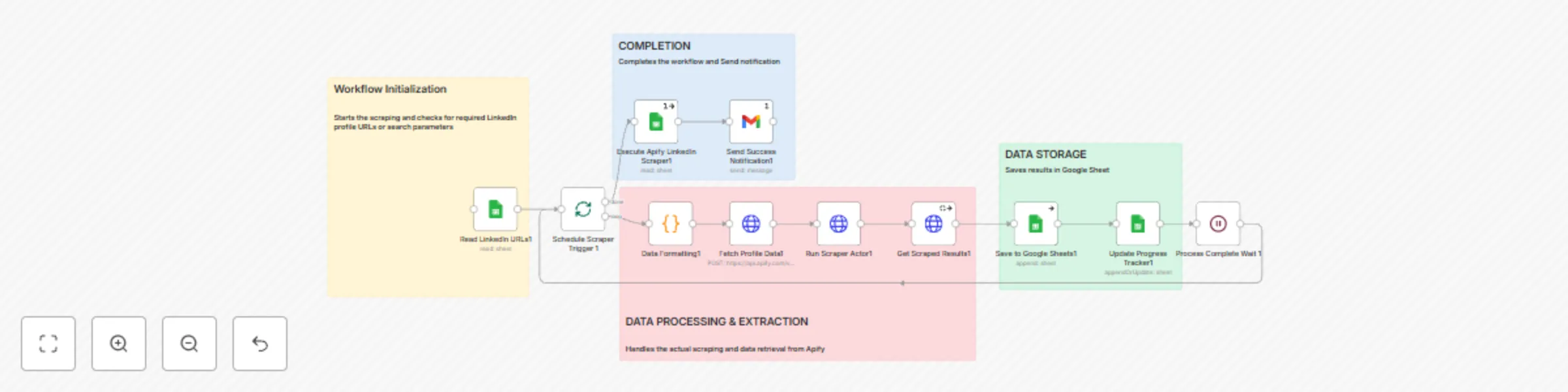
1. Workflow Initialization & Input

  • Webhook Start Scraper: Triggers the entire scraping workflow
  • Read LinkedIn URLs: Retrieves LinkedIn profile URLs from Google Sheets
  • Schedule Scraper Trigger: Sets up automated scheduling for regular scraping

2. Data Processing & Extraction

  • Data Formatting: Prepares and structures the LinkedIn URLs for processing
  • Fetch Profile Data: Makes HTTP requests to Apify API with profile URLs
  • Run Scraper Actor: Executes the Apify LinkedIn scraper actor
  • Get Scraped Results: Retrieves the extracted profile data from Apify

3. Data Storage & Completion

  • Save to Google Sheets: Stores the scraped profile data in organized spreadsheet format
  • Update Progress Tracker: Updates workflow status and progress tracking
  • Process Complete Wait: Ensures all operations finish before final steps
  • Send Success Notification: Alerts users when scraping is successfully completed

Requirements

Apify Account

  • Active Apify account with sufficient credits
  • API token for authentication
  • Access to LinkedIn Profile Scraper actor

Google Sheets

  • Google account with Sheets access
  • Properly formatted input sheet with LinkedIn URLs
  • Credentials configured in n8n

n8n Setup

  • HTTP Request node credentials for Apify
  • Google Sheets node credentials
  • Webhook endpoint configured

How to Use

Step 1: Prepare Your Data

  1. Create a Google Sheet with LinkedIn profile URLs
  2. Ensure the sheet has a column named 'linkedin_url'
  3. Add any additional columns for metadata (name, company, etc.)

Step 2: Configure Credentials

  1. Set up Apify API credentials in n8n
  2. Configure Google Sheets authentication
  3. Update webhook endpoint URL

Step 3: Customize Settings

  1. Adjust scraping parameters in the Apify node
  2. Modify data fields to extract based on your needs
  3. Set up notification preferences

Step 4: Execute Workflow

  1. Trigger via webhook or manual execution
  2. Monitor progress through the workflow
  3. Check Google Sheets for scraped data
  4. Review completion notifications

Good to Know

  • Rate Limits: LinkedIn scraping is subject to rate limits. The workflow includes delays to respect these limits.
  • Data Quality: Results depend on profile visibility and LinkedIn's anti-scraping measures.
  • Costs: Apify charges based on compute units used. Monitor your usage to control costs.
  • Compliance: Ensure your scraping activities comply with LinkedIn's Terms of Service and applicable laws.

Customizing This Workflow

Enhanced Data Processing

  • Add data enrichment steps to append additional information
  • Implement duplicate detection and merge logic
  • Create data validation rules for quality control

Advanced Notifications

  • Set up Slack or email alerts for different scenarios
  • Create detailed reports with scraping statistics
  • Implement error recovery mechanisms

Integration Options

  • Connect to CRM systems for automatic lead creation
  • Integrate with marketing automation platforms
  • Export data to analytics tools for further analysis

Troubleshooting

Common Issues

  • Apify Actor Failures: Check API limits and actor status
  • Google Sheets Errors: Verify permissions and sheet structure
  • Rate Limiting: Implement longer delays between requests
  • Data Quality Issues: Review scraping parameters and target profiles

Best Practices

  • Test with small batches before scaling up
  • Monitor Apify credit usage regularly
  • Keep backup copies of your data
  • Regular validation of scraped information accuracy

1.2 Logical Blocks

This catalog entry is organized from the workflow JSON. The node-level section below shows the executable blocks available for review before importing the template.

2. Block-by-Block Analysis

Block 1 - Read LinkedIn URLs1

Type / Role
n8n-nodes-base.googleSheets - googleSheets
Config choices
Version 4.6

Block 2 - Schedule Scraper Trigger 1

Type / Role
n8n-nodes-base.splitInBatches - splitInBatches
Config choices
Version 3

Block 3 - Execute Apify LinkedIn Scraper1

Type / Role
n8n-nodes-base.googleSheets - googleSheets
Config choices
Version 4.6

Block 4 - Fetch Profile Data1

Type / Role
n8n-nodes-base.httpRequest - httpRequest
Config choices
Version 4.2

Block 5 - Run Scraper Actor1

Type / Role
n8n-nodes-base.httpRequest - httpRequest
Config choices
Version 4.2

Block 6 - Get Scraped Results1

Type / Role
n8n-nodes-base.httpRequest - httpRequest
Config choices
Version 4.2

Block 7 - Save to Google Sheets1

Type / Role
n8n-nodes-base.googleSheets - googleSheets
Config choices
Version 4.6

Block 8 - Update Progress Tracker1

Type / Role
n8n-nodes-base.googleSheets - googleSheets
Config choices
Version 4.6

Block 9 - Process Complete Wait 1

Type / Role
n8n-nodes-base.wait - wait
Config choices
Version 1.1

Block 10 - Send Success Notification1

Type / Role
n8n-nodes-base.gmail - gmail
Config choices
Version 2.1

Block 11 - Sticky Note4

Type / Role
n8n-nodes-base.stickyNote - stickyNote
Config choices
Version 1

Block 12 - Data Formatting1

Type / Role
n8n-nodes-base.code - code
Config choices
Version 2

Block 13 - Sticky Note5

Type / Role
n8n-nodes-base.stickyNote - stickyNote
Config choices
Version 1

Block 14 - Sticky Note6

Type / Role
n8n-nodes-base.stickyNote - stickyNote
Config choices
Version 1

Block 15 - Sticky Note7

Type / Role
n8n-nodes-base.stickyNote - stickyNote
Config choices
Version 1

3. Summary Table

Workflow Scrape LinkedIn profiles & save to Google Sheets with Apify
Complexity advanced
Nodes 15
Categories Lead Generation
Author Oneclick AI Squad
Published 03 Jul 2025

4. Reproducing the Workflow from Scratch

  1. 1. Download the workflow JSON

    Use the JSON export at /data/workflows/5618/5618.json as the source template for this automation.

  2. 2. Import the template into n8n

    Open n8n, import the downloaded JSON, and review each node before activating the workflow.

  3. 3. Configure credentials and variables

    Replace placeholder credentials, API keys, webhook URLs, account IDs, and environment-specific values with your own settings.

  4. 4. Test with sample data

    Run the workflow manually or in a staging workspace, inspect node output, and confirm downstream systems receive the expected data.

  5. 5. Activate and monitor

    Enable the workflow only after testing, then monitor executions, errors, and rate limits during the first production runs.

5. General Notes & Resources

Review imported nodes carefully before activation. This catalog entry is intended to help you inspect the workflow structure, understand required services, and find related templates faster.

Node names, credentials, schedules, webhook paths, and external service limits may need adjustment for your workspace.

Frequently asked questions

What does Scrape LinkedIn profiles & save to Google Sheets with Apify do?

This n8n workflow automates the process of scraping LinkedIn profiles using the Apify platform and organizing the extracted data into Google Sheets for easy analysis and follow up. Use Cases Lead G...

What do I need before importing this workflow?

Review the workflow JSON, configure any required credentials in n8n, and test the automation in a safe workspace before using it in production.

Can I customize this workflow?

Yes. Use the block-by-block analysis and the downloadable JSON to inspect each node, then adjust credentials, prompts, schedules, filters, or destinations for your Lead Generation use case.