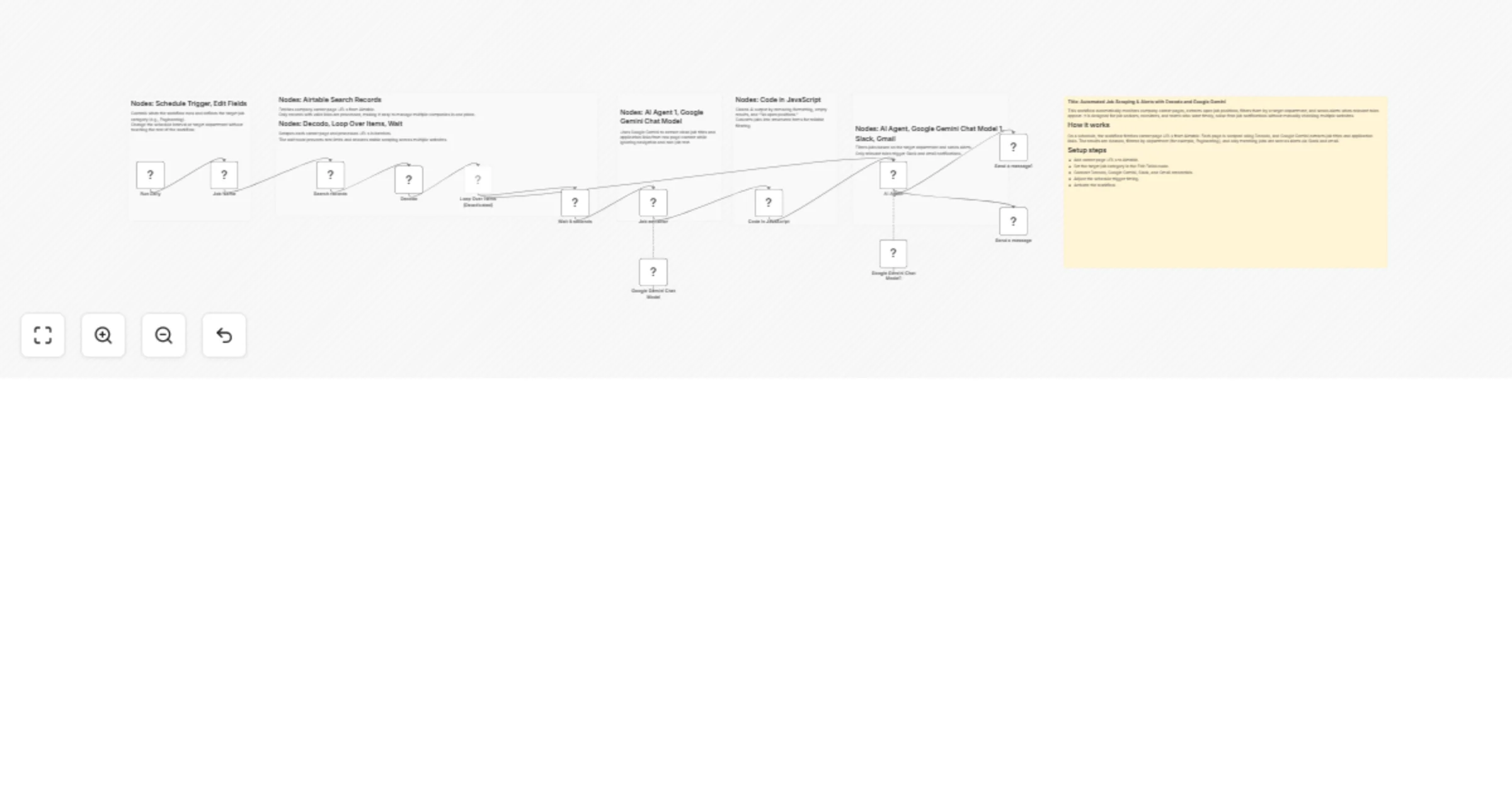
Scrape job listings and send alerts using Decodo, Google Gemini, Slack, and Gmail

Workflow preview

Workflow preview
100%
Scrape job listings and send alerts using Decodo, Google Gemini, Slack, and Gmail preview
Open on n8n.io

1. Workflow Overview

This n8n workflow automates job discovery by scanning company career pages, extracting open positions using AI, filtering them by department, and sending real time alerts via Slack and email. It is...

Best for

  • Market Research automation workflows
  • AI Summarization automation workflows
  • advanced n8n builders looking for reusable templates

Tools used

@decodo/n8n-nodes-decodo.decodo, @n8n/n8n-nodes-langchain.lmchatgooglegemini, n8n-nodes-base.code, @n8n/n8n-nodes-langchain.agent, n8n-nodes-base.splitinbatches, n8n-nodes-base.gmail, n8n-nodes-base.slack, n8n-nodes-base.stickynote

Source and attribution

This workflow is cataloged by N8N Workflows and links back to its original n8n.io source page by Zain Khan.

Original n8n.io source

1.1 Workflow description

Title
Scrape job listings and send alerts using Decodo, Google Gemini, Slack, and Gmail
Workflow name
Scrape job listings and send alerts using Decodo, Google Gemini, Slack, and Gmail

This n8n workflow automates job discovery by scanning company career pages, extracting open positions using AI, filtering them by department, and sending real-time alerts via Slack and email. It is ideal for monitoring targeted job roles (such as Engineering) across multiple companies without manual checking.

Use Cases Targeted Job Monitoring: Automatically track new job postings for a specific department or role. Faster Job Alerts: Receive instant Slack and email notifications when relevant positions are found. Multi-Company Career Tracking: Monitor multiple company career pages from a single Airtable base. Reduced Noise: Filter out irrelevant roles and avoid empty or misleading notifications.

Good to Know

  • The workflow runs on a schedule and processes career pages stored in Airtable.
  • Jobs are processed in batches with a delay node to avoid rate limits or scraping issues.
  • Google Gemini is used for intelligent job extraction and filtering, which may incur API costs.
  • If no relevant jobs are found, the workflow safely returns “No matching positions found” to prevent false alerts.
  • Some Gemini models may be geo-restricted depending on your region.

How it Works

  • Step 1: Job Source & Scheduling A Schedule Trigger starts the workflow and defines the job category to monitor (e.g., Engineering). Airtable is queried to fetch all company career page URLs.
  • Step 2: Scraping & Extraction Each career page is scraped using Decodo. Google Gemini analyzes the raw page content and extracts job titles with application URLs while ignoring navigation and non-job content.
  • Step 3: Data Cleaning & Structuring A JavaScript code node cleans the AI output, removes noise (e.g., “No open positions”), and converts results into structured job items.
  • Step 4: AI-Based Filtering A second AI Agent compares extracted jobs against the target department and keeps only relevant roles.
  • Step 5: Notifications Matching jobs are sent instantly to Slack and email.

How to Use

  1. Airtable Credentials: Connect Airtable and store career page URLs in the table.
  2. Google Gemini Credentials: Add your Gemini API key for AI extraction and filtering.
  3. Slack Credentials: Select a user or channel to receive job alerts.
  4. Gmail Credentials: Configure Gmail to receive job notification emails.
  5. Schedule Setup: Adjust the trigger interval based on how often you want job checks.
  6. Activate Workflow: Enable the workflow to start automated job monitoring.

Requirements

  • n8n instance (self-hosted or cloud)
  • Airtable base with company career page URLs
  • Google Gemini API key
  • Slack workspace
  • Gmail account for email notifications

1.2 Logical Blocks

This catalog entry is organized from the workflow JSON. The node-level section below shows the executable blocks available for review before importing the template.

2. Block-by-Block Analysis

Block 1 - Decodo

Type / Role
@decodo/n8n-nodes-decodo.decodo - decodo
Config choices
Version 1

Block 2 - Google Gemini Chat Model

Type / Role
@n8n/n8n-nodes-langchain.lmChatGoogleGemini - lmChatGoogleGemini
Config choices
Version 1

Block 3 - Code in JavaScript

Type / Role
n8n-nodes-base.code - code
Config choices
Version 2

Block 4 - AI Agent

Type / Role
@n8n/n8n-nodes-langchain.agent - agent
Config choices
Version 2.2

Block 5 - Google Gemini Chat Model1

Type / Role
@n8n/n8n-nodes-langchain.lmChatGoogleGemini - lmChatGoogleGemini
Config choices
Version 1

Block 6 - Loop Over Items

Type / Role
n8n-nodes-base.splitInBatches - splitInBatches
Config choices
Version 3

Block 7 - Send a message

Type / Role
n8n-nodes-base.gmail - gmail
Config choices
Version 2.1

Block 8 - Send a message1

Type / Role
n8n-nodes-base.slack - slack
Config choices
Version 2.3

Block 9 - Sticky Note

Type / Role
n8n-nodes-base.stickyNote - stickyNote
Config choices
Version 1

Block 10 - Sticky Note1

Type / Role
n8n-nodes-base.stickyNote - stickyNote
Config choices
Version 1

Block 11 - Sticky Note2

Type / Role
n8n-nodes-base.stickyNote - stickyNote
Config choices
Version 1

Block 12 - Search records

Type / Role
n8n-nodes-base.airtable - airtable
Config choices
Version 2.1

Block 13 - Run Daily

Type / Role
n8n-nodes-base.scheduleTrigger - scheduleTrigger
Config choices
Version 1.2

Block 14 - Job Name

Type / Role
n8n-nodes-base.set - set
Config choices
Version 3.4

Block 15 - Sticky Note3

Type / Role
n8n-nodes-base.stickyNote - stickyNote
Config choices
Version 1

Block 16 - Sticky Note4

Type / Role
n8n-nodes-base.stickyNote - stickyNote
Config choices
Version 1

Block 17 - Sticky Note5

Type / Role
n8n-nodes-base.stickyNote - stickyNote
Config choices
Version 1

Block 18 - Wait 5 seconds

Type / Role
n8n-nodes-base.wait - wait
Config choices
Version 1.1

Block 19 - Job extractor

Type / Role
@n8n/n8n-nodes-langchain.agent - agent
Config choices
Version 2.2

3. Summary Table

Workflow Scrape job listings and send alerts using Decodo, Google Gemini, Slack, and Gmail
Complexity advanced
Nodes 19
Categories Market Research, AI Summarization
Author Zain Khan
Published 03 Feb 2026

4. Reproducing the Workflow from Scratch

  1. 1. Download the workflow JSON

    Use the JSON export at /data/workflows/13187/13187.json as the source template for this automation.

  2. 2. Import the template into n8n

    Open n8n, import the downloaded JSON, and review each node before activating the workflow.

  3. 3. Configure credentials and variables

    Replace placeholder credentials, API keys, webhook URLs, account IDs, and environment-specific values with your own settings.

  4. 4. Test with sample data

    Run the workflow manually or in a staging workspace, inspect node output, and confirm downstream systems receive the expected data.

  5. 5. Activate and monitor

    Enable the workflow only after testing, then monitor executions, errors, and rate limits during the first production runs.

5. General Notes & Resources

Review imported nodes carefully before activation. This catalog entry is intended to help you inspect the workflow structure, understand required services, and find related templates faster.

Node names, credentials, schedules, webhook paths, and external service limits may need adjustment for your workspace.

Frequently asked questions

What does Scrape job listings and send alerts using Decodo, Google Gemini, Slack, and Gmail do?

This n8n workflow automates job discovery by scanning company career pages, extracting open positions using AI, filtering them by department, and sending real time alerts via Slack and email. It is...

What do I need before importing this workflow?

Review the workflow JSON, configure any required credentials in n8n, and test the automation in a safe workspace before using it in production.

Can I customize this workflow?

Yes. Use the block-by-block analysis and the downloadable JSON to inspect each node, then adjust credentials, prompts, schedules, filters, or destinations for your Market Research, AI Summarization use case.