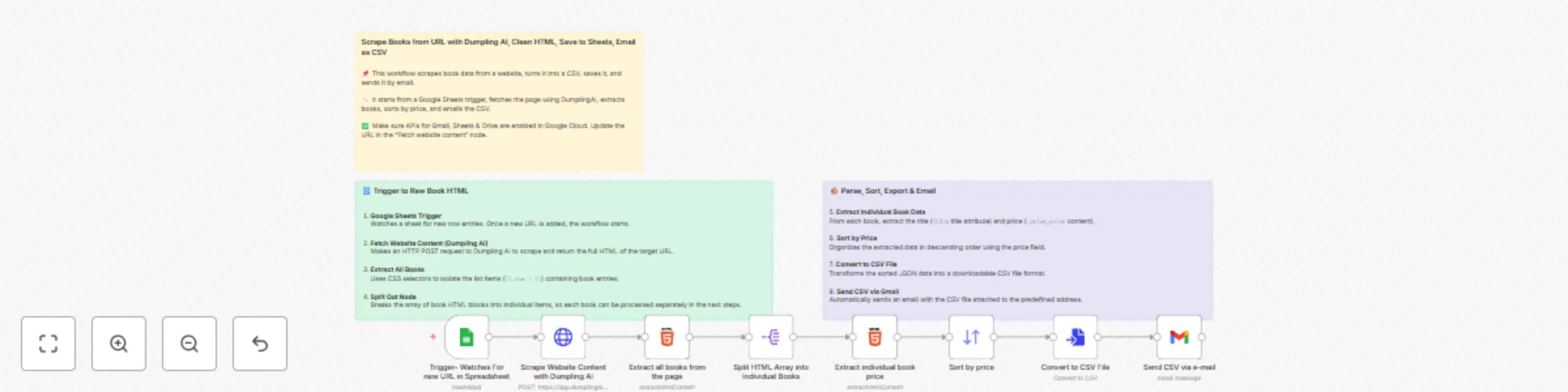
Scrape books from URL with Dumpling AI, clean HTML, save to Sheets, email as CSV

Workflow preview

Workflow preview
100%
Scrape books from URL with Dumpling AI, clean HTML, save to Sheets, email as CSV preview
Open on n8n.io

Important notice

This workflow is provided as-is. Please review and test before using in production.

1. Workflow Overview

Who is this for? This workflow is ideal for virtual assistants, researchers, developers, automation specialists, and data analysts who need to regularly extract and organize structured product i...

Best for

  • Market Research automation workflows
  • intermediate n8n builders looking for reusable templates

Tools used

n8n-nodes-base.converttofile, n8n-nodes-base.html, n8n-nodes-base.sort, n8n-nodes-base.gmail, n8n-nodes-base.stickynote, n8n-nodes-base.googlesheetstrigger, n8n-nodes-base.httprequest, n8n-nodes-base.splitout

Source and attribution

This workflow is cataloged by N8N Workflows and links back to its original n8n.io source page by Yang.

Original n8n.io source

1.1 Workflow description

Title
Scrape books from URL with Dumpling AI, clean HTML, save to Sheets, email as CSV
Workflow name
Scrape books from URL with Dumpling AI, clean HTML, save to Sheets, email as CSV

👥 Who is this for?

This workflow is ideal for virtual assistants, researchers, developers, automation specialists, and data analysts who need to regularly extract and organize structured product information (like books) from a website. It’s especially useful for those working with catalog-based websites who want to automate extraction and delivery of clean, sorted data.


🧩 What problem is this solving?

Manually copying product listings like book titles and prices from a website into a spreadsheet is slow and repetitive. This automation solves that problem by scraping content using Dumpling AI, extracting the right data using CSS selectors, and formatting it into a clean CSV file that is sent to your email—all triggered automatically when a new URL is added to Google Sheets.


⚙️ What this workflow does

This template automates an entire content scraping and delivery process:

  • Watches a Google Sheet for new URLs
  • Scrapes the HTML content of the given webpage using Dumpling AI
  • Uses CSS selectors in the HTML node to extract each book from the page
  • Splits the HTML array into individual items
  • Extracts the book title and price from each HTML block
  • Sorts the books in descending order based on price
  • Converts the sorted data to a CSV file
  • Sends the CSV via email using Gmail

🛠️ Setup

  1. Google Sheets

    • Create a sheet titled something like URLs
    • Add your product listing URLs (e.g., http://books.toscrape.com)
    • Connect the Google Sheets trigger node to your sheet
    • Ensure you have proper credentials connected
  2. Dumpling AI

    • Create an account at Dumpling AI - Generate your API key

    • Set the HTTP Method to POST and pass the URL dynamically from the Google Sheet

    • Use Header Auth to include your API key in the request header

    • Make sure "cleaned": "True" is included in the body for optimized HTML output

  3. HTML Node

    • The first HTML node extracts the main book container blocks using:
      .row > li
    • The second HTML node parses out the individual fields:
      • title: h3 > a (via the title attribute)
      • price: .price_color
  4. Sort Node

    • Sorts books by price in descending order
    • Note: price is extracted as a string, ensure it's parsable if you plan to use numeric filtering later
  5. Convert to CSV

    • The JSON data is passed into a Convert node and transformed into a CSV file
  6. Gmail

    • Sends the CSV as an attachment to a designated email

🔄 How to customize this workflow

  • Extract more data: Add more CSS selectors in the second HTML node to pull fields like author, availability, or product links
  • Switch destinations: Replace Gmail with Slack, Google Drive, Dropbox, or another platform
  • Adjust sorting: Sort alphabetically or based on another extracted value
  • Use a different source: As long as the site structure is consistent, this can scrape any listing-like page
  • Trigger differently: Use a webhook, form submission, or schedule trigger instead of Google Sheets

⚠️ Dependencies and Notes

  • This workflow uses Dumpling AI to perform the web scraping. This requires an API key and uses credits per request.
  • The HTML node depends on valid CSS selectors. If the site layout changes, the selectors may need to be updated.
  • Ensure you’re not scraping content from websites that prohibit automated scraping.

1.2 Logical Blocks

This catalog entry is organized from the workflow JSON. The node-level section below shows the executable blocks available for review before importing the template.

2. Block-by-Block Analysis

Block 1 - Convert to CSV File

Type / Role
n8n-nodes-base.convertToFile - convertToFile
Config choices
Version 1.1

Block 2 - Extract all books from the page

Type / Role
n8n-nodes-base.html - html
Config choices
Version 1.2

Block 3 - Sort by price

Type / Role
n8n-nodes-base.sort - sort
Config choices
Version 1

Block 4 - Extract individual book price

Type / Role
n8n-nodes-base.html - html
Config choices
Version 1.2

Block 5 - Send CSV via e-mail

Type / Role
n8n-nodes-base.gmail - gmail
Config choices
Version 2.1

Block 6 - Sticky Note3

Type / Role
n8n-nodes-base.stickyNote - stickyNote
Config choices
Version 1

Block 7 - Sticky Note

Type / Role
n8n-nodes-base.stickyNote - stickyNote
Config choices
Version 1

Block 8 - Sticky Note1

Type / Role
n8n-nodes-base.stickyNote - stickyNote
Config choices
Version 1

Block 9 - Trigger- Watches For new URL in Spreadsheet

Type / Role
n8n-nodes-base.googleSheetsTrigger - googleSheetsTrigger
Config choices
Version 1

Block 10 - Scrape Website Content with Dumpling AI

Type / Role
n8n-nodes-base.httpRequest - httpRequest
Config choices
Version 4.1

Block 11 - Split HTML Array into Individual Books

Type / Role
n8n-nodes-base.splitOut - splitOut
Config choices
Version 1

3. Summary Table

Workflow Scrape books from URL with Dumpling AI, clean HTML, save to Sheets, email as CSV
Complexity intermediate
Nodes 11
Categories Market Research
Author Yang
Published 24 Apr 2025

4. Reproducing the Workflow from Scratch

  1. 1. Download the workflow JSON

    Use the JSON export at /data/workflows/3701/3701.json as the source template for this automation.

  2. 2. Import the template into n8n

    Open n8n, import the downloaded JSON, and review each node before activating the workflow.

  3. 3. Configure credentials and variables

    Replace placeholder credentials, API keys, webhook URLs, account IDs, and environment-specific values with your own settings.

  4. 4. Test with sample data

    Run the workflow manually or in a staging workspace, inspect node output, and confirm downstream systems receive the expected data.

  5. 5. Activate and monitor

    Enable the workflow only after testing, then monitor executions, errors, and rate limits during the first production runs.

5. General Notes & Resources

Review imported nodes carefully before activation. This catalog entry is intended to help you inspect the workflow structure, understand required services, and find related templates faster.

Node names, credentials, schedules, webhook paths, and external service limits may need adjustment for your workspace.

Frequently asked questions

What does Scrape books from URL with Dumpling AI, clean HTML, save to Sheets, email as CSV do?

Who is this for? This workflow is ideal for virtual assistants, researchers, developers, automation specialists, and data analysts who need to regularly extract and organize structured product i...

What do I need before importing this workflow?

Review the workflow JSON, configure any required credentials in n8n, and test the automation in a safe workspace before using it in production.

Can I customize this workflow?

Yes. Use the block-by-block analysis and the downloadable JSON to inspect each node, then adjust credentials, prompts, schedules, filters, or destinations for your Market Research use case.