Block 1 - Format Data
- Type / Role
- n8n-nodes-base.code - code
- Config choices
- Version 2


 Early Deal
This workflow is provided as-is. Please review and test before using in production.
This workflow contains community nodes that are only compatible with the self hosted version of n8n. Description This n8n workflow automatically scrapes Airbnb listings from a specified location an...
n8n-nodes-base.code, n8n-nodes-base.googlesheets, n8n-nodes-mcp.mcpclient, n8n-nodes-base.set, n8n-nodes-base.splitinbatches, n8n-nodes-base.manualtrigger, n8n-nodes-base.if, n8n-nodes-base.merge
This workflow is cataloged by N8N Workflows and links back to its original n8n.io source page by Alex Huy.
Original n8n.io sourceThis workflow contains community nodes that are only compatible with the self-hosted version of n8n.
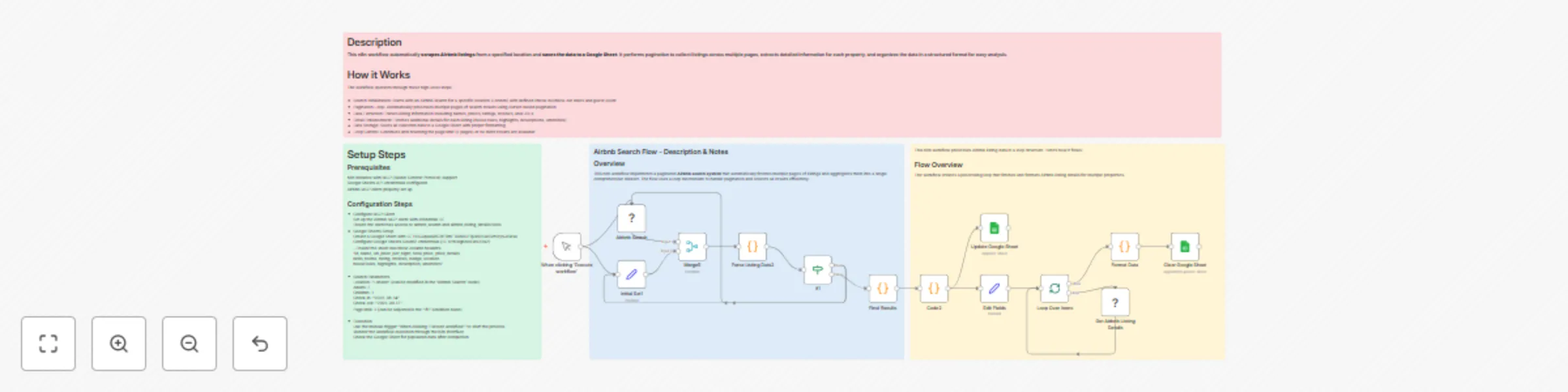
This n8n workflow automatically scrapes Airbnb listings from a specified location and saves the data to a Google Sheet. It performs pagination to collect listings across multiple pages, extracts detailed information for each property, and organizes the data in a structured format for easy analysis.
The workflow operates through these high-level steps:
Prerequisites n8n instance with MCP (Model Context Protocol) support Google Sheets API credentials configured Airbnb MCP client properly set up
Configuration Steps --- Configure MCP Client Set up the Airbnb MCP client with credential ID: Ensure the client has access to airbnb_search and airbnb_listing_details tools --- Google Sheets Setup Create a Google Sheet with ID: 15IOJquaQ8CBtFilmFTuW8UFijux10NwSVzStyNJ1MsA Configure Google Sheets OAuth2 credentials (ID: 6YhBlgb8cXMN3Ra2) Ensure the sheet has these column headers: "id, name, url, price_per_night, total_price, price_details beds_rooms, rating, reviews, badge, location houseRules, highlights, description, amenities"
Search Parameters Location: "London" (can be modified in the "Airbnb Search" node) Adults: 7 Children: 1 Check-in: "2025-08-14" Check-out: "2025-08-17" Page limit: 2 (can be adjusted in the "If1" condition node)
Execution Use the manual trigger "When clicking 'Execute workflow'" to start the process Monitor the workflow execution through the n8n interface Check the Google Sheet for populated data after completion
Key Features Automatic Pagination: Processes multiple pages without manual intervention Comprehensive Data: Extracts both basic listing info and detailed property information Error Handling: Includes JSON parsing error handling and data validation Batch Processing: Uses split batches for efficient processing of individual listings Real-time Updates: Appends new data to existing Google Sheet records
Each listing contains:
This catalog entry is organized from the workflow JSON. The node-level section below shows the executable blocks available for review before importing the template.
| Workflow | Scrape Airbnb listings with pagination & store in Google Sheets |
|---|---|
| Complexity | advanced |
| Nodes | 18 |
| Categories | Market Research |
| Author | Alex Huy |
| Published | 14 Jul 2025 |
Use the JSON export at /data/workflows/5981/5981.json as the source template for this automation.
Open n8n, import the downloaded JSON, and review each node before activating the workflow.
Replace placeholder credentials, API keys, webhook URLs, account IDs, and environment-specific values with your own settings.
Run the workflow manually or in a staging workspace, inspect node output, and confirm downstream systems receive the expected data.
Enable the workflow only after testing, then monitor executions, errors, and rate limits during the first production runs.
Review imported nodes carefully before activation. This catalog entry is intended to help you inspect the workflow structure, understand required services, and find related templates faster.
Node names, credentials, schedules, webhook paths, and external service limits may need adjustment for your workspace.
This workflow contains community nodes that are only compatible with the self hosted version of n8n. Description This n8n workflow automatically scrapes Airbnb listings from a specified location an...
Review the workflow JSON, configure any required credentials in n8n, and test the automation in a safe workspace before using it in production.
Yes. Use the block-by-block analysis and the downloadable JSON to inspect each node, then adjust credentials, prompts, schedules, filters, or destinations for your Market Research use case.