Route Facebook Story replies to Slack, Telegram, and Supabase CRM by region

Workflow preview

Workflow preview
100%
Route Facebook Story replies to Slack, Telegram, and Supabase CRM by region preview
Open on n8n.io

1. Workflow Overview

Facebook Story Replies → Telegram “Human Required” Routing + Supabase CRM This workflow automatically captures Facebook Story replies, normalizes incoming webhook payloads, stores them in Supabase,...

Best for

  • Ticket Management automation workflows
  • advanced n8n builders looking for reusable templates

Tools used

n8n-nodes-base.webhook, n8n-nodes-base.function, n8n-nodes-base.if, n8n-nodes-base.telegram, n8n-nodes-base.slack, n8n-nodes-base.supabase, n8n-nodes-base.stickynote

Source and attribution

This workflow is cataloged by N8N Workflows and links back to its original n8n.io source page by WeblineIndia.

Original n8n.io source

1.1 Workflow description

Title
Route Facebook Story replies to Slack, Telegram, and Supabase CRM by region
Workflow name
Route Facebook Story replies to Slack, Telegram, and Supabase CRM by region

Facebook Story Replies → Telegram “Human Required” Routing + Supabase CRM

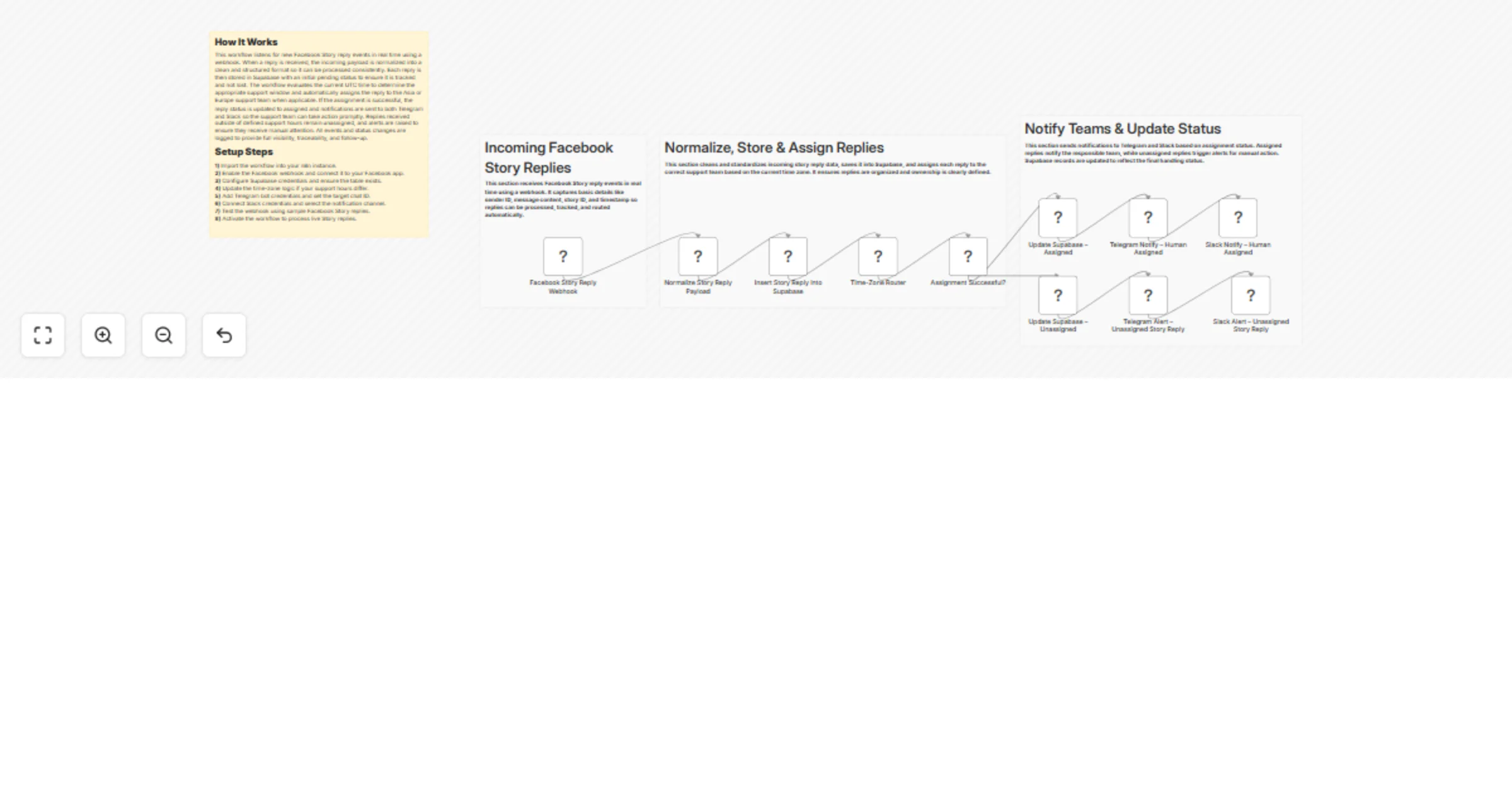
This workflow automatically captures Facebook Story replies, normalizes incoming webhook payloads, stores them in Supabase, assigns them to the correct regional support team based on UTC time, and sends real-time notifications to Slack and Telegram.

This workflow listens to Facebook Story reply webhooks, converts raw payloads into a clean data structure, saves each reply in Supabase with a pending status, and automatically assigns it to the Asia or Europe support team based on the current UTC time. Once assigned, notifications are sent to Slack and Telegram, ensuring no customer reply is missed.

You receive:

  • Real-time Facebook Story reply ingestion
  • Automatic support team assignment (Asia / Europe)
  • Centralized Supabase storage
  • Instant Slack & Telegram notifications
  • Alerts for replies outside support hours

Ideal for support teams handling high volumes of social media interactions with strict response-time requirements.

Quick Start – Implementation Steps

  1. Add your Facebook Webhook credentials and verify the callback URL.
  2. Connect Supabase credentials and confirm the replies table exists.
  3. Configure UTC-based time window logic for your support regions.
  4. Connect Slack credentials and select the notification channel.
  5. Add Telegram Bot Token and target chat ID.
  6. Activate the workflow — live reply handling starts instantly.

What It Does

This workflow automates end-to-end handling of Facebook Story replies:

  1. Receives Story reply events from Facebook via webhook.
  2. Normalizes incoming payloads into a structured format.
  3. Stores replies in Supabase with a pending status.
  4. Checks current UTC time to identify the active support window.
  5. Assigns replies to Asia or Europe support teams.
  6. Updates reply status to assigned when routing succeeds.
  7. Sends notifications to Slack and Telegram.
  8. Raises alerts for replies outside support hours.
  9. Logs all actions for auditing and follow-up.

This ensures consistent handling, assignment, and visibility of customer interactions.

Who’s It For

This workflow is ideal for:

  • Social media support teams
  • Customer success teams
  • Digital marketing teams
  • E-commerce support operations
  • SaaS companies handling Facebook DMs
  • Businesses requiring timezone-based support routing

Requirements to Use This Workflow

To run this workflow, you need:

  • n8n instance (cloud or self-hosted)
  • Facebook App with Webhook access
  • Supabase project + API credentials
  • Slack workspace with API permissions
  • Telegram Bot Token and chat ID
  • Basic understanding of JSON payloads and UTC time logic

How It Works

  1. Webhook Listener – Receives Facebook Story reply events.
  2. Normalize Payload – Converts raw webhook data into a clean format.
  3. Save to Supabase – Stores reply with pending status.
  4. Time Window Check – Evaluates current UTC time.
  5. Assign Support Team – Routes to Asia or Europe team.
  6. Update Status – Marks reply as assigned.
  7. Send Notifications – Alerts Slack and Telegram.
  8. Alert Handling – Flags replies outside support hours.

Setup Steps

  1. Import the workflow JSON into your n8n instance.
  2. Configure the Facebook Webhook node and verify it with your Facebook App.
  3. Connect Supabase credentials and ensure the replies table includes:
  • id
  • platform
  • story_id
  • sender_id
  • sender_name
  • message
  • status
  • assigned_to
  • timestamps
  1. Adjust support time windows (UTC) in the IF/Switch node.
  2. Connect Slack API credentials and choose the notification channel.
  3. Add Telegram Bot Token and chat ID.
  4. Test using sample Facebook Story reply payloads.
  5. Activate the workflow — production ready.

How To Customize Nodes

Customize Support Hours

Modify the time-check logic node to:

  • Change Asia / Europe support windows
  • Add additional regions
  • Handle weekends or holidays

Customize Supabase Storage

You can extend the table with:

  • Response SLA
  • Agent name
  • Resolution status
  • Follow-up notes
  • Raw webhook payload

Customize Notifications

Slack & Telegram messages can include:

  • Mentions (@channel, @support)
  • Emojis for priority
  • Direct links to CRM or dashboard
  • Highlighted urgent keywords

Customize Assignment Logic

You may:

  • Route based on message content
  • Assign by priority or keywords
  • Add AI-based sentiment classification
  • Use round-robin agent assignment

Add-Ons (Optional Enhancements)

You can extend this workflow to:

  • Add sentiment analysis (OpenAI)
  • Auto-reply with predefined responses
  • Create SLA breach alerts
  • Integrate with CRM tools
  • Generate daily or weekly reports
  • Add dashboard visualization in Supabase
  • Escalate urgent replies automatically

Use Case Examples

1. Social Media Support Routing

Automatically assign story replies to the correct regional team.

2. SLA Enforcement

Ensure replies are handled within working hours.

3. Multi-Channel Alerts

Notify teams instantly via Slack and Telegram.

4. Centralized Reply Tracking

Store all interactions in Supabase for audits.

5. Scalable Support Automation

Handle growing message volumes without manual routing.

Troubleshooting Guide

Issue Possible Cause Solution
No webhook data Webhook not verified Re-check Facebook webhook verification
Replies not assigned Time logic mismatch Validate UTC time windows
No Slack alert Invalid credentials Reconnect Slack API
Supabase insert fails Column mismatch Match table schema exactly
Telegram alert missing Wrong chat ID Verify bot permissions
Workflow inactive Workflow not activated Enable workflow

Need Help?

If you need help extending this workflow like adding AI analysis, advanced routing logic, CRM integration or scaling it for high-volume social channels, our n8n team at WeblineIndia can assist with enterprise-grade automation solutions.

1.2 Logical Blocks

This catalog entry is organized from the workflow JSON. The node-level section below shows the executable blocks available for review before importing the template.

2. Block-by-Block Analysis

Block 1 - Facebook Story Reply Webhook

Type / Role
n8n-nodes-base.webhook - webhook
Config choices
Version 1

Block 2 - Normalize Story Reply Payload

Type / Role
n8n-nodes-base.function - function
Config choices
Version 1

Block 3 - Time-Zone Router

Type / Role
n8n-nodes-base.function - function
Config choices
Version 1

Block 4 - Assignment Successful?

Type / Role
n8n-nodes-base.if - if
Config choices
Version 1

Block 5 - Telegram Notify – Human Assigned

Type / Role
n8n-nodes-base.telegram - telegram
Config choices
Version 1

Block 6 - Telegram Alert – Unassigned Story Reply

Type / Role
n8n-nodes-base.telegram - telegram
Config choices
Version 1

Block 7 - Slack Alert – Unassigned Story Reply

Type / Role
n8n-nodes-base.slack - slack
Config choices
Version 2.3

Block 8 - Slack Notify – Human Assigned

Type / Role
n8n-nodes-base.slack - slack
Config choices
Version 2.3

Block 9 - Insert Story Reply into Supabase

Type / Role
n8n-nodes-base.supabase - supabase
Config choices
Version 1

Block 10 - Update Supabase – Assigned

Type / Role
n8n-nodes-base.supabase - supabase
Config choices
Version 1

Block 11 - Update Supabase – Unassigned

Type / Role
n8n-nodes-base.supabase - supabase
Config choices
Version 1

Block 12 - Sticky Note

Type / Role
n8n-nodes-base.stickyNote - stickyNote
Config choices
Version 1

Block 13 - Sticky Note1

Type / Role
n8n-nodes-base.stickyNote - stickyNote
Config choices
Version 1

Block 14 - Sticky Note2

Type / Role
n8n-nodes-base.stickyNote - stickyNote
Config choices
Version 1

Block 15 - Sticky Note3

Type / Role
n8n-nodes-base.stickyNote - stickyNote
Config choices
Version 1

3. Summary Table

Workflow Route Facebook Story replies to Slack, Telegram, and Supabase CRM by region
Complexity advanced
Nodes 15
Categories Ticket Management
Author WeblineIndia
Published 05 Feb 2026

4. Reproducing the Workflow from Scratch

  1. 1. Download the workflow JSON

    Use the JSON export at /data/workflows/13231/13231.json as the source template for this automation.

  2. 2. Import the template into n8n

    Open n8n, import the downloaded JSON, and review each node before activating the workflow.

  3. 3. Configure credentials and variables

    Replace placeholder credentials, API keys, webhook URLs, account IDs, and environment-specific values with your own settings.

  4. 4. Test with sample data

    Run the workflow manually or in a staging workspace, inspect node output, and confirm downstream systems receive the expected data.

  5. 5. Activate and monitor

    Enable the workflow only after testing, then monitor executions, errors, and rate limits during the first production runs.

5. General Notes & Resources

Review imported nodes carefully before activation. This catalog entry is intended to help you inspect the workflow structure, understand required services, and find related templates faster.

Node names, credentials, schedules, webhook paths, and external service limits may need adjustment for your workspace.

Frequently asked questions

What does Route Facebook Story replies to Slack, Telegram, and Supabase CRM by region do?

Facebook Story Replies → Telegram “Human Required” Routing + Supabase CRM This workflow automatically captures Facebook Story replies, normalizes incoming webhook payloads, stores them in Supabase,...

What do I need before importing this workflow?

Review the workflow JSON, configure any required credentials in n8n, and test the automation in a safe workspace before using it in production.

Can I customize this workflow?

Yes. Use the block-by-block analysis and the downloadable JSON to inspect each node, then adjust credentials, prompts, schedules, filters, or destinations for your Ticket Management use case.