Reusable subworkflow zip multiple files dynamically (compress)
Workflow preview


 Early Deal
DISCOUNT 20%

Important notice
This workflow is provided as-is. Please review and test before using in production.
Overview
📦 Zip Multiple Files Dynamically
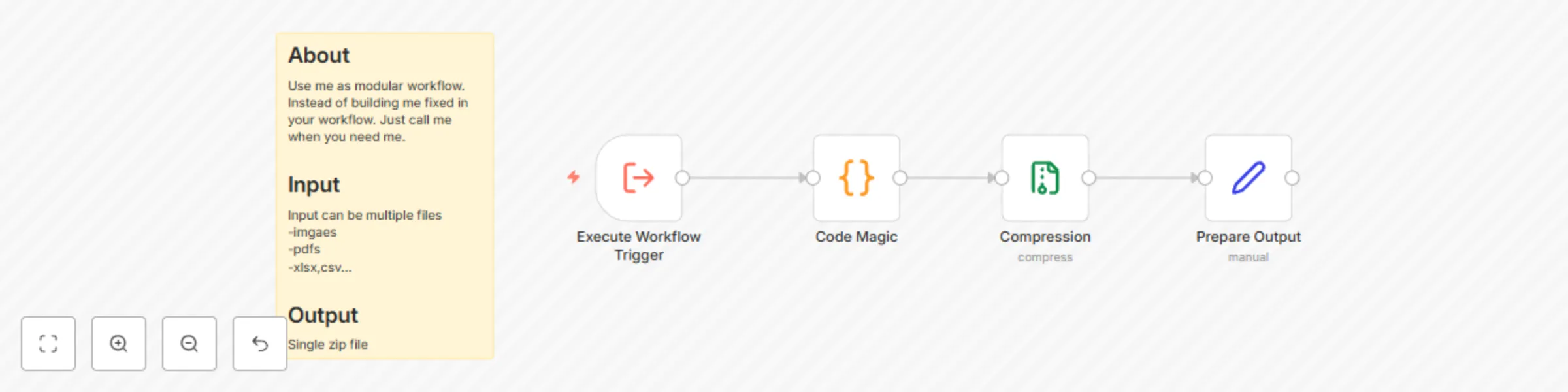
This template enables you to dynamically bundle multiple files into a ZIP archive. Designed to be used as a Subworkflow, it’s modular, flexible, and easy to integrate into various workflows. The output is a single ZIP file with a name that includes the current date, time, and fileName.
Shoutout: Code from: Tom (mutedjam)
👤 Who is this for?
This workflow is perfect for:
- 🚀 Businesses automating file archiving tasks.
- 💻 Developers managing files programmatically.
- 📂 Anyone needing a reusable solution for bundling files into ZIP archives.
❓ What problem is this workflow solving?
Manually zipping multiple files is:
- 🕒 Time-consuming.
- 🤔 Prone to errors.
This workflow automates the process and, as a Subworkflow, ensures:
- ⚡ Consistent file archiving across different workflows.
- 🛠️ Reduced manual effort.
- 📈 Streamlined integration into existing automation.
🔧 What this workflow does
- 🗂️ Dynamically collects binary files from the input.
- 📦 Bundles them into a single ZIP archive.
- 🕒 Names the ZIP file with the current date, time, and a customizable
fileName. - ✅ Outputs the ZIP file, ready for storage or further processing.
⚙️ Setup
- 🔗 Add this Subworkflow to your existing workflows.
- 📥 Pass the binary files as input to the Subworkflow.
- ▶️ Call the Subworkflow to generate a ZIP file.
🛠️ How to customize this workflow to your needs
- 🌐 File Sources: Adjust the input nodes in your parent workflow to connect to your preferred file sources.
- 📝 File Naming: Customize the logic for the output
fileNamein the Subworkflow. - 🚀 Additional Use Cases: Use this Subworkflow in various scenarios, such as:
- ✉️ Sending ZIP files via email.
- ☁️ Uploading ZIP files to cloud storage.
- 🔄 Triggering further automation.
🎉 Why use this as a Subworkflow?
Instead of building a fixed ZIP functionality for every workflow, this template offers a reusable solution that can be integrated into many different workflows effortlessly. Save time and ensure consistency across your automation projects! 💡