Replace your call center with an AI agent using GoHighLevel (GHL), VAPI & Twilio

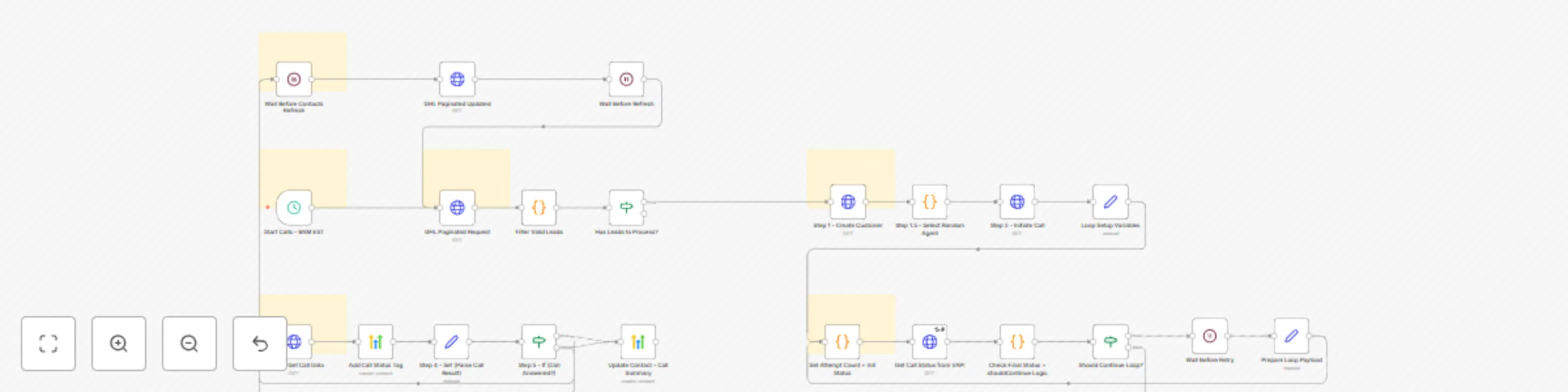
Workflow preview

Workflow preview
100%
Replace your call center with an AI agent using GoHighLevel (GHL), VAPI & Twilio preview
Open on n8n.io

Important notice

This workflow is provided as-is. Please review and test before using in production.

1. Workflow Overview

The AI Calling Agent is a fully automated phone assistant built with n8n, GoHighLevel (GHL), VAPI, and Twilio . This workflow allows you to: Trigger outbound calls from your CRM (GHL). Use a voice ...

Best for

  • Lead Nurturing automation workflows
  • AI Chatbot automation workflows
  • advanced n8n builders looking for reusable templates

Tools used

n8n-nodes-base.httprequest, n8n-nodes-base.set, n8n-nodes-base.if, n8n-nodes-base.code, n8n-nodes-base.wait, n8n-nodes-base.highlevel, n8n-nodes-base.scheduletrigger, n8n-nodes-base.stickynote

Source and attribution

This workflow is cataloged by N8N Workflows and links back to its original n8n.io source page by Țugui Dragoș.

Original n8n.io source

1.1 Workflow description

Title
Replace your call center with an AI agent using GoHighLevel (GHL), VAPI & Twilio
Workflow name
Replace your call center with an AI agent using GoHighLevel (GHL), VAPI & Twilio

The AI Calling Agent is a fully automated phone assistant built with n8n, GoHighLevel (GHL), VAPI, and Twilio.
This workflow allows you to:

  • Trigger outbound calls from your CRM (GHL).
  • Use a voice AI assistant (VAPI) to talk with leads in real time.
  • Route calls through Twilio.
  • Save appointments and full conversation summaries directly in GHL.

It has been tested on real warm leads (not random numbers) and proven stable at up to 300 calls/day without interruption.
Instead of manually calling and qualifying each lead, let the agent do it automatically and focus only on booked calls.


Workflow in Action

Appointment booking
  • The agent can confirm appointments and save them directly in your GHL calendar, along with the summary of the conversation.

Agent performance
  • You can monitor conversations, call logs, and outcomes directly in the VAPI dashboard.

Agent working live
  • Proof that the agent can run non-stop for hundreds of calls per day without errors or interruptions.
  • Demonstrates reliability and stability even under continuous execution.

Contact statuses
  • Each contact in GHL receives a status tag depending on the call result: answered, invalid number, no response, etc. This ensures your pipeline stays clean and updated automatically.

The brain of the agent
  • Inside VAPI, every assistant is powered by a command system (the brain) where you define how it should behave during calls.
  • In this case, the brain is propelled by OpenAI, but VAPI also supports a wide range of AI models such as Anthropic Claude, Google Gemini, Mistral, LLaMA and more.
  • The same flexibility applies to voices: you can instantly switch between integrated providers like ElevenLabs, Play.ht, Microsoft Azure Voices, Google Cloud TTS, and others.
  • This makes the agent not only smart but also highly customizable - from the intelligence driving the conversation to the exact voice your clients will hear.


Required APIs

To run this workflow, you need the following:

  • VAPI API key → for the voice AI assistant logic.
  • Twilio API key → to provide phone numbers and route calls.
  • GoHighLevel (GHL) API key → to manage contacts, pipelines, and save appointments.

Setup Steps

  1. Generate API keys for VAPI, Twilio, and GHL.
  2. Import the n8n template into your environment.
  3. Configure credentials in n8n for each API.
  4. Set your trigger conditions in GHL (e.g., pipeline stage changes, new leads).
  5. Test the workflow with a warm lead before scaling.
  6. (Optional) Adjust logging or sync results with Google Sheets/Notion.

💡 Use Cases

  • Sales Teams: Automatically call new inbound leads, qualify them, and book appointments.
  • Agencies: Replace repetitive cold calling with an automated assistant, then hand over only the hot leads to human agents.
  • Real Estate: Pre-qualify potential buyers or renters, schedule viewings, and save results in GHL.
  • Healthcare/Clinics: Confirm appointments, send reminders, and reduce no-shows with an AI calling agent.
  • Education/Coaching: Handle inquiries for courses, book consultations, and sync data with your CRM.
  • Inbound Calls: The agent can also be configured to answer incoming phone calls, providing information, capturing lead details, or routing the caller to the right person.

With this template, you get a scalable AI-powered sales assistant that saves hours of manual calling while ensuring every lead gets a fast, professional response.


Links

1.2 Logical Blocks

This catalog entry is organized from the workflow JSON. The node-level section below shows the executable blocks available for review before importing the template.

2. Block-by-Block Analysis

Block 1 - Step 1 - Create Customer

Type / Role
n8n-nodes-base.httpRequest - httpRequest
Config choices
Version 4.2

Block 2 - Step 2 - Initiate Call

Type / Role
n8n-nodes-base.httpRequest - httpRequest
Config choices
Version 4.2

Block 3 - Step 3 - Get Call Data

Type / Role
n8n-nodes-base.httpRequest - httpRequest
Config choices
Version 4.2

Block 4 - Step 4 - Set (Parse Call Result)

Type / Role
n8n-nodes-base.set - set
Config choices
Version 3.4

Block 5 - Step 5 - If (Call Answered?)

Type / Role
n8n-nodes-base.if - if
Config choices
Version 2.2

Block 6 - Set Attempt Count + Init Status

Type / Role
n8n-nodes-base.code - code
Config choices
Version 2

Block 7 - Get Call Status from VAPI

Type / Role
n8n-nodes-base.httpRequest - httpRequest
Config choices
Version 4.2

Block 8 - Check Final Status + shouldContinue Logic

Type / Role
n8n-nodes-base.code - code
Config choices
Version 2

Block 9 - Prepare Loop Payload

Type / Role
n8n-nodes-base.set - set
Config choices
Version 3.4

Block 10 - Should Continue Loop?

Type / Role
n8n-nodes-base.if - if
Config choices
Version 2.2

Block 11 - Wait Before Retry

Type / Role
n8n-nodes-base.wait - wait
Config choices
Version 1.1

Block 12 - Filter Valid Leads

Type / Role
n8n-nodes-base.code - code
Config choices
Version 2

Block 13 - Has Leads to Process?

Type / Role
n8n-nodes-base.if - if
Config choices
Version 2.2

Block 14 - Loop Setup Variables

Type / Role
n8n-nodes-base.set - set
Config choices
Version 3.4

Block 15 - Wait Before Contacts Refresh

Type / Role
n8n-nodes-base.wait - wait
Config choices
Version 1.1

Block 16 - Add Call Status Tag

Type / Role
n8n-nodes-base.highLevel - highLevel
Config choices
Version 2

Block 17 - Update Contact - Call Summary

Type / Role
n8n-nodes-base.highLevel - highLevel
Config choices
Version 2

Block 18 - Wait Before Refresh

Type / Role
n8n-nodes-base.wait - wait
Config choices
Version 1.1

Block 19 - GHL Paginated Request

Type / Role
n8n-nodes-base.httpRequest - httpRequest
Config choices
Version 4.2

Block 20 - Step 1.5 - Select Random Agent

Type / Role
n8n-nodes-base.code - code
Config choices
Version 2

Block 21 - GHL Paginated Updated

Type / Role
n8n-nodes-base.httpRequest - httpRequest
Config choices
Version 4.2

Block 22 - Start Calls - 9AM EST

Type / Role
n8n-nodes-base.scheduleTrigger - scheduleTrigger
Config choices
Version 1.2

Block 23 - Sticky Note1

Type / Role
n8n-nodes-base.stickyNote - stickyNote
Config choices
Version 1

Block 24 - Sticky Note2

Type / Role
n8n-nodes-base.stickyNote - stickyNote
Config choices
Version 1

Showing the first 24 of 28 workflow blocks. Download the JSON for the full node graph.

3. Summary Table

Workflow Replace your call center with an AI agent using GoHighLevel (GHL), VAPI & Twilio
Complexity advanced
Nodes 28
Categories Lead Nurturing, AI Chatbot
Author Țugui Dragoș
Published 06 Sept 2025

4. Reproducing the Workflow from Scratch

  1. 1. Download the workflow JSON

    Use the JSON export at /data/workflows/8339/8339.json as the source template for this automation.

  2. 2. Import the template into n8n

    Open n8n, import the downloaded JSON, and review each node before activating the workflow.

  3. 3. Configure credentials and variables

    Replace placeholder credentials, API keys, webhook URLs, account IDs, and environment-specific values with your own settings.

  4. 4. Test with sample data

    Run the workflow manually or in a staging workspace, inspect node output, and confirm downstream systems receive the expected data.

  5. 5. Activate and monitor

    Enable the workflow only after testing, then monitor executions, errors, and rate limits during the first production runs.

5. General Notes & Resources

Review imported nodes carefully before activation. This catalog entry is intended to help you inspect the workflow structure, understand required services, and find related templates faster.

Node names, credentials, schedules, webhook paths, and external service limits may need adjustment for your workspace.

Frequently asked questions

What does Replace your call center with an AI agent using GoHighLevel (GHL), VAPI & Twilio do?

The AI Calling Agent is a fully automated phone assistant built with n8n, GoHighLevel (GHL), VAPI, and Twilio . This workflow allows you to: Trigger outbound calls from your CRM (GHL). Use a voice ...

What do I need before importing this workflow?

Review the workflow JSON, configure any required credentials in n8n, and test the automation in a safe workspace before using it in production.

Can I customize this workflow?

Yes. Use the block-by-block analysis and the downloadable JSON to inspect each node, then adjust credentials, prompts, schedules, filters, or destinations for your Lead Nurturing, AI Chatbot use case.