Block 1 - Webhook
- Type / Role
- n8n-nodes-base.webhook - webhook
- Config choices
- Version 1


 Early Deal
This workflow is provided as-is. Please review and test before using in production.
Guidebook: How the Website ChatBot Template Works Chapter 1: Introduction & Objectives This guidebook provides a comprehensive walkthrough of the Website ChatBot developed using n8n and OpenAI. The...
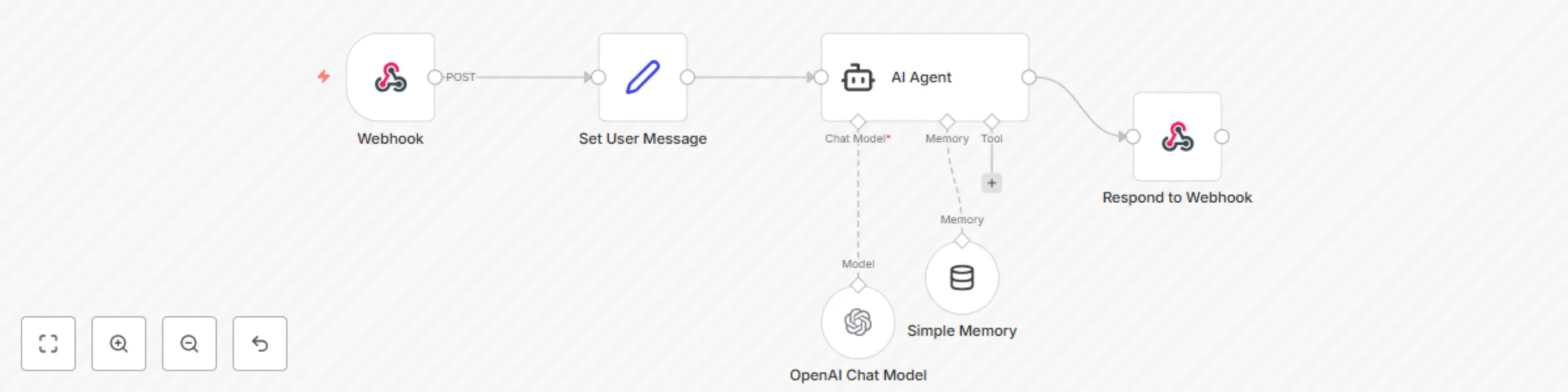
n8n-nodes-base.webhook, n8n-nodes-base.set, @n8n/n8n-nodes-langchain.agent, n8n-nodes-base.respondtowebhook, @n8n/n8n-nodes-langchain.lmchatopenai, @n8n/n8n-nodes-langchain.memorybufferwindow
This workflow is cataloged by N8N Workflows and links back to its original n8n.io source page by Tausif.
Original n8n.io sourceThis guidebook provides a comprehensive walkthrough of the Website ChatBot developed using n8n and OpenAI. The chatbot is designed to qualify real estate leads and encourage site visits for the Alcove New Kolkata Sangam project through personalized, intelligent conversations.
An open-source workflow builder to automate data flows between services.
For generating AI-based chatbot responses.
Frontend integration that sends messages via webhook to the chatbot.
/webhook/chatbot-webhookmessage from the JSON body.user_message.| Framework | Purpose |
|---|---|
| AIDA | Capture attention, interest, desire, action |
| BANT | Qualify Budget, Authority, Need, Timing |
| SPIN | Understand user's Situation, Problems, Implications |
| PAS | Tackle objections using Problem, Agitation, Solution |
The chatbot aims to qualify leads and gently move them toward booking a site visit without pushing or over-informing.
/webhook/chatbot-webhook.{
"message": "Looking for 2 BHK",
"session_id": "user123"
}
| Issue | Fix |
|---|---|
| No response | Check webhook URL or credentials |
| Repeated replies | Ensure memory node is active |
| Wrong language | Check system message language rules |
User: Hi, I’m looking for a home near the Ganga.
Bot: Namaste! Main Khusboo hoon, Alcove New Kolkata Sangam se. Aapka naam kya hai?
User: Rajat.
Bot: Great Rajat! Kya aap apne family ke saath shift hone ka plan kar rahe ho?
... (continues using frameworks)
Q: Can I update the AI agent persona? A: Yes, by modifying the system message inside the AI Agent node.
Q: How do I share new videos or links?
A: Add them in the sharingVideos or UserRequests section in the system message.
Q: How to scale this for multiple projects?
A: Duplicate the workflow and update the aboutProject and links accordingly.
End of Guidebook.
This catalog entry is organized from the workflow JSON. The node-level section below shows the executable blocks available for review before importing the template.
| Workflow | Real estate lead qualification chatbot with GPT-4o-mini |
|---|---|
| Complexity | intermediate |
| Nodes | 6 |
| Categories | Lead Nurturing, AI Chatbot |
| Author | Tausif |
| Published | 19 Jul 2025 |
Use the JSON export at /data/workflows/6162/6162.json as the source template for this automation.
Open n8n, import the downloaded JSON, and review each node before activating the workflow.
Replace placeholder credentials, API keys, webhook URLs, account IDs, and environment-specific values with your own settings.
Run the workflow manually or in a staging workspace, inspect node output, and confirm downstream systems receive the expected data.
Enable the workflow only after testing, then monitor executions, errors, and rate limits during the first production runs.
Review imported nodes carefully before activation. This catalog entry is intended to help you inspect the workflow structure, understand required services, and find related templates faster.
Node names, credentials, schedules, webhook paths, and external service limits may need adjustment for your workspace.
Guidebook: How the Website ChatBot Template Works Chapter 1: Introduction & Objectives This guidebook provides a comprehensive walkthrough of the Website ChatBot developed using n8n and OpenAI. The...
Review the workflow JSON, configure any required credentials in n8n, and test the automation in a safe workspace before using it in production.
Yes. Use the block-by-block analysis and the downloadable JSON to inspect each node, then adjust credentials, prompts, schedules, filters, or destinations for your Lead Nurturing, AI Chatbot use case.