Block 1 - Global Variables
- Type / Role
- n8n-nodes-base.set - set
- Config choices
- Version 3.3


 Early Deal
This workflow is provided as-is. Please review and test before using in production.
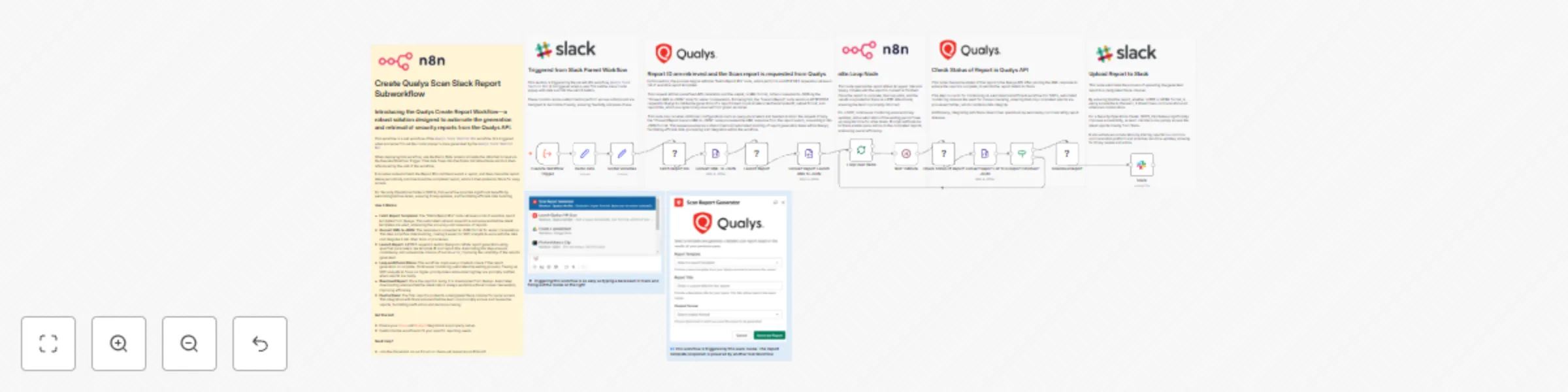
Introducing the Qualys Scan Slack Report Subworkflow—a robust solution designed to automate the generation and retrieval of security reports from the Qualys API. This workflow is a sub workflow of ...
n8n-nodes-base.set, n8n-nodes-base.httprequest, n8n-nodes-base.xml, n8n-nodes-base.splitinbatches, n8n-nodes-base.wait, n8n-nodes-base.if, n8n-nodes-base.slack, n8n-nodes-base.executeworkflowtrigger
This workflow is cataloged by N8N Workflows and links back to its original n8n.io source page by Angel Menendez.
Original n8n.io sourceThis workflow is a sub workflow of the Qualys Slack Shortcut Bot workflow. It is triggered when someone fills out the modal popup in slack generated by the Qualys Slack Shortcut Bot.
When deploying this workflow, use the Demo Data node to simulate the data that is input via the Execute Workflow Trigger. That data flows into the Global Variables Node which is then referenced by the rest of the workflow.
It includes nodes to Fetch the Report IDs and then Launch a report, and then check the report status periodically and download the completed report, which is then posted to Slack for easy access.
For Security Operations Centers (SOCs), this workflow provides significant benefits by automating tedious tasks, ensuring timely updates, and facilitating efficient data handling.
Fetch Report Templates: The "Fetch Report IDs" node retrieves a list of available report templates from Qualys. This automated retrieval saves time and ensures that the latest templates are used, enhancing the accuracy and relevance of reports.
Convert XML to JSON: The response is converted to JSON format for easier manipulation. This step simplifies data handling, making it easier for SOC analysts to work with the data and integrate it into other tools or processes.
Launch Report: A POST request is sent to Qualys to initiate report generation using specified parameters like template ID and report title. Automating this step ensures consistency and reduces the chance of human error, improving the reliability of the reports generated.
Loop and Check Status: The workflow loops every minute to check if the report generation is complete. Continuous monitoring automates the waiting process, freeing up SOC analysts to focus on higher-priority tasks while ensuring they are promptly notified when reports are ready.
Download Report: Once the report is ready, it is downloaded from Qualys. Automated downloading ensures that the latest data is always available without manual intervention, improving efficiency.
Post to Slack: The final report is posted to a designated Slack channel for quick access. This integration with Slack ensures that the team can promptly access and review the reports, facilitating swift action and decision-making.
Deploy this workflow to streamline your security report generation process, improve response times, and enhance the efficiency of your security operations.
This catalog entry is organized from the workflow JSON. The node-level section below shows the executable blocks available for review before importing the template.
| Workflow | Qualys scan Slack report subworkflow |
|---|---|
| Complexity | advanced |
| Nodes | 22 |
| Categories | SecOps |
| Author | Angel Menendez |
| Published | 31 Oct 2024 |
Use the JSON export at /data/workflows/2512/2512.json as the source template for this automation.
Open n8n, import the downloaded JSON, and review each node before activating the workflow.
Replace placeholder credentials, API keys, webhook URLs, account IDs, and environment-specific values with your own settings.
Run the workflow manually or in a staging workspace, inspect node output, and confirm downstream systems receive the expected data.
Enable the workflow only after testing, then monitor executions, errors, and rate limits during the first production runs.
Review imported nodes carefully before activation. This catalog entry is intended to help you inspect the workflow structure, understand required services, and find related templates faster.
Node names, credentials, schedules, webhook paths, and external service limits may need adjustment for your workspace.
Introducing the Qualys Scan Slack Report Subworkflow—a robust solution designed to automate the generation and retrieval of security reports from the Qualys API. This workflow is a sub workflow of ...
Review the workflow JSON, configure any required credentials in n8n, and test the automation in a safe workspace before using it in production.
Yes. Use the block-by-block analysis and the downloadable JSON to inspect each node, then adjust credentials, prompts, schedules, filters, or destinations for your SecOps use case.