Block 1 - Google Gemini Chat Model2
- Type / Role
- @n8n/n8n-nodes-langchain.lmChatGoogleGemini - lmChatGoogleGemini
- Config choices
- Version 1


 Early Deal
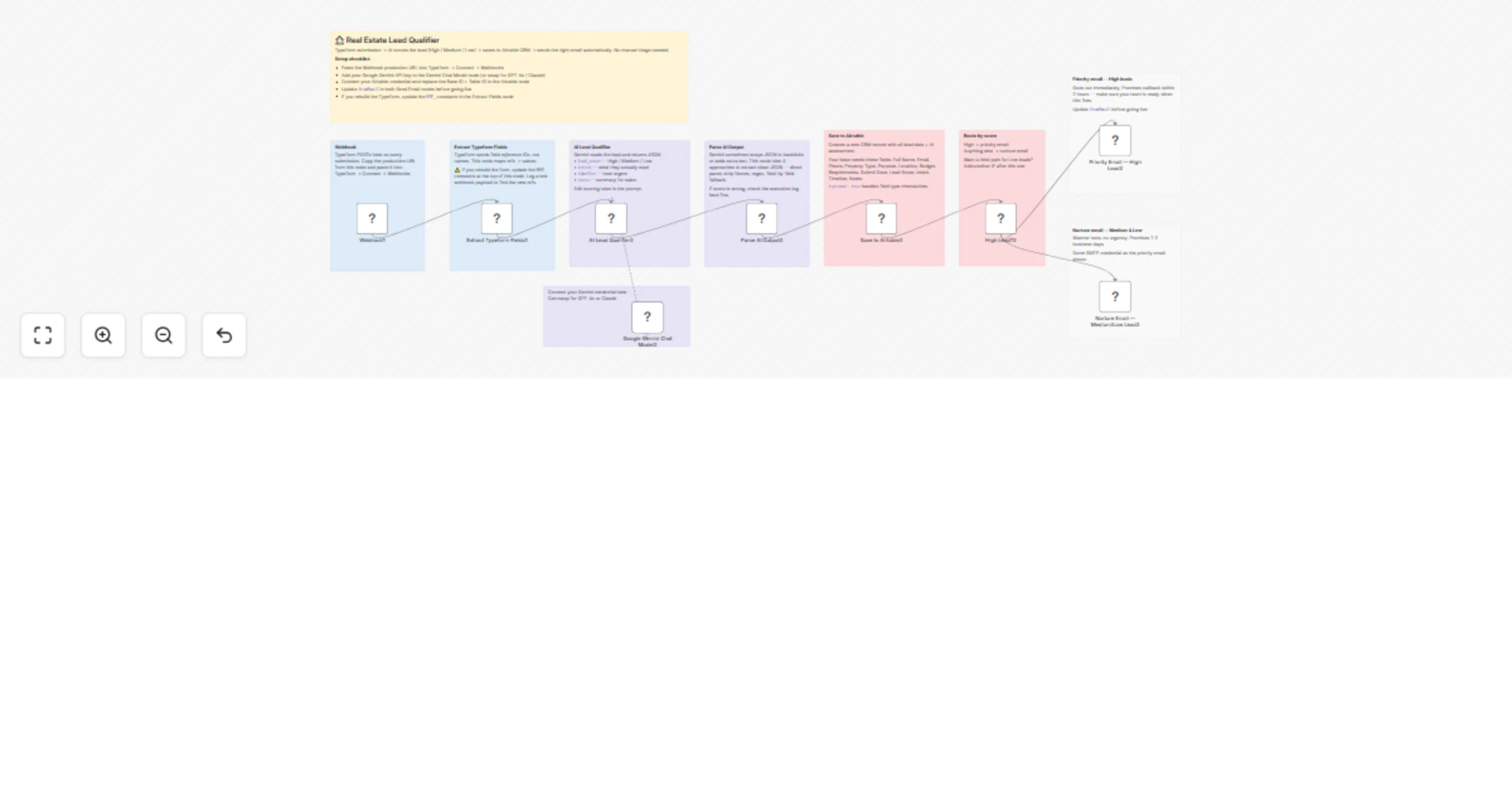
AI Real Estate Lead Qualifier — Typeform to Airtable with Smart Email Routing Automatically qualify property leads, score them with AI, save to Airtable, and send personalised emails — all in se...
@n8n/n8n-nodes-langchain.lmchatgooglegemini, n8n-nodes-base.emailsend, n8n-nodes-base.if, n8n-nodes-base.airtable, n8n-nodes-base.code, @n8n/n8n-nodes-langchain.agent, n8n-nodes-base.webhook, n8n-nodes-base.stickynote
This workflow is cataloged by N8N Workflows and links back to its original n8n.io source page by Nirav Gajera.
Original n8n.io sourceEvery time a prospect submits your Typeform property inquiry, this workflow kicks in automatically. It extracts their details, runs them through an AI lead scoring engine, saves the record to Airtable, and sends a personalised email — a priority response for hot leads, a nurture email for everyone else.
No manual review. No missed leads. No delayed follow-ups.
This is built for real estate agencies, leasing companies, and property managers who receive inquiries through Typeform and want instant, intelligent responses without hiring extra staff.
Prospect submits Typeform inquiry
 ↓
Webhook receives the form payload
 ↓
Extract Typeform Fields
 → name, email, phone, property type
 → purpose, location, budget, requirements
 ↓
AI Lead Qualifier (Google Gemini)
 → lead_score: High / Medium / Low
 → intent, timeline, notes
 ↓
Parse AI Output (4-layer fallback)
 ↓
Save to Airtable CRM
 ↓
High Lead? (IF check)
 ✅ YES → Priority Email (contact within 2 hours)
 ❌ NO → Nurture Email (contact within 1-2 days)
The AI automatically classifies leads based on these criteria:
| Score | Criteria |
|---|---|
| 🔴 High | Has budget + specific location + clear purpose (investment or near-term buying) |
| 🟡 Medium | Partial information — needs follow-up to qualify further |
| 🟢 Low | Vague inquiry, missing budget or location, early exploration |
The AI also extracts:
🏠 [Name], we have properties matching your needs!Thanks for reaching out, [Name]!Create a Typeform with these fields and note their field ref IDs from the Typeform API:
| Field | Type | Required |
|---|---|---|
| Full Name | Short text | ✅ |
| Phone Number | Phone | ✅ |
| Email Address | ✅ | |
| Property Type | Multiple choice | ✅ |
| Purpose | Multiple choice | ✅ |
| Preferred Location | Short text | ✅ |
| Budget Range | Multiple choice | ✅ |
| Requirements | Long text | ✅ |
| Consent | Yes/No | Optional |
Connect Typeform webhook:
In the Extract Typeform Fields Code node, update the REF_* constants to match your actual Typeform field reference IDs:
const REF_NAME = 'your-field-ref-here';
const REF_EMAIL = 'your-field-ref-here';
const REF_PHONE = 'your-field-ref-here';
// ... etc
Find your field refs from the Typeform API or by logging a test webhook payload.
Create an Airtable base with a table containing these fields:
| Field Name | Field Type |
|---|---|
| Full Name | Single line text |
| Email Address | |
| Mobile Phone Number | Phone |
| Property Type | Single line text |
| Purpose | Single line text |
| Preferred Location | Single line text |
| Budget Range | Single line text |
| Requirements | Long text |
| Submit Date | Single line text |
| Lead Score | Single line text |
| Intent | Single line text |
| Timeline | Single line text |
| Notes | Long text |
Update the Save to Airtable node with your Base ID and Table ID.
| Credential | Used for | Free? |
|---|---|---|
| Google Gemini (PaLM) API | AI lead scoring | Free tier available |
| Airtable Personal Access Token | CRM save | Free |
| SMTP | Sending emails | Depends on provider |
In both email nodes, update:
fromEmail — your sending addressRecommended SMTP providers for testing: Mailtrap (sandbox), Gmail, SendGrid
| Node | Type | Purpose |
|---|---|---|
| Webhook | Webhook | Receives Typeform POST payload |
| Extract Typeform Fields | Code | Parses answers by field ref ID |
| AI Lead Qualifier | AI Agent | Scores lead using Gemini |
| Google Gemini Chat Model | LLM | AI model for scoring |
| Parse AI Output | Code | Extracts JSON with 4-layer fallback |
| Save to Airtable | Airtable | Creates CRM record |
| High Lead? | IF | Routes by lead score |
| Priority Email | Email Send | Sends to High leads |
| Nurture Email | Email Send | Sends to Medium/Low leads |
Change scoring criteria: Edit the prompt in the AI Lead Qualifier node. Add your own rules — e.g. score higher if budget exceeds a threshold, or if the purpose is investment.
Add more email tiers: Add a third IF branch for Low leads with a different nurture sequence, or add a Slack/WhatsApp alert for High leads.
Use a different form:
The Extract Typeform Fields node uses Typeform's field.ref system. Replace it with a Google Forms or Jotform parser by adjusting how you read the incoming webhook body.
Change the AI model: Replace the Google Gemini node with Claude, OpenAI, or any other LLM Chat Model node — no other changes needed.
Add lead deduplication: Before saving to Airtable, add a search step to check if the email already exists and skip or update instead of creating a duplicate.
The Parse AI Output node uses a 4-layer fallback to ensure the workflow never breaks due to AI formatting issues:
lead_score: MediumThis means the workflow continues and saves the record even if the AI returns unexpected output.
Full Name: Sarah Johnson
Email Address: [email protected]
Mobile Phone: +91 9876543210
Property Type: 2BHK Apartment
Purpose: Investment
Preferred Location: Bandra, Mumbai
Budget Range: ₹80L - ₹1.2Cr
Requirements: Parking, gym, sea view
Submit Date: 2026-03-18T10:30:00Z
Lead Score: High
Intent: Serious buyer looking for investment property with strong rental yield
Timeline: Within 3 months
Notes: High-intent lead with clear budget and location. Has specific amenity requirements. Recommend immediate callback.
Built with n8n · Google Gemini AI · Typeform · Airtable · SMTP
This catalog entry is organized from the workflow JSON. The node-level section below shows the executable blocks available for review before importing the template.
| Workflow | Qualify real estate leads from Typeform to Airtable with Gemini and smart email routing |
|---|---|
| Complexity | advanced |
| Nodes | 19 |
| Categories | Lead Generation, AI Summarization |
| Author | Nirav Gajera |
| Published | 18 Mar 2026 |
Use the JSON export at /data/workflows/14137/14137.json as the source template for this automation.
Open n8n, import the downloaded JSON, and review each node before activating the workflow.
Replace placeholder credentials, API keys, webhook URLs, account IDs, and environment-specific values with your own settings.
Run the workflow manually or in a staging workspace, inspect node output, and confirm downstream systems receive the expected data.
Enable the workflow only after testing, then monitor executions, errors, and rate limits during the first production runs.
Review imported nodes carefully before activation. This catalog entry is intended to help you inspect the workflow structure, understand required services, and find related templates faster.
Node names, credentials, schedules, webhook paths, and external service limits may need adjustment for your workspace.
AI Real Estate Lead Qualifier — Typeform to Airtable with Smart Email Routing Automatically qualify property leads, score them with AI, save to Airtable, and send personalised emails — all in se...
Review the workflow JSON, configure any required credentials in n8n, and test the automation in a safe workspace before using it in production.
Yes. Use the block-by-block analysis and the downloadable JSON to inspect each node, then adjust credentials, prompts, schedules, filters, or destinations for your Lead Generation, AI Summarization use case.