Qualify & nurture website demo requests with Claude AI, Cal.com and Instantly.ai

Workflow preview

Workflow preview
100%
Qualify & nurture website demo requests with Claude AI, Cal.com and Instantly.ai preview
Open on n8n.io

Important notice

This workflow is provided as-is. Please review and test before using in production.

1. Workflow Overview

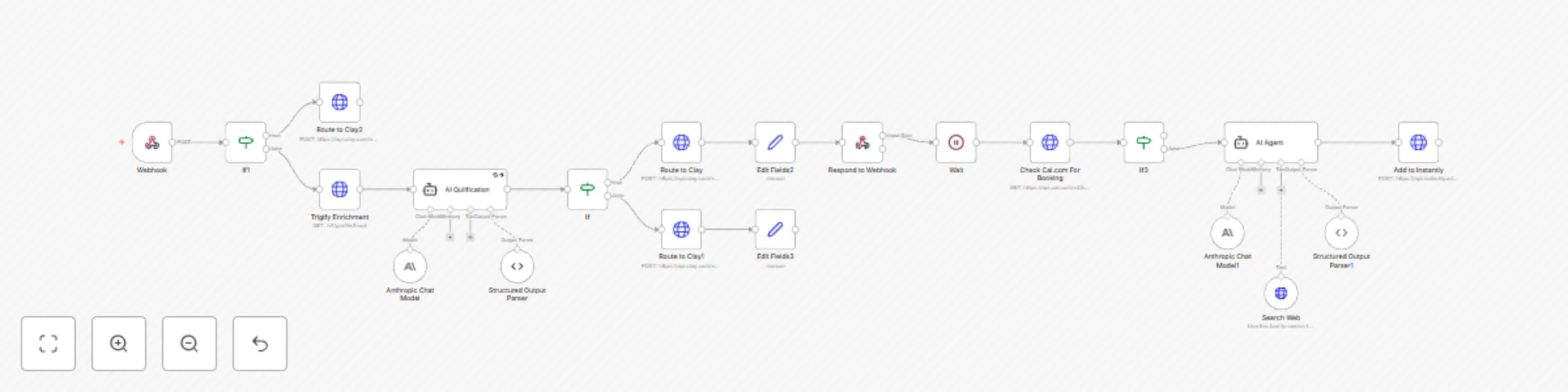
An intelligent automation workflow that processes website demo requests, qualifies leads using AI powered analysis, and automatically nurtures prospects through personalized follow up sequences to ...

Best for

  • Lead Generation automation workflows
  • AI Summarization automation workflows
  • advanced n8n builders looking for reusable templates

Tools used

n8n-nodes-base.webhook, n8n-nodes-base.if, n8n-nodes-base.set, n8n-nodes-base.httprequest, @n8n/n8n-nodes-langchain.lmchatanthropic, @n8n/n8n-nodes-langchain.outputparserstructured, @n8n/n8n-nodes-langchain.agent, n8n-nodes-base.respondtowebhook

Source and attribution

This workflow is cataloged by N8N Workflows and links back to its original n8n.io source page by Max Mitcham.

Original n8n.io source

1.1 Workflow description

Title
Qualify & nurture website demo requests with Claude AI, Cal.com and Instantly.ai
Workflow name
Qualify & nurture website demo requests with Claude AI, Cal.com and Instantly.ai

An intelligent automation workflow that processes website demo requests, qualifies leads using AI-powered analysis, and automatically nurtures prospects through personalized follow-up sequences to maximize conversion rates.

Overview

This workflow transforms raw website leads into qualified prospects through intelligent filtering, enrichment, and personalized nurturing. It combines AI-powered qualification with automated follow-up to ensure high-quality leads receive immediate attention while nurturing those needing additional touchpoints.


🔄 Workflow Process

1. Entry Point - Webhook

Website form submission capture

  • Receives demo requests from website forms in real-time
  • Captures lead data including LinkedIn URL, email, use case, and referral source

2. Initial Routing Filter

Source-based lead classification

  • Filters out low-quality leads from "lead_capture_box" sources
  • Routes qualified submissions to enrichment process

3. Lead Enrichment

Comprehensive data enhancement

  • Enriches LinkedIn profile data via Trigify API
  • Gathers additional company and professional intelligence

4. AI Qualification Engine

Intelligent prospect evaluation

  • Uses Claude AI to assess lead quality across multiple criteria:
    • B2B company validation
    • Geographic filtering (US, UK, Europe, Australia)
    • Senior-level job titles or strategic keywords
    • Current employment verification

5. Booking Verification Check

Conversion status validation

  • Checks Cal.com API to verify demo scheduling
  • Routes booked leads to completion, non-booked to nurturing

6. AI-Powered Follow-up Research

Personalized nurturing preparation

  • Researches prospect's company using AI and web search
  • Generates personalized follow-up messaging based on use case and company context

7. Email Campaign Integration

Automated nurturing execution

  • Adds qualified, non-booking leads to Instantly.ai email campaigns
  • Includes personalized research for tailored outreach

🛠️ Technology Stack

  • n8n: Workflow orchestration
  • Trigify API: Lead enrichment
  • Claude AI: Qualification and personalized research
  • Clay: CRM integration
  • Cal.com API: Booking verification
  • Instantly.ai: Email campaign automation

✨ Key Features

  • Real-time lead processing and AI-powered qualification
  • Geographic and demographic filtering for market focus
  • Automated booking verification and conversion tracking
  • Personalized follow-up research and content generation
  • Multi-platform integration for seamless lead management

🎯 Ideal Use Cases

Perfect for B2B companies with demo-driven sales processes:

  • SaaS companies requiring product demonstrations
  • B2B service providers needing qualified prospect identification
  • Sales teams managing high-volume inbound lead qualification
  • Organizations with international markets requiring geographic focus

📈 Business Impact

Transform website visitors into qualified sales opportunities:

  • Lead Quality Enhancement: AI filtering ensures only qualified prospects reach sales
  • Conversion Optimization: Systematic follow-up increases demo booking rates
  • Sales Efficiency: Automated qualification frees teams for high-value activities
  • Personalized Engagement: Research-driven follow-up increases response rates

💡 Strategic Advantage

This workflow creates a sophisticated qualification funnel that combines automation with personalization. By using AI-powered assessment and research-driven follow-up, it ensures qualified prospects receive appropriate attention while preventing resource waste on unqualified leads.

The system maximizes the value extracted from every website visitor by focusing sales efforts on highest-probability opportunities while automatically nurturing prospects who need additional touchpoints to convert.

1.2 Logical Blocks

This catalog entry is organized from the workflow JSON. The node-level section below shows the executable blocks available for review before importing the template.

2. Block-by-Block Analysis

Block 1 - Webhook

Type / Role
n8n-nodes-base.webhook - webhook
Config choices
Version 2

Block 2 - If

Type / Role
n8n-nodes-base.if - if
Config choices
Version 2.2

Block 3 - Edit Fields2

Type / Role
n8n-nodes-base.set - set
Config choices
Version 3.4

Block 4 - Route to Clay

Type / Role
n8n-nodes-base.httpRequest - httpRequest
Config choices
Version 4.2

Block 5 - Edit Fields3

Type / Role
n8n-nodes-base.set - set
Config choices
Version 3.4

Block 6 - If1

Type / Role
n8n-nodes-base.if - if
Config choices
Version 2.2

Block 7 - Route to Clay2

Type / Role
n8n-nodes-base.httpRequest - httpRequest
Config choices
Version 4.2

Block 8 - Anthropic Chat Model

Type / Role
@n8n/n8n-nodes-langchain.lmChatAnthropic - lmChatAnthropic
Config choices
Version 1.3

Block 9 - Structured Output Parser

Type / Role
@n8n/n8n-nodes-langchain.outputParserStructured - outputParserStructured
Config choices
Version 1.2

Block 10 - AI Qulification

Type / Role
@n8n/n8n-nodes-langchain.agent - agent
Config choices
Version 2

Block 11 - Respond to Webhook

Type / Role
n8n-nodes-base.respondToWebhook - respondToWebhook
Config choices
Version 1.3

Block 12 - Wait

Type / Role
n8n-nodes-base.wait - wait
Config choices
Version 1.1

Block 13 - Check Cal.com For Booking

Type / Role
n8n-nodes-base.httpRequest - httpRequest
Config choices
Version 4.2

Block 14 - If3

Type / Role
n8n-nodes-base.if - if
Config choices
Version 2.2

Block 15 - Add to Instantly

Type / Role
n8n-nodes-base.httpRequest - httpRequest
Config choices
Version 4.2

Block 16 - AI Agent

Type / Role
@n8n/n8n-nodes-langchain.agent - agent
Config choices
Version 2

Block 17 - Anthropic Chat Model1

Type / Role
@n8n/n8n-nodes-langchain.lmChatAnthropic - lmChatAnthropic
Config choices
Version 1.3

Block 18 - Search Web

Type / Role
@n8n/n8n-nodes-langchain.toolHttpRequest - toolHttpRequest
Config choices
Version 1.1

Block 19 - Structured Output Parser1

Type / Role
@n8n/n8n-nodes-langchain.outputParserStructured - outputParserStructured
Config choices
Version 1.2

Block 20 - Route to Clay1

Type / Role
n8n-nodes-base.httpRequest - httpRequest
Config choices
Version 4.2

Block 21 - Trigify Enrichment

Type / Role
n8n-nodes-base.httpRequest - httpRequest
Config choices
Version 4.2

3. Summary Table

Workflow Qualify & nurture website demo requests with Claude AI, Cal.com and Instantly.ai
Complexity advanced
Nodes 21
Categories Lead Generation, AI Summarization
Author Max Mitcham
Published 24 Jul 2025

4. Reproducing the Workflow from Scratch

  1. 1. Download the workflow JSON

    Use the JSON export at /data/workflows/6380/6380.json as the source template for this automation.

  2. 2. Import the template into n8n

    Open n8n, import the downloaded JSON, and review each node before activating the workflow.

  3. 3. Configure credentials and variables

    Replace placeholder credentials, API keys, webhook URLs, account IDs, and environment-specific values with your own settings.

  4. 4. Test with sample data

    Run the workflow manually or in a staging workspace, inspect node output, and confirm downstream systems receive the expected data.

  5. 5. Activate and monitor

    Enable the workflow only after testing, then monitor executions, errors, and rate limits during the first production runs.

5. General Notes & Resources

Review imported nodes carefully before activation. This catalog entry is intended to help you inspect the workflow structure, understand required services, and find related templates faster.

Node names, credentials, schedules, webhook paths, and external service limits may need adjustment for your workspace.

Frequently asked questions

What does Qualify & nurture website demo requests with Claude AI, Cal.com and Instantly.ai do?

An intelligent automation workflow that processes website demo requests, qualifies leads using AI powered analysis, and automatically nurtures prospects through personalized follow up sequences to ...

What do I need before importing this workflow?

Review the workflow JSON, configure any required credentials in n8n, and test the automation in a safe workspace before using it in production.

Can I customize this workflow?

Yes. Use the block-by-block analysis and the downloadable JSON to inspect each node, then adjust credentials, prompts, schedules, filters, or destinations for your Lead Generation, AI Summarization use case.