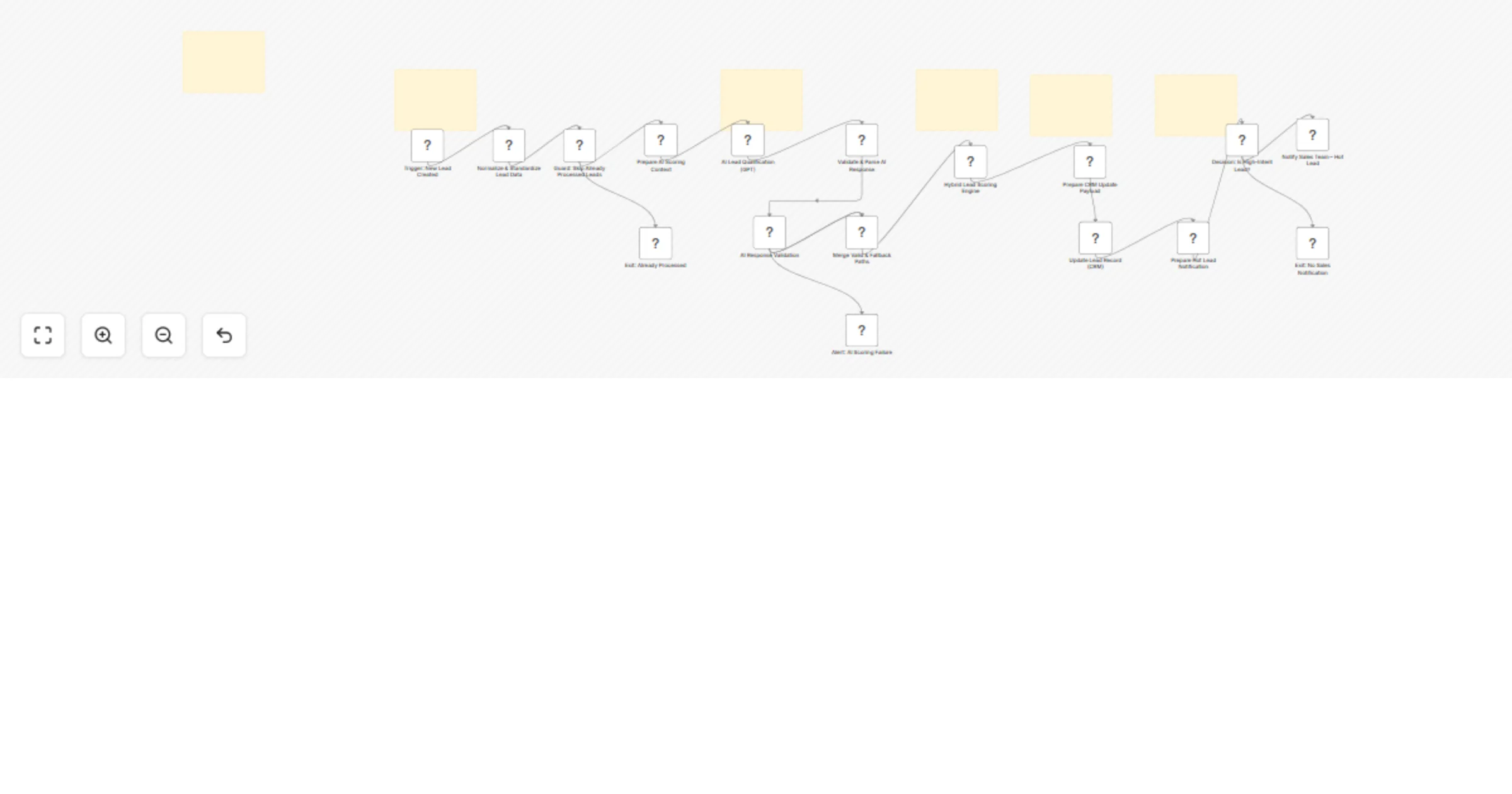
Qualify and score leads in Airtable with OpenAI and Slack alerts

Workflow preview

Workflow preview
100%
Qualify and score leads in Airtable with OpenAI and Slack alerts preview
Open on n8n.io

1. Workflow Overview

Description Automatically qualify, score, and route new leads using a hybrid AI + rule based scoring engine. This workflow analyzes incoming leads from Airtable, enriches them with OpenAI powere...

Best for

  • Lead Generation automation workflows
  • AI Summarization automation workflows
  • advanced n8n builders looking for reusable templates

Tools used

n8n-nodes-base.airtabletrigger, n8n-nodes-base.set, n8n-nodes-base.if, n8n-nodes-base.noop, @n8n/n8n-nodes-langchain.openai, n8n-nodes-base.code, n8n-nodes-base.merge, n8n-nodes-base.slack

Source and attribution

This workflow is cataloged by N8N Workflows and links back to its original n8n.io source page by Edson Encinas.

Original n8n.io source

1.1 Workflow description

Title
Qualify and score leads in Airtable with OpenAI and Slack alerts
Workflow name
Qualify and score leads in Airtable with OpenAI and Slack alerts

đź§© Description

Automatically qualify, score, and route new leads using a hybrid AI + rule-based scoring engine. This workflow analyzes incoming leads from Airtable, enriches them with OpenAI-powered qualification, applies deterministic business rules, and instantly alerts your sales team in Slack when a high-intent lead is detected.

🎯 Who’s it for

  • Sales teams that want instant alerts for high-intent leads
  • Founders who need automated qualification without hiring SDRs
  • Marketing teams running paid campaigns and capturing inbound leads
  • RevOps teams building structured, explainable scoring systems

If you store leads in Airtable and want AI-assisted qualification with fallback logic (not just blind AI scoring), this template is for you.

🤖 What it does

This workflow implements a hybrid lead scoring model:

  1. Triggers when a new lead is created in Airtable.
  2. Normalizes and standardizes lead data.
  3. Sends structured context to OpenAI for qualification.
  4. Validates the AI response (strict JSON parsing).
  5. Falls back to deterministic scoring if AI fails.
  6. Combines AI score (50% weight) + rule-based score.
  7. Updates Airtable with:
  • Final score (0–100)
  • Hot/Warm/Cold tag
  • AI reasoning
  • Confidence level
  1. Sends Slack alerts:
  • 🔥 Hot leads (score ≥ 80)
  • ⚠️ AI scoring failures (manual review required)

Unlike basic AI-only scoring, this workflow guarantees reliability by combining LLM reasoning with business logic.

🔄 How it works

  1. Lead intake & guardrail
  • Airtable Trigger watches for new records.
  • A guard condition prevents re-processing already scored leads (processed = true).
  1. AI qualification engine
  • A structured prompt sends lead context to OpenAI.
  • A code node vlidates and safely parses the JSON.
  • If invalid - fallback scoring is activated + Slack alert.
  1. Deterministic scoring layer Business logic evaluates:
  • Company size
  • Role authority (Founder, Executive, Manager)
  • Industry relevance
  • Intent message length

The deterministic score is capped at 50.

How deteministic scoring works? Larger companies receive higher baseline scores:

  • 1-10: 5
  • 11-50: 10
  • 51-200: 20
  • 201-500": 25
  • 501-1000": 30
  • 1000+: 35

You can increase or decrease these values depending on your Ideal Customer Profile (ICP).

Industry boost

  • Technology/Software: 10
  • SaaS/Cloud Services: 15
  • Cybersecurity: 20
  • IT Services/Consulting: 10

If your product is industry-specific, this is where you fine-tune relevance.

Role authority boost Decision-making power increases lead quality:

  • Founder → +20
  • Executive → +20
  • Manager → +10
  • Head → +10

The workflow detects these keywords inside the role field and applies the corresponding boost. Intent boost (message length) Longer intent messages imply higher purchase interest:

  • 100 characters → +15
  • 50 characters → +8
  1. Hybrid scoring formula Final Score = (AI Score Ă— 0.5) + Deterministic Score

Tag thresholds:

  • 80–100 → Hot
  • 50–79 → Warm
  • 0–49 → Cold
  1. CRM update

The workflow updates Airtable with:

  • score
  • ai_score
  • deterministic_score
  • tag
  • ai_reason
  • score_confidence
  • processed = true
  1. Sales alert logic If:
  • Tag = Hot
  • Score ≥ 80

→ Slack sends an immediate notification to the sales team.

đź“‹ Requirements

You’ll need:

  • Airtable account (Base with Leads table)
  • OpenAI API credentials
  • Slack bot credentials
  • n8n (Cloud or Self-hosted)

No API keys are hardcoded. All credentials use secure n8n credential storage.

🛠️ How to set up

  1. Import the workflow.
  2. Connect credentials:
  • Airtable
  • OpenAI
  • Slack
  1. Update:
  • Airtable Base ID
  • Table name
  • Slack channel
  1. Ensure your Airtable table includes:
  • lead_id (unique)
  • first_name (text)
  • last_name (text)
  • email
  • phone
  • job_role (single select)
  • industry (single select)
  • company_size (single select)
  • intent_message (long text) -
  • score (number)
  • ai_score (number)
  • deterministic_score (number)
  • tag (text)
  • ai_tag (text)
  • score_confidence (text)
  • created_at (created time)
  • processed (checkbox/boolean)

Activate the workflow.

🎛️ How to customize

This template uses a hybrid scoring model, combining:

  • 🤖 AI qualification score (50% weight)
  • 📊 Deterministic rule-based scoring (fully customizable)

All deterministic scoring logic can be modified inside the Hybrid Lead Scoring Engine Code node.

That node contains the full business rule logic for:

  • Company size scoring
  • Industry boosts
  • Role authority boosts
  • Intent-based scoring

Final score calculation formula You can easily adjust:

  • AI scoring weight (currently 50%)
  • Hot lead threshold (currently 80)
  • Slack notification logic
  • AI prompt instructions (to match your ICP)

You can also:

  • Add email notifications
  • Route Warm leads to nurturing workflows
  • Push Hot leads into a CRM like HubSpot or Salesforce

✨ Why this template is different

  • Uses AI with validation and fallback
  • Prevents double-processing
  • Preserves explainability (AI reasoning stored in CRM)
  • Avoids over-reliance on LLM output
  • Production-ready structure with clear separation of logic blocks

This is not just AI scoring — it’s a resilient, sales-ready qualification engine.

1.2 Logical Blocks

This catalog entry is organized from the workflow JSON. The node-level section below shows the executable blocks available for review before importing the template.

2. Block-by-Block Analysis

Block 1 - Trigger: New Lead Created

Type / Role
n8n-nodes-base.airtableTrigger - airtableTrigger
Config choices
Version 1

Block 2 - Normalize & Standardize Lead Data

Type / Role
n8n-nodes-base.set - set
Config choices
Version 3.4

Block 3 - Guard: Skip Already Processed Leads

Type / Role
n8n-nodes-base.if - if
Config choices
Version 2.3

Block 4 - Exit: Already Processed

Type / Role
n8n-nodes-base.noOp - noOp
Config choices
Version 1

Block 5 - Prepare AI Scoring Context

Type / Role
n8n-nodes-base.set - set
Config choices
Version 3.4

Block 6 - AI Lead Qualification (GPT)

Type / Role
@n8n/n8n-nodes-langchain.openAi - openAi
Config choices
Version 2

Block 7 - Validate & Parse AI Response

Type / Role
n8n-nodes-base.code - code
Config choices
Version 2

Block 8 - AI Response Validation

Type / Role
n8n-nodes-base.if - if
Config choices
Version 2.3

Block 9 - Merge Valid & Fallback Paths

Type / Role
n8n-nodes-base.merge - merge
Config choices
Version 3.2

Block 10 - Alert: AI Scoring Failure

Type / Role
n8n-nodes-base.slack - slack
Config choices
Version 2.4

Block 11 - Hybrid Lead Scoring Engine

Type / Role
n8n-nodes-base.code - code
Config choices
Version 2

Block 12 - Prepare CRM Update Payload

Type / Role
n8n-nodes-base.set - set
Config choices
Version 3.4

Block 13 - Update Lead Record (CRM)

Type / Role
n8n-nodes-base.airtable - airtable
Config choices
Version 2.1

Block 14 - Prepare Hot Lead Notification

Type / Role
n8n-nodes-base.set - set
Config choices
Version 3.4

Block 15 - Decision: Is High-Intent Lead?

Type / Role
n8n-nodes-base.if - if
Config choices
Version 2.3

Block 16 - Notify Sales Team – Hot Lead

Type / Role
n8n-nodes-base.slack - slack
Config choices
Version 2.4

Block 17 - Exit: No Sales Notification

Type / Role
n8n-nodes-base.noOp - noOp
Config choices
Version 1

Block 18 - Sticky Note

Type / Role
n8n-nodes-base.stickyNote - stickyNote
Config choices
Version 1

Block 19 - Sticky Note1

Type / Role
n8n-nodes-base.stickyNote - stickyNote
Config choices
Version 1

Block 20 - Sticky Note2

Type / Role
n8n-nodes-base.stickyNote - stickyNote
Config choices
Version 1

Block 21 - Sticky Note3

Type / Role
n8n-nodes-base.stickyNote - stickyNote
Config choices
Version 1

Block 22 - Sticky Note4

Type / Role
n8n-nodes-base.stickyNote - stickyNote
Config choices
Version 1

Block 23 - Sticky Note5

Type / Role
n8n-nodes-base.stickyNote - stickyNote
Config choices
Version 1

3. Summary Table

Workflow Qualify and score leads in Airtable with OpenAI and Slack alerts
Complexity advanced
Nodes 23
Categories Lead Generation, AI Summarization
Author Edson Encinas
Published 27 Feb 2026

4. Reproducing the Workflow from Scratch

  1. 1. Download the workflow JSON

    Use the JSON export at /data/workflows/13746/13746.json as the source template for this automation.

  2. 2. Import the template into n8n

    Open n8n, import the downloaded JSON, and review each node before activating the workflow.

  3. 3. Configure credentials and variables

    Replace placeholder credentials, API keys, webhook URLs, account IDs, and environment-specific values with your own settings.

  4. 4. Test with sample data

    Run the workflow manually or in a staging workspace, inspect node output, and confirm downstream systems receive the expected data.

  5. 5. Activate and monitor

    Enable the workflow only after testing, then monitor executions, errors, and rate limits during the first production runs.

5. General Notes & Resources

Review imported nodes carefully before activation. This catalog entry is intended to help you inspect the workflow structure, understand required services, and find related templates faster.

Node names, credentials, schedules, webhook paths, and external service limits may need adjustment for your workspace.

Frequently asked questions

What does Qualify and score leads in Airtable with OpenAI and Slack alerts do?

Description Automatically qualify, score, and route new leads using a hybrid AI + rule based scoring engine. This workflow analyzes incoming leads from Airtable, enriches them with OpenAI powere...

What do I need before importing this workflow?

Review the workflow JSON, configure any required credentials in n8n, and test the automation in a safe workspace before using it in production.

Can I customize this workflow?

Yes. Use the block-by-block analysis and the downloadable JSON to inspect each node, then adjust credentials, prompts, schedules, filters, or destinations for your Lead Generation, AI Summarization use case.