Block 1 - Create session
- Type / Role
- n8n-nodes-base.airtop - airtop
- Config choices
- Version 1


 Early Deal
This workflow is provided as-is. Please review and test before using in production.
About The Post to X Automation Seamlessly automate posting to X using Airtop and Make. How to Automate Posting to X with Airtop Consistently engaging your audience on X (formerly Twitter) can be a ...
n8n-nodes-base.airtop, n8n-nodes-base.executeworkflowtrigger, n8n-nodes-base.stickynote, n8n-nodes-base.formtrigger, n8n-nodes-base.set
This workflow is cataloged by N8N Workflows and links back to its original n8n.io source page by Airtop.
Original n8n.io sourceSeamlessly automate posting to X using Airtop and Make.
Consistently engaging your audience on X (formerly Twitter) can be a challenge, particularly when done manually. Developers and automation engineers often struggle with repetitive tasks like scheduling tweets, maintaining consistent posting cycles, and integrating content from various sources or AI-generated feeds. Manually managing content updates increases fatigue, human error, and decreases scalability.
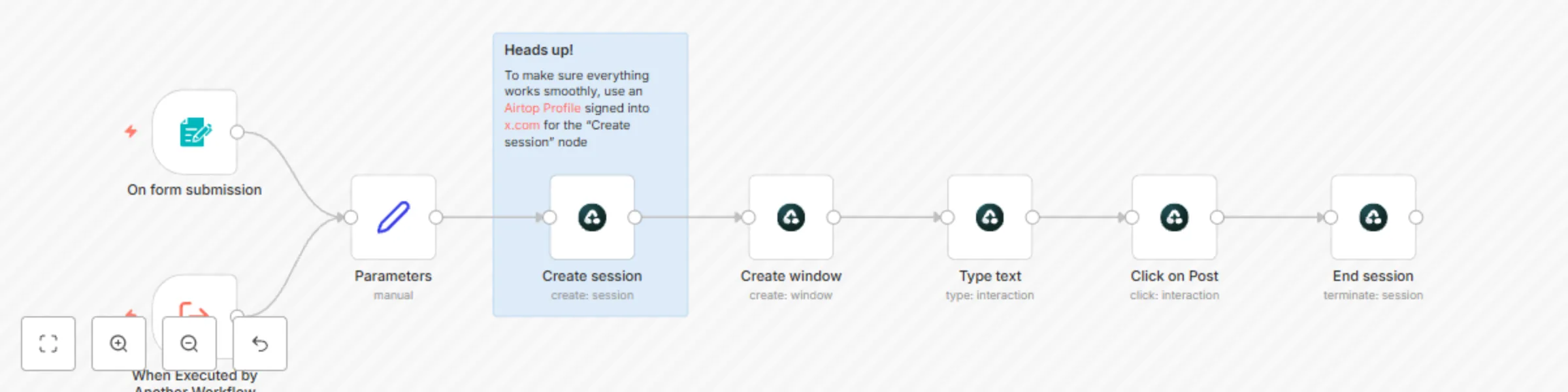
This n8n automation, powered by Airtop, simplifies automated content publishing onto X. Whether you're sharing daily updates, integrating dynamically generated AI content, or streamlining your marketing content pipeline, Airtop’s automation helps eliminate manual labor and reduces potential execution errors.
This Airtop automation works by using your Airtop Profile signed-in into X via Airtop. Once authenticated securely with your X credentials, n8n handles the structured data flow, which can come from manual inputs, AI-generated sources, databases, or RSS feeds. Airtop then securely publishes the posts, providing reliable scheduled updates directly on X, removing manual oversight and streamlining your social media workflows.
Customize your posting workflow extensively using Airtop's built-in node in n8n:
Happy Automating!
This catalog entry is organized from the workflow JSON. The node-level section below shows the executable blocks available for review before importing the template.
| Workflow | Post on X using Airtop and automate content pipelines |
|---|---|
| Complexity | intermediate |
| Nodes | 9 |
| Categories | Social Media |
| Author | Airtop |
| Published | 08 Apr 2025 |
Use the JSON export at /data/workflows/3482/3482.json as the source template for this automation.
Open n8n, import the downloaded JSON, and review each node before activating the workflow.
Replace placeholder credentials, API keys, webhook URLs, account IDs, and environment-specific values with your own settings.
Run the workflow manually or in a staging workspace, inspect node output, and confirm downstream systems receive the expected data.
Enable the workflow only after testing, then monitor executions, errors, and rate limits during the first production runs.
Review imported nodes carefully before activation. This catalog entry is intended to help you inspect the workflow structure, understand required services, and find related templates faster.
Node names, credentials, schedules, webhook paths, and external service limits may need adjustment for your workspace.
About The Post to X Automation Seamlessly automate posting to X using Airtop and Make. How to Automate Posting to X with Airtop Consistently engaging your audience on X (formerly Twitter) can be a ...
Review the workflow JSON, configure any required credentials in n8n, and test the automation in a safe workspace before using it in production.
Yes. Use the block-by-block analysis and the downloadable JSON to inspect each node, then adjust credentials, prompts, schedules, filters, or destinations for your Social Media use case.