Personalise outreach emails using customer data and AI

Workflow preview

Workflow preview
100%
Personalise outreach emails using customer data and AI preview
Open on n8n.io

Important notice

This workflow is provided as-is. Please review and test before using in production.

1. Workflow Overview

This n8n template uses existing emails from customers as context to customise and "finetune" outreach emails to them using AI. By now, it should be common knowledge that we can leverage AI to gener...

Best for

  • Lead Nurturing automation workflows
  • Multimodal AI automation workflows
  • advanced n8n builders looking for reusable templates

Tools used

n8n-nodes-base.manualtrigger, n8n-nodes-base.set, @n8n/n8n-nodes-langchain.lmchatgooglegemini, n8n-nodes-base.gmail, @n8n/n8n-nodes-langchain.informationextractor, n8n-nodes-base.stickynote, n8n-nodes-base.hubspot, n8n-nodes-base.splitinbatches

Source and attribution

This workflow is cataloged by N8N Workflows and links back to its original n8n.io source page by Jimleuk.

Original n8n.io source

1.1 Workflow description

Title
Personalise outreach emails using customer data and AI
Workflow name
Personalise outreach emails using customer data and AI

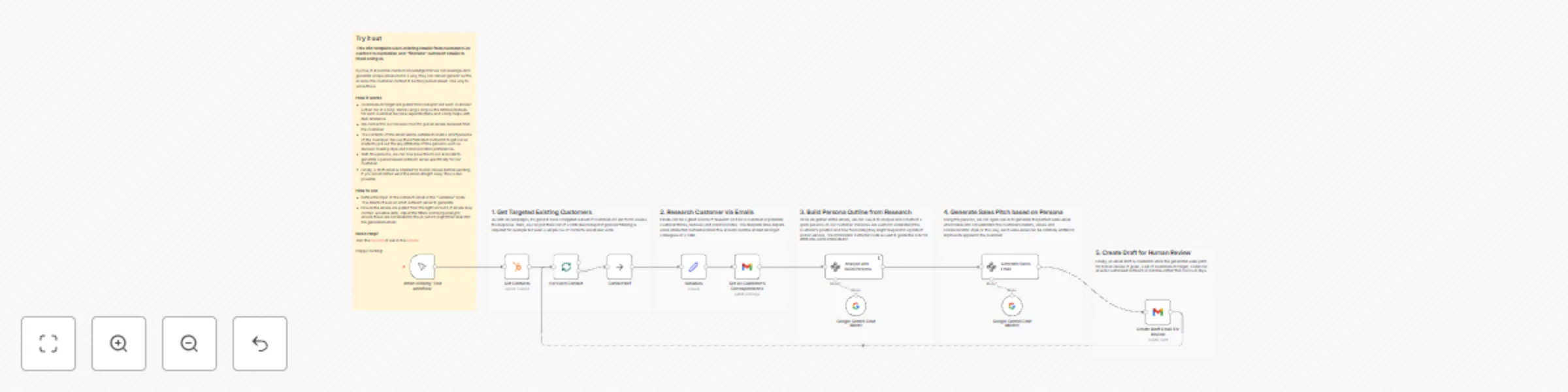
This n8n template uses existing emails from customers as context to customise and "finetune" outreach emails to them using AI.

By now, it should be common knowledge that we can leverage AI to generate unique emails but in a way, they can remain generic as the AI lacks the customer context to be truly personalised. One way to solve this is by pulling in a source of customer data - and what better way then by using existing email correspondence.

How it works

  • Customers to target are pulled from Hubspot and each customer is then run in a loop. We're using a loop as the retrieved emails for each customer become separate items and a loop helps with item reference.
  • We connect to our Gmail account to pull all emails recieved from the customer.
  • The contents of the email will be suitable to build a short persona of the customer. We use the Information Extractor to get our AI model to pull out the key attributes of this persona such as decision making style and communication preferences.
  • With this persona, we can now pass this to our AI model to generate a personalised outreach email specifically for our customer.
  • Finally, a draft email is created for human review before sending. If you would rather send the email straight away, this is also possible.

How to use

  • Define the topic of the outreach email in the "variables" node. This directs the AI on what outreach email to generate.
  • Ensure the emails are pulled from the right account. If emails may contain sensitive data, adjust the filters and text parsing to ensure these are not leaked to the AI (which might then leak into the generated email).

Requirements

  • Hubspot for Contacts List
  • OpenAI for LLM
  • Gmail for Existing Emails and Sending Emails

Customising this workflow

  • Not using Hubspot? Any CRM would work just as well or even a simple text csv!
  • If you have customer past deals or engagements in your CRM, consider using this as additional context for the AI to use.

1.2 Logical Blocks

This catalog entry is organized from the workflow JSON. The node-level section below shows the executable blocks available for review before importing the template.

2. Block-by-Block Analysis

Block 1 - When clicking ‘Test workflow’

Type / Role
n8n-nodes-base.manualTrigger - manualTrigger
Config choices
Version 1

Block 2 - Variables

Type / Role
n8n-nodes-base.set - set
Config choices
Version 3.4

Block 3 - Google Gemini Chat Model

Type / Role
@n8n/n8n-nodes-langchain.lmChatGoogleGemini - lmChatGoogleGemini
Config choices
Version 1

Block 4 - Google Gemini Chat Model1

Type / Role
@n8n/n8n-nodes-langchain.lmChatGoogleGemini - lmChatGoogleGemini
Config choices
Version 1

Block 5 - Create Draft Email For Review

Type / Role
n8n-nodes-base.gmail - gmail
Config choices
Version 2.1

Block 6 - Generate Sales Email

Type / Role
@n8n/n8n-nodes-langchain.informationExtractor - informationExtractor
Config choices
Version 1

Block 7 - Sticky Note

Type / Role
n8n-nodes-base.stickyNote - stickyNote
Config choices
Version 1

Block 8 - Sticky Note1

Type / Role
n8n-nodes-base.stickyNote - stickyNote
Config choices
Version 1

Block 9 - Sticky Note2

Type / Role
n8n-nodes-base.stickyNote - stickyNote
Config choices
Version 1

Block 10 - Sticky Note3

Type / Role
n8n-nodes-base.stickyNote - stickyNote
Config choices
Version 1

Block 11 - Analyse and Build Persona

Type / Role
@n8n/n8n-nodes-langchain.informationExtractor - informationExtractor
Config choices
Version 1

Block 12 - Sticky Note4

Type / Role
n8n-nodes-base.stickyNote - stickyNote
Config choices
Version 1

Block 13 - Get All Customer's Correspondence

Type / Role
n8n-nodes-base.gmail - gmail
Config choices
Version 2.1

Block 14 - Get Contacts

Type / Role
n8n-nodes-base.hubspot - hubspot
Config choices
Version 2.1

Block 15 - For Each Contact

Type / Role
n8n-nodes-base.splitInBatches - splitInBatches
Config choices
Version 3

Block 16 - Contact Ref

Type / Role
n8n-nodes-base.noOp - noOp
Config choices
Version 1

Block 17 - Sticky Note5

Type / Role
n8n-nodes-base.stickyNote - stickyNote
Config choices
Version 1

3. Summary Table

Workflow Personalise outreach emails using customer data and AI
Complexity advanced
Nodes 17
Categories Lead Nurturing, Multimodal AI
Author Jimleuk
Published 01 Apr 2025

4. Reproducing the Workflow from Scratch

  1. 1. Download the workflow JSON

    Use the JSON export at /data/workflows/3397/3397.json as the source template for this automation.

  2. 2. Import the template into n8n

    Open n8n, import the downloaded JSON, and review each node before activating the workflow.

  3. 3. Configure credentials and variables

    Replace placeholder credentials, API keys, webhook URLs, account IDs, and environment-specific values with your own settings.

  4. 4. Test with sample data

    Run the workflow manually or in a staging workspace, inspect node output, and confirm downstream systems receive the expected data.

  5. 5. Activate and monitor

    Enable the workflow only after testing, then monitor executions, errors, and rate limits during the first production runs.

5. General Notes & Resources

Review imported nodes carefully before activation. This catalog entry is intended to help you inspect the workflow structure, understand required services, and find related templates faster.

Node names, credentials, schedules, webhook paths, and external service limits may need adjustment for your workspace.

Frequently asked questions

What does Personalise outreach emails using customer data and AI do?

This n8n template uses existing emails from customers as context to customise and "finetune" outreach emails to them using AI. By now, it should be common knowledge that we can leverage AI to gener...

What do I need before importing this workflow?

Review the workflow JSON, configure any required credentials in n8n, and test the automation in a safe workspace before using it in production.

Can I customize this workflow?

Yes. Use the block-by-block analysis and the downloadable JSON to inspect each node, then adjust credentials, prompts, schedules, filters, or destinations for your Lead Nurturing, Multimodal AI use case.