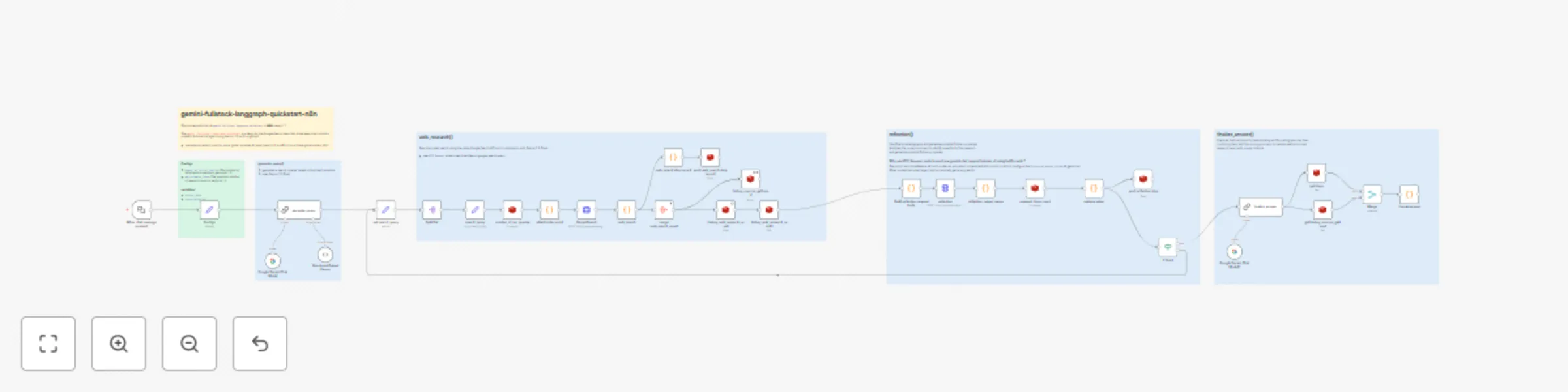
Perplexity-style iterative research with Gemini and Google Search

Workflow preview

Workflow preview
100%
Perplexity-style iterative research with Gemini and Google Search preview
Open on n8n.io

Important notice

This workflow is provided as-is. Please review and test before using in production.

1. Workflow Overview

AI Comprehensive Research on User's Query with Gemini and Web Search What is this? Perform comprehensive research on a user's query by dynamically generating search terms, querying the web using Go...

Best for

  • Market Research automation workflows
  • AI RAG automation workflows
  • advanced n8n builders looking for reusable templates

Tools used

n8n-nodes-base.stickynote, n8n-nodes-base.set, @n8n/n8n-nodes-langchain.lmchatgooglegemini, @n8n/n8n-nodes-langchain.outputparserstructured, @n8n/n8n-nodes-langchain.chainllm, n8n-nodes-base.splitout, n8n-nodes-base.code, n8n-nodes-base.aggregate

Source and attribution

This workflow is cataloged by N8N Workflows and links back to its original n8n.io source page by [email protected].

Original n8n.io source

1.1 Workflow description

Title
Perplexity-style iterative research with Gemini and Google Search
Workflow name
Perplexity-style iterative research with Gemini and Google Search

AI Comprehensive Research on User's Query with Gemini and Web Search

What is this?

Perform comprehensive research on a user's query by dynamically generating search terms, querying the web using Google Search (by Gemini) , reflecting on the results to identify knowledge gaps, and iteratively refining its search until it can provide a well-supported answer with citations. (like Perplexity)

This workflow is a reproduction of gemini-fullstack-langgraph-quickstart in N8N.

The gemini‑fullstack‑langgraph‑quickstart is a demo by the Google‑Gemini team that showcases how to build a powerful full‑stack AI agent using Gemini and LangGraph

How It Works

Generate Query 💬

  • generates one or more search queries tasks based on the User's question.
  • uses Gemini 2.0 Flash

Web Research 🌐

  • execute web search tasks using the native Google Search API tool in combination with Gemini 2.0 Flash.

Reflection 📚

  • Identifies knowledge gaps and generates potential follow-up queries.

Setup

  1. Configure API Credentials:

    • Create Google Gemini(PaLM) Api Credential using you own Gemini key
    • Connect the credential with three nodes: Google Gemini Chat Model and GeminiSearch and reflection
  2. Configure Redis Source:

    • prepare a Redis service that can be accessed by n8n
    • Create Redis Crediential and connect it with all Redis node

Customize

  • Try using different Gemini models.
  • Try modifying the parameters number_of_initial_queries and max_research_loops.

Why use Redis?

Use Redis as an external storage to maintain global variables (counter, search results, etc.)

This workflow contains a loop process, which need global variables (as State in LangGraph).

It is difficult to achieve global variables management without external storage in n8n.

1.2 Logical Blocks

This catalog entry is organized from the workflow JSON. The node-level section below shows the executable blocks available for review before importing the template.

2. Block-by-Block Analysis

Block 1 - Sticky Note

Type / Role
n8n-nodes-base.stickyNote - stickyNote
Config choices
Version 1

Block 2 - Configs

Type / Role
n8n-nodes-base.set - set
Config choices
Version 3.4

Block 3 - Sticky Note1

Type / Role
n8n-nodes-base.stickyNote - stickyNote
Config choices
Version 1

Block 4 - Google Gemini Chat Model

Type / Role
@n8n/n8n-nodes-langchain.lmChatGoogleGemini - lmChatGoogleGemini
Config choices
Version 1

Block 5 - Structured Output Parser

Type / Role
@n8n/n8n-nodes-langchain.outputParserStructured - outputParserStructured
Config choices
Version 1.2

Block 6 - generate_query

Type / Role
@n8n/n8n-nodes-langchain.chainLlm - chainLlm
Config choices
Version 1.7

Block 7 - Split Out

Type / Role
n8n-nodes-base.splitOut - splitOut
Config choices
Version 1

Block 8 - Sticky Note2

Type / Role
n8n-nodes-base.stickyNote - stickyNote
Config choices
Version 1

Block 9 - attach index as id

Type / Role
n8n-nodes-base.code - code
Config choices
Version 2

Block 10 - web_search

Type / Role
n8n-nodes-base.code - code
Config choices
Version 2

Block 11 - Sticky Note3

Type / Role
n8n-nodes-base.stickyNote - stickyNote
Config choices
Version 1

Block 12 - merge web_search_result

Type / Role
n8n-nodes-base.aggregate - aggregate
Config choices
Version 1

Block 13 - history_web_research_result

Type / Role
n8n-nodes-base.redis - redis
Config choices
Version 1

Block 14 - history_web_research_result1

Type / Role
n8n-nodes-base.redis - redis
Config choices
Version 1

Block 15 - history_sources_gathered

Type / Role
n8n-nodes-base.redis - redis
Config choices
Version 1

Block 16 - research_loop_count

Type / Role
n8n-nodes-base.redis - redis
Config choices
Version 1

Block 17 - retrieve value

Type / Role
n8n-nodes-base.code - code
Config choices
Version 2

Block 18 - If finish

Type / Role
n8n-nodes-base.if - if
Config choices
Version 2.2

Block 19 - search_query

Type / Role
n8n-nodes-base.set - set
Config choices
Version 3.4

Block 20 - number_of_ran_queries

Type / Role
n8n-nodes-base.redis - redis
Config choices
Version 1

Block 21 - GeminiSearch

Type / Role
n8n-nodes-base.httpRequest - httpRequest
Config choices
Version 4.2

Block 22 - Build reflection request body

Type / Role
n8n-nodes-base.code - code
Config choices
Version 2

Block 23 - reflection

Type / Role
n8n-nodes-base.httpRequest - httpRequest
Config choices
Version 4.2

Block 24 - reflection_output_parse

Type / Role
n8n-nodes-base.code - code
Config choices
Version 2

Showing the first 24 of 37 workflow blocks. Download the JSON for the full node graph.

3. Summary Table

Workflow Perplexity-style iterative research with Gemini and Google Search
Complexity advanced
Nodes 37
Categories Market Research, AI RAG
Author [email protected]
Published 07 Jun 2025

4. Reproducing the Workflow from Scratch

  1. 1. Download the workflow JSON

    Use the JSON export at /data/workflows/4758/4758.json as the source template for this automation.

  2. 2. Import the template into n8n

    Open n8n, import the downloaded JSON, and review each node before activating the workflow.

  3. 3. Configure credentials and variables

    Replace placeholder credentials, API keys, webhook URLs, account IDs, and environment-specific values with your own settings.

  4. 4. Test with sample data

    Run the workflow manually or in a staging workspace, inspect node output, and confirm downstream systems receive the expected data.

  5. 5. Activate and monitor

    Enable the workflow only after testing, then monitor executions, errors, and rate limits during the first production runs.

5. General Notes & Resources

Review imported nodes carefully before activation. This catalog entry is intended to help you inspect the workflow structure, understand required services, and find related templates faster.

Node names, credentials, schedules, webhook paths, and external service limits may need adjustment for your workspace.

Frequently asked questions

What does Perplexity-style iterative research with Gemini and Google Search do?

AI Comprehensive Research on User's Query with Gemini and Web Search What is this? Perform comprehensive research on a user's query by dynamically generating search terms, querying the web using Go...

What do I need before importing this workflow?

Review the workflow JSON, configure any required credentials in n8n, and test the automation in a safe workspace before using it in production.

Can I customize this workflow?

Yes. Use the block-by-block analysis and the downloadable JSON to inspect each node, then adjust credentials, prompts, schedules, filters, or destinations for your Market Research, AI RAG use case.