Perform SEO keyword research & insights with Ahrefs API and Gemini 1.5 Flash

Workflow preview

Workflow preview
100%
Perform SEO keyword research & insights with Ahrefs API and Gemini 1.5 Flash preview
Open on n8n.io

Important notice

This workflow is provided as-is. Please review and test before using in production.

1. Workflow Overview

This n8n workflow automates SEO keyword research by querying the Ahrefs API for keyword data and related keyword insights. The enriched data is then processed by an AI agent to format a response an...

Best for

  • Market Research automation workflows
  • AI Summarization automation workflows
  • intermediate n8n builders looking for reusable templates

Tools used

@n8n/n8n-nodes-langchain.chattrigger, @n8n/n8n-nodes-langchain.lmchatgooglegemini, @n8n/n8n-nodes-langchain.agent, n8n-nodes-base.code, n8n-nodes-base.aggregate, n8n-nodes-base.httprequest, n8n-nodes-base.stickynote, @n8n/n8n-nodes-langchain.memorybufferwindow

Source and attribution

This workflow is cataloged by N8N Workflows and links back to its original n8n.io source page by Joseph.

Original n8n.io source

1.1 Workflow description

Title
Perform SEO keyword research & insights with Ahrefs API and Gemini 1.5 Flash
Workflow name
Perform SEO keyword research & insights with Ahrefs API and Gemini 1.5 Flash

This n8n workflow automates SEO keyword research by querying the Ahrefs API for keyword data and related keyword insights. The enriched data is then processed by an AI agent to format a response and provide valuable SEO recommendations.

Perfect for SEO specialists, content marketers, digital agencies, and anyone looking to gain valuable insights into keyword opportunities to boost their rankings.


βš™οΈ How This Workflow Works

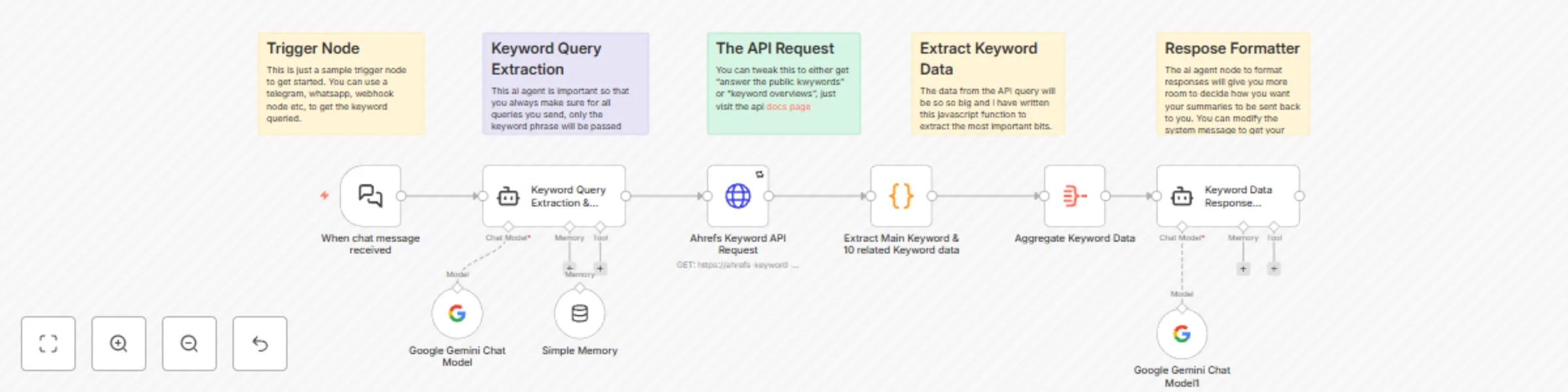
This workflow guides you through the entire SEO keyword research process, from entering the initial keyword to receiving detailed insights and related keyword suggestions.

1. πŸ—£οΈ User Input (Keyword Query)

  • The user enters a keyword they want to research.
  • This input is captured by the Chat Input Node, ready for analysis.

2. πŸ€– AI Agent (Input Verification)

  • The AI Agent reviews the keyword input for any grammatical errors or extra commentary.
  • If necessary, it cleans the input to ensure a seamless query to the API.

3. πŸ”‘ Ahrefs API (Keyword Data Retrieval)

  • The cleaned keyword is sent to the Ahrefs Keyword Tool API.
  • This retrieves a detailed report including metrics like search volume, keyword difficulty, and CPC.

4. πŸ’‘ Related Keywords Extraction (Using JavaScript Function)

  • The workflow uses a JavaScript function to extract main keyword data and 10 related keywords data from the Ahrefs response.
  • You can tweak the script to adjust the number of related keywords or the level of detail you want.

5. 🧠 AI Agent (Text Formatting)

  • The aggregated data, including both the main keyword and related keywords, is sent to an AI agent.
  • The AI agent formats the data into a concise, readable format that can be shared with the user.

6. πŸ“¨ Final Response

  • The formatted text is delivered to the user with keyword insights, recommendations, and related keyword suggestions.

βœ… Smart Retry & Error Handling

Each subworkflow includes a fail-safe mechanism to ensure:

  • βœ… Proper error handling for any issues with the API request.
  • πŸ•’ Failed API requests are retried after a customizable period (e.g., 2 hours or 1 day).
  • πŸ’¬ User input validation prevents any incorrect or malformed queries from being processed.

πŸ“‹ Ahrefs API Setup

To use this workflow, you’ll need to set up your Ahrefs API credentials:

πŸ”‘ Ahrefs API

  • Sign up for an Ahrefs account and get your key here: Ahrefs Keyword Tool API
  • Once signed up, you'll receive an API key, which you’ll use in the x-rapidapi-key header in n8n.
  • Ensure you check the Ahrefs Keyword Tool API documentation for more details on available parameters.

πŸ“₯ How to Import This Workflow

  1. Copy the json code.
  2. Open your n8n instance.
  3. Open a new workflow.
  4. Paste anywhere inside the workflow.
  5. Voila.

πŸ› οΈ Customization Options

  • Adjust the number of related keywords extracted (default is 10).
  • Customize the AI agent response formatting or add specific recommendations for users.
  • Modify the JavaScript function to extract different metrics from the Ahrefs API.

πŸ§ͺ Use Case Example

Trying to optimize your blog post around a specific keyword?

  1. Query a broad keyword, like β€œSEO tips”.
  2. Get related keyword data and search volume insights.
  3. Use the AI agent to provide keyword recommendations and additional topics to target.
  4. πŸ’₯ Boost your content strategy with fresh keywords and relevant search data!

1.2 Logical Blocks

This catalog entry is organized from the workflow JSON. The node-level section below shows the executable blocks available for review before importing the template.

2. Block-by-Block Analysis

Block 1 - When chat message received

Type / Role
@n8n/n8n-nodes-langchain.chatTrigger - chatTrigger
Config choices
Version 1.1

Block 2 - Google Gemini Chat Model

Type / Role
@n8n/n8n-nodes-langchain.lmChatGoogleGemini - lmChatGoogleGemini
Config choices
Version 1

Block 3 - Google Gemini Chat Model1

Type / Role
@n8n/n8n-nodes-langchain.lmChatGoogleGemini - lmChatGoogleGemini
Config choices
Version 1

Block 4 - Keyword Data Response Formatter

Type / Role
@n8n/n8n-nodes-langchain.agent - agent
Config choices
Version 1.8

Block 5 - Keyword Query Extraction & Cleaning Agent

Type / Role
@n8n/n8n-nodes-langchain.agent - agent
Config choices
Version 1.8

Block 6 - Extract Main Keyword & 10 related Keyword data

Type / Role
n8n-nodes-base.code - code
Config choices
Version 2

Block 7 - Aggregate Keyword Data

Type / Role
n8n-nodes-base.aggregate - aggregate
Config choices
Version 1

Block 8 - Ahrefs Keyword API Request

Type / Role
n8n-nodes-base.httpRequest - httpRequest
Config choices
Version 4.2

Block 9 - Sticky Note

Type / Role
n8n-nodes-base.stickyNote - stickyNote
Config choices
Version 1

Block 10 - Sticky Note1

Type / Role
n8n-nodes-base.stickyNote - stickyNote
Config choices
Version 1

Block 11 - Sticky Note2

Type / Role
n8n-nodes-base.stickyNote - stickyNote
Config choices
Version 1

Block 12 - Sticky Note3

Type / Role
n8n-nodes-base.stickyNote - stickyNote
Config choices
Version 1

Block 13 - Sticky Note4

Type / Role
n8n-nodes-base.stickyNote - stickyNote
Config choices
Version 1

Block 14 - Simple Memory

Type / Role
@n8n/n8n-nodes-langchain.memoryBufferWindow - memoryBufferWindow
Config choices
Version 1.3

3. Summary Table

Workflow Perform SEO keyword research & insights with Ahrefs API and Gemini 1.5 Flash
Complexity intermediate
Nodes 14
Categories Market Research, AI Summarization
Author Joseph
Published 28 Apr 2025

4. Reproducing the Workflow from Scratch

  1. 1. Download the workflow JSON

    Use the JSON export at /data/workflows/3769/3769.json as the source template for this automation.

  2. 2. Import the template into n8n

    Open n8n, import the downloaded JSON, and review each node before activating the workflow.

  3. 3. Configure credentials and variables

    Replace placeholder credentials, API keys, webhook URLs, account IDs, and environment-specific values with your own settings.

  4. 4. Test with sample data

    Run the workflow manually or in a staging workspace, inspect node output, and confirm downstream systems receive the expected data.

  5. 5. Activate and monitor

    Enable the workflow only after testing, then monitor executions, errors, and rate limits during the first production runs.

5. General Notes & Resources

Review imported nodes carefully before activation. This catalog entry is intended to help you inspect the workflow structure, understand required services, and find related templates faster.

Node names, credentials, schedules, webhook paths, and external service limits may need adjustment for your workspace.

Frequently asked questions

What does Perform SEO keyword research & insights with Ahrefs API and Gemini 1.5 Flash do?

This n8n workflow automates SEO keyword research by querying the Ahrefs API for keyword data and related keyword insights. The enriched data is then processed by an AI agent to format a response an...

What do I need before importing this workflow?

Review the workflow JSON, configure any required credentials in n8n, and test the automation in a safe workspace before using it in production.

Can I customize this workflow?

Yes. Use the block-by-block analysis and the downloadable JSON to inspect each node, then adjust credentials, prompts, schedules, filters, or destinations for your Market Research, AI Summarization use case.