Block 1 - HTTP Request
- Type / Role
- n8n-nodes-base.httpRequest - httpRequest
- Config choices
- Version 4.2


 Early Deal
This workflow is provided as-is. Please review and test before using in production.
This n8n workflow automates website security audits. It combines direct website scanning, threat intelligence from AlienVault OTX, and advanced analysis from an OpenAI large language model (LLM) to...
n8n-nodes-base.httprequest, n8n-nodes-base.formtrigger, @n8n/n8n-nodes-langchain.lmchatopenai, @n8n/n8n-nodes-langchain.agent, n8n-nodes-base.gmail, n8n-nodes-base.code
This workflow is cataloged by N8N Workflows and links back to its original n8n.io source page by Sean Birmingham.
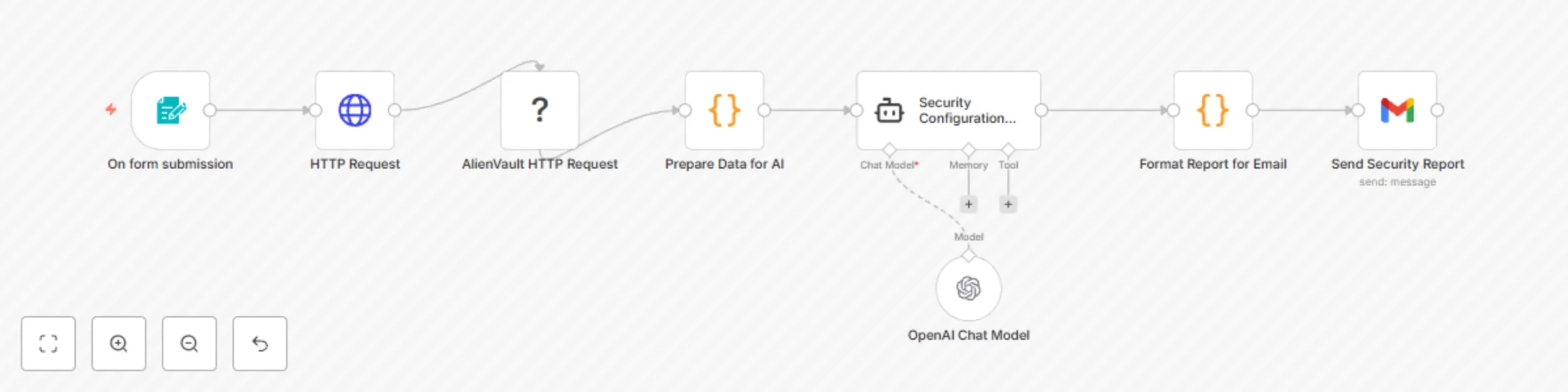
Original n8n.io sourceInput: A user provides a website URL via a simple web form. Data Collection: An HTTP Request node visits the provided URL to gather initial data (status code, headers). An AlienVault HTTP Request node queries AlienVault OTX for known threats associated with the website's hostname. Data Preparation (Prepare Data for AI): A custom code node consolidates the collected website data and AlienVault intelligence, performing initial checks for common issues (e.g., error codes, missing security headers, AlienVault warnings). AI Analysis (Security Configuration Audit): The prepared data is sent to an OpenAI Chat Model, which acts as a cybersecurity expert. The AI analyzes the data to identify vulnerabilities, explain their impact, suggest exploitation methods, and outline mitigation steps. Report Formatting (Format Report for Email): Another custom code node takes the AI's plain-text report and converts it into a structured HTML format suitable for email. Delivery (Send Security Report): The final HTML report is sent via Gmail to a specified email address.
To use this workflow, you'll need an n8n instance and the following credentials:
n8n Instance: Ensure your n8n environment is running. OpenAI API Key: Generate a key from OpenAI. Add an "OpenAI API" credential in n8n (e.g., "OpenAI account"). AlienVault OTX API Key: Obtain a key from your AlienVault OTX profile. Add an "AlienVault OTX API" credential in n8n (e.g., "AlienVault account"). Gmail Account: Set up a "Gmail OAuth2" credential in n8n for sending emails (recommended for security; involves Google Cloud setup). Import Workflow: Copy the workflow's JSON code. In n8n, import the workflow via "Workflows" > "New" > "Import from JSON". Configure Recipient: In the "Send Security Report" node, specify the email address where reports should be sent. Activate: Enable the workflow to start processing submissions.
Once activated, access the "On form submission" webhook URL to input a URL and trigger an audit.
This catalog entry is organized from the workflow JSON. The node-level section below shows the executable blocks available for review before importing the template.
| Workflow | OTX & OpenAI web security check |
|---|---|
| Complexity | intermediate |
| Nodes | 8 |
| Categories | SecOps, AI Summarization |
| Author | Sean Birmingham |
| Published | 24 Jun 2025 |
Use the JSON export at /data/workflows/5175/5175.json as the source template for this automation.
Open n8n, import the downloaded JSON, and review each node before activating the workflow.
Replace placeholder credentials, API keys, webhook URLs, account IDs, and environment-specific values with your own settings.
Run the workflow manually or in a staging workspace, inspect node output, and confirm downstream systems receive the expected data.
Enable the workflow only after testing, then monitor executions, errors, and rate limits during the first production runs.
Review imported nodes carefully before activation. This catalog entry is intended to help you inspect the workflow structure, understand required services, and find related templates faster.
Node names, credentials, schedules, webhook paths, and external service limits may need adjustment for your workspace.
This n8n workflow automates website security audits. It combines direct website scanning, threat intelligence from AlienVault OTX, and advanced analysis from an OpenAI large language model (LLM) to...
Review the workflow JSON, configure any required credentials in n8n, and test the automation in a safe workspace before using it in production.
Yes. Use the block-by-block analysis and the downloadable JSON to inspect each node, then adjust credentials, prompts, schedules, filters, or destinations for your SecOps, AI Summarization use case.