Block 1 - List Files
- Type / Role
- n8n-nodes-base.googleDrive - googleDrive
- Config choices
- Version 3
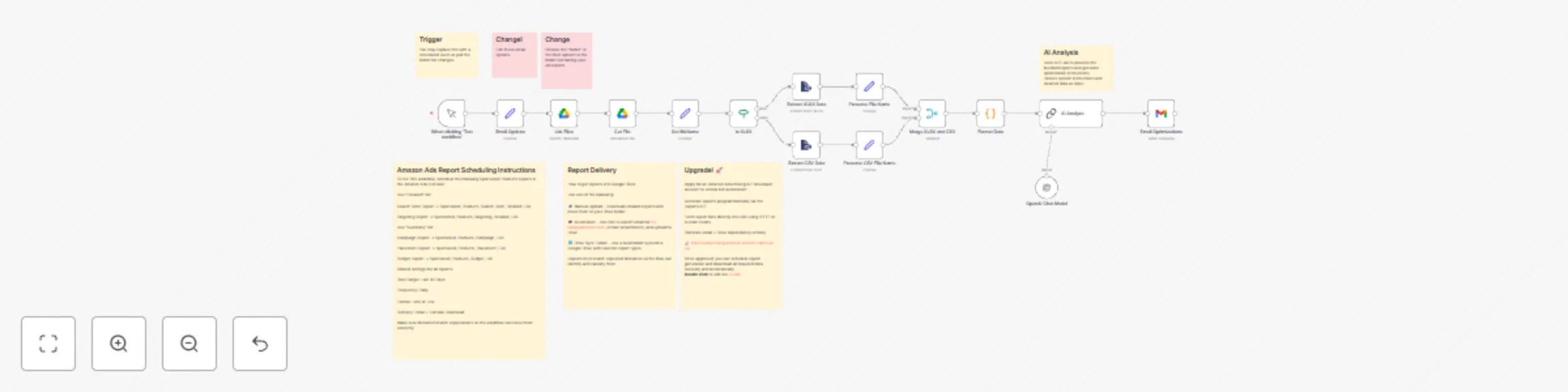


 Early Deal
This workflow is provided as-is. Please review and test before using in production.
This template is designed for Amazon sellers and advertisers who want to automate their campaign performance analysis and bidding strategy. It solves the common challenge of manually reviewing Spon...
n8n-nodes-base.googledrive, @n8n/n8n-nodes-langchain.lmchatopenai, n8n-nodes-base.if, n8n-nodes-base.merge, n8n-nodes-base.code, n8n-nodes-base.set, n8n-nodes-base.stickynote, n8n-nodes-base.gmail
This workflow is cataloged by N8N Workflows and links back to its original n8n.io source page by Brian Money.
Original n8n.io sourceThis template is designed for Amazon sellers and advertisers who want to automate their campaign performance analysis and bidding strategy. It solves the common challenge of manually reviewing Sponsored Products reports and guessing how to adjust keywords, placements, and budgets. By combining Amazon Advertising reports with OpenAI's GPT-4o, this workflow delivers real-time, personalized optimization instructions — automatically.
📥 Automatically downloads Sponsored Products reports from Google Drive
🧠 Uses AI to analyze campaign, keyword, placement, targeting, and budget performance
📊 Supports both .csv and .xlsx report formats
🔁 Handles multiple ASINs and scales easily across ad accounts
📧 Sends structured optimization recommendations to your inbox via Gmail
🗂 Built-in logic to normalize filenames and correctly map reports
🧹 Includes error handling and formatting cleanup for AI-ready input
To use this workflow, you’ll need:
An Amazon Ads account with access to Sponsored Products reports
A Google Drive folder where Amazon Ads reports are delivered (manually or via Gmail automation)
A Gmail account (for sending summaries)
An OpenAI API key with access to GPT-4o
Optional: a developer account for the Amazon Ads API to fully automate report generation in the future
📂 Connect your Amazon Ads reports folder in the Google Drive node
🔐 Add your credentials to the OpenAI and Gmail nodes
📝 Schedule five reports in the Amazon Ads Console:
Search Term Report → Detailed
Targeting Report → Detailed
Campaign Report → Summary
Placement Report → Summary
Budget Report → Summary Use “Last 30 Days”, “Daily”, and .xlsx or .csv format
🔁 (Optional) Automate report ingestion using Gmail + Drive workflows
🧪 Test with one account, then replicate across additional ad accounts as needed
⏱️ Setup time: 15–30 minutes 📌 All field-specific guidance is included in workflow notes`
This catalog entry is organized from the workflow JSON. The node-level section below shows the executable blocks available for review before importing the template.
| Workflow | Optimize Amazon ads with GPT-4o for bid, budget & keyword recommendations |
|---|---|
| Complexity | advanced |
| Nodes | 22 |
| Categories | Market Research, AI Summarization |
| Author | Brian Money |
| Published | 29 Apr 2025 |
Use the JSON export at /data/workflows/3793/3793.json as the source template for this automation.
Open n8n, import the downloaded JSON, and review each node before activating the workflow.
Replace placeholder credentials, API keys, webhook URLs, account IDs, and environment-specific values with your own settings.
Run the workflow manually or in a staging workspace, inspect node output, and confirm downstream systems receive the expected data.
Enable the workflow only after testing, then monitor executions, errors, and rate limits during the first production runs.
Review imported nodes carefully before activation. This catalog entry is intended to help you inspect the workflow structure, understand required services, and find related templates faster.
Node names, credentials, schedules, webhook paths, and external service limits may need adjustment for your workspace.
This template is designed for Amazon sellers and advertisers who want to automate their campaign performance analysis and bidding strategy. It solves the common challenge of manually reviewing Spon...
Review the workflow JSON, configure any required credentials in n8n, and test the automation in a safe workspace before using it in production.
Yes. Use the block-by-block analysis and the downloadable JSON to inspect each node, then adjust credentials, prompts, schedules, filters, or destinations for your Market Research, AI Summarization use case.