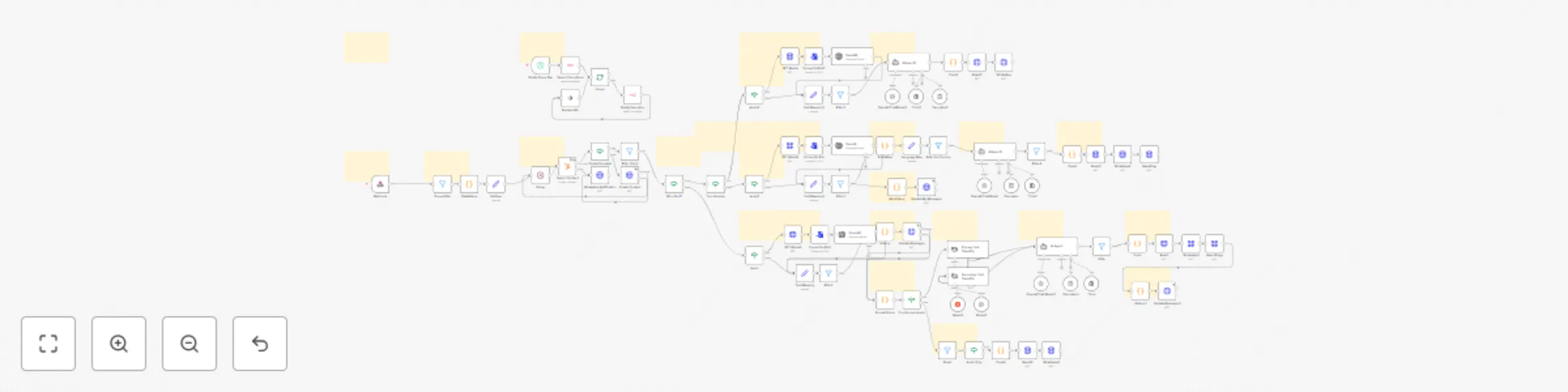
Multilingual WhatsApp translator with OpenAI Whisper & GPT-4 and HubSpot integration

Workflow preview

Workflow preview
100%
Multilingual WhatsApp translator with OpenAI Whisper & GPT-4 and HubSpot integration preview
Open on n8n.io

Important notice

This workflow is provided as-is. Please review and test before using in production.

1. Workflow Overview

AI WhatsApp Translator + Voice Transcriber with HubSpot Integration Hello! I'm Amanda ️, a passionate automation creator and AI enthusiast. With over 2 yea...

Best for

  • Support Chatbot automation workflows
  • AI Chatbot automation workflows
  • advanced n8n builders looking for reusable templates

Tools used

n8n-nodes-base.converttofile, @n8n/n8n-nodes-langchain.openai, n8n-nodes-base.webhook, @n8n/n8n-nodes-langchain.agent, @n8n/n8n-nodes-langchain.lmchatopenai, n8n-nodes-base.filter, @n8n/n8n-nodes-langchain.toolcalculator, n8n-nodes-base.httprequest

Source and attribution

This workflow is cataloged by N8N Workflows and links back to its original n8n.io source page by Amanda Benks.

Original n8n.io source

1.1 Workflow description

Title
Multilingual WhatsApp translator with OpenAI Whisper & GPT-4 and HubSpot integration
Workflow name
Multilingual WhatsApp translator with OpenAI Whisper & GPT-4 and HubSpot integration

🌍 AI WhatsApp Translator + Voice Transcriber with HubSpot Integration

Hello! I'm Amanda ❤️, a passionate automation creator and AI enthusiast.

With over 2 years of experience in n8n and Make.com, I design robust, intelligent agents
that make your operations smarter and smoother.

This translator + transcriber assistant is perfect for multilingual communication via WhatsApp.
It automatically captures voice or text messages, identifies the customer's region and language,
transcribes audio using OpenAI Whisper, and generates friendly, culturally adapted translations
with GPT-4 or GPT-4o. All messages and contacts are saved in your HubSpot CRM—so no lead gets lost.


✅ What this Workflow Does:

  • 🎧 Transcribes audio messages using OpenAI Whisper (accurate + fast).
  • 🌐 Translates text & voice into the client’s native language or a default one.
  • 🇧🇷 Adapts tone, slang, emojis, and cultural expressions for natural conversation.
  • 💼 Saves contact info & history to HubSpot automatically (name, phone, and translation).
  • 📬 Replies via WhatsApp using Evolution API (also works with chatbots).
  • ✨ Handles over 80+ countries and phone prefixes to detect preferred languages.

🛠️ How to Use It:

  1. Clone the workflow to your n8n instance (cloud or self-hosted).
  2. Configure the Webhook URL in your Evolution API or WhatsApp provider.
  3. Set up credentials for:
    • OpenAI (for transcription and GPT translation)
    • HubSpot (to store leads)
  4. Optional: Adjust prompt logic and default languages inside the AI Agent node.
  5. Done! Your AI translator bot is live 💬🌎

🧠 LLMs and Tools Used:

  • OpenAI GPT-4o / GPT-4 Mini for translation
  • OpenAI Whisper for transcription
  • HubSpot CRM integration
  • Evolution API for WhatsApp messaging
  • Dynamic language detection based on phone prefix

💡 Ideal For:

  • Multinational businesses with global customers
  • Customer support teams with multilingual needs
  • Agencies serving clients in Latin America, Europe, or Asia
  • Translating informal messages in real-time

📁 Included:

  • 1x Complete n8n Workflow
  • Preconfigured translation agents
  • HubSpot contact mapper
  • Multi-country language index
  • Ready-to-use voice transcription logic

❤️ Support Materials and Templates:

iloveflows.gumroad.com

☁️ Want to use this with n8n Cloud?

Use my affiliate link to get started:
👉 https://n8n.partnerlinks.io/amanda

🔥 Buy a VPS server with a Super Discount: https://hostinger.com/vps

1.2 Logical Blocks

This catalog entry is organized from the workflow JSON. The node-level section below shows the executable blocks available for review before importing the template.

2. Block-by-Block Analysis

Block 1 - Convert to File

Type / Role
n8n-nodes-base.convertToFile - convertToFile
Config choices
Version 1.1

Block 2 - OpenAI

Type / Role
@n8n/n8n-nodes-langchain.openAi - openAi
Config choices
Version 1.6

Block 3 - Webhook

Type / Role
n8n-nodes-base.webhook - webhook
Config choices
Version 2

Block 4 - AI Agent

Type / Role
@n8n/n8n-nodes-langchain.agent - agent
Config choices
Version 1.9

Block 5 - OpenAI Chat Model

Type / Role
@n8n/n8n-nodes-langchain.lmChatOpenAi - lmChatOpenAi
Config choices
Version 1.2

Block 6 - Filter

Type / Role
n8n-nodes-base.filter - filter
Config choices
Version 2.2

Block 7 - Calculator

Type / Role
@n8n/n8n-nodes-langchain.toolCalculator - toolCalculator
Config choices
Version 1

Block 8 - AI Agent1

Type / Role
@n8n/n8n-nodes-langchain.agent - agent
Config choices
Version 1.9

Block 9 - WhatsApp2

Type / Role
n8n-nodes-base.httpRequest - httpRequest
Config choices
Version 4.2

Block 10 - Audio

Type / Role
n8n-nodes-base.if - if
Config choices
Version 2

Block 11 - Convert to File1

Type / Role
n8n-nodes-base.convertToFile - convertToFile
Config choices
Version 1.1

Block 12 - OpenAI1

Type / Role
@n8n/n8n-nodes-langchain.openAi - openAi
Config choices
Version 1.6

Block 13 - WhatsApp1

Type / Role
n8n-nodes-base.httpRequest - httpRequest
Config choices
Version 4.2

Block 14 - Code

Type / Role
n8n-nodes-base.code - code
Config choices
Version 2

Block 15 - OpenAI Chat Model2

Type / Role
@n8n/n8n-nodes-langchain.lmChatOpenAi - lmChatOpenAi
Config choices
Version 1.2

Block 16 - Calculator1

Type / Role
@n8n/n8n-nodes-langchain.toolCalculator - toolCalculator
Config choices
Version 1

Block 17 - Think

Type / Role
@n8n/n8n-nodes-langchain.toolThink - toolThink
Config choices
Version 1

Block 18 - Code1

Type / Role
n8n-nodes-base.code - code
Config choices
Version 2

Block 19 - Think1

Type / Role
@n8n/n8n-nodes-langchain.toolThink - toolThink
Config choices
Version 1

Block 20 - PrefixMap

Type / Role
n8n-nodes-base.code - code
Config choices
Version 2

Block 21 - Audio1

Type / Role
n8n-nodes-base.if - if
Config choices
Version 2

Block 22 - Convert to File2

Type / Role
n8n-nodes-base.convertToFile - convertToFile
Config choices
Version 1.1

Block 23 - OpenAI2

Type / Role
@n8n/n8n-nodes-langchain.openAi - openAi
Config choices
Version 1.6

Block 24 - OpenAI Chat Model3

Type / Role
@n8n/n8n-nodes-langchain.lmChatOpenAi - lmChatOpenAi
Config choices
Version 1.2

Showing the first 24 of 107 workflow blocks. Download the JSON for the full node graph.

3. Summary Table

Workflow Multilingual WhatsApp translator with OpenAI Whisper & GPT-4 and HubSpot integration
Complexity advanced
Nodes 107
Categories Support Chatbot, AI Chatbot
Author Amanda Benks
Published 10 May 2025

4. Reproducing the Workflow from Scratch

  1. 1. Download the workflow JSON

    Use the JSON export at /data/workflows/3972/3972.json as the source template for this automation.

  2. 2. Import the template into n8n

    Open n8n, import the downloaded JSON, and review each node before activating the workflow.

  3. 3. Configure credentials and variables

    Replace placeholder credentials, API keys, webhook URLs, account IDs, and environment-specific values with your own settings.

  4. 4. Test with sample data

    Run the workflow manually or in a staging workspace, inspect node output, and confirm downstream systems receive the expected data.

  5. 5. Activate and monitor

    Enable the workflow only after testing, then monitor executions, errors, and rate limits during the first production runs.

5. General Notes & Resources

Review imported nodes carefully before activation. This catalog entry is intended to help you inspect the workflow structure, understand required services, and find related templates faster.

Node names, credentials, schedules, webhook paths, and external service limits may need adjustment for your workspace.

Frequently asked questions

What does Multilingual WhatsApp translator with OpenAI Whisper & GPT-4 and HubSpot integration do?

AI WhatsApp Translator + Voice Transcriber with HubSpot Integration Hello! I'm Amanda ️, a passionate automation creator and AI enthusiast. With over 2 yea...

What do I need before importing this workflow?

Review the workflow JSON, configure any required credentials in n8n, and test the automation in a safe workspace before using it in production.

Can I customize this workflow?

Yes. Use the block-by-block analysis and the downloadable JSON to inspect each node, then adjust credentials, prompts, schedules, filters, or destinations for your Support Chatbot, AI Chatbot use case.