A

Amanda Benks

17
Workflows

Workflows by Amanda Benks

Workflow preview: Multi-agent personal assistant orchestration with GPT-4o & WhatsApp
Free advanced

Multi-agent personal assistant orchestration with GPT-4o & WhatsApp

## Description 'Elena AI' is a powerful n8n workflow that transforms your automation platform into a full-fledged, multi-agent AI hub. 🤖✨ By combining Redis state management with specialized “tool” sub-workflows, you can build contextual, scalable, and highly personalized conversational automations for WhatsApp, Telegram, email, and more. ## 🔥 Key Features - **Unified Ingestion** 📥 • Webhook trigger for text, audio, image, or document messages • Automatic extraction of `remoteJid`, user ID, and payload metadata - **Stateful Context** 🔄 • Redis push/get queue to preserve conversation history • Seamless handling of follow-ups and multi-turn dialogs - **Dynamic Routing** 🔀 • Smart Switch logic directs messages to the right agent workflow • Agents available: - 🗓️ **Malu**: Google Calendar scheduling & reminders - 💰 **Maria**: Expense logging & budget tracking in Baserow - 👥 **Mafalda**: Contact CRUD operations in Baserow - 📸 **Marcela**: Audio transcription & image analysis - ✉️ **Martina**: Gmail send/receive & template replies - **Bite-Sized Responses** ✂️ • Splits long AI replies into line-by-line messages • Loop node controls rate & order for best UX - **Flexible Output** 📤 • HTTP Request node to deliver text, media, or files • Customize headers, payloads, and endpoints ## 🎯 Use Cases - AI-powered customer support bots - Automated lead qualification & follow-up - Intelligent scheduling & reminders - Expense approval workflows - Multimedia content analysis & response ## 📋 Requirements - **n8n ≥ 1.0** with **Webhook**, **Redis**, **SplitInBatches**, **HTTP Request** & **Workflow** nodes - **Redis** server (connection credentials in n8n) - Service accounts / API keys for: - Google Calendar (OAuth2) - Baserow (API token) - Gmail (OAuth2) - Messaging API endpoint (HTTP) - Environment variables set in n8n: - `REDIS_HOST`, `REDIS_PORT`, `REDIS_PASSWORD` - `GOOGLE_CLIENT_ID`, `GOOGLE_CLIENT_SECRET` - `BASEROW_API_TOKEN` - `GMAIL_CLIENT_ID`, `GMAIL_CLIENT_SECRET` - `MSG_API_URL`, `MSG_API_KEY` ## 🚀 Quick Start 1. **Import** the `ElenaAI.json` into n8n. 2. **Configure** credentials and environment variables under **Settings → Credentials**. 3. **Link** sub-workflows (Malu, Maria, Mafalda, Marcela, Martina) by updating their Workflow IDs in the main node. 4. **Test** via Execute node or send a sample webhook payload. 5. **Deploy** by exposing the Webhook endpoint to your messaging platform. Unlock seamless, AI-driven conversations across any channel—get MavenBot 2.0 running in minutes! 🚀

A
Amanda Benks
Support Chatbot
28 Jun 2025
597
0
Workflow preview: AI-powered Telegram & WhatsApp business agent workflow
Free advanced

AI-powered Telegram & WhatsApp business agent workflow

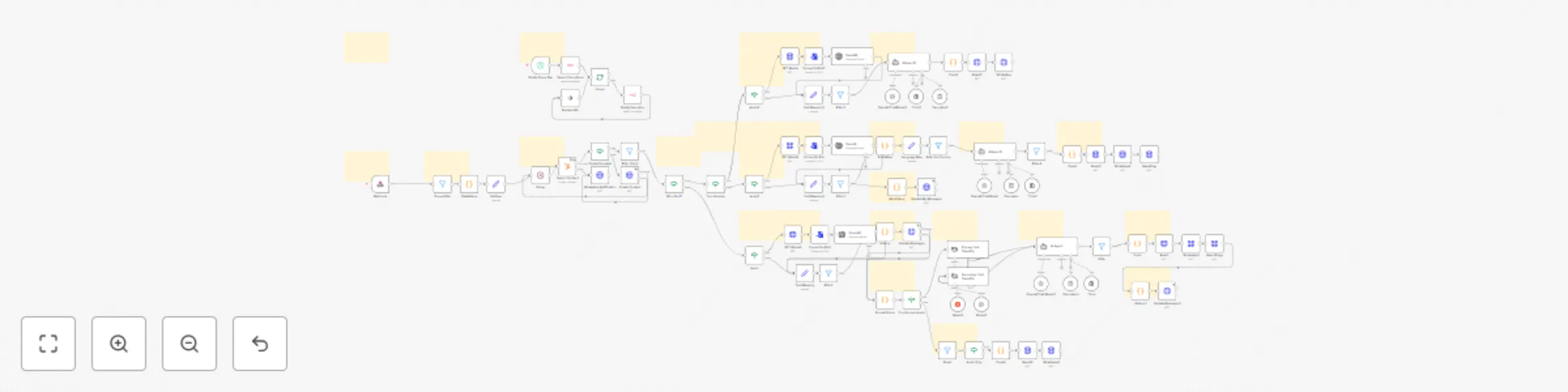
*This workflow contains community nodes that are only compatible with the self-hosted version of n8n.* **Deliver seamless, AI-driven customer support on Telegram and WhatsApp—powered by GPT-4 Turbo and n8n.** --- ## 🌟 Key Features - **Unified Messaging:** Receive and normalize messages from both Telegram (via Bot Trigger) and WhatsApp (via Webhook). - **Contextual AI Responses:** Build customer context from Google Sheets, then craft personalized replies with GPT-4 Turbo. - **Smart Routing:** Automatically detect platform and send replies with platform-appropriate formatting (HTML for Telegram, plain for WhatsApp). - **Intent Detection & Escalation:** Flag orders, appointments or complex queries and trigger Slack notifications for human handoff. - **Comprehensive Logging:** Append every interaction to a “conversations” sheet and upsert customer profiles in a “customers” sheet. ## 📋 Prerequisites 1. **n8n instance** (self-hosted or n8n Cloud) 2. **Credentials**: - OpenAI API key - Telegram Bot Token - WhatsApp Business API credentials (`WHATSAPP_PHONE_ID`) - Google Sheets service-account credentials - Slack Incoming Webhook URL 3. **Google Sheets Setup**: - **customers** sheet with columns: `user_id`, `user_name`, `previousOrders`, `lastInteraction`, `preferences`, `conversationHistory` - **conversations** sheet with columns: `user_id`, `user_name`, `platform`, `message`, `ai_response`, `timestamp`, `needs_escalation`, `is_order`, `is_appointment` ## 🚀 Setup & Usage 1. **Import** the provided JSON into your n8n editor. 2. **Configure** each node’s credentials in n8n’s Credentials panel. 3. **Set** the following Workflow Variables: - `GOOGLE_SHEET_ID` - `WHATSAPP_PHONE_ID` 4. **Activate** the Telegram Bot Trigger and WhatsApp Webhook nodes. 5. **Test** by messaging your bot on Telegram and WhatsApp. ## 🔍 How It Works 1. **Trigger:** Listens for new Telegram updates or WhatsApp webhook calls. 2. **Normalize Message:** Standardizes payload into `{ user_id, user_name, message_text, platform, chat_id, timestamp }`. 3. **Get Customer Data:** Reads from “customers” sheet to fetch past history and order count. 4. **Build AI Context:** Merges incoming message with customer info and history. 5. **AI Assistant:** Sends context to GPT-4 Turbo (temperature 0.8, maxTokens 800). 6. **Process Response:** Cleans formatting, identifies intents (order, appointment), and sets escalation flags. 7. **Platform Router:** Routes reply to the appropriate “Send Telegram” or “Send WhatsApp” node. 8. **Log Conversation:** Appends each message and response to the “conversations” sheet. 9. **Update Customer:** Increments `previousOrders`, updates last interaction timestamp, and saves a snippet of the latest message. 10. **Escalation:** If flagged, posts a formatted alert to your Slack channel for immediate attention. --- Empower your business with 24/7 AI-powered support—save time, increase conversions, and ensure no customer inquiry goes unanswered.

A
Amanda Benks
Support Chatbot
26 Jun 2025
1132
0
Workflow preview: 🤖 AI customer support agent - never sleep, never miss a customer again!
Free advanced

🤖 AI customer support agent - never sleep, never miss a customer again!

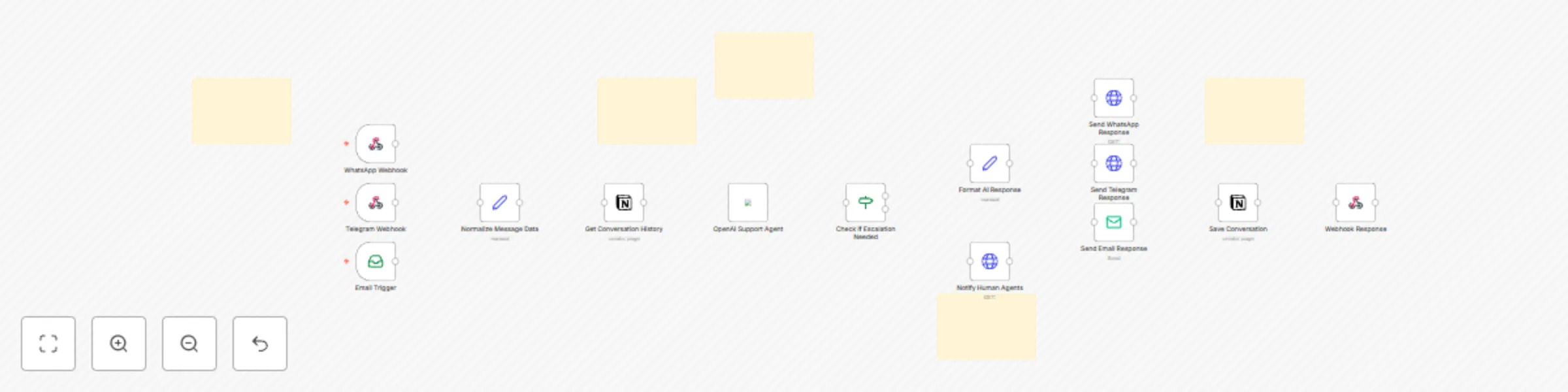
*This workflow contains community nodes that are only compatible with the self-hosted version of n8n.* ## 24/7 AI Support Agent: Handle 10x More Customers While You Sleep! 💰 --- ## 🚀 **Transform Your Customer Support Into a Profit Machine** **Stop losing customers to slow responses!** This revolutionary AI Customer Support Agent workflow turns your n8n into a **24/7 customer service powerhouse** that: ✅ **Handles unlimited customers simultaneously** ✅ **Responds in under 3 seconds** across ALL channels ✅ **Reduces support costs by 70%** (proven ROI) ✅ **Works while you sleep** - never miss another sale ✅ **Escalates complex issues** to humans automatically --- ## 💎 **What You Get** ### ⚡ **The Workflow** - **Multi-Channel Integration**: WhatsApp, Telegram, Email, Website Chat - **GPT-4 Powered Intelligence**: Context-aware, professional responses - **Smart Escalation System**: Knows when humans are needed - **Conversation Memory**: Remembers every customer interaction - **Analytics Dashboard**: Track performance and ROI ### 📋 **Setup Materials** - **Complete JSON Workflow** (drag & drop installation) - **Step-by-Step PDF Guide** (non-technical friendly) - **Troubleshooting Guide** (solve any issue) --- ## 🔥 **Why This Workflow is a Game-Changer** ### **Problem It Solves:** - **Lost Sales**: 67% of customers abandon purchases due to poor support - **High Costs**: Average support agent costs $50,000+/year - **Limited Hours**: Miss 60% of inquiries outside business hours - **Inconsistent Quality**: Human agents have bad days - **Scaling Issues**: Can't hire fast enough for growth ### **The Solution:** - **Zero Response Delays**: Instant replies 24/7/365 - **Consistent Excellence**: Perfect responses every time - **Unlimited Scaling**: Handle 1 or 10,000 customers - **Massive Cost Savings**: $500/month vs $50,000/year per agent - **Never Misses Anything**: Catches every single inquiry --- ## 🛠️ **Integrations & Tools Used** ### **AI & Automation:** - **OpenAI GPT-4 Turbo** - Industry-leading AI responses - **n8n Workflow Engine** - Reliable automation backbone - **Smart Decision Trees** - Perfect escalation logic ### **Communication Channels:** - **WhatsApp Business API** - Reach 2+ billion users - **Telegram Bot API** - Lightning-fast messaging - **IMAP/SMTP Email** - Professional email support - **Webhook Integration** - Connect any chat widget ### **Data & Analytics:** - **Notion Database** - Conversation history & analytics - **Slack Integration** - Instant team notifications - **Custom Webhooks** - Connect to any CRM/tool ### **Advanced Features:** - **Multi-language Support** - Serve global customers - **Sentiment Analysis** - Detect frustrated customers - **Auto-categorization** - Organize inquiries automatically - **Performance Metrics** - Track ROI and efficiency --- ## 🎯 **Perfect For:** ### **E-commerce Businesses** - Handle pre-sale questions instantly - Provide order status updates - Resolve shipping inquiries - Increase conversion rates by 34% ### **SaaS Companies** - Technical support automation - Onboarding assistance - Feature explanations - Reduce churn by 28% ### **Service Businesses** - Appointment scheduling - Service inquiries - Quote requests - Increase booking rates by 45% ### **Digital Agencies** - Client communication - Project updates - Scope clarifications - Improve client satisfaction by 52% --- ## ⚡ **Installation is RIDICULOUSLY Easy** ### **Step 1**: Import JSON (2 minutes) - Download the workflow file - Import into your n8n instance - Activate the workflow ### **Step 2**: Configure APIs (10 minutes) - Add your OpenAI API key - Connect your messaging accounts - Set up email credentials ### **Step 3**: Test & Launch (5 minutes) - Send test messages - Verify responses - Go live and start saving money! **Total Setup Time**: Under 20 minutes **Technical Skill Required**: None (detailed guide included) --- ## 🔒 **Enterprise-Grade Security & Reliability** ### **Security Features:** - **End-to-end encryption** for all communications - **API rate limiting** to prevent abuse - **Data privacy compliance** (GDPR ready) - **Secure credential storage** in n8n vault ### **Reliability Features:** - **99.9% uptime** with proper n8n hosting - **Automatic error handling** and recovery - **Failover to human agents** when needed - **Complete conversation logging** for compliance ### **Scalability:** - **Handles 1000+ concurrent chats** - **Processes 10,000+ messages/day** - **Auto-scales with your business** - **No performance degradation**

A
Amanda Benks
Support Chatbot
26 Jun 2025
3729
0
Workflow preview: Multilingual WhatsApp translator with OpenAI Whisper & GPT-4 and HubSpot integration
Free advanced

Multilingual WhatsApp translator with OpenAI Whisper & GPT-4 and HubSpot integration

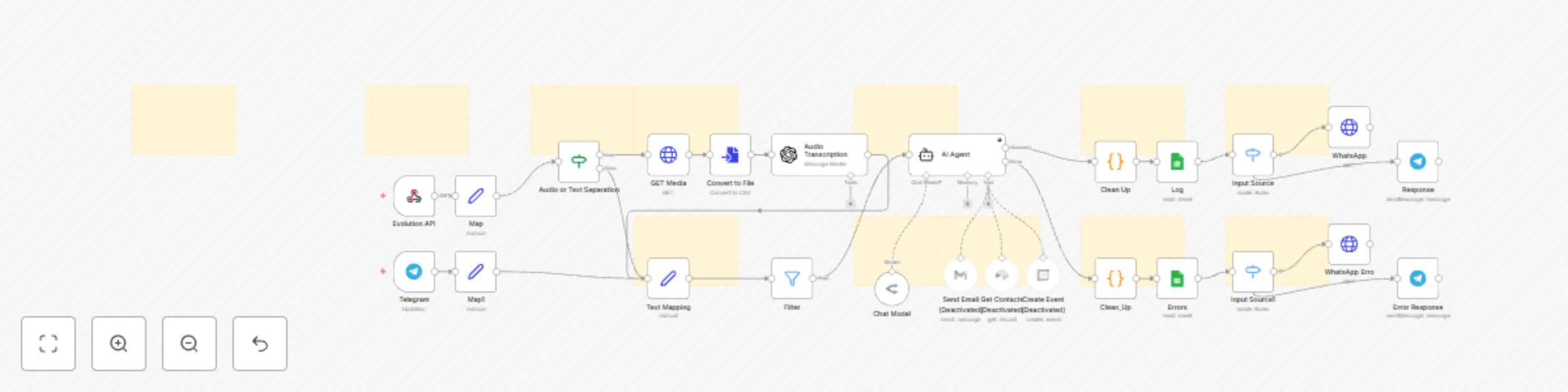
![flowinterpreten8n.png](fileId:1307) ## 🌍 AI WhatsApp Translator + Voice Transcriber with HubSpot Integration #### Hello! I'm Amanda ❤️, a passionate automation creator and AI enthusiast. With over 2 years of experience in n8n and Make.com, I design robust, intelligent agents that make your operations smarter and smoother. This translator + transcriber assistant is perfect for multilingual communication via WhatsApp. It automatically captures voice or text messages, identifies the customer's region and language, transcribes audio using OpenAI Whisper, and generates friendly, culturally adapted translations with GPT-4 or GPT-4o. All messages and contacts are saved in your HubSpot CRM—so no lead gets lost. --- ### ✅ What this Workflow Does: - 🎧 **Transcribes audio messages** using OpenAI Whisper (accurate + fast). - 🌐 **Translates text & voice** into the client’s native language or a default one. - 🇧🇷 **Adapts tone, slang, emojis**, and cultural expressions for natural conversation. - 💼 **Saves contact info & history** to HubSpot automatically (name, phone, and translation). - 📬 **Replies via WhatsApp** using Evolution API (also works with chatbots). - ✨ Handles **over 80+ countries** and phone prefixes to detect preferred languages. --- ### 🛠️ How to Use It: 1. Clone the workflow to your n8n instance (cloud or self-hosted). 2. Configure the **Webhook** URL in your Evolution API or WhatsApp provider. 3. Set up credentials for: - OpenAI (for transcription and GPT translation) - HubSpot (to store leads) 4. Optional: Adjust prompt logic and default languages inside the `AI Agent` node. 5. Done! Your AI translator bot is live 💬🌎 --- ### 🧠 LLMs and Tools Used: - **OpenAI GPT-4o / GPT-4 Mini** for translation - **OpenAI Whisper** for transcription - **HubSpot CRM** integration - **Evolution API** for WhatsApp messaging - Dynamic language detection based on phone prefix --- ## 💡 Ideal For: - Multinational businesses with global customers - Customer support teams with multilingual needs - Agencies serving clients in Latin America, Europe, or Asia - Translating informal messages in real-time --- ## 📁 Included: - 1x Complete n8n Workflow - Preconfigured translation agents - HubSpot contact mapper - Multi-country language index - Ready-to-use voice transcription logic --- #### ❤️ Support Materials and Templates: **[iloveflows.gumroad.com](https://iloveflows.gumroad.com)** #### ☁️ Want to use this with n8n Cloud? Use my affiliate link to get started: 👉 **[https://n8n.partnerlinks.io/amanda](https://n8n.partnerlinks.io/amanda)** #### 🔥 Buy a VPS server with a Super Discount: **[https://hostinger.com/vps](https://www.hostinger.com/cart?product=vps%3Avps_kvm_4&period=12&referral_type=cart_link&REFERRALCODE=iloveflows&referral_id=0196b5ab-28ce-710f-b543-2fd6a0d7699f)**

A
Amanda Benks
Support Chatbot
10 May 2025
567
0
Workflow preview: 📊 AI token tracker for WhatsApp & Telegram – Save AI usage to Google Sheets
Free advanced

📊 AI token tracker for WhatsApp & Telegram – Save AI usage to Google Sheets

### 💸 GPT-4o Token Tracker – Measure AI Usage and Cost via WhatsApp or Telegram Hi! I'm Amanda — I create smart, useful AI automations for n8n and Make. This workflow helps you monitor how many tokens are consumed per conversation with AI Agent Tokens, and logs that usage into **Google Sheets** — so you can track expenses and make smarter decisions about your AI usage. You can connect it to **Telegram** or **WhatsApp (via Evolution API)**, and it will automatically capture: - Prompt and completion tokens - Total tokens - Time of interaction - The user/channel - (Optional) Cost estimate in USD --- ### 📊 What this workflow does - Logs token usage from LangChain agents - Calculates token totals for each request - Appends the data to a structured Google Sheet - Works with **WhatsApp (Evolution API)** or **Telegram bots** - Ideal for tracking AI Agent Tokens usage over time and controlling costs --- ### 🧪 Free Spreadsheet Template You can duplicate and use this template for logging token usage: 👉 [Google Sheets Template](https://docs.google.com/spreadsheets/d/1_HHTTT_gXEaH-LtZxNycSXeGGYE7dcS9vbuad0dZcnw/edit?usp=sharing) Includes columns like: - Date - Input - Output - Tokens (Prompt / Completion / Total) - Tool name or use case - Estimated cost --- ### 🛠️ Setup Instructions 1. Import the workflow to your n8n (Cloud or self-hosted) 2. Connect your Google Sheets account 3. Choose your trigger: - WhatsApp (Evolution API webhook) - Telegram (Bot webhook or message input) 4. Fill out: - AI Agent model used (e.g. `gpt-4o`) - Cost per 1K tokens (optional, for USD estimation) 5. Update spreadsheet ID and tab name in the Google Sheets node 6. (Optional) Connect as a sub-tool to an AI agent for automatic logging --- ### 🧰 Tech Used - OpenRouter - LangChain - Google Sheets - Telegram or WhatsApp webhook (Evolution API) - Nodes: HTTP Request, Set, If, Google Sheets, Merge --- ### ✅ Who This Is For - Developers or agencies that want to monitor AI Agent Tokens usage - Freelancers managing AI bots for clients - Teams that need billing visibility and cost control - Anyone who wants transparency in AI token spending --- ### ✅ Requirements - OpenAI GPT-4o access - Google Sheets credential - Telegram Bot Token (or Evolution API access for WhatsApp) - n8n (Cloud or self-hosted) --- ### 🌐 Want this template? ❤️ Buy more workflows at: [https://iloveflows.com](https://iloveflows.com) ☁️ Try n8n Cloud: [https://n8n.partnerlinks.io/amanda](https://n8n.partnerlinks.io/amanda)

A
Amanda Benks
Engineering
9 May 2025
627
0
Workflow preview: Automated Facebook comment management with GPT-4o and LangChain
Free advanced

Automated Facebook comment management with GPT-4o and LangChain

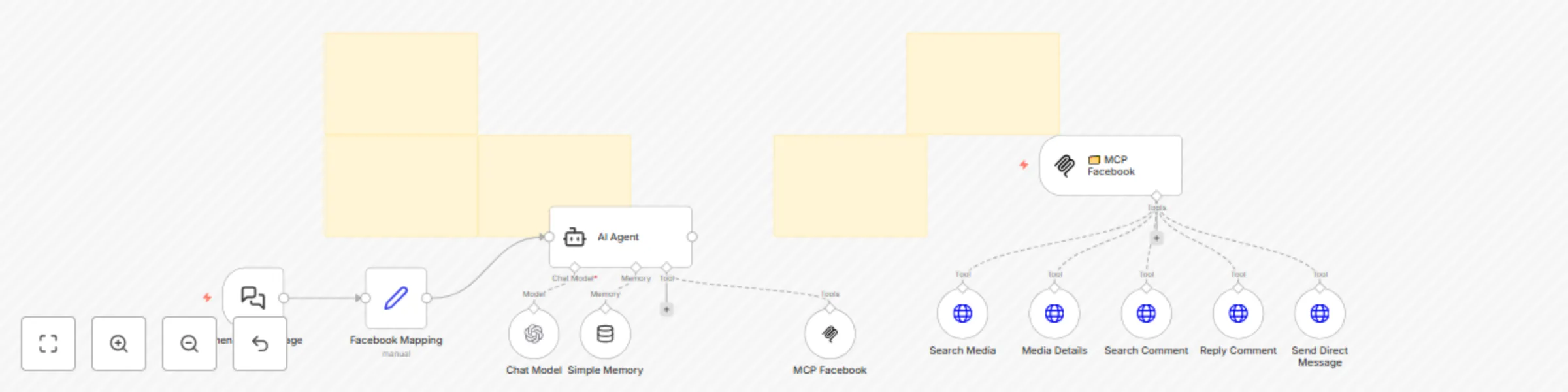
### 🤖 Facebook AI Agent with MCP Server – Built for Smart Engagement and Automation #### Hi! I’m Amanda 🥰😘 — I build intelligent automations with n8n and Make. This powerful workflow was designed to help teams automatically handle Facebook page interactions with AI. Using **Meta Graph API**, **LangChain**, **MCP Server**, and **GPT-4o**, it allows your AI agent to **search for posts, read captions, fetch comments**, and even **reply or message followers**, all through structured tools. --- ### 🔧 What the workflow does - Searches for recent media using Facebook Page ID and access token - Reads and extracts captions or media URLs - Fetches comments and specific replies from each post - Replies to comments automatically with GPT-generated responses - Sends direct messages to followers who commented - Maps user input and session to keep memory context via LangChain - Communicates via Server-Sent Events (SSE) using your MCP Server URL --- ### 🧰 Nodes & Tech Used - `LangChain Agent` + `Chat Model` with GPT-4o - `Memory Buffer` for session memory - `toolHttpRequest` to search media, comments, and send replies - `MCP Trigger` and `MCP Tool` (custom SSE connection) - `Set` node for input and variable assignment - `Webhook` and JSON for Facebook API structure --- ### ⚙️ Setup Instructions 1. Create your Facebook App in Meta Developer Portal 2. Add your **Facebook Page ID** and **Access Token** in the `Set` node 3. Update the **MCP Server Tool URL** in the `MCP Facebook` node - Use your n8n server URL (e.g. `https://yourdomain.com/mcp/server/facebook/sse`) 4. Trigger the workflow using the included `LangChain Chat Trigger` 5. Interact via text to ask the agent to: - “Get latest posts” - “Reply to comment X with this message” - “Send DM to this user about...” --- ### 👥 Who this is for - Social media teams managing multiple Facebook pages - Brands automating engagement with followers - Agencies creating smart, autonomous digital assistants - Developers building conversational bots for Facebook --- ### ✅ Requirements - Meta Graph API access - Facebook Page (with permissions) - n8n instance (Cloud or Self-hosted) - MCP Server configured (SSE Endpoint enabled) - OpenAI API Key (for GPT-4o + LangChain) --- ### 🌐 Want to use this workflow? ❤️ Buy workflows: [https://iloveflows.com](https://iloveflows.com) ☁️ Try n8n Cloud: [https://n8n.partnerlinks.io/amanda](https://n8n.partnerlinks.io/amanda)

A
Amanda Benks
Social Media
9 May 2025
1685
0
Workflow preview: AI personal assistant with GPT-4o, RAG & voice for WhatsApp using Supabase
Free advanced

AI personal assistant with GPT-4o, RAG & voice for WhatsApp using Supabase

### 🧠 Intelligent AI Assistant with RAG & Voice for WhatsApp – Built with GPT-4o & Supabase --- ### 📌 About this workflow and its creator Hi! I’m Amanda, a creator of intelligent automations using n8n and Make. I’ve been building AI-powered workflows for over 2 years, always focused on usability and innovation. This one here is very special to me – a truly advanced AI assistant that reads, listens, interprets and responds like a real human 🤖✨ This ready-to-use workflow acts as a powerful AI personal assistant capable of understanding messages via voice, text, documents, or even images. It supports full multi-channel operation (WhatsApp via Evolution API, Instagram, Facebook, and more), and includes advanced RAG capabilities using Supabase + GPT-4o. It’s designed to be highly extensible, with memory, prompt update tools, and knowledge base management. --- ### ⚙️ What this workflow does - 💬 Understands user input via text, document, audio or image (voice, OCR, PDF) - 🎤 Transcribes and interprets voice messages using OpenAI Whisper - 🧠 Understands prompts and user commands using GPT-4o via LangChain agent - 🗂️ Searches knowledge base using RAG + Supabase vector DB - 📄 Accepts documents and automatically indexes them for future questions - 🧾 Summarizes documents and stores metadata in Supabase - 🗃️ Offers memory support (PostgreSQL chat memory per user session) - 📧 Sends replies through WhatsApp (Evolution API), Instagram, Facebook, etc. - 📅 Manages schedules (via tool integration with Google Calendar) - 📬 Sends and searches emails (with support tools) - 🛠 Modular and expandable structure (tools for saving knowledge, deleting, updating prompt) --- ### 🔧 Setup Instructions 1. **n8n Hosting** This workflow **requires n8n self-hosted** (or n8n Cloud with custom credentials + community nodes enabled). 2. **Create required databases** Use the provided SQL queries inside the `setar_supabase_tabelas_vectoriais`, `criar_cerebro`, and `criar_rag_controle` nodes to initialize: - `documents` table for RAG - `cerebro` table for prompt - `memoria_chat` for session memory - `rag_controle` for summaries and indexing 3. **Credentials needed** - OpenAI API (for chat, embeddings and Whisper transcription) - Redis (for managing message buffer) - Supabase (for vector store + metadata) - Postgres (for memory and prompts) - Evolution API (or other messaging platforms) 4. **Webhook** Set the webhook path to receive messages from your Evolution or WhatsApp API provider. 5. **Configure ‘Set’ node** In the `config` node, adjust: - `adminNumero`: your personal WhatsApp or admin number - `evolutionApiKey`: your private API key - `utilizacaoApenasViaAdmin`: toggle if this should only respond to admin numbers 6. **Tool connections** Ensure the supporting workflows are also imported and connected for: - Emails - Knowledge management - Calendar events --- ### 📎 Notes - This workflow uses LangChain agents, OpenAI GPT-4o, Supabase, Redis, and PostgreSQL. - It includes multiple “sticky notes” inside the workflow with explanations. - Ideal for businesses, consultants, and developers looking to offer an intelligent and extendable AI chatbot experience. --- ## 🛍 Want to use this on your system? ❤️ Buy workflows: [https://iloveflows.com](https://iloveflows.com) ☁️ Use n8n Cloud with my partner link: [https://n8n.partnerlinks.io/amanda](https://n8n.partnerlinks.io/amanda)

A
Amanda Benks
Personal Productivity
9 May 2025
3876
0
Workflow preview: 💾 Backup automation for n8n workflows to Google Drive (daily or manual)
Free advanced

💾 Backup automation for n8n workflows to Google Drive (daily or manual)

### 💾 Backup Automation for n8n Workflows to Google Drive – No Risk, No Stress #### Hi! I’m Amanda, I build automation workflows for n8n and Make. This ready-to-use workflow is designed to automatically **export and back up all your n8n workflows** to a designated **Google Drive folder**, organized by date. It’s perfect for agencies, developers, and teams that want to protect their automation assets — without relying on manual exports or risking losing their work. --- ### ✅ What this workflow does - Fetches **all your existing workflows** from the n8n API - Compiles each workflow as a `.json` file - Creates a new folder in Google Drive using the current date - Uploads each `.json` file to that folder - Can be triggered **manually** or **automatically via cron** (date-time node) --- ### ⚙️ How to set it up 1. **Connect your Google Drive** in the “Folder Creation” and “Save to Drive” nodes 2. **Add your n8n API Key** in the “Search All Workflows” and “Compiles Individual Data” nodes 3. Define your time zone and execution method: - Run manually via the “Manual Trigger” node - Or schedule backups using the “Date & Time” and “Schedule Trigger” nodes 4. (Optional) Change the parent folder ID in the “Folder Creation in Drive” node to set your destination Once configured, the workflow will back up your entire workflow list daily — or whenever you run it — and send the files to your Google Drive! --- ### 🧰 Nodes & Tech Used - `Schedule Trigger` + `Manual Trigger` - `Date & Time` – For timestamp folder naming - `n8n API` – To list and fetch each workflow - `Google Drive` – Folder creation and file upload - `Merge`, `Move Binary Data`, `Set` – Workflow compilation and formatting --- ### 🧑‍💻 Who this is for - n8n developers who want peace of mind - Agencies managing many client automations - Anyone worried about losing their workflow work - Teams needing version control and backup history --- ### 🛠️ Requirements - **Google Drive OAuth2 credential** - **n8n API Key** (from your account settings) - n8n Cloud or self-hosted instance --- ### 🌐 Want to use this workflow? ❤️ Buy workflows: [https://iloveflows.com](https://iloveflows.com) ☁️ Try n8n Cloud with my partner link: [https://n8n.partnerlinks.io/amanda](https://n8n.partnerlinks.io/amanda)

A
Amanda Benks
DevOps
7 May 2025
627
0
Workflow preview: 🤖 Instagram MCP AI agent – read, reply & manage comments with GPT-4o
Free advanced

🤖 Instagram MCP AI agent – read, reply & manage comments with GPT-4o

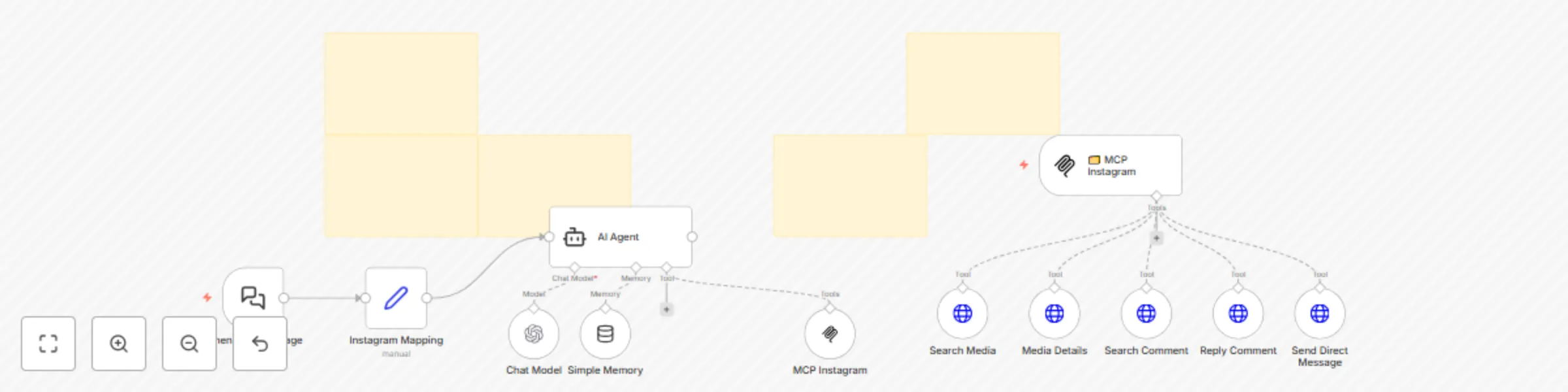
### 🤖 Instagram AI Agent with MCP Server – Built for Smart Engagement and Automation #### Hi! I’m Amanda 🥰 I build intelligent automations with n8n and Make. This powerful workflow was designed to help teams automatically handle Instagram interactions with AI. Using **Meta Graph API**, **LangChain**, **MCP Server**, and **GPT-4o**, it allows your AI agent to **search for posts, read captions, fetch comments**, and even **reply or message followers**, all through structured tools. --- ### 🔧 What the workflow does - Searches for recent media using Instagram ID and access token - Reads and extracts captions or media URLs - Fetches comments and specific replies from each post - Replies to comments automatically with GPT-generated responses - Sends direct messages to followers who commented - Maps user input and session to keep memory context via LangChain - Communicates via Server-Sent Events (SSE) using your MCP Server URL --- ### 🧰 Nodes & Tech Used - `LangChain Agent` + `Chat Model` with GPT-4o - `Memory Buffer` for session memory - `toolHttpRequest` to search media, comments, and send replies - `MCP Trigger` and `MCP Tool` (custom SSE connection) - `Set` node for input and variable assignment - `Webhook` and JSON for Instagram API structure --- ### ⚙️ Setup Instructions 1. Create your Instagram App in Meta Developer Portal 2. Add your **Instagram ID** and **Access Token** in the `Set` node 3. Update the **MCP Server Tool URL** in the `MCP Instagram` node - Use your n8n server URL (e.g. `https://yourdomain.com/mcp/server/instagram/sse`) 4. Trigger the workflow using the included `LangChain Chat Trigger` 5. Interact via text to ask the agent to: - “Get latest posts” - “Reply to comment X with this message” - “Send DM to this user about...” --- ### 👥 Who this is for - Social media teams managing multiple comments - Brands automating engagement with followers - Agencies creating smart, autonomous digital assistants - Developers building conversational Instagram bots --- ### ✅ Requirements - Meta Graph API access - Instagram Business account - n8n instance (Cloud or Self-hosted) - MCP Server configured (SSE Endpoint enabled) - OpenAI API Key (for GPT-4o + LangChain) --- ### 🌐 Want to use this workflow? ❤️ Buy workflows: [https://iloveflows.com](https://iloveflows.com) ☁️ Try n8n Cloud: [https://n8n.partnerlinks.io/amanda](https://n8n.partnerlinks.io/amanda)

A
Amanda Benks
Social Media
6 May 2025
5485
0
Workflow preview: 📢 Multi-platform video publisher – YouTube, Instagram & TikTok
Free advanced

📢 Multi-platform video publisher – YouTube, Instagram & TikTok

![Workflow Image](https://i.ibb.co/zVv3psvZ/n8n-workflow-midia-publish.png) ### Hi! I'm Amanda ❤️ I build intelligent automation flows with n8n and Make. This one is for all content creators, marketing teams, and agencies who want to **publish once and post everywhere**. With this workflow, you can upload a single video to **YouTube**, **Instagram Reels**, and **TikTok** — simultaneously and automatically. --- ### ✅ What the workflow does - Downloads a video from a provided URL - Uploads the video to your **YouTube** channel with title and description - Publishes it as a **Reel on Instagram** via the Meta Graph API - Sends the same video to **TikTok** using their official API - Supports credential input via `Set` node (tokens, titles, descriptions) --- ### ⚙️ Nodes & Tech Used - `HTTP Request` – Download video and handle uploads to Instagram & TikTok - `YouTube` node – Official n8n integration for video upload - `Set` node – For handling user inputs (tokens, titles, video URLs) - `Switch`, `Wait`, `Merge` – Logic to control publishing status - Manual or webhook start available --- ### 🛠️ Setup Instructions 1. Open the workflow in your **n8n (Cloud or self-hosted)** instance 2. Edit the `Set` node called `Credentials` and fill in: - `Token Instagram` - `Token Tiktok` - `YouTube title`, `description`, and `video URL` - Instagram account ID 3. Connect your YouTube OAuth credentials in the **YouTube** node 4. Optionally, trigger via webhook to automate from other apps (Typebot, CRM, Drive) 5. Hit "Execute Workflow" or schedule via cron --- ### 👥 Who this is for - Content creators who want to post everywhere at once - Agencies managing video distribution across platforms - Social media managers and freelancers - Anyone wanting a one-click multi-platform publishing workflow --- ### 🌐 Explore more workflows ❤️ Buy workflows: [https://iloveflows.com](https://iloveflows.com) ☁️ Try n8n Cloud: [https://n8n.partnerlinks.io/amanda](https://n8n.partnerlinks.io/amanda)

A
Amanda Benks
Social Media
6 May 2025
4861
0
Workflow preview: 🔔 Meta Ads Low Balance Alert – Auto Notification via WhatsApp or Email
Free advanced

🔔 Meta Ads Low Balance Alert – Auto Notification via WhatsApp or Email

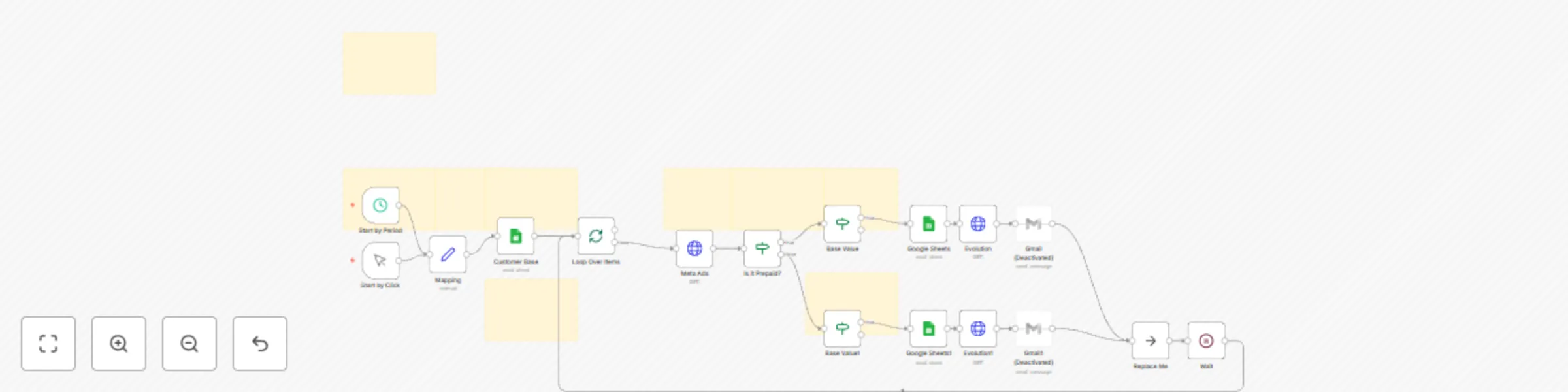
### Hello my loves! I’m Amanda... I created this workflow with care for marketing professionals and agencies who manage multiple **Meta Ads (Facebook)** accounts and want to track **ad account balances automatically** — no more logging in every day or risking campaigns stopping unexpectedly. With this setup, n8n will check the balance of each account using the Meta API, compare it to a defined threshold, and if the balance is too low, it will automatically send a friendly alert via **WhatsApp or email**. It also logs everything neatly into a **Google Sheet** — so you always know where things stand. --- ## ✨ What this workflow does - 🧾 Pulls balance data from Meta Ads accounts using the Facebook Graph API - 📉 Compares current balance with the minimum threshold set in a Google Sheet - 🚨 Sends low-balance alerts via WhatsApp (Evolution API) or Gmail - 🧠 Customizes alerts depending on payment type: **Boleto or Credit Card** - 📊 Updates the Google Sheet with new balance, check date, and status - 📆 Can run automatically every day or manually whenever you want --- ## 🔧 What you’ll need 1. A Google Sheet with your client accounts and minimum balance thresholds → Use this template: [Google Sheet Example](https://docs.google.com/spreadsheets/d/1wwjHif98Jyc8QUGZI15YI-Z68QXznIuMcK951AuUYdY/edit?usp=sharing) 2. Access Token for Meta Ads API 3. Evolution API (if you want to send alerts via WhatsApp) 4. Gmail account connected to n8n (for email notifications) 5. “Base Value” column filled out in the sheet for each account --- ## ✅ Works with: - **n8n Cloud** - **n8n Self-hosted** 🔐 Secure credentials managed directly in n8n — no exposed tokens. --- ## Want to adapt this workflow to your business? ❤️ Buy Workflows: https://iloveflows.gumroad.com ☁️ Try n8n Cloud with my partner link: [https://n8n.partnerlinks.io/amanda](https://n8n.partnerlinks.io/amanda) --- ## Translation to Portuguese: ### Olá meus amores! Eu sou a Amanda 🌟 Esse fluxo foi feito com muito cuidado para profissionais que gerenciam contas de anúncios no **Meta Ads (Facebook)** e precisam acompanhar de perto o **saldo disponível**, evitando pausas indesejadas nas campanhas. Com ele, você automatiza todo o controle de saldo: o sistema busca os dados da conta via API do Facebook, calcula o valor restante, compara com o limite definido, **envia alertas personalizados por WhatsApp ou e-mail** e ainda atualiza tudo em uma planilha do **Google Sheets** — todos os dias, de forma segura e sem esforço. --- ## ✨ O que esse fluxo faz - 🔄 Busca automaticamente o saldo das contas via API do Meta Ads - 🧮 Verifica se o saldo está abaixo do valor base definido para cada conta - 🟨 Se estiver abaixo, envia alerta com mensagem personalizada para o cliente - 💌 Alerta pode ser enviado por **WhatsApp (via Evolution API)** ou **Email (Gmail)** - 📊 Atualiza a planilha do Google Sheets com o novo saldo e data da última checagem - 💳 Verifica se o método de pagamento da conta é **boleto, PIX ou cartão** e envia mensagens diferentes para cada caso - 📆 Funciona com agendamento automático diário ou execução manual --- ## 🛠️ O que você precisa 1. Uma planilha no Google Sheets com os dados das contas (use este [modelo](https://docs.google.com/spreadsheets/d/1wwjHif98Jyc8QUGZI15YI-Z68QXznIuMcK951AuUYdY/edit?usp=sharing)) 2. Conta de anúncios no Meta configurada com token de acesso válido 3. API do Evolution (caso queira enviar alertas por WhatsApp) 4. Gmail conectado no n8n (para envio de emails) 5. Base Value (valor mínimo desejado) preenchido na planilha para cada conta --- ## ✅ Compatível com: - **n8n Cloud** - **n8n Auto-hospedado** 🔐 Segurança garantida com o uso de credenciais do próprio n8n. --- ## Quer adaptar esse fluxo pro seu sistema? ❤️ Buy Workflows: https://iloveflows.gumroad.com ☁️ Use n8n Cloud com meu link parceiro: [https://n8n.partnerlinks.io/amanda](https://n8n.partnerlinks.io/amanda)

A
Amanda Benks
Miscellaneous
25 Apr 2025
575
0
Workflow preview: 🐶 AI Petshop Assistant with GPT-4o, Google Calendar & WhatsApp/Instagram/FB
Free advanced

🐶 AI Petshop Assistant with GPT-4o, Google Calendar & WhatsApp/Instagram/FB

### Hi! I’m Amanda 🐶💕 This is honestly one of the cutest, smartest workflows I’ve ever built. It was designed with a lot of love to help petshops give their customers fast, modern, and sweet service — without losing the personal touch. Imagine a client sending a message on **WhatsApp, Instagram or Messenger**, and in seconds, they’re greeted with a kind message, a helpful menu, and everything they need. No delays. No stress. Just smooth, intelligent automation. This AI agent chats, books, checks, confirms, charges, and saves — all powered by **GPT-4o**, **LangChain**, **Google Calendar**, **Asaas**, **Supabase**, and more. It’s like having a super capable receptionist who works 24/7 and never forgets a detail 🐾 --- ## 🌟 What this workflow does (and it does it with love) ### 💬 Multichannel AI Support Serve customers across **WhatsApp (official or Evolution API)**, **Instagram Direct**, **Facebook Messenger**, and more — all in one single flow. ### 🧠 Smart, friendly conversations Powered by **OpenAI GPT-4o**, this assistant understands natural language, voice messages, even PDFs and images. It keeps context, remembers the client, and replies with clarity and warmth. ### 🗓️ Real-time booking with Google Calendar Book baths, check-ups or grooming sessions instantly. It checks availability, suggests times, and even handles rescheduling when needed. ### 🧾 Automatic billing with Asaas It can generate payment links or invoices through the **Asaas API** and send them straight to the customer — no manual work involved. ### 📦 Check product availability Clients can ask things like “Do you have Royal Canin puppy food?” and get a real-time answer based on your inventory stored in **Supabase**. ### 📂 Understands voice, images & files Whether it’s a voice note describing symptoms or a picture of a vaccine card, the assistant processes and responds intelligently. ### 💌 Fully customizable tone and flow You can adjust the AI’s prompt, tweak the tone of voice, include emojis, and make the whole flow match your brand’s style perfectly. ### 💾 Save customer history All conversations, bookings, names, preferences and contact info are stored in **Supabase** — safe and organized. ### 🕒 Handles time rules beautifully The flow respects your opening hours and avoids scheduling on holidays or weekends (unless you say otherwise). It can even respond politely if a message arrives after hours. --- ## 🛠️ How to set it up 1. Connect your APIs: OpenAI, Supabase, Google Calendar, Asaas, Evolution or WhatsApp API 2. Customize your business hours, greeting text and booking options 3. Add your services menu or calendar rules 4. Test and go live — your smart, kind AI receptionist is ready to help 💛 --- ✅ Works on **n8n Cloud** and **Self-hosted** 🔒 Secure credential management built into n8n 🐾 Recommended for users with basic n8n experience --- ## Want to adapt this flow to your business? ❤️ Buy Workflows: https://iloveflows.gumroad.com --- ### Oi! Eu sou a Amanda 🐶💕 E olha… esse aqui é um dos meus fluxos favoritos da vida! Ele foi feito com muito amor pra ajudar petshops a oferecerem um atendimento moderno, gentil e automático — sem perder o toque humano, sabe? Imagina só: seu cliente envia uma mensagem por **WhatsApp, Instagram ou Facebook**, e em segundos, ele já recebe um “oi” carinhoso, com menu de opções, horários disponíveis e tudo o que precisa. ✨ Esse fluxo conversa, entende, agenda, confirma, cobra, atualiza e registra — tudo com a inteligência do **GPT-4o** e várias integrações superpoderosas. É tipo ter uma atendente virtual carismática, atenta e que nunca tira férias 🐾 --- ## 🌟 O que esse fluxo faz (e faz com amor) ### 💬 Atende por multicanais Isso mesmo! Seu cliente pode falar com você pelo **WhatsApp API oficial**, **Evolution API**, **Instagram Direct**, **Messenger do Facebook** e muito mais. Um só fluxo pra todos os lugares onde seu cliente está. ### 🧠 Conversa com inteligência (e simpatia) O assistente usa **OpenAI GPT-4o** com LangChain pra entender texto, áudio e até imagens. Ele mantém o contexto da conversa, lembra do cliente, responde com naturalidade e se adapta à personalidade do seu petshop. ### 🗓️ Faz agendamentos em tempo real Seja banho, tosa, consulta ou vacinação, o fluxo se conecta com o **Google Calendar** e encontra o horário perfeito. Se o cliente quiser reagendar, ele oferece novas datas com todo o cuidado. ### 🧾 Gera cobranças automáticas Integrado com a **API do Asaas**, o assistente pode gerar boletos ou links de pagamento e enviar para o cliente direto no chat. Tudo isso com confirmação automática. ### 📦 Consulta produtos no estoque O cliente pode perguntar: “tem ração Golden para gatos de 10kg?” — e pronto, o assistente verifica no **Supabase** e responde rapidinho se tem ou não, com base no que você cadastrou. ### 📂 Entende arquivos, áudios e imagens Sim! Se o cliente mandar um **áudio explicando o problema do pet**, ou até uma **foto da carteirinha de vacinação**, o assistente analisa com a IA e responde com base nessas informações. ### 💌 Personaliza o atendimento Você pode editar o prompt da IA, mudar o tom de voz, escolher emojis, ajustar frases… assim, o atendimento fica com a carinha e a linguagem da sua marca. ### 💾 Salva tudo com segurança O fluxo guarda todo o histórico no **Supabase**: nome do cliente, horário do atendimento, preferência, pedidos anteriores, endereço e muito mais. ### 🕓 Respeita horários e feriados Não tem risco de marcar agendamentos fora do horário. Você define os dias e períodos de atendimento, e ele segue direitinho — com lembretes e mensagens fofas se o cliente escrever fora do horário. --- ## 🛠️ Como configurar? 1. Conecte suas APIs: OpenAI, Supabase, Google Calendar, Asaas, Evolution (ou WhatsApp API oficial) 2. Preencha seus horários de atendimento e personalize seu menu 3. Adicione links do seu cardápio de serviços, regras ou política de agendamento 4. Teste tudo com carinho e pronto! Você tem um atendente virtual incrível 💕 --- ✅ Compatível com **n8n Cloud** e **n8n Auto-hospedado** 🔒 Segurança total usando credenciais protegidas no n8n 🐾 Recomendado para quem já conhece um pouquinho de n8n --- ## Quer adaptar esse fluxo pro seu sistema? ❤️ Buy Workflows: https://iloveflows.gumroad.com

A
Amanda Benks
Support Chatbot
24 Apr 2025
2656
0
Workflow preview: 💬 Daily WhatsApp group summarizer – GPT-4o, Google Sheets & Evolution API
Free advanced

💬 Daily WhatsApp group summarizer – GPT-4o, Google Sheets & Evolution API

### Hey! I’m Amanda ❤️ I made this little workflow with care for people like you who are part of busy WhatsApp groups and want a simple way to keep track of everything. It connects to **Evolution API**, collects all the group messages throughout the day, stores them in **Google Sheets**, and uses **GPT-4o** to generate a daily summary. The summary is saved as a document in **Google Drive** — ready to read, share, or archive. It’s perfect for teams, communities, classes, or any group that talks a lot but doesn’t want to miss important info. --- ## What it does - Collects WhatsApp group messages using Evolution API - Saves the messages in Google Sheets (organized by date) - Creates a clean, structured summary using GPT-4o - Saves the summary in Google Drive as a doc - Can run daily at a set time (fully automated) --- ## How to set it up 1. Connect your Evolution API and provide the group ID 2. Use this [Google Sheets template](https://docs.google.com/spreadsheets/d/1eLLLHHdkkaBjtu2qtqqwrLBbcGM49kwZq-TMky5y5Oc/edit?usp=sharing) 3. Connect Google Sheets and Google Drive in n8n 4. Add your OpenAI API key 5. (Optional) Adjust the AI prompt for a custom tone or structure --- ✅ Works on both **n8n Cloud** and **Self-hosted** 🔐 All credentials stay safe in n8n --- ## Want to customize this for your group or business? ❤️ Buy Workflows: https://iloveflows.gumroad.com 💬 Hire My Services: +5517991557874 (WhatsApp) --- --- ## Tradução em Português (pt-br): ### Oi! Eu sou a Amanda 💬 Se você participa de grupos movimentados no WhatsApp e quer transformar tudo isso em resumos diários organizadinhos, esse fluxo foi feito com todo carinho pra você! Ele conecta com a **API da Evolution**, coleta as mensagens trocadas em grupos, armazena tudo no **Google Sheets**, e no fim do dia gera um **resumo completo** usando **GPT-4o**. Esse resumo é salvo como documento no seu Google Drive — pronto pra ser lido, compartilhado ou arquivado. Ideal pra equipes, comunidades, projetos colaborativos ou até grupos de estudos 📚 --- ## O que o fluxo faz - Monitora e salva conversas do grupo no Google Sheets - Gera resumos diários com IA (formato estruturado e pronto pra leitura) - Salva o resumo como documento no seu Google Drive - Funciona com qualquer grupo conectado à sua conta Evolution - Pode ser agendado pra rodar automaticamente todo fim de dia --- ## Como configurar 1. Conecte sua API Evolution e informe o ID do grupo 2. Use essa [planilha modelo](https://docs.google.com/spreadsheets/d/1eLLLHHdkkaBjtu2qtqqwrLBbcGM49kwZq-TMky5y5Oc/edit?usp=sharing) para armazenar as mensagens 3. Conecte sua conta do Google (Sheets + Drive) 4. Adicione sua chave da OpenAI 5. Personalize o prompt do resumo (opcional) --- ✅ Compatível com n8n Cloud e Auto-hospedado 🔐 Tudo seguro, simples e sem complicações --- ## Quer adaptar esse fluxo pro seu sistema? ❤️ Buy Workflows: https://iloveflows.gumroad.com 💬 Hire My Services: +5517991557874 (WhatsApp)

A
Amanda Benks
Personal Productivity
21 Apr 2025
2221
0
Workflow preview: MCP Supabase agent – manage your database with AI
Free advanced

MCP Supabase agent – manage your database with AI

### Hi, I’m Amanda 🌷 This workflow was built with love to help you manage your **Supabase database using natural language**, powered by the MCP (Multi-Channel Protocol) AI Agent on n8n. With just a message like “update the status to active where city is New York”, your agent will know exactly what to do — safely, step by step, and always asking for confirmation before deleting anything. It’s ideal for developers who want a smart assistant to create, update, delete or search database records without writing SQL or opening Supabase. --- ## What this workflow does - Receives messages through a chat interface or webhook - Translates them into actions using GPT-4o (via LangChain Agent) - Interacts with Supabase using a custom MCP tool - Supports create, update, delete, search (single or all rows) - Handles confirmations, validations, and missing data checks --- ## Setup (quick and easy 💫) 1. Connect your Supabase credentials 2. Adjust your table and field names 3. Link the MCP webhook to your AI frontend (Typebot, WhatsApp, etc.) 4. Customize the system message to reflect your tone of voice 5. Start chatting — your agent is ready to assist! --- ✅ Works on **n8n Cloud** and **Self-Hosted** 🧠 Built with GPT-4o + LangChain + Supabase + MCP Trigger 💡 No code or SQL required --- ## Want it tailored to your project? #### ❤️ Buy Workflows: https://iloveflows.gumroad.com ##### 💬 Hire My Services: +5517991557874 (WhatsApp)

A
Amanda Benks
Engineering
21 Apr 2025
2690
0
Workflow preview: ✨ Meta ads campaign report by period – auto-send via WhatsApp & email
Free advanced

✨ Meta ads campaign report by period – auto-send via WhatsApp & email

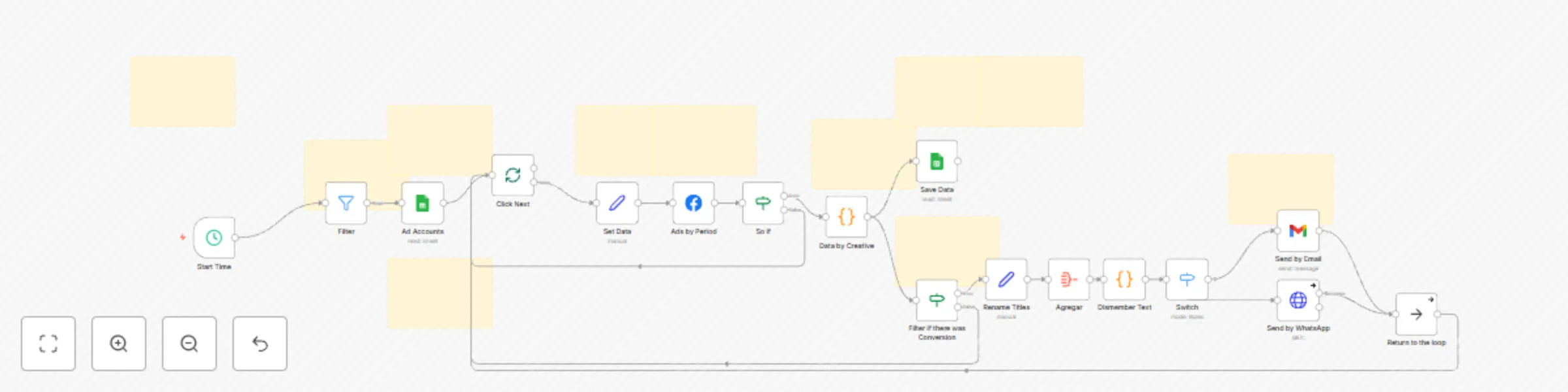
## Hi, I’m Amanda 🌷 I created this workflow with great care to help you simplify your daily reporting routine. If you manage Meta Ads campaigns, you know how time-consuming it can be to open Ads Manager, filter data, and build client reports. This automation does all that for you — pulling campaign data by period, calculating key metrics, filtering only what matters, and sending everything via WhatsApp or Email, fully formatted and ready to share. --- ## What it does - Collects ad performance data from multiple accounts - Filters campaigns and creatives with real results - Calculates metrics like CPC, CTR, CPV, conversions, and spend - Formats the report clearly and professionally - Sends the report via WhatsApp (Evolution API) or Gmail - Runs automatically every morning (optional schedule) --- ## Setup Guide 1. Use this [Google Sheet template](https://docs.google.com/spreadsheets/d/1c5QdBtyiYRW8DPmYxHWcfKa0Lg54CVHSrQJ6kXbiz40/edit?usp=sharing) to manage your accounts 2. Connect Google Sheets, Gmail, and Meta Ads to n8n 3. Set your `action_type` filters (lead, purchase, etc.) 4. Customize your message and delivery time --- ## Requirements - Google account connected to n8n - Facebook Graph API access - WhatsApp via Evolution API (optional) - Basic n8n knowledge --- ## Want it customized for your business? **Let’s chat** → [WhatsApp me](https://wa.me/5517991557874) (+55 17 99155-7874)

A
Amanda Benks
Market Research
17 Apr 2025
2296
0
Workflow preview: MCP AI agent Google Calendar - create, update & manage events
Free intermediate

MCP AI agent Google Calendar - create, update & manage events

### Hi! I’m Amanda :) 💖 I created this sweet little workflow with lots of love and care, just for you who wants to manage your Google Calendar in a smart and gentle way 💌 This AI-powered agent connects with MCP (Multi-Channel Protocol) and understands natural language like “book a meeting tomorrow at 3pm”, “reschedule my call to Monday”, or “what events do I have on Wednesday?” — and it does everything quietly and beautifully in your calendar 🧸 --- ## 💡 What this lovely agent does - 🗓️ Creates new events in your Google Calendar (with or without guests) - ✏️ Updates existing events with new times or details - 🧹 Deletes events you no longer need - 🔍 Retrieves scheduled events by date - 🤖 Works through GPT-4o or any AI via MCP Agent --- ## ⚙️ How to set it up (gently and step-by-step) 1. **Webhook** is ready for MCP messages at `POST /mcp/calendar` 2. **Connect your Google Calendar account** using OAuth2 inside n8n 3. **Link it to your favorite AI tool** (like LangChain, Typebot, etc.) that can talk to the MCP agent 4. All details like title, time, date, and guests are parsed automatically from natural language 💫 --- ## ✨ Requirements - Google Calendar connected to n8n - n8n instance (Cloud or Self-hosted — both are supported!) - An AI interface that talks to the MCP agent (like LangChain or Typebot) - MCP Trigger API set up in your n8n environment --- This agent is perfect for therapists, consultants, coaches, small teams, or anyone who wants to keep their calendar flowing naturally and peacefully with a little help from AI 💆‍♀️🧠 --- ## Want something customized just for you? ### Chat with me 💻💛 [Chat via WhatsApp](https://wa.me/5517991557874) (+55 17 99155-7874) . . ## Tradução para Português: ### 💖 Oi! Eu sou a Amanda :) Esse fluxinho aqui foi feito com muito cuidado pra você que quer automatizar sua agenda do Google Calendar de forma inteligente, simples e com muito carinho 💌 Ele funciona como um agente que conversa com outro sistema de IA (via MCP) e consegue entender pedidos como “agende uma consulta amanhã às 15h”, “remarque a reunião para segunda”, ou “quais eventos tenho na quarta?” — tudo isso feito direto no seu calendário, sem você precisar abrir nada 🧸 --- ## 💡 O que ele faz com amor - 🗓️ Cria eventos no seu Google Calendar (com ou sem convidados) - ✏️ Atualiza eventos já existentes com novos horários - 🧹 Exclui eventos que você não precisa mais - 🔍 Busca seus compromissos com base em datas específicas - ❤️ Tudo isso com suporte ao modelo GPT-4o via agente MCP --- ## ⚙️ Como configurar (bem facinho, prometo!) 1. **Conecte o webhook**: o endpoint do MCP já vem prontinho com o caminho `mcp/calendar` 2. **Conecte sua conta do Google Calendar** usando o OAuth2 no n8n 3. **Adicione a integração do MCP Trigger** com seu sistema de IA (LangChain, Typebot, etc.) 4. Todos os campos como título, data, hora e convidados são extraídos automaticamente via IA 💫 --- ## ✨ Requisitos - Conta Google Calendar integrada ao n8n - Instância n8n (Cloud ou Self-hosted) - Integração com uma IA que converse com o MCP Agent (como LangChain) - Acesso à API MCP ativado no n8n --- Esse agente é ideal pra psicólogos, consultores, times de atendimento, terapeutas — ou qualquer pessoa fofa que quer deixar sua agenda fluindo sozinha, com a ajuda de um toque de inteligência 💆‍♀️🧠 --- ## Quer algo feito só pra você? ### Fala comigo com carinho 💻💛 [Falar no WhatsApp](https://wa.me/5517991557874) (+55 17 99155-7874)

A
Amanda Benks
Personal Productivity
17 Apr 2025
2082
0
Workflow preview: 🤖 AI restaurant assistant for WhatsApp, Instagram & Messenger
Free advanced

🤖 AI restaurant assistant for WhatsApp, Instagram & Messenger

#### Hi, I’m Amanda! 💌 This workflow was created with so much love, care, and attention… especially for you, who runs a restaurant, a cozy little burger place, or a delivery business full of heart. 🥰 I know how busy your days can be, so I made this sweet AI assistant to help you take care of your customers on WhatsApp, Instagram, Messenger (or Evolution API). It sends your beautiful menu, checks ZIP codes, creates payment links, and even notifies the kitchen when the order is ready. All gentle, all automatic, all with love. 💛 --- ## 💡 What this workflow does - Replies to customers via **WhatsApp API, Instagram Direct, Messenger**, and **Evolution API** - Checks ZIP codes to see if delivery is available using Google Maps - Sends your **menu as images**, because food should look as good as it tastes 🍕 - Collects item selections and offers lovely upsells like drinks or extras - Creates payment links with the **Asaas API** - Confirms when the payment is complete and sends the order to the kitchen - Stores all messages and session data safely in **Supabase** - Uses **OpenAI GPT-4o** to talk naturally and kindly with your customers --- ## ⚙️ How to set it up (I’ll guide you with care 🧸) 1. Connect your webhook from WhatsApp, Instagram, Messenger, or Evolution API 2. Create a Supabase table called `n8n_workflow_followup` - You can use this ready-made template here: 👉 [Supabase Sheet Template](https://drive.google.com/file/d/1KUGb0ujyfwy1yUroxZTqpUp9c5-FTXf6/view?usp=sharing) 3. Add your API keys (OpenAI, Supabase, Google Maps, and Asaas) securely in n8n 4. Customize the AI prompt with your brand’s voice and sweet style 💫 5. Set your delivery radius (default is 10km, but you can change it!) 6. Upload your menu images (from Google Drive, your website, or any link) 7. That’s it! Your assistant is now ready to serve with kindness and automation 💕 --- ## 🍯 Works with: ✅ **n8n Cloud** and **Self-Hosted n8n** 🔐 All API credentials are safely stored using n8n’s secure credential manager --- ## Want something customized just for you? ### Chat with me, I’d love to help 💻💛 [Chat via WhatsApp](https://wa.me/5517991557874) (+55 17 99155-7874) . . . ### Tradução em Português: #### Oi, eu sou a Amanda! 💌 Esse workflow foi feito com muito carinho, dedicação e cuidado... pensando especialmente em você, que tem um restaurante, lanchonete ou delivery cheio de amor pelo que faz. 🥰 Eu sei como o dia a dia pode ser corrido, e foi por isso que eu criei esse atendente com IA: pra te ajudar a responder clientes no WhatsApp, Instagram, Messenger (ou Evolution API), enviar cardápio com imagens lindas, calcular entregas, gerar links de pagamento e até avisar a cozinha. Tudo com jeitinho, sem complicação, e com muito coração. 💛 --- ## 💡 O que esse fluxo faz - Atende clientes pelo **WhatsApp API, Instagram Direct, Messenger** e **Evolution API** - Valida CEP e calcula se o cliente está dentro da área de entrega (usando Google Maps) - Envia **cardápio com imagens**, porque comer começa pelos olhos 🍕 - Coleta os pedidos e também oferece bebidas e adicionais - Gera link de pagamento automaticamente com a **API do Asaas** - Confirma o pagamento e avisa a cozinha quando estiver tudo certo - Armazena mensagens, horários e histórico no **Supabase** - Usa o **GPT-4o da OpenAI** pra conversar de forma educada e natural com seus clientes --- ## ⚙️ Como configurar (com meu passo a passo cheio de cuidado 🧸) 1. Conecte seu webhook do WhatsApp, Instagram, Messenger ou Evolution API 2. Crie uma tabela no Supabase chamada `n8n_workflow_followup` - Você pode usar esse modelo aqui: 👉 [Planilha modelo Supabase](https://drive.google.com/file/d/1KUGb0ujyfwy1yUroxZTqpUp9c5-FTXf6/view?usp=sharing) 3. Adicione suas chaves de API do OpenAI, Google Maps, Supabase e Asaas no gerenciador do n8n 4. Personalize o prompt da IA com o nome do seu restaurante, estilo de fala e sua magia 💫 5. Defina a distância máxima de entrega (padrão: 10km) 6. Coloque seus próprios links de imagens do cardápio (pode ser do Drive, site ou CDN) 7. Prontinho! Agora o seu restaurante tem um atendente inteligente, gentil e muito eficiente 💕 --- ## 🍯 Funciona com: ✅ **n8n Cloud** e **n8n auto-hospedado** 🔐 E suas credenciais ficam guardadinhas com segurança no próprio n8n, tá bom? --- ## Quer algo feito especialmente pra você? ### Fala comigo com todo carinho 💻💛 [Falar no WhatsApp](https://wa.me/5517991557874) (+55 17 99155-7874)

A
Amanda Benks
Support Chatbot
17 Apr 2025
7862
0