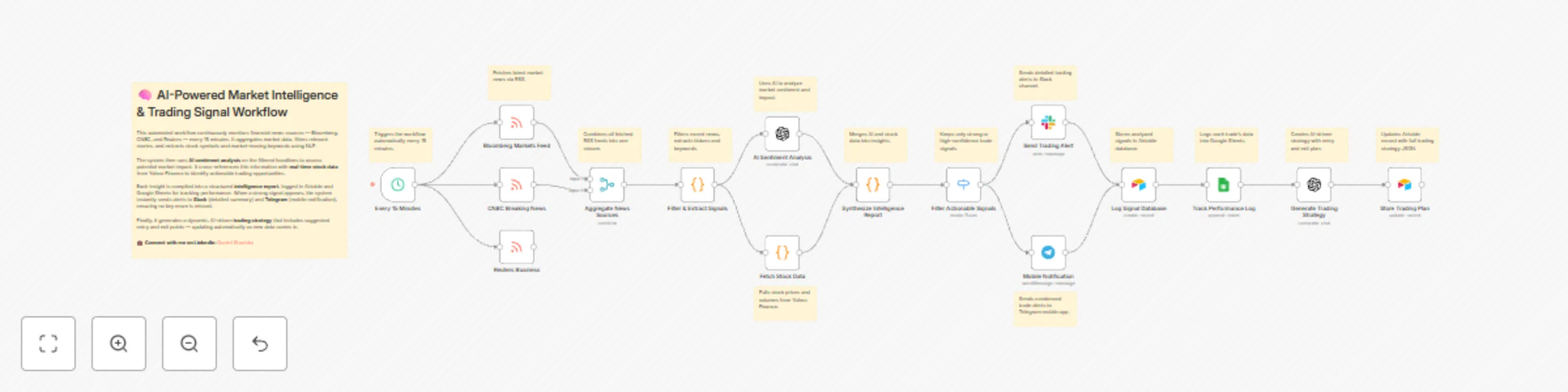
Monitor stock market with AI: news analysis & multi-channel alerts via Slack & Telegram

Workflow preview

Workflow preview
100%
Monitor stock market with AI: news analysis & multi-channel alerts via Slack & Telegram preview
Open on n8n.io

Important notice

This workflow is provided as-is. Please review and test before using in production.

1. Workflow Overview

AI Customer Support Triage with Gmail, OpenAI, Airtable & Slack How it Works This workflow monitors your Gmail support inbox every minute, automatically sending each unread email to OpenAI for inte...

Best for

  • Ticket Management automation workflows
  • AI Summarization automation workflows
  • advanced n8n builders looking for reusable templates

Tools used

n8n-nodes-base.scheduletrigger, n8n-nodes-base.rssfeedread, n8n-nodes-base.merge, n8n-nodes-base.code, n8n-nodes-base.openai, n8n-nodes-base.switch, n8n-nodes-base.slack, n8n-nodes-base.telegram

Source and attribution

This workflow is cataloged by N8N Workflows and links back to its original n8n.io source page by Daniel Shashko.

Original n8n.io source

1.1 Workflow description

Title
Monitor stock market with AI: news analysis & multi-channel alerts via Slack & Telegram
Workflow name
Monitor stock market with AI: news analysis & multi-channel alerts via Slack & Telegram

AI Customer Support Triage with Gmail, OpenAI, Airtable & Slack

How it Works

This workflow monitors your Gmail support inbox every minute, automatically sending each unread email to OpenAI for intelligent analysis. The AI evaluates sentiment (Positive/Neutral/Negative/Critical), urgency level (Low/Medium/High/Critical), categorizes requests (Technical/Billing/Feature Request/Bug Report/General), extracts key issues, and generates professional response templates.

The system calculates a priority score (0-110) by combining urgency and sentiment weights, then routes tickets accordingly. Critical issues trigger immediate Slack alerts with full context and 30-minute SLA reminders, while routine tickets post to standard monitoring channels. Every ticket logs to Airtable with complete analysis and thread tracking, then updates a Google Sheets dashboard for real-time analytics.

A secondary AI pass generates strategic insights (trend identification, risk assessment, actionable recommendations) and stores them back in Airtable. The entire process takes seconds from email arrival to team notification, eliminating manual triage and ensuring critical issues get immediate attention.


Who is this for?

  • Customer support teams needing automated prioritization for high email volumes
  • SaaS companies tracking support metrics and response times
  • Startups with lean teams requiring intelligent ticket routing
  • E-commerce businesses managing technical, billing, and return inquiries
  • Support managers needing data-driven insights into customer pain points

Setup Steps

  • Setup time: 20-30 minutes
  • Requirements: Gmail, OpenAI API key, Airtable account, Google Sheets, Slack workspace
  1. Monitor Support Emails: Connect Gmail via OAuth2, configure INBOX monitoring for unread emails
  2. AI Analysis Engine: Add OpenAI API key, system prompt pre-configured for support analysis
  3. Parse & Enrich Data: JavaScript code automatically calculates priority scores (no changes needed)
  4. Route by Urgency: Configure routing rules for critical vs routine tickets
  5. Slack Alerts: Create Slack app, get bot token and channel IDs, replace placeholders in nodes
  6. Airtable Database: Create base with "tblSupportTickets" table, add API key and Base ID (replace appXXXXXXXXXXXXXX)
  7. Google Sheets Dashboard: Create spreadsheet, enable Sheets API, add OAuth2 credentials, replace Sheet ID (1XXXXXXXXXXXXXXXXXXXXXXXXXXXXXXXXX)
  8. Generate Insights: Second OpenAI call analyzes patterns, stores insights in Airtable
  9. Test: Send test email, verify Slack alerts, check Airtable/Sheets data logging

Customization Guidance

  • Priority Scoring: Adjust urgency weight (25) and sentiment weight (10) in Code node to match your SLA requirements
  • Categories: Modify AI system prompt to add industry-specific categories (e.g., healthcare: appointments, prescriptions)
  • Routing Rules: Add paths for High urgency, VIP customers, or specific categories
  • Auto-Responses: Insert Gmail send node after routine tickets for automatic acknowledgment emails
  • Multi-Language: Add Google Translate node for non-English support
  • VIP Detection: Query CRM APIs or match email domains to flag enterprise customers
  • Team Assignment: Route different categories to dedicated Slack channels by department
  • Cost Optimization: Use GPT-3.5 (~$0.001/email) instead of GPT-4, self-host n8n for unlimited executions

Once configured, this workflow operates as your intelligent support triage layer—analyzing every email instantly, routing urgent issues to the right team, maintaining comprehensive analytics, and generating strategic insights to improve support operations.


Built by Daniel Shashko
Connect on LinkedIn

1.2 Logical Blocks

This catalog entry is organized from the workflow JSON. The node-level section below shows the executable blocks available for review before importing the template.

2. Block-by-Block Analysis

Block 1 - Every 15 Minutes

Type / Role
n8n-nodes-base.scheduleTrigger - scheduleTrigger
Config choices
Version 1.2

Block 2 - Bloomberg Markets Feed

Type / Role
n8n-nodes-base.rssFeedRead - rssFeedRead
Config choices
Version 1.2

Block 3 - CNBC Breaking News

Type / Role
n8n-nodes-base.rssFeedRead - rssFeedRead
Config choices
Version 1.2

Block 4 - Reuters Business

Type / Role
n8n-nodes-base.rssFeedRead - rssFeedRead
Config choices
Version 1.2

Block 5 - Aggregate News Sources

Type / Role
n8n-nodes-base.merge - merge
Config choices
Version 3

Block 6 - Filter & Extract Signals

Type / Role
n8n-nodes-base.code - code
Config choices
Version 2

Block 7 - AI Sentiment Analysis

Type / Role
n8n-nodes-base.openAi - openAi
Config choices
Version 1.1

Block 8 - Fetch Stock Data

Type / Role
n8n-nodes-base.code - code
Config choices
Version 2

Block 9 - Synthesize Intelligence Report

Type / Role
n8n-nodes-base.code - code
Config choices
Version 2

Block 10 - Filter Actionable Signals

Type / Role
n8n-nodes-base.switch - switch
Config choices
Version 3

Block 11 - Send Trading Alert

Type / Role
n8n-nodes-base.slack - slack
Config choices
Version 2.3

Block 12 - Mobile Notification

Type / Role
n8n-nodes-base.telegram - telegram
Config choices
Version 1.2

Block 13 - Log Signal Database

Type / Role
n8n-nodes-base.airtable - airtable
Config choices
Version 2.1

Block 14 - Track Performance Log

Type / Role
n8n-nodes-base.googleSheets - googleSheets
Config choices
Version 4.7

Block 15 - Generate Trading Strategy

Type / Role
n8n-nodes-base.openAi - openAi
Config choices
Version 1.1

Block 16 - Store Trading Plan

Type / Role
n8n-nodes-base.airtable - airtable
Config choices
Version 2.1

Block 17 - Sticky Note

Type / Role
n8n-nodes-base.stickyNote - stickyNote
Config choices
Version 1

Block 18 - Sticky Note1

Type / Role
n8n-nodes-base.stickyNote - stickyNote
Config choices
Version 1

Block 19 - Sticky Note2

Type / Role
n8n-nodes-base.stickyNote - stickyNote
Config choices
Version 1

Block 20 - Sticky Note3

Type / Role
n8n-nodes-base.stickyNote - stickyNote
Config choices
Version 1

Block 21 - Sticky Note4

Type / Role
n8n-nodes-base.stickyNote - stickyNote
Config choices
Version 1

Block 22 - Sticky Note5

Type / Role
n8n-nodes-base.stickyNote - stickyNote
Config choices
Version 1

Block 23 - Sticky Note6

Type / Role
n8n-nodes-base.stickyNote - stickyNote
Config choices
Version 1

Block 24 - Sticky Note7

Type / Role
n8n-nodes-base.stickyNote - stickyNote
Config choices
Version 1

Showing the first 24 of 31 workflow blocks. Download the JSON for the full node graph.

3. Summary Table

Workflow Monitor stock market with AI: news analysis & multi-channel alerts via Slack & Telegram
Complexity advanced
Nodes 31
Categories Ticket Management, AI Summarization
Author Daniel Shashko
Published 29 Oct 2025

4. Reproducing the Workflow from Scratch

  1. 1. Download the workflow JSON

    Use the JSON export at /data/workflows/10284/10284.json as the source template for this automation.

  2. 2. Import the template into n8n

    Open n8n, import the downloaded JSON, and review each node before activating the workflow.

  3. 3. Configure credentials and variables

    Replace placeholder credentials, API keys, webhook URLs, account IDs, and environment-specific values with your own settings.

  4. 4. Test with sample data

    Run the workflow manually or in a staging workspace, inspect node output, and confirm downstream systems receive the expected data.

  5. 5. Activate and monitor

    Enable the workflow only after testing, then monitor executions, errors, and rate limits during the first production runs.

5. General Notes & Resources

Review imported nodes carefully before activation. This catalog entry is intended to help you inspect the workflow structure, understand required services, and find related templates faster.

Node names, credentials, schedules, webhook paths, and external service limits may need adjustment for your workspace.

Frequently asked questions

What does Monitor stock market with AI: news analysis & multi-channel alerts via Slack & Telegram do?

AI Customer Support Triage with Gmail, OpenAI, Airtable & Slack How it Works This workflow monitors your Gmail support inbox every minute, automatically sending each unread email to OpenAI for inte...

What do I need before importing this workflow?

Review the workflow JSON, configure any required credentials in n8n, and test the automation in a safe workspace before using it in production.

Can I customize this workflow?

Yes. Use the block-by-block analysis and the downloadable JSON to inspect each node, then adjust credentials, prompts, schedules, filters, or destinations for your Ticket Management, AI Summarization use case.