Block 1 - Schedule (Every Hour)
- Type / Role
- n8n-nodes-base.scheduleTrigger - scheduleTrigger
- Config choices
- Version 1


 Early Deal
This workflow is provided as-is. Please review and test before using in production.
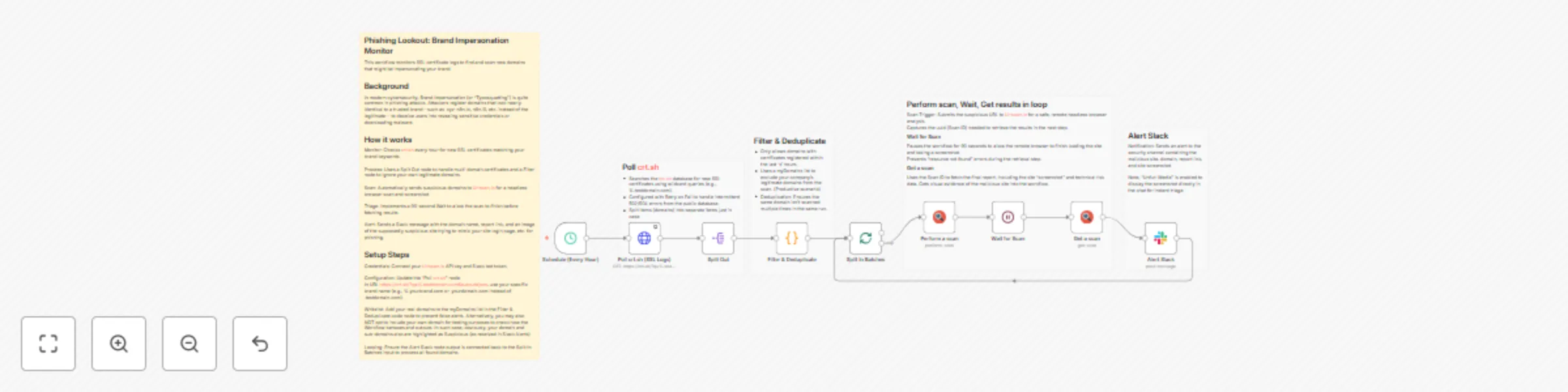
Phishing Lookout (Typosquatting) and Brand Domain Monitor This workflow monitors SSL certificate logs to find and scan new domains that might be impersonating your brand. Background In modern cyber...
n8n-nodes-base.scheduletrigger, n8n-nodes-base.httprequest, n8n-nodes-base.code, n8n-nodes-base.splitinbatches, n8n-nodes-base.wait, n8n-nodes-base.slack, n8n-nodes-base.urlscanio, n8n-nodes-base.splitout
This workflow is cataloged by N8N Workflows and links back to its original n8n.io source page by RamS.
Original n8n.io sourceThis workflow monitors SSL certificate logs to find and scan new domains that might be impersonating your brand.
In modern cybersecurity, Brand Impersonation (or "Typosquatting") is quite common in phishing attacks. Attackers register domains that look nearly identical to a trusted brand—such as .input-n8n.io, n8n.i0, etc. instead of the legitimate— to deceive users into revealing sensitive credentials or downloading malware.
Monitor: Checks crt.sh every hour for new SSL certificates matching your brand keywords.
Process: Uses a Split Out node to handle multi-domain certificates and a Filter node to ignore your own legitimate domains bringing only most recent certificates.
Scan: Automatically sends suspicious domains to Urlscan.io for a headless browser scan and screenshot.
Loop & Triage: Implements a 30-second Wait to allow the scan in loop to finish before fetching results.
Alert: Sends a Slack message with the domain name, report link, and an image of the supposedly suspicious site trying to mimic your site login page, etc. alerting potentially a phishing case.
Credentials: Connect your Urlscan.io API key and Slack bot token.
Configuration: Update the "Poll crt.sh" node. In URL https://crt.sh/?q=%.testdomain.com&output=json, use your specific brand name (e.g., %.yourbrand.com or .yourdomain.com instead of .testdomain.com).
Whitelist: Add your real domains to the myDomains list in the Filter & Deduplicate code node to prevent false alerts. Alternatively, you may also NOT opt to include your own domain for testing purposes to check how the Workflow behaves and outputs. In such case, obviously, your domain and sub-domains also are highlighted as Suspicious (as received in Slack Alerts)
Looping: Ensure the Alert Slack node output is connected back to the Split In Batches input to process all found domains.
This catalog entry is organized from the workflow JSON. The node-level section below shows the executable blocks available for review before importing the template.
| Workflow | Monitor SSL certificates for brand-impersonating domains with crt.sh, Urlscan.io and Slack |
|---|---|
| Complexity | intermediate |
| Nodes | 14 |
| Categories | SecOps |
| Author | RamS |
| Published | 27 Dec 2025 |
Use the JSON export at /data/workflows/12221/12221.json as the source template for this automation.
Open n8n, import the downloaded JSON, and review each node before activating the workflow.
Replace placeholder credentials, API keys, webhook URLs, account IDs, and environment-specific values with your own settings.
Run the workflow manually or in a staging workspace, inspect node output, and confirm downstream systems receive the expected data.
Enable the workflow only after testing, then monitor executions, errors, and rate limits during the first production runs.
Review imported nodes carefully before activation. This catalog entry is intended to help you inspect the workflow structure, understand required services, and find related templates faster.
Node names, credentials, schedules, webhook paths, and external service limits may need adjustment for your workspace.
Phishing Lookout (Typosquatting) and Brand Domain Monitor This workflow monitors SSL certificate logs to find and scan new domains that might be impersonating your brand. Background In modern cyber...
Review the workflow JSON, configure any required credentials in n8n, and test the automation in a safe workspace before using it in production.
Yes. Use the block-by-block analysis and the downloadable JSON to inspect each node, then adjust credentials, prompts, schedules, filters, or destinations for your SecOps use case.