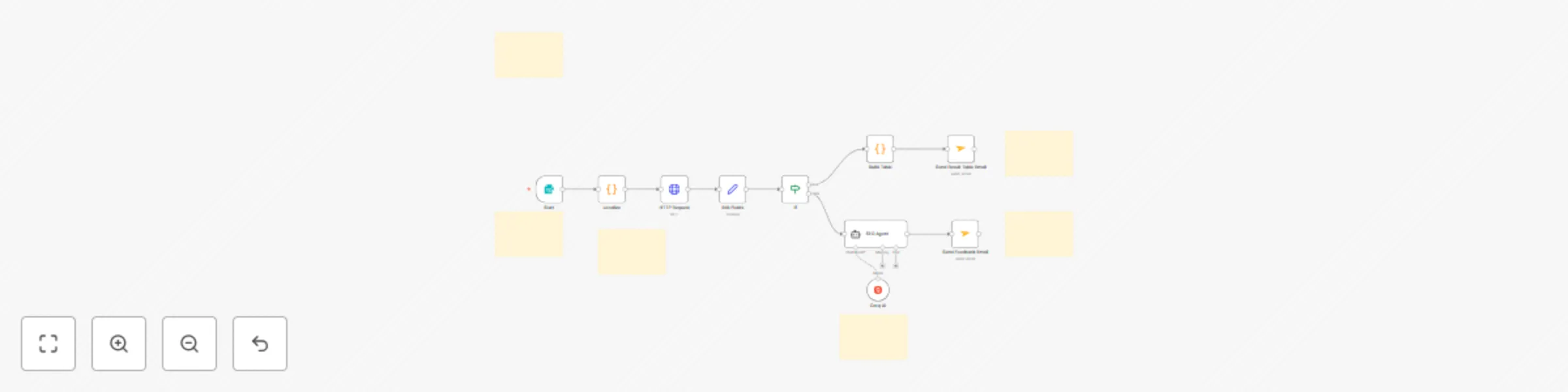
Monitor SEO keyword rankings with LLaMA AI & Apify Google SERP scraping

Workflow preview

Workflow preview
100%
Monitor SEO keyword rankings with LLaMA AI & Apify Google SERP scraping preview
Open on n8n.io

Important notice

This workflow is provided as-is. Please review and test before using in production.

1. Workflow Overview

Who is this template for? This SEO Keyword Monitoring workflow template is perfect for SEO professionals, digital marketing agencies, website owners, and content strategists who need to track their...

Best for

  • Market Research automation workflows
  • AI Summarization automation workflows
  • advanced n8n builders looking for reusable templates

Tools used

n8n-nodes-base.httprequest, n8n-nodes-base.formtrigger, n8n-nodes-base.code, n8n-nodes-base.if, n8n-nodes-base.set, @n8n/n8n-nodes-langchain.lmchatgroq, @n8n/n8n-nodes-langchain.agent, n8n-nodes-base.mailjet

Source and attribution

This workflow is cataloged by N8N Workflows and links back to its original n8n.io source page by Gegenfeld.

Original n8n.io source

1.1 Workflow description

Title
Monitor SEO keyword rankings with LLaMA AI & Apify Google SERP scraping
Workflow name
Monitor SEO keyword rankings with LLaMA AI & Apify Google SERP scraping

Who is this template for?

This SEO Keyword Monitoring workflow template is perfect for SEO professionals, digital marketing agencies, website owners, and content strategists who need to track their search rankings and get actionable insights when they're not performing well. Whether you're managing multiple client sites, monitoring your own brand's visibility, or conducting competitive analysis, this automation provides comprehensive rank tracking with AI-powered recommendations.

What problem does this workflow solve?

Manual keyword rank tracking is time-consuming and often provides limited actionable insights. SEO professionals typically struggle with:

  • Manually checking search rankings across different countries and languages
  • Identifying why a website isn't ranking for target keywords
  • Getting specific, actionable recommendations for SEO improvements
  • Tracking competitor performance and market positioning
  • Scaling rank monitoring across multiple keywords and domains
  • Generating professional reports for clients or stakeholders

What this workflow does

This n8n workflow automates comprehensive SEO keyword monitoring with intelligent analysis and reporting. It tracks your rankings in Google search results and provides AI-powered insights when your site isn't performing as expected.

Here's what it includes:

  • Multi-language web form that accepts keyword, domain, country (24 options), and language (12 options)
  • Intelligent localization that converts country/language selections into proper API codes
  • Real-time Google SERP scraping using Apify's Google Search API (up to 100 results per query)
  • Automated rank detection that checks if your domain appears in the search results
  • Dual email reporting system:
    • Success reports: Beautiful HTML tables showing your rankings, competitor positions, titles, URLs, and descriptions
    • AI-powered improvement reports: When your site doesn't rank, an AI agent (LLaMA 70B) analyzes the search results and provides specific, actionable SEO recommendations
  • Professional email formatting with HTML markup for easy sharing with clients or teams

Setup

Getting started is straightforward:

Connect your Apify account

  • Sign up for a free Apify account 🡥
  • Get your Personal API Token from Settings → API & Integrations
  • Replace YOUR_API_TOKEN in the HTTP Request node with your actual token

Configure the AI model

  • The workflow uses Groq AI with LLaMA 70B by default
  • Connect your Groq account or replace with OpenAI, Claude, or another LLM
  • The AI agent analyzes search results and provides tailored SEO recommendations

Set up email delivery / data export

  • Configure the Mailjet nodes with your email credentials
  • Or replace with Gmail, Outlook, SMTP, or other email providers
  • Or replace with/add Google Sheets, Airtable, Notion or similar service, for data storage
  • Set your sender and recipient email addresses

Test the workflow

  • Click "Test workflow" to access the web form
  • Enter a keyword, domain, country, and language
  • Check your email for either ranking results or AI-powered recommendations

Activate the workflow

  • Turn on the trigger so you can access the form anytime
  • Share the form URL with team members or clients

How to customize this workflow

This template is highly flexible and can be adapted for various SEO monitoring needs:

  • Scale up monitoring: Add loops to track multiple keywords simultaneously
  • Alternative outputs: Replace email nodes with Google Sheets, Airtable, or Notion for data storage
  • Team notifications: Connect to Slack, Discord, or Microsoft Teams for instant alerts
  • Scheduled monitoring: Add cron triggers for daily, weekly, or monthly automated checks
  • Enhanced analysis: Integrate additional AI models for deeper competitive analysis
  • Custom reporting: Modify the HTML templates to match your brand or client requirements
  • Data persistence: Add database connections to store historical ranking data
  • Competitor tracking: Expand the logic to monitor multiple domains for the same keywords

Key features

  • 24 country support: Track rankings in major markets worldwide
  • 12 language options: Monitor multilingual SEO performance
  • AI-powered insights: Get specific recommendations when rankings are low
  • Professional reporting: HTML-formatted emails ready for client delivery
  • Competitor analysis: See who's ranking above you with full SERP data
  • Scalable architecture: Easy to extend for enterprise-level monitoring

This workflow transforms manual rank checking into an intelligent, automated system that not only tracks your performance but actively helps you improve it with AI-driven recommendations. Developed by Gegenfeld 🡥 and codecope 🡥 in Berlin, Germany.

1.2 Logical Blocks

This catalog entry is organized from the workflow JSON. The node-level section below shows the executable blocks available for review before importing the template.

2. Block-by-Block Analysis

Block 1 - HTTP Request

Type / Role
n8n-nodes-base.httpRequest - httpRequest
Config choices
Version 4.2

Block 2 - Start

Type / Role
n8n-nodes-base.formTrigger - formTrigger
Config choices
Version 2.2

Block 3 - Localize

Type / Role
n8n-nodes-base.code - code
Config choices
Version 2

Block 4 - If

Type / Role
n8n-nodes-base.if - if
Config choices
Version 2.2

Block 5 - Edit Fields

Type / Role
n8n-nodes-base.set - set
Config choices
Version 3.4

Block 6 - Groq AI

Type / Role
@n8n/n8n-nodes-langchain.lmChatGroq - lmChatGroq
Config choices
Version 1

Block 7 - SEO Agent

Type / Role
@n8n/n8n-nodes-langchain.agent - agent
Config choices
Version 1.8

Block 8 - Send Feedback Email

Type / Role
n8n-nodes-base.mailjet - mailjet
Config choices
Version 1

Block 9 - Send Result Table Email

Type / Role
n8n-nodes-base.mailjet - mailjet
Config choices
Version 1

Block 10 - Build Table

Type / Role
n8n-nodes-base.code - code
Config choices
Version 2

Block 11 - Sticky Note4

Type / Role
n8n-nodes-base.stickyNote - stickyNote
Config choices
Version 1

Block 12 - Sticky Note3

Type / Role
n8n-nodes-base.stickyNote - stickyNote
Config choices
Version 1

Block 13 - Sticky Note5

Type / Role
n8n-nodes-base.stickyNote - stickyNote
Config choices
Version 1

Block 14 - Sticky Note2

Type / Role
n8n-nodes-base.stickyNote - stickyNote
Config choices
Version 1

Block 15 - Sticky Note1

Type / Role
n8n-nodes-base.stickyNote - stickyNote
Config choices
Version 1

Block 16 - Sticky Note

Type / Role
n8n-nodes-base.stickyNote - stickyNote
Config choices
Version 1

3. Summary Table

Workflow Monitor SEO keyword rankings with LLaMA AI & Apify Google SERP scraping
Complexity advanced
Nodes 16
Categories Market Research, AI Summarization
Author Gegenfeld
Published 22 May 2025

4. Reproducing the Workflow from Scratch

  1. 1. Download the workflow JSON

    Use the JSON export at /data/workflows/4301/4301.json as the source template for this automation.

  2. 2. Import the template into n8n

    Open n8n, import the downloaded JSON, and review each node before activating the workflow.

  3. 3. Configure credentials and variables

    Replace placeholder credentials, API keys, webhook URLs, account IDs, and environment-specific values with your own settings.

  4. 4. Test with sample data

    Run the workflow manually or in a staging workspace, inspect node output, and confirm downstream systems receive the expected data.

  5. 5. Activate and monitor

    Enable the workflow only after testing, then monitor executions, errors, and rate limits during the first production runs.

5. General Notes & Resources

Review imported nodes carefully before activation. This catalog entry is intended to help you inspect the workflow structure, understand required services, and find related templates faster.

Node names, credentials, schedules, webhook paths, and external service limits may need adjustment for your workspace.

Frequently asked questions

What does Monitor SEO keyword rankings with LLaMA AI & Apify Google SERP scraping do?

Who is this template for? This SEO Keyword Monitoring workflow template is perfect for SEO professionals, digital marketing agencies, website owners, and content strategists who need to track their...

What do I need before importing this workflow?

Review the workflow JSON, configure any required credentials in n8n, and test the automation in a safe workspace before using it in production.

Can I customize this workflow?

Yes. Use the block-by-block analysis and the downloadable JSON to inspect each node, then adjust credentials, prompts, schedules, filters, or destinations for your Market Research, AI Summarization use case.