Block 1 - Schedule Trigger
- Type / Role
- n8n-nodes-base.scheduleTrigger - scheduleTrigger
- Config choices
- Version 1.2


 Early Deal
This workflow is provided as-is. Please review and test before using in production.
How It Works: The 5 Node Anomaly Detection Flow This workflow efficiently processes logs to detect anomalies. 1. Scheduled Check (Cron Node): This is the primary trigger. It schedules the workflow ...
n8n-nodes-base.scheduletrigger, n8n-nodes-base.httprequest, n8n-nodes-base.code, n8n-nodes-base.if, n8n-nodes-base.slack, n8n-nodes-base.stickynote
This workflow is cataloged by N8N Workflows and links back to its original n8n.io source page by Marth.
Original n8n.io sourceThis workflow efficiently processes logs to detect anomalies.
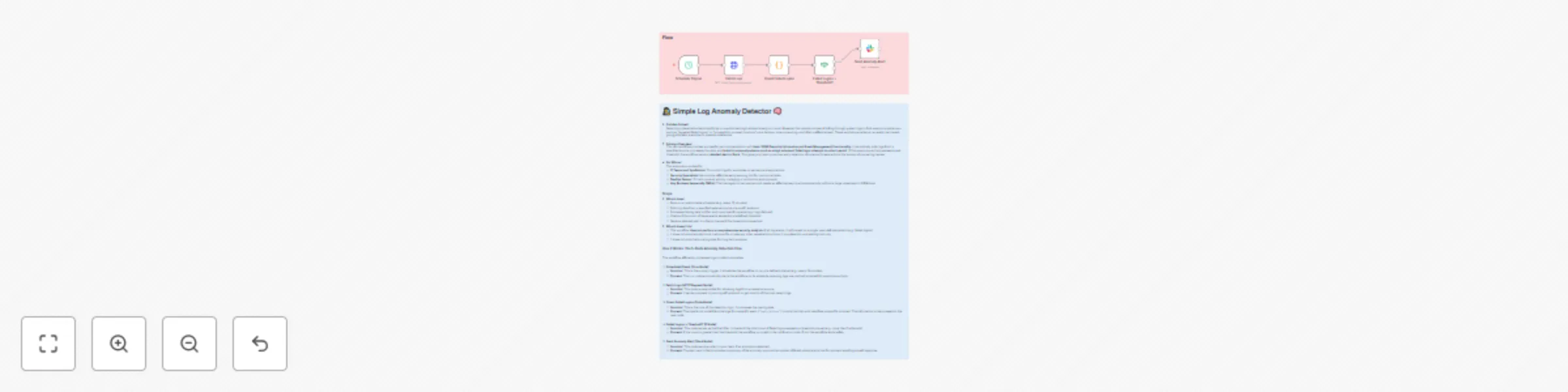
Scheduled Check (Cron Node): This is the primary trigger. It schedules the workflow to run at a defined interval (e.g., every 15 minutes), ensuring logs are routinely scanned for suspicious activity.
Fetch Logs (HTTP Request Node): This node is responsible for retrieving logs from an external source. It sends a request to your log API endpoint to get a batch of the most recent logs.
Count Failed Logins (Code Node): This is the core of the detection logic. The JavaScript code filters the logs for a specific event ("login_failure"), counts the total, and identifies unique IPs involved. This information is then passed to the next node.
Failed Logins > Threshold? (If Node): This node serves as the final filter. It checks if the number of failed logins exceeds a threshold you set (e.g., more than 5 attempts). If it does, the workflow is routed to the notification node; if not, the workflow ends safely.
Send Anomaly Alert (Slack Node): This node sends an alert to your team if an anomaly is detected. The Slack message includes a summary of the anomaly, such as the number of failed attempts and the IPs involved, enabling a swift response.
Implementing this essential log anomaly detector in your n8n instance is quick and straightforward.
Prepare Your Credentials & API:
#security-alerts).Import the Workflow JSON:
Configure the Nodes:
log.event === 'login_failure' if your log events use a different name.5) based on your risk tolerance.Test and Activate:
0 to ensure the alert is triggered.This catalog entry is organized from the workflow JSON. The node-level section below shows the executable blocks available for review before importing the template.
| Workflow | Monitor security logs for failed login attempts with Slack alerts |
|---|---|
| Complexity | intermediate |
| Nodes | 7 |
| Categories | SecOps |
| Author | Marth |
| Published | 03 Aug 2025 |
Use the JSON export at /data/workflows/6922/6922.json as the source template for this automation.
Open n8n, import the downloaded JSON, and review each node before activating the workflow.
Replace placeholder credentials, API keys, webhook URLs, account IDs, and environment-specific values with your own settings.
Run the workflow manually or in a staging workspace, inspect node output, and confirm downstream systems receive the expected data.
Enable the workflow only after testing, then monitor executions, errors, and rate limits during the first production runs.
Review imported nodes carefully before activation. This catalog entry is intended to help you inspect the workflow structure, understand required services, and find related templates faster.
Node names, credentials, schedules, webhook paths, and external service limits may need adjustment for your workspace.
How It Works: The 5 Node Anomaly Detection Flow This workflow efficiently processes logs to detect anomalies. 1. Scheduled Check (Cron Node): This is the primary trigger. It schedules the workflow ...
Review the workflow JSON, configure any required credentials in n8n, and test the automation in a safe workspace before using it in production.
Yes. Use the block-by-block analysis and the downloadable JSON to inspect each node, then adjust credentials, prompts, schedules, filters, or destinations for your SecOps use case.